Category: Uncategorized

  • Business Automation Software for Salons and Med Spas: Run the Back Office Without Staying Late

    Business Automation Software for Salons and Med Spas: Run the Back Office Without Staying Late

    Hi there! If you own a salon or a med spa, your day does not end when the last client leaves. That is when the real list starts: the intake forms nobody filled out before their appointment, the three people who did not show today, the deposits you have to chase, and the clients whose six-week rebooking window quietly passed two weeks ago. Business automation software is not about replacing your front desk. It is about taking that 9 p.m. list off your hands so the hours you spend on the business stop eating the hours you earn from it.

    The Work That Happens After the Last Client Leaves

    Count what actually happens in a normal week. A new client books online but the intake form arrives half filled, so someone calls to finish it while the client is already in the chair. Two people forget their appointments and one of them never rebooks. A package client needs a follow-up in five weeks and nobody remembers. A med spa client asks about financing and the reply waits until morning.

    None of that is hard work. It is just work that has to happen at a specific time, which is exactly the kind of work that slips when the person who owns it is also running color on a Saturday.

    Three Jobs Worth Automating First

    Start with these, in this order, and ignore everything else on the vendor’s feature list for now.

    Intake before arrival. Send the form with the booking confirmation instead of at the door. The client finishes it on their phone while they are still motivated, and your team starts the appointment with answers instead of a clipboard. Set it so a form that goes unfilled triggers one reminder, not five.

    Reminder and confirmation. A text at booking, one a day or two before, and a clear way to cancel or reschedule. The goal is not fewer cancellations, it is cancellations you hear about early enough to refill the slot. Route the reply to whoever can actually rebook it.

    Recall at the right interval. A color client, a lash fill and a laser series all have different natural return windows. Tag the service, set the interval, and let the software send the nudge. This one job usually pays for the whole subscription, because the client who forgot you is the easiest booking you will ever get.

    What the Software Actually Connects

    Most salons already own four or five tools: an online booking page, a payment terminal, a form builder, a texting app, a review request. The problem is that none of them talk to each other, so a person becomes the integration.

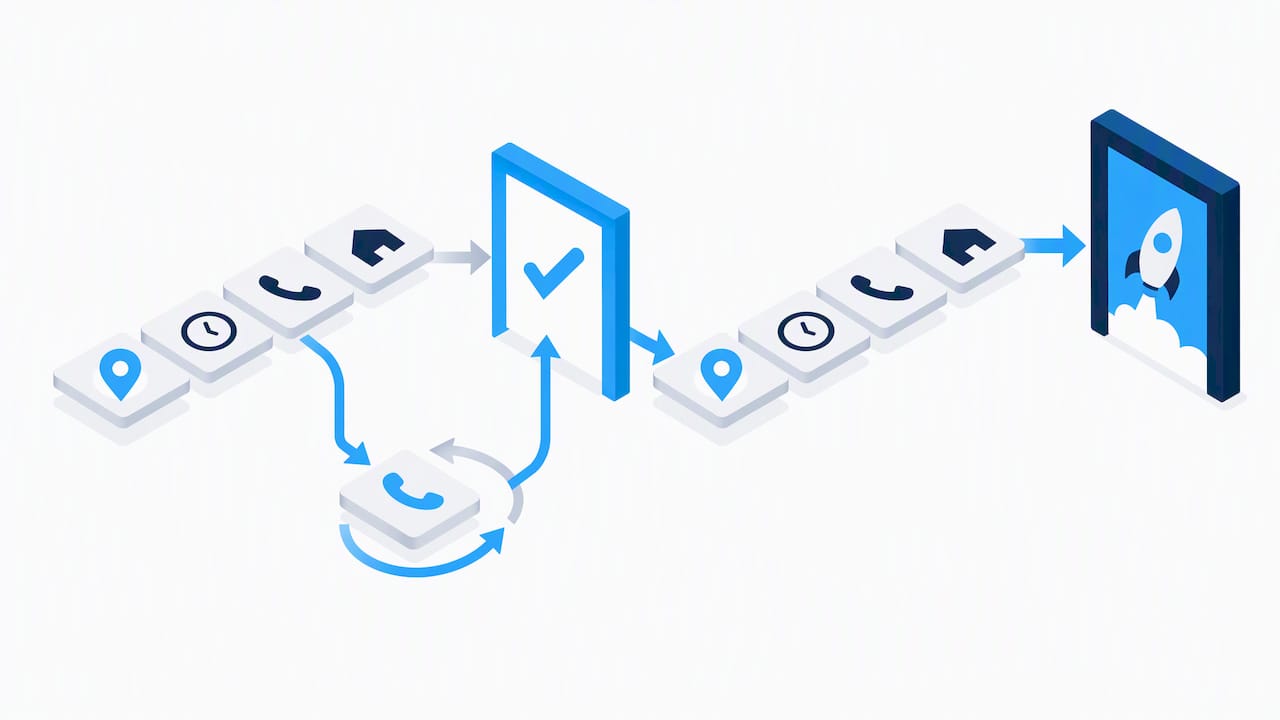
    Business automation software is the middle layer. A booking creates a client record, that record triggers the form, the form completion triggers the reminder sequence, the completed appointment triggers a payment request and later a review request, and the review lands on your Google profile. Nobody copies anything between tabs.

    That is the test to apply to any platform you look at: can it see the booking, and can it act on it? If the answer is no, it is another app to check, not automation.

    Where a Human Still Belongs

    Automate the logistics, not the conversations that carry risk.

    Med spa and clinical questions about suitability, outcomes or pricing exceptions should reach a person, and a benefits or insurance question should never get an automated answer. Automated messages also need consent handled properly: collect permission before you text anyone, keep the opt-out obvious, and do not reuse a marketing list for appointment reminders.

    The rule that keeps owners out of trouble is simple. Anything that could be read as medical advice, a quote, or a promise goes to a human. Everything that is really a schedule goes to the software.

    What to Measure in the First 60 Days

    Four numbers, tracked monthly, tell you whether this is working.

    Your no-show rate, because early cancellations are the point. The share of intake forms completed before arrival. Your rebooking rate, meaning clients who leave with their next appointment already booked. And the honest one: how many hours a week you personally spend on admin after closing.

    If no-shows do not move, the reminder sequence is badly timed or clients have no easy way to cancel. If rebooking does not move, the recall intervals are wrong or nobody is asking at checkout. Both are tuning problems, not software problems.

    The Back Office Is Only Part of the Leak

    A back office that runs itself gives you your evenings back, and it does something more useful than that: it makes every client you already have worth more. The client who is reminded, confirmed, rebooked and asked for a review is a client who returns without you spending a dollar to find them.

    That said, it is one part of the bucket. If your booking page is hard to use on a phone, or your reviews have gone quiet, or your service pages do not show up in the map, the leak is upstream of the back office. A gap analysis is a plain way to see which of those is costing you the most right now, and it is the kind of thing worth knowing before you spend on anything else.

    Frequently Asked Questions

    Will automation make my salon feel impersonal?

    Not if you automate the scheduling and keep the conversations. Clients notice a form they did not have to fill out at the desk and a reminder that arrives before they forget. The warmth comes from your team, and the software exists to give them time for it.

    Do I have to replace my booking software?

    Usually not. The best setup connects to the calendar, forms and payment tools you already run. Ask any vendor which systems they integrate with before you sign, and test one full booking-to-review path before you commit.

    Is texting clients about appointments allowed?

    Yes, with consent. Collect permission when you collect the phone number, keep the opt-out language visible in every message, and keep appointment texts separate from promotional ones. Those habits keep your messages landing and keep you compliant.

    How long before it pays for itself?

    Most of the return comes from rebooking and fewer empty slots, so expect the first month to be setup work and the second month to be where you can see anything. Track no-shows and hours saved, not just the monthly fee.

    Share This Article

    Found this useful? Send it to another owner who is still running the back office at nine at night.

    Share on Facebook · Share on X · Share on LinkedIn · Share on Pinterest

    Want More Information? Let’s Talk.

    If you would rather not take this on yourself, we handle it for you. Our Business OS (uBOS) service takes care of the setup and the ongoing work, then reports back so you can see exactly what changed. You keep running your business; we keep this moving.

    Call us at 631-825-9464 or reach out here. No pressure, no obligation, and you can ask us anything — including whether this is even worth doing for a business your size.

    Looking ahead, request your roadmap analysis and we will map out a 12-month plan to close the conversion leaky bucket so more of the customers you already reach turn into booked work.


    Written by Joe Leineke · Content on this blog is generated with AI assistance and independently reviewed and fact-checked by human marketing professionals for accuracy and quality.

  • AI Business Tools That Answer the Phone When Your Front Desk Can’t

    AI Business Tools That Answer the Phone When Your Front Desk Can’t

    Hi there! If you run a dental office, a chiropractic practice or a salon, you already know the most expensive sound in the building is a phone ringing while everyone is busy. Your hygienist is chairside, your receptionist is checking someone in, and an anxious patient is calling about a swollen tooth. Nobody picks up. They call the next practice on the list, and you never even see the missed opportunity in your numbers. That is the gap AI business tools are genuinely good at closing, and it is a much smaller project than most owners expect.

    Dental office front desk closed at night with a smartphone answering a call and booking an appointment

    The Calls You Never Hear About

    A missed call does not show up as a complaint. It shows up as an empty slot two weeks from now that nobody can explain. New patient calls, scheduling changes and insurance questions mostly arrive during the exact hours your team is busiest, and a good share land after you close, before you open, and on the lunch hour. Those callers do not leave voicemail. They dial the next name on the map.

    So the real question is not whether a phone should be answered. It is who answers it when the answer is nobody.

    What the Tool Actually Does on a Call

    Think of it as a front-desk teammate who never steps away from the phone. When a call comes in, it greets the caller with your practice name, answers the questions your team answers fifty times a day (hours, location, insurance plans you accept, whether you are taking new patients, what to do about an urgent issue), and then books the appointment straight into your calendar.

    If the caller needs a person, it takes a clean message with a name and number and texts the summary to your team. If your scheduling software will not allow a same-day slot, it offers the next realistic one instead of promising something you cannot deliver. And it keeps a record of every call, so you finally have a list of the calls you used to lose.

    Where It Fits Beside Your Front Desk, Not Instead of It

    Nobody is suggesting you replace the person who greets patients by name and knows the families. The tool covers the edges your team cannot: the after-hours ring, the lunch window, the hours when every chair is full, the holiday week, the day your receptionist is out sick.

    Set an escalation rule and stick to it. Anything that sounds like a medical emergency goes to a live person or your on-call number immediately. New patient bookings and routine questions get handled by the tool. Existing patients who ask for a specific team member get a message, not a script. That line between routine and urgent is the whole design decision, and it is worth writing down before you turn anything on.

    Set It Up in an Order That Works

    Start with your team’s own calls. Record the ten questions your receptionist answers most often and the exact phrasing you want callers to hear. Feed that in first, before anything clever.

    Then connect the calendar and decide the booking rules: which appointment types the tool may book, how far out, and what it should never promise. After that, set the handoff. Who gets the text summary, how fast, and what happens at 9 p.m. on a Saturday.

    One more thing worth getting right is disclosure. Callers should know they are talking to an automated assistant, and the tool should not collect clinical details over the phone. Keep the conversation to scheduling and logistics, and hand anything medical to your staff.

    What to Review in the First Month

    Watch three things weekly: how many calls came in outside your staffed hours, how many turned into booked appointments, and how many needed a human and got one quickly. Read a handful of transcripts yourself. You will learn how patients actually describe their problems, which is useful for your website copy and your service pages too.

    If a question keeps tripping the tool up, add it to the script instead of switching tools. Most of the value in the first month comes from tuning, not from the feature list.

    Answering the Phone Is One Hole in the Bucket

    Fixing the phone stops the most visible leak, but it is still one leak. Booked appointments that never show, a website that does not make it obvious how to book, and reviews that stopped coming in all cost you patients the same way. If you want the whole picture in one place, a marketing gap analysis is a plain-language way to see which of those is costing you the most right now. It pairs well with a phone that finally gets answered.

    Frequently Asked Questions

    Will an AI receptionist confuse older patients?

    Not if the greeting is clear and the voice is calm. Most callers simply want an answer to a practical question, and a tool that answers immediately beats a voicemail box every time. Always offer the option to speak with a person.

    Can it book directly into my practice management software?

    It depends on your system. Most setups connect to your calendar or scheduling platform through an integration, and the booking rules you set control what it is allowed to offer. Ask exactly which integrations are supported before you commit.

    What happens if a caller has an emergency?

    Route emergencies to a live person or your on-call line. The assistant should recognize urgent language and transfer immediately rather than trying to schedule. Test that path yourself before going live.

    Is this only worth it for large practices?

    No. A single-location office that misses calls during a full schedule loses the same patient a large group does. The tool pays for itself fastest where your team is smallest relative to call volume.

    Share This Article

    Found this useful? Send it to another owner who is still letting the phone ring while every chair is full.

    Share on Facebook · Share on X · Share on LinkedIn · Share on Pinterest

    Want More Information? Let’s Talk.

    If you would rather not take this on yourself, we handle it for you. Our AI Gent service takes care of the setup and the ongoing work, then reports back so you can see exactly what changed. You keep running your business; we keep this moving.

    Call us at 631-825-9464 or reach out here. No pressure, no obligation, and you can ask us anything — including whether this is even worth doing for a business your size.

    Looking ahead, request your roadmap analysis and we will map out a 12-month plan to get every call answered and every one of them turned into a booked appointment.


    Written by Joe Leineke · Content on this blog is generated with AI assistance and independently reviewed and fact-checked by human marketing professionals for accuracy and quality.

  • How to Respond to Negative Reviews: Templates That Protect Your Rating

    How to Respond to Negative Reviews: Templates That Protect Your Rating

    Hi there! Here is a scenario every local owner knows: a two-star review lands on Google, your stomach drops, and the first instinct is to fire back a paragraph nobody will ever read the right way. The truth is better. A calm, quick, well-written response often matters more to the next customer than the review itself, because everyone who reads that review later also reads what you did about it. Below are the templates we hand to dentists, med spas, salons and other local owners, plus the few rules that keep a bad review from doing real damage.

    Local business owner replying professionally to a negative online review

    Reply Fast, Reply Calm

    Aim to respond within 24 hours, and always in the same tone you would use at the front desk. Reviewers edit or remove reviews far more often when they feel heard, and prospective patients notice a business that answers. If you are angry, save the draft, walk away, and come back in an hour. A response written in the first five minutes is the one you will want to delete later.

    The Four-Sentence Response Template

    This template works for almost any business, because it covers the four things every reader is looking for:

    • Thank them by name and acknowledge the specific experience: “Thanks, Dana, for telling us about the wait on Tuesday.”
    • Apologize for the experience without admitting to anything you cannot stand behind: “That is not the pace we aim for.”
    • Say what you are doing about it: “We have added a second chair at peak hours and are reviewing our schedule.”
    • Take it offline: “Please call us at your number on file so we can make this right.”

    Four sentences, done. No excuses, no history lesson, no argument. The reader skimming reviews sees a business that listens, which is the whole point.

    What Not to Say in a Public Reply

    A few responses quietly cost you customers, so keep these off the page:

    • Never argue about the facts in public or call the reviewer a liar, even when you are right. Readers side with whoever sounds calmer.
    • Do not confirm the person was a patient or discuss their treatment in the reply. For dental and medical practices especially, keep health details out of a public thread entirely.
    • Skip the public refund offer. Compensate privately if the situation calls for it, otherwise every unhappy customer learns that a review is a coupon.
    • Avoid copy-pasting the identical reply under every review. Respondents and readers both notice, and it reads as not caring.

    Turn the Fix Into a Second Chance

    The conversation does not end with the reply. Follow up offline, fix what actually broke, and then give the customer a reason to come back. Many reviewers will update or raise their rating after a genuine fix, and an edited review with a visible response often reads as more credible than a perfect five from the start. This is also where our Review Generation & Reputation service earns its keep, because a steady stream of fresh, positive reviews is what makes any single bad review a rounding error instead of a headline.

    When Templates Are Not Enough

    Templates handle the single review. The bigger job is knowing the moment one arrives, across Google, Yelp and Facebook, and making sure a real reply happens even on your busiest week. That is what reputation management software does: it watches your listings around the clock, alerts you the minute a review lands, and keeps your response history in one place so nothing slips through. If you are a practice owner juggling chairs, patients and staff, a tool that tells you when to act is worth far more than one more app to check.

    A Quick Word on Seeing the Bigger Picture

    One review is one data point, and the strongest reputations are built when reviews, local search visibility and your website all pull in the same direction. If you have ever wondered which part of your marketing deserves attention next, a marketing gap analysis gives you that full picture in plain language. It pairs nicely with the templates above.

    Frequently Asked Questions

    How should I respond to a negative review I believe is fake?

    Report it to the platform first with your evidence, and still leave a short, calm public reply saying you have no record of the experience and inviting them to contact you. The reply is really written for future customers, and it shows you take every review seriously.

    Can a bad Google review be removed?

    Only reviews that break Google’s policies, like spam, fake accounts or impersonation, can be removed by reporting them. Genuine negative reviews stay up, so a professional response is your best option. Never pay a service that promises to delete real reviews, since paying for removal creates legal risk.

    Should I respond to every negative review?

    Yes, even if briefly. An unanswered negative review reads as indifference to everyone who sees it, while a short reply shows you are paying attention. Two or three sentences in the template above is enough.

    How do I keep up with reviews on Google, Yelp and Facebook at once?

    Use reputation management software that consolidates alerts from all your platforms into one place and notifies you as soon as something arrives. You can also ask whoever manages your marketing to monitor reviews daily, but automation removes the human forgetfulness from the equation.

    Share This Article

    Found this useful? Send it to another owner who is still guessing how to answer a rough review.

    Share on Facebook · Share on X · Share on LinkedIn · Share on Pinterest

    Want More Information? Let’s Talk.

    If you would rather not take this on yourself, we handle it for you. Our Review Generation & Reputation service takes care of the setup and the ongoing work, then reports back so you can see exactly what changed. You keep running your business; we keep this moving.

    Call us at 631-825-9464 or reach out here. No pressure, no obligation, and you can ask us anything — including whether this is even worth doing for a business your size.

    Looking ahead, request your roadmap analysis and we will map out a 12-month plan to close the conversion leaky bucket so more of the customers you already reach turn into booked work.


    Written by Joe Leineke · Content on this blog is generated with AI assistance and independently reviewed and fact-checked by human marketing professionals for accuracy and quality.

  • Turn Website Visitors Into Booked Appointments: A Local Conversion Checklist

    Turn Website Visitors Into Booked Appointments: A Local Conversion Checklist

    Hi there! Here is a question worth asking before you spend another dollar on ads: when someone finds your website, do they book an appointment, or do they leave and keep scrolling? If your phone is quiet but your traffic looks fine, the problem is not visibility. It is conversion, and it is one of the fastest fixes available to a local business.

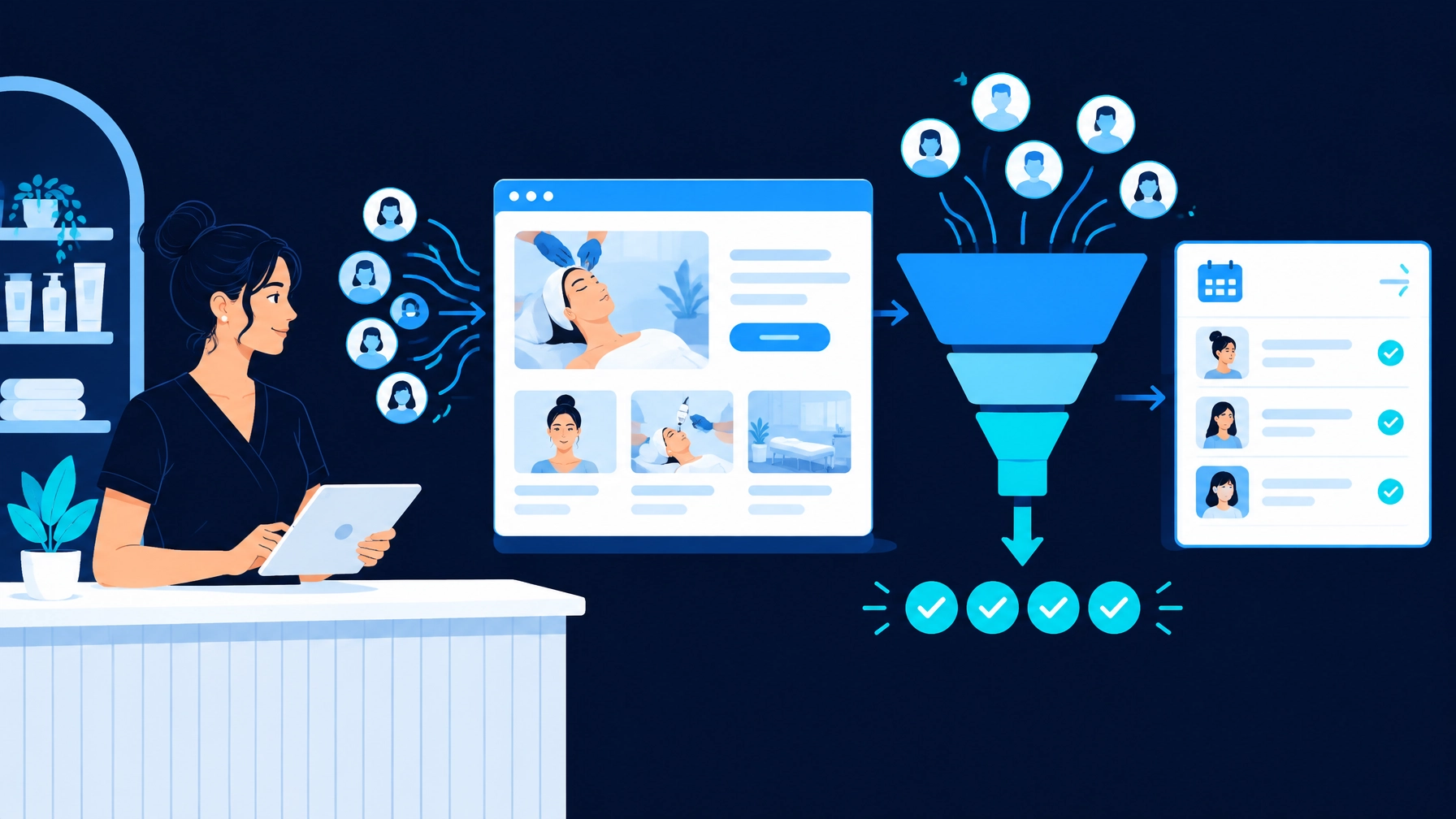
    The good news is that you do not need a redesign or a big budget to see a difference. You need to remove the small moments of friction that make a ready-to-book visitor hesitate. Below is a checklist we run through with salons, med spas, auto shops, gyms, restaurants and real estate agents. Work through it top to bottom and watch what happens to your bookings.

    Local business owner turning website visitors into booked appointments

    Make Your Phone Number and Booking Button Impossible to Miss

    Most local customers visit your site on their phone, usually while doing something else. Your phone number should be clickable at the top of every page, and your booking button should sit where a thumb can reach it without scrolling. If someone has to hunt for a way to contact you, many will simply go back to the map and pick the next business. Put the action where their eyes already are.

    Show Reviews Where the Decision Happens

    Your visitors are already comparing you with two or three other businesses. Placing a few genuine reviews next to your booking button answers their biggest question at the exact moment they are deciding. If you need more reviews to show off, our Review Generation & Reputation service helps you collect them consistently, and our Winning Websites team builds pages designed to turn visitors into customers from the start.

    Trim Your Booking Form to the Bare Essentials

    Every extra field in a form is a chance to lose the booking. Name, phone or email, preferred time, done. You can always confirm the details when you reply. A shorter form feels easier to finish, and finished forms are what turn into appointments. If your form asks for ten details, cut it to three and measure the difference over two weeks.

    Answer the Questions That Stop People From Booking

    Price ranges, parking, how long the appointment takes, what to bring, what happens next. When a visitor cannot find an answer, they do not email you to ask; they leave. A short FAQ on your booking page removes the hesitation that quietly costs you customers every week. Write down the five questions you hear on the phone most often and put the answers right where people book.

    Follow Up on Every Visitor Who Almost Booked

    Not everyone books on the first visit, and that is normal. A simple email follow-up for people who started but did not finish a booking often recovers a surprising share of them. Our Email Marketing service can put that kind of gentle follow-up on autopilot, so interested visitors hear from you even if they got distracted.

    Check Your Site on the Phone Your Customers Actually Use

    Open your own site on your phone right now. Does it load fast? Can you read the text without pinching and zooming? Does the booking button work on the first tap? Small mobile frustrations push customers to a competitor whose site just works. Fixing them is inexpensive, and the payoff shows up in bookings within days, not months.

    A Quick Word on Seeing the Bigger Picture

    Conversion fixes work best when you can see how they connect to everything else, from your map visibility to your reviews to your ads. If you have ever wondered which part of your marketing deserves attention next, a marketing gap analysis gives you that full-picture view in plain language. It is a useful companion to the checklist above.

    Frequently Asked Questions

    What does a conversion rate optimization agency actually do?

    A conversion rate optimization agency studies what happens after people land on your website and makes changes that turn more of them into customers. For a local business that usually means clearer calls to action, faster mobile pages, shorter forms, and reviews placed where decisions happen. The goal is more bookings from the traffic you already have.

    How long does it take to see more bookings from conversion changes?

    Simple changes like a prominent booking button or a shorter form can show results within a couple of weeks. Bigger patterns, like follow-up emails and page-by-page improvements, build over one to three months. Because you are improving the same traffic you already pay for, the gains tend to stick.

    Do I need a new website to improve conversions?

    Usually no. Most local sites improve significantly with targeted changes: clearer buttons, honest reviews, faster loading, and easier booking. A rebuild only makes sense when your current site fights you at every step. Start with the checklist and let the results guide the decision.

    How do I know if my website is converting well?

    Track two simple numbers: how many visitors you get and how many bookings or calls come from the site. If your traffic is steady but bookings are not, visitors are leaking out somewhere. Even a rough monthly comparison tells you whether your changes are working.

    Share This Article

    Found this useful? Send it to another owner who is still guessing why the phone is quiet.

    Share on Facebook · Share on X · Share on LinkedIn · Share on Pinterest

    Want More Information? Let’s Talk.

    If you would rather not take this on yourself, we handle it for you. Our 4X Conversions service takes care of the setup and the ongoing work, then reports back so you can see exactly what changed. You keep running your business; we keep this moving.

    Call us at 631-825-9464 or reach out here. No pressure, no obligation, and you can ask us anything — including whether this is even worth doing for a business your size.

    Looking ahead, request your roadmap analysis and we will map out a 12-month plan to close the conversion leaky bucket so more of the customers you already reach turn into booked work.


    Written by Joe Leineke · Content on this blog is generated with AI assistance and independently reviewed and fact-checked by human marketing professionals for accuracy and quality.

  • Google Local Service Ads: Pay Only for Real Leads, Not Empty Clicks

    Google Local Service Ads: Pay Only for Real Leads, Not Empty Clicks

    Hi there! If you run a plumbing, HVAC, electrical, roofing, dental, or other home service business, you have probably watched this happen: your ad budget disappears into clicks, and the phone stays quiet. Google’s Local Services Ads flip that arrangement. You pay when a potential customer actually contacts you about the job, not when someone glances at your listing and moves on. Here is how these ads work in 2026, what they cost, and how to make them worth every dollar.

    What Google Local Service Ads Are

    Local Service Ads are the cards that appear at the very top of local search results, above the map pack and above the paid search ads, marked “Sponsored” and often showing a “Google Guaranteed” or “Google Screened” badge.

    Local service ads appear at the top of local search results with a trust badge and a direct call button

    Unlike regular search ads, these cards show your business name, your review rating, your hours, and a call or message button right on the card. A homeowner searching “plumber near me” or “emergency AC repair” taps the card, calls you, and that is the lead. The ads are built for businesses that serve people at their homes or at a local office, which is exactly the audience they put you in front of.

    How Pay Per Lead Actually Works

    This is the part owners like most. With traditional pay-per-click ads, every click costs you money whether that caller becomes a customer or hangs up after two seconds. With Local Services Ads, Google charges you only when someone contacts you through the ad: a phone call, a message, or a booked appointment request.

    A few practical details worth knowing:

    • You dispute the leads that do not count. Wrong numbers, spam, job quotes outside your service area, and messages with no real customer behind them can be disputed inside your Local Services Ads dashboard, and disputed credits are applied back to your account. Disputes have a submission window, so check your lead list regularly rather than once a month.
    • Pricing varies by market and job type. Google sets the cost per lead based on the kind of work, the city, and how competitive the service is, so the same lead type can cost differently in different markets. Ask for the going rates in your area before you commit to a budget.
    • Response time affects everything. Leads go to several businesses at once. The provider who answers first and follows up properly has the best shot at booking the job. The system also tracks how you handle inquiries, and it is a factor in how your business is treated in the marketplace.

    What the Green Badge Requires

    The “Google Guaranteed” badge is not automatic. To run Local Services Ads, your business goes through Google’s screening: a license check where your state licenses apply, insurance verification, and identity and background checks for the business owner. The process usually takes a few business days to a couple of weeks depending on your trade and state, so start it before you want the ads live.

    For professional practices such as dentists and attorneys, the equivalent is the “Google Screened” badge, which includes license checks through the appropriate state boards.

    What You Get Beyond the Ad Card

    The badge does more than sit next to your name:

    • Trust at the decision moment. When a homeowner compares three cards at the top of the page, the guarantee badge answers the “can I trust this company?” question before they call anyone.
    • Booking through the ad. Customers can request a time directly from the card, and the requests land in your dashboard.
    • Your reviews do the selling. The card shows your rating and review count pulled from your Google Business Profile, which is one more reason a steady review flow matters here as much as it does in the map pack.

    Setting Up for a Strong First Month

    A first month of Local Services Ads works best when the basics are handled before budget goes live:

    1. Complete your profile in the Local Services Ads dashboard. Job types, service area, hours, and coverage radius all decide which searches you appear in. A vague service area shows you for the wrong towns; too narrow hides you where you actually work.
    2. Turn on call recordings. Call recording is required for lead disputes, so if a “lead” was really a robocall, the recording is your evidence. It also gives you a library of what callers actually ask for, which is free market research.
    3. Pick your job types deliberately. Emergency repair work and planned remodel work behave very differently. Decide which types you want in the inbox and which are better served by other channels.
    4. Answer every lead fast. These leads are shared. Speed of response is the difference between a booked job and a missed opportunity, and consistent responsiveness helps your standing with the platform.

Where Local Service Ads Fit in the Rest of Your Marketing

Local Services Ads sit at the very top of the page, but they are one layer of a local visibility system. The map pack below it depends on your Google Business Profile strength and review velocity. Below that, your website either turns the visitor into a call or leaks the lead entirely. When all three layers work together, you stop paying three times for the same customer.

A quick way to see your own gaps: search your main service in your city and count how many times a customer could reach you on page one. Most owners find they are visible in one layer and invisible in the other two. That is where the leaky bucket starts.

Frequently Asked Questions

Are Local Service Ads worth it for a small business?

They are worth testing for most local service businesses because the pay-per-lead model limits the damage of a slow month. The key is budgeting for a realistic test window and tracking booked jobs, not just lead counts.

How much do leads cost?

Costs are set per market and per job type, and they change with local competition. Check the current rates for your trade in your city inside the Local Services Ads dashboard before setting a budget.

Do I still need my Google Business Profile?

Yes. Your Local Services Ads card displays your rating and review count, and the map pack below the ads is driven by your profile. The two work together.

Can I run Local Services Ads and regular search ads at the same time?

Yes, and many businesses do. Local Services Ads take the top-of-page trust position while search ads let you control the message, the landing page, and the keywords.

Share This Article

Found this useful? Send it to another owner who is still https://www.engagezing.com/local-service-ads.

Share on Facebook · Share on X · Share on LinkedIn · Share on Pinterest

Want More Information? Let’s Talk.

If you would rather not take this on yourself, we handle it for you. Our Local Service Ads service takes care of the setup and the ongoing work, then reports back so you can see exactly what changed. You keep running your business; we keep this moving.

Call us at 631-825-9464 or reach out here. No pressure, no obligation, and you can ask us anything — including whether this is even worth doing for a business your size.

Looking ahead, request your roadmap analysis and we will map out a 12-month plan to close the conversion leaky bucket so more of the customers you already reach turn into booked work.


Written by Joe Leineke · Content on this blog is generated with AI assistance and independently reviewed and fact-checked by human marketing professionals for accuracy and quality.

  • Nextdoor Ads for Businesses: Costs, Formats and Setup

    Nextdoor Ads for Businesses: Costs, Formats and Setup

    Small business owner setting up Nextdoor ads

    Nextdoor ads put your business in front of verified neighbors who live near you, at the moment they ask for a plumber, a bakery or a dentist. They can work well for local service businesses, but only if your Business Page, reviews and offer are ready before you spend. This guide covers how the ads work, how billing behaves, and how to avoid paying for clicks that go nowhere.

    How Nextdoor ads work for local businesses

    Nextdoor is a private social network organized by neighborhood. People use it to ask for recommendations, so intent is often high. A neighbor who posts “Who do you trust for roof repair?” is close to hiring.

    As a business you have three main ways to show up:

    1. A free Business Page. You claim it, add services, photos and your service area. Neighbors can recommend you.
    2. Promoted posts and local deals. Paid placements that reach more neighbors in the areas you pick.
    3. National-brand programs. Sponsored posts are generally sold through Nextdoor’s sales team to large advertisers. Most small businesses will not need them.
    4. If you are new, claim the free page first and get a few real recommendations. Paid reach on top of an empty page wastes money.

      What Nextdoor ads cost and how you are billed

      There is no single price. Your cost depends on your neighborhoods, how many competitors bid there, your daily goal and your bid. Nextdoor shows recommended bids inside Ads Manager when you build a campaign, so use those numbers rather than a blog’s average.

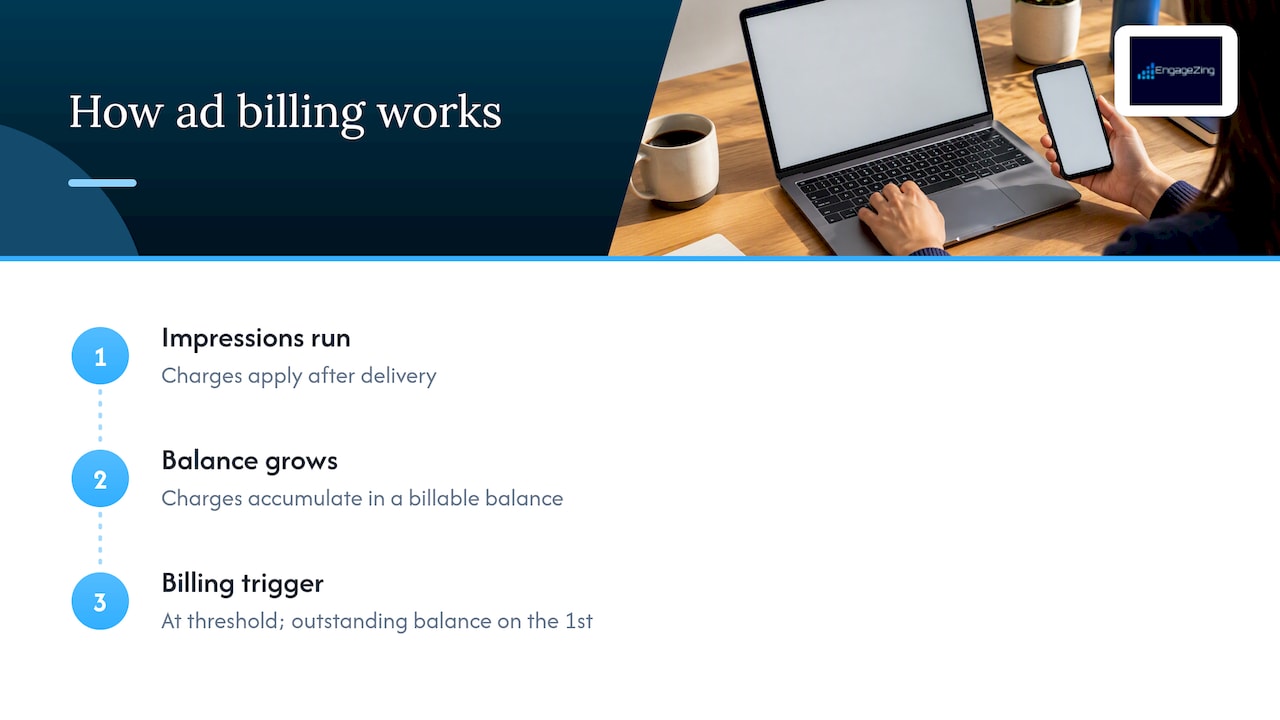
      Here is what Nextdoor itself says about billing. Ads Manager uses a pay-as-you-go model and charges for impressions after they run. Charges build up in a billable balance. You are billed when that balance hits your billing threshold, and again on the 1st of each month for any outstanding balance.

      Nextdoor ad billing balance and charge timing

      That explains a common surprise. If you see a small charge you did not expect, it is usually the threshold or the monthly settlement. Paused campaigns can still be billed for what they already delivered.

      A simple way to set a budget

      • Pick two or three neighborhoods, not your whole city.
      • Set a daily goal you could lose without stress for the first 30 days.
      • Run one offer with one clear action: call, book or claim a deal.
      • Check results weekly. Pause neighborhoods that bring views but no calls.

      If you also run search or social ads, compare cost per lead across channels. Our guides on Facebook ads costs for US small businesses and local Facebook ad budgets show how to set that baseline.

      Who should use Nextdoor ads, and who should not

      Nextdoor tends to fit businesses that serve homes in a defined area:

      • Home services: cleaning, landscaping, HVAC, roofing, pest control
      • Local retail, restaurants and salons
      • Real estate, personal services and neighborhood pros

      It fits less well for e-commerce stores that ship nationwide, or B2B services with a small number of buyers. For those, search and Facebook ads usually give you more control. Google Advertising and Facebook Advertising are the usual next steps.

      Make the ad convert: tips that matter

      Most wasted Nextdoor spend comes from the same few gaps.

      Write like a neighbor. Lead with your area and a specific job. “Fence repair in Maple Heights, free quotes this week” beats a generic slogan.

      Use a real photo. A picture of your team or your work builds more trust than stock art.

      Make one offer. A local discount, a free estimate or a bundle. Tell people exactly how to redeem it. If a printed item helps, such as a branded flyer or a welcome kit, local promotional campaigns can reinforce the same offer offline.

      Send clicks somewhere fast. If your site loads slowly or hides your phone number, the ad pays for a bounce. Our Winning Websites service is built around turning visits into calls.

      Answer quickly. Neighbors compare. The first business to reply often wins the job.

      Reviews and recommendations decide the click

      Before a neighbor calls, they look at your page. Recommendations from other neighbors carry weight, and so do your Google reviews. A steady flow of honest reviews does more for your ad results than any bid tweak.

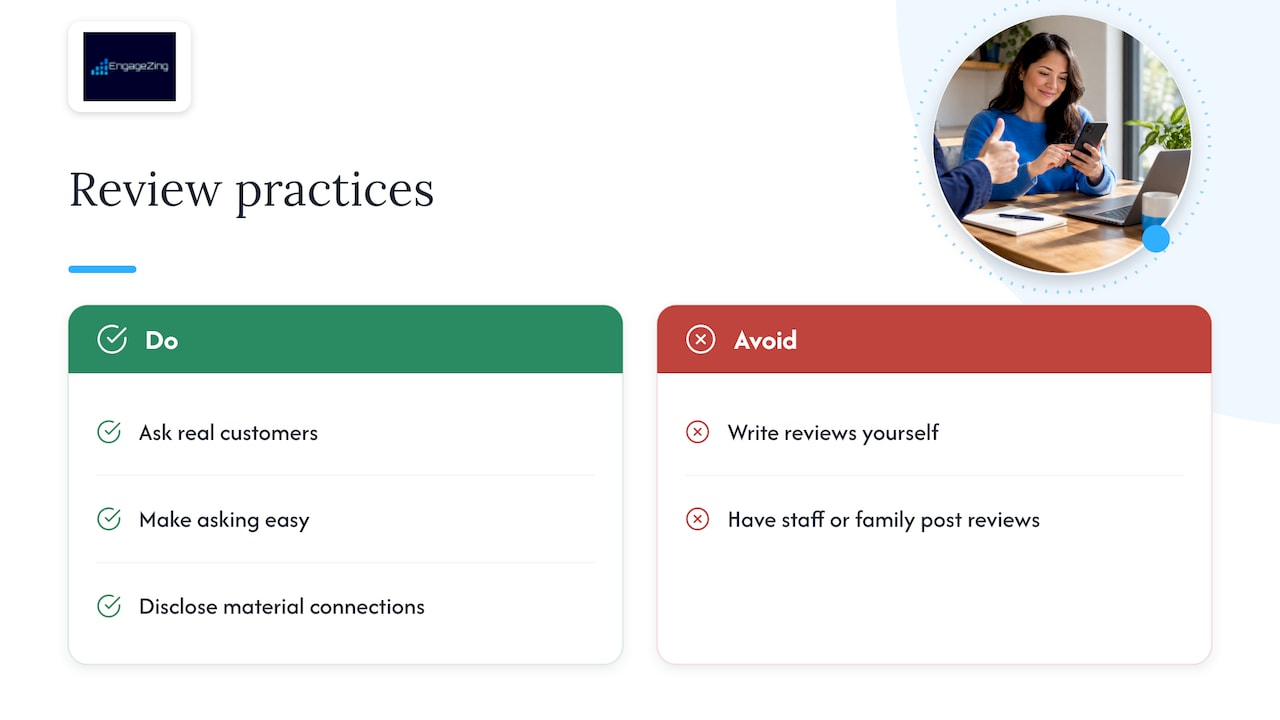
      Keep the process clean. The Federal Trade Commission has said that failing to disclose a material connection to a reviewer, such as paying for or incentivizing reviews, can be a deceptive practice. Ask real customers, make it easy, and never write reviews yourself or have staff and family post them.

      Our Review Generation & Reputation service automates the ask after each job, so happy customers are prompted while the work is fresh. If you are dealing with a bad review, read our guide to the FTC’s 2024 rule and when Google reviews can be removed and our notes on the 2026 Google review policy.

      Reviews and recommendations decide the click — overview diagram

      Pair Nextdoor with local search

      Nextdoor reaches neighbors who are browsing. Search reaches people who are ready right now. You want both.

      When someone searches “plumber near me,” Google shows a short list. Your Google Business Profile, listings and reviews decide whether you are on it. Our Near-Me Search Boost improves that visibility, and Business Listings & Voice Search keeps your name, address and phone number consistent across directories and voice assistants.

      For a step-by-step plan, see our 30/60/90 local marketing strategies.

      Our perspective

      We work with small and local businesses, and the pattern is consistent. Owners often ask which ad platform to try next. The better question is where leads are leaking today.

      A Nextdoor campaign can be a good test, because it is cheap to start and easy to limit to a few neighborhoods. But an ad is a multiplier. If your reviews are thin, your listings are inconsistent or your website buries the phone number, the ad multiplies those problems.

      So we start with a gap analysis. We look at how people find you, what they see, and where they drop off. Then we build a 12-month plan that puts the right channel in the right order. Sometimes that is Nextdoor. Sometimes it is reviews first, then search, then paid. We would rather you spend your first dollar where it returns the most.

      See where your leads leak before you spend

      Our Roadmap Analysis shows how your business appears online, where you lose customers and what to fix first. You also get a custom 12-Month Growth Plan and a High Converting Website Mockup, included in the analysis. Our local experts can walk you through it. See our 4x Conversions approach, or start with the analysis at the end of this article.

      Frequently Asked Questions

      How much do Nextdoor ads cost?

      There is no fixed price. Self-serve ads run on an auction, so cost depends on your neighborhoods, bid and daily goal. Ads Manager shows recommended bids when you set up a campaign. Start with a small daily goal and review results after a few weeks.

      Why was I charged by Nextdoor unexpectedly?

      Ads Manager bills after impressions run. You are charged when your balance reaches your billing threshold and on the 1st of each month for any outstanding balance, as Nextdoor’s billing help page explains. Paused campaigns can still be billed for delivered impressions.

      Can a small business advertise on Nextdoor?

      Yes. You claim a free Business Page, then add paid placements through Ads Manager. You choose the neighborhoods and set your own daily goal. National sponsored programs are a separate, larger-budget path.

      Are Nextdoor ads better than Facebook or Google ads?

      Not better, different. Nextdoor is hyperlocal and trust-driven. Google captures people searching for you right now. Facebook gives deeper targeting and retargeting. Most local businesses do best with a mix, tested one channel at a time.

      Share This Article

      Found this useful? Send it to another owner who is still the same questions keep coming up.

      Share on Facebook · Share on X · Share on LinkedIn · Share on Pinterest

      Want More Information? Let’s Talk.

      If you would rather not take this on yourself, we handle it for you. Our Facebook Advertising service takes care of the setup and the ongoing work, then reports back so you can see exactly what changed. You keep running your business; we keep this moving.

      Call us at 631-825-9464 or reach out here. No pressure, no obligation, and you can ask us anything — including whether this is even worth doing for a business your size.

      Looking ahead, request your roadmap analysis and we will map out a 12-month plan to close the conversion leaky bucket so more of the customers you already reach turn into booked work.


      Written by Joe Leineke · Content on this blog is generated with AI assistance and independently reviewed and fact-checked by human marketing professionals for accuracy and quality.

  • Call to Action Examples That Get Local Customers to Act

    Call to Action Examples That Get Local Customers to Act

    Customer taps a local business call-to-action

    The best call to action tells the visitor exactly what happens after the click. “Get My Analysis,” “Book a Consultation,” “Call for Same-Day Service” and “Get Directions” all do that. “Submit” and “Get Started” do not. Below are call to action examples sorted by business type, the rules behind them, and how to test them. Each tip links to a service that can put it to work for your business.

    What makes a call to action work

    A CTA is a promise. The button says what you will get, and the next page has to deliver it right away.

    People scan pages, so the first words must carry the meaning. Nielsen Norman Group’s guidance on link labels says to be concise, put information-carrying words first, and set expectations that the destination meets immediately. The same group warns that a generic “Get Started” button attracts clicks but can mislead people who only want information.

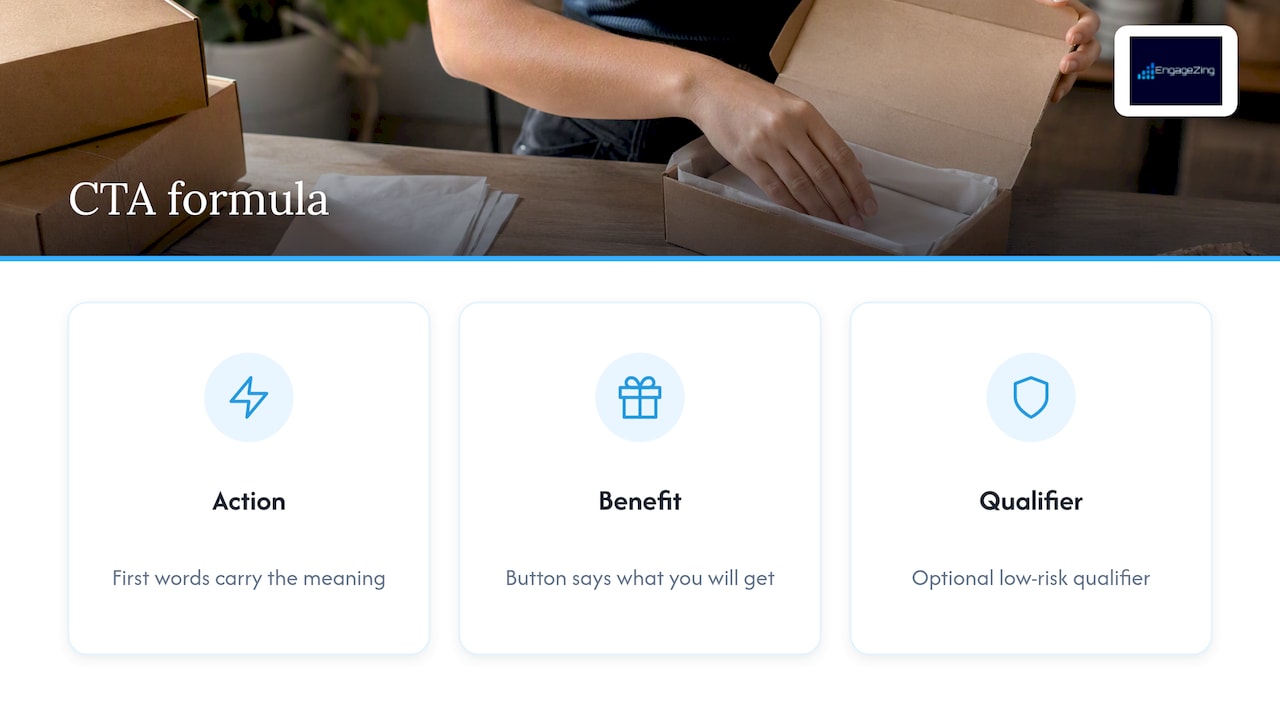
    A simple formula covers most cases: action verb + what you get + (optional) low-risk qualifier. “Get My Roadmap Analysis” has all three. “Learn More” has none.

    Three parts of an effective call to action

    Call to action examples by business type

    The right wording depends on what your visitor wants to do next. Use this table as a starting point.

    | Business type | Weak CTA | Stronger CTA |

    |—|—|—|

    | Plumber, HVAC, electrician | Contact Us | Call for Same-Day Service |

    | Dentist, salon, clinic | Learn More | Book an Appointment |

    | Local retailer | Click Here | Get Directions, Shop Best Sellers |

    | Online store | Submit | Add to Cart, See Delivery Options |

    | Consultant, freelancer | Get Started | Book a 15-Minute Consultation |

    | Marketing or B2B service | Get Started | Get My Analysis |

    | Lead magnet | Download | Download the Pricing Guide |

    Service businesses: make calling easy

    When a form would ask for complex or sensitive details, a phone call is often the faster path. Google and Ipsos found that 61% of mobile searchers viewed click-to-call as important in the purchase phase. Try “Call [Business Name],” “Talk to a Local Expert” or “Request a Quote.”

    Track calls separately from form fills, so you know which path brings real jobs. A Google Maps lead playbook for service businesses covers how trackable calls and profile actions fit together.

    Local retailers: send people to the door

    A shopper nearby wants hours, parking and a route. “Get Directions” and “Shop Best Sellers” serve that need. If you want more of those searchers to find you in the first place, our Near-Me Search Boost is built for “near me” visibility.

    E-commerce: remove doubt at the product page

    Make the transaction clear: “Add to Cart,” “Buy Now,” “Choose Your Size.” NN/G advises making targets visibly clickable with recognizable conventions. Avoid several competing buttons beside one product image unless each is clearly labeled.

    Professionals and freelancers: lower the commitment

    “Book a 15-Minute Consultation” feels smaller than “Hire Me.” “See Client Results” invites proof before a sales conversation. Both give the visitor a safe next step.

    Where to place your CTA

    On mobile, put the primary action front and center. Google and AnswerLab’s mobile study lists keeping calls to action front and center as its first principle of mobile site design. Use “Call Now,” “Get Directions,” “Book an Appointment” or “Request a Quote” in the main body. Keep secondary actions in menus or lower on the page.

    Speed matters too. A 2013 Google and Nielsen diary study found that more than half of mobile-search conversions happened within an hour. That is old data, so treat it as context and check your own analytics. Still, it is a good reason to make the action possible on the first screen.

    Page design counts as much as button text. A strong CTA on a slow, cluttered page still loses. A website built around conversions puts the CTA, the proof and the next step in one clear path. For a look at what that can mean for trades, see these contractor website examples that bring in leads.

    Keep your CTA honest

    Confidence sells. Unsupported promises create risk. In the United States, the FTC requires advertising claims to be truthful and substantiated, and its endorsement and testimonial guides say testimonials should reflect typical experiences or clearly disclose when they do not. The FTC’s business guidance on internet advertising repeats the same principle.

    In January 2025 the FTC ordered a company to pay $1 million over deceptive claims about what its AI accessibility product could do. That case is a compliance warning, not a marketing benchmark, but the lesson carries over to CTAs.

    | Risky | Safer |

    |—|—|

    | Get 4X More Leads Guaranteed | Request a Personalized Plan |

    | Risk-Free Results for Everyone | See Client Results |

    | Only 2 Spots Left (when untrue) | Book Your Consultation |

    If you are unsure whether a specific claim holds up, ask your attorney before it goes live.

    How to test your CTAs

    1. Pick one goal. Choose a qualified call, a booked consultation, a store visit or a completed purchase.
    2. Change one thing at a time. NN/G suggests an A/B test for big redesigns, then smaller tests of label, placement, supporting text or visual treatment.
    3. Judge by outcomes. Clicks are not customers. Count what reaches your revenue.
    4. Remember interactions. Button copy, imagery and form length affect each other, so test the whole experience.
    5. Our perspective: a CTA is only as good as the offer behind it

      We see the same pattern with small business owners. They rewrite the button and leave the offer alone. A sharper label helps, but a visitor clicks when the next step is worth their time and carries no risk.

      That is why our own main CTA leads with: a roadmap analysis that shows where your site and listings lose leads. Every CTA on your site should answer one question for the visitor: what do I get, and what does it cost me? If the answer is clear and honest, the label almost writes itself.

      We also pair CTAs with the rest of the path. Reviews build the trust that makes someone call. Automated review requests and a 90-day plan for service business leads work alongside strong CTAs, not instead of them.

      Put these CTAs to work with a roadmap

      Writing CTAs is easy. Knowing which ones your business needs is harder. Our Conversion Roadmap, 12-month Growth Roadmap and High Converting Website Mockup are included in the analysis. They show where your visitors drop off and what to change first, and our local experts walk you through them.

      If you want the full conversion picture, see our 4x Conversions page. If ads drive your traffic, our Google advertising and email marketing services send people to pages built to convert.

      Frequently Asked Questions

      What is an example of a good call to action?

      “Get My Analysis” is a good one. It names the action, the benefit and the price in three words. Other strong examples are “Book a Consultation,” “Call for Same-Day Service” and “Get Directions.”

      How long should a CTA be?

      Keep it short, usually two to five words. Put the words that carry meaning first, because visitors scan. Add a short line of supporting text underneath if you need to clarify cost or time.

      Is “Get Started” a bad CTA?

      Often it is too vague. NN/G found it can mislead people who only want information, since it could mean a signup, a quiz or a sales funnel. Name the step instead, for example “Book a 15-Minute Consultation.”

      How many CTAs should a page have?

      One primary CTA per page, repeated where the visitor is ready to act. Add a quieter secondary option, such as “See Client Results,” for people who are not ready yet. Several equal buttons compete and slow decisions.

      Where can I get my CTAs reviewed?

      We offer a personalized analysis that covers your website, listings and conversion path. Get My Analysis and one of our local experts will help.

      Ready to see what your site is missing? Get My Roadmap Analysis

      Share This Article

      Found this useful? Send it to another owner who is still the same questions keep coming up.

      Share on Facebook · Share on X · Share on LinkedIn · Share on Pinterest

      Want More Information? Let’s Talk.

      If you would rather not take this on yourself, we handle it for you. Our 4X Conversions service takes care of the setup and the ongoing work, then reports back so you can see exactly what changed. You keep running your business; we keep this moving.

      Call us at 631-825-9464 or reach out here. No pressure, no obligation, and you can ask us anything — including whether this is even worth doing for a business your size.

      Looking ahead, request your roadmap analysis and we will map out a 12-month plan to close the conversion leaky bucket so more of the customers you already reach turn into booked work.


      Written by Joe Leineke · Content on this blog is generated with AI assistance and independently reviewed and fact-checked by human marketing professionals for accuracy and quality.

  • Local SEO Strategy for Small Businesses: A 2026 Plan

    Local SEO Strategy for Small Businesses: A 2026 Plan

    Customer checking local search outside a shop

    A local SEO strategy is a plan for showing up when nearby customers search for what you sell. It rests on five jobs: a complete Google Business Profile, consistent business data, a steady flow of real reviews, a website that names the places you serve, and structured data that explains it all to Google. This guide puts them in the order we would do them, with the traps to avoid.

    How Google decides who ranks locally

    When someone searches “plumber near me” or “Italian restaurant,” Google weighs three things, according to Google’s own guidance on local ranking:

    • Relevance: how well your profile matches the search.
    • Distance: how far you are from the searcher, or from the location named in the query.
    • Prominence: how well known you are, which includes review count, review quality and information found around the web.

    You cannot change distance. You can change the other two. That is the whole strategy in one sentence: be the most complete, consistent and trusted match for the search.

    The payoff is intent. The U.S. Small Business Administration describes a local business as one that gets most of its customers from within a 75-mile radius, so your job is to reach people close enough to buy. Local searchers are often ready to call, visit or book.

    Step 1: Build a complete Google Business Profile

    Your profile is the first thing many customers see. Treat it as a living asset, not a one-time form.

    1. Claim and verify it. Only one profile per business. Google’s representation guidelines ask that you use the name your business uses in the real world, and an accurate address or service area.
    2. Choose the fewest categories that describe your core business. Pick the primary category with care. It carries the most weight for relevance.
    3. Keep hours, phone and services current. Update for holidays and seasonal changes.
    4. Add real photos. Show your storefront, your team and finished work. For a good example of why images matter, see this look at Google Business Profile photos that convert.
    5. Answer every review, good or bad. The SBA recommends monitoring the sites where reviews appear and responding consistently.
    6. We cover the full routine in our Google Business Profile checklist. If you have no storefront, read our guide to service area SEO.

      Step 2: Make your NAP data match everywhere

      Matching business details across local listings

      Many small businesses have three phone numbers and two spellings of the street across the web. That inconsistency weakens the confidence Google has in your listing.

      Do this once, carefully:

      • Write your exact business name, address and phone number in a single document.
      • Search for your business on the major directories, maps and data aggregators.
      • Correct every mismatch, not only the main profile. Old addresses and tracking numbers are the usual offenders.
      • Check again every quarter.

      This is slow work, and it is why many owners hand it off. Our Near-Me Search Boost is built to keep your listings accurate and your business visible in nearby searches.

      Step 3: Earn reviews the safe way

      Reviews feed prominence directly. According to the BrightLocal 2025 Local Consumer Review Survey, 81% of consumers use Google to find reviews, and 40% check at least two sites before choosing a local business. Recent reviews matter too: 20% of consumers say reviews as recent as two weeks old affect their decision.

      A simple routine works better than a one-off campaign:

      1. Ask right after the job is done, when satisfaction is highest.
      2. Send a direct link by text or email so leaving a review takes under a minute.
      3. Reply to every review within a few days.
      4. Keep the negative ones visible and answer them calmly. A mix of ratings looks more credible than a flawless 5.0.
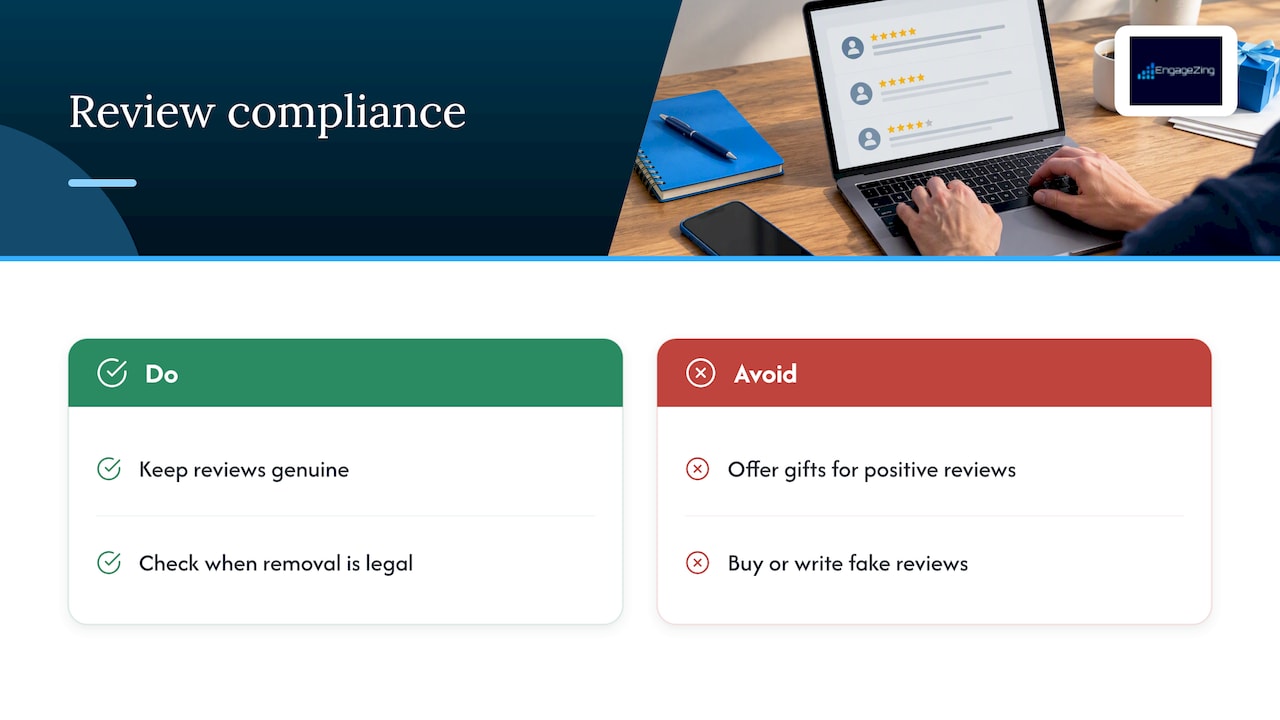
      5. What you must not do

        Never offer discounts or gifts for positive reviews, and never buy or write fake ones. Google says reviews must reflect a genuine experience. The FTC’s Consumer Review Rule took effect on October 21, 2024, and its Q&A for businesses explains that courts can impose civil penalties of up to $53,088 per violation. The agency has also sent warning letters to businesses about the rule.

        If an unfair review is hurting you, see when you can legally ask to remove a Google review. To automate compliant requests, look at our Review Generation & Reputation service.

        What you must not do — overview diagram

        Step 4: Make your website say where you work

        Your profile gets you into the map results. Your website backs it up.

        • Give each main service its own page, and each location or service area its own page when you have real content for it.
        • Put the city or neighborhood in titles, headings and body copy where it reads naturally.
        • Show your address and phone number in text, not only in an image.
        • Embed a map, add local photos and list local details such as neighborhoods served.
        • Keep pages fast and readable on a phone, since most local searches happen there.

        Trade-specific pages help. For a worked example of the research and page planning, a locksmith’s step-by-step local SEO competitor research guide shows how a service business studies the businesses ranking above it. We also publish checklists for plumbers and dentists. If your website itself is the bottleneck, see our Winning Websites.

        Step 5: Add structured data

        Google reads structured data as explicit clues about what a page means. For a local business, LocalBusiness schema in JSON-LD can state your business type, address, hours and service area. Most owners rely only on their profile and skip this step, so it is an easy way to give Google more context. Ask your web developer to add it and test it before publishing.

        A 30/60/90 day order of work

        | Days | Focus | Output |

        |—|—|—|

        | 1 to 30 | Profile and NAP | Verified, complete profile; clean listings |

        | 31 to 60 | Reviews and website | Review routine running; service and location pages live |

        | 61 to 90 | Schema and content | Structured data added; one local post or page per month |

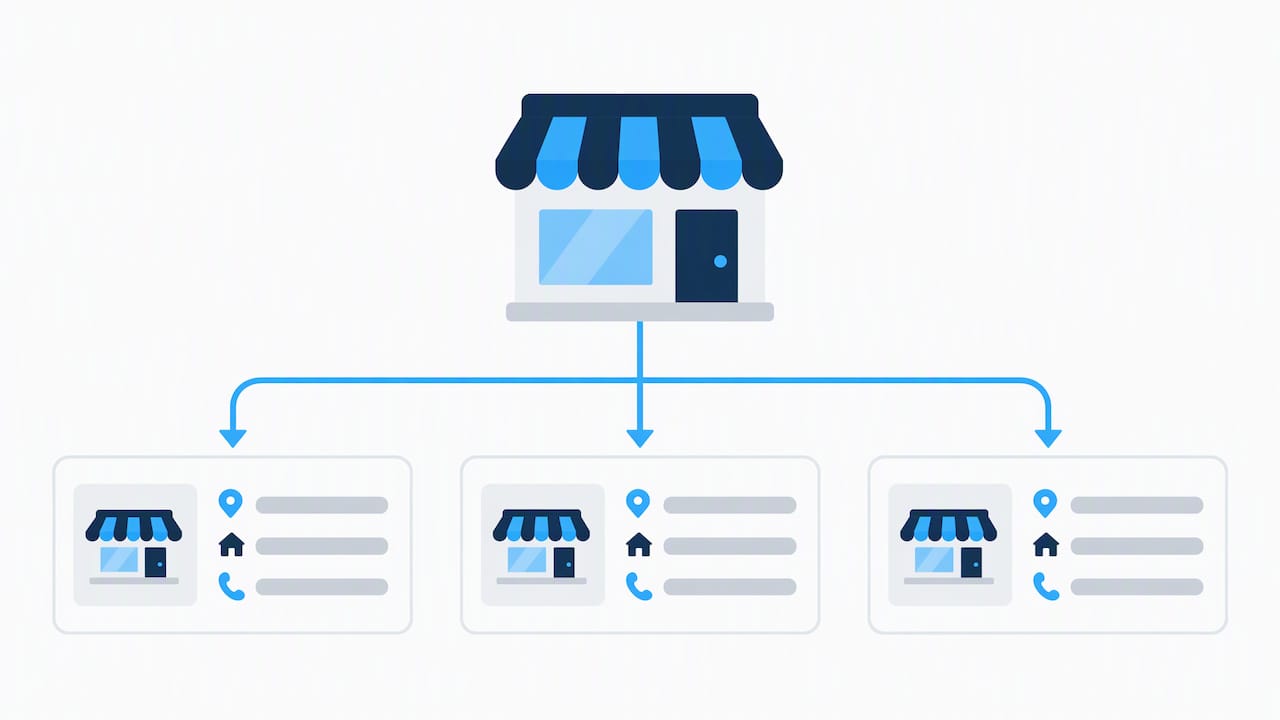
        For more tactics at each stage, read our 30/60/90 local marketing strategies. Running more than one location? Our guide to multi-location SEO covers data and review management at scale.

        Our perspective

        Most local businesses we talk to do not lack effort. They lack a map. They have a profile that is half finished, a handful of reviews from two years ago, and a website that never says which town it serves. Each gap is small, but together they send customers to the competitor down the street.

        That is why we start with a look at where you stand before asking you to spend anything. A clear audit shows where leads leak and what to fix first, so you can pick the work that moves the needle. We pair it with a local account manager who knows your market, because what works in a small town differs from what works in a big metro. And we favor results-based work over vague retainers, so you can see what you are paying for.

        Frequently Asked Questions

        What is a local SEO strategy?

        It is a plan to improve your visibility in local results on Google Maps and Search. It covers your Business Profile, listings, reviews, website content and technical signals. The goal is to be the most relevant and trusted option for nearby searchers.

        Is local SEO effective for small businesses?

        Yes, because it reaches people already searching for what you sell, close to where you operate. Results take time, usually weeks to months, and depend on your competition and how complete your presence is today. No one can guarantee a specific ranking.

        Can I pay Google to rank higher in local results?

        No. Google states that there is no way to pay for a better local ranking. Paid ads are separate from the organic map results.

        How many reviews do I need?

        There is no magic number. Aim for a steady stream of recent, genuine reviews, and compare yourself with the top three businesses in your area. Ask every customer, and never offer rewards for positive feedback.

        Ready to see what is holding your local rankings back? Request your roadmap analysis.

        Share This Article

        Found this useful? Send it to another owner who is still the same questions keep coming up.

        Share on Facebook · Share on X · Share on LinkedIn · Share on Pinterest

        Want More Information? Let’s Talk.

        If you would rather not take this on yourself, we handle it for you. Our Near-Me Search Boost service takes care of the setup and the ongoing work, then reports back so you can see exactly what changed. You keep running your business; we keep this moving.

        Call us at 631-825-9464 or reach out here. No pressure, no obligation, and you can ask us anything — including whether this is even worth doing for a business your size.

        Looking ahead, request your roadmap analysis and we will map out a 12-month plan to close the conversion leaky bucket so more of the customers you already reach turn into booked work.


        Written by Joe Leineke · Content on this blog is generated with AI assistance and independently reviewed and fact-checked by human marketing professionals for accuracy and quality.

  • Ecommerce Conversion Rates: Benchmark Bands, Then Fix the Leak

    Ecommerce Conversion Rates: Benchmark Bands, Then Fix the Leak

    Ecommerce owner reviewing store conversion performance

    Most online stores convert somewhere between roughly 1.8% and 3.4% of visits, with a general ecommerce median near 2.8%. A single average hides too much, because industry, device mix and how you count visitors all shift the result. Your first move: confirm your denominator in GA4 and Shopify, then run a quick mobile and checkout check.

    Why one ecommerce conversion rate average misleads you

    Think of a benchmark as a band, not a target. The useful version shows a low end (the 25th percentile), a median and a high end (the 75th percentile) for stores like yours.

    Conversion Radar makes the same case by publishing bands by sub-vertical instead of one headline number. Its example medians show how much a blended figure masks:

    • Electronics: around 1.5%, because shoppers compare prices and buy less often on impulse.
    • Apparel and DTC: around 2.6%.
    • Beauty: around 2.9%.
    • Subscription: around 3.8%, helped by recurring offers and lower purchase risk.

    Why do published medians disagree? Sources use different denominators (sessions versus unique visitors), different store samples and different months. A report heavy on holiday traffic will read differently from one built on a quiet quarter. Neither is wrong. They just answer slightly different questions.

    Our advice: pick the one sub-vertical band that matches your store, write down its low, median and high values, and compare yourself to that row every month. If you sit below the low end, you likely have a leak worth fixing. If you sit near the median, the next gains come from testing. If you sit above the high end, protect what works and look at traffic volume and average order value instead.

    How to calculate your ecommerce conversion rate correctly

    The formula is simple: purchases divided by sessions, multiplied by 100. Some teams divide by unique visitors instead. Both are valid, but they give different answers, so choose one and stick with it. For example, divide purchases by sessions to calculate a session-based rate. Using unique visitors instead gives a different rate.

    The trouble starts when GA4 and Shopify disagree. Each platform counts visits its own way, filters bots differently and uses its own attribution windows. Before you compare yourself to any benchmark, line up three things:

    • One source of truth: decide whether GA4 or your store platform is the official count, and report from it every time.
    • Clean traffic: exclude internal visits and known bot traffic so they do not inflate the denominator.
    • Consistent windows: compare the same date ranges, and segment by device, channel and landing page.

    It also helps to know how GA4 labels ecommerce data. Google’s ecommerce metrics documentation separates event-scoped metrics from item-scoped metrics. Event-scoped counts record how many times an action happened (an add_to_cart event, for example). Item-scoped counts record how many products were involved (items added). One shopper adding three products creates one event but three items. Mixing the two is a common reason a report looks wrong, and correct event setup is what keeps your numbers trustworthy.

    Pro Tip: Write your conversion rate formula on one line (numerator, denominator, date window, data source) and pin it where your whole team sees it, so every report uses the same math.

    Conversion rate by industry, device and traffic source

    Once you know your band, split your own number. A blended rate can look average while one device or channel quietly drags it down.

    Industry comes first. Pick the peer group closest to what you sell and how often customers buy, not the one that looks most flattering.

    Device is the next split. Desktop usually converts higher than mobile, because larger screens make forms, comparisons and payment entry easier. If most of your traffic is on phones, your blended rate will sit lower than a desktop-heavy store’s, even when your checkout is just as good. That is not necessarily a problem to solve; it is context for reading the number. What matters is whether your mobile rate is improving over time and whether the gap to desktop is wider than it should be.

    Traffic source matters just as much. Visitors from branded search or email usually arrive ready to buy. Visitors from a broad social ad are often just browsing. A rising ad budget can push your overall rate down while revenue goes up, which is fine if you know why. If you run paid social, benchmarks for channel-level results, such as these Meta Ads ecommerce benchmarks, help you judge whether a weak channel is the problem or simply the expected cost of reaching colder audiences.

    Here is the routine we recommend each month:

    • Split the conversion rate by device and note the gap.
    • Split it by source and medium, and flag any channel with heavy traffic but few orders.
    • Check your top five landing pages and compare their rates.
    • Compare each result to your stored sub-vertical band, not to the blended average.

    This helps show you where the leak actually is.

    Cart abandonment: where most lost sales happen

    Even a healthy store loses most of its carts. Baymard’s current figures put the average cart abandonment rate at about 70%, and its long-term tracking has stayed close to that line for years.

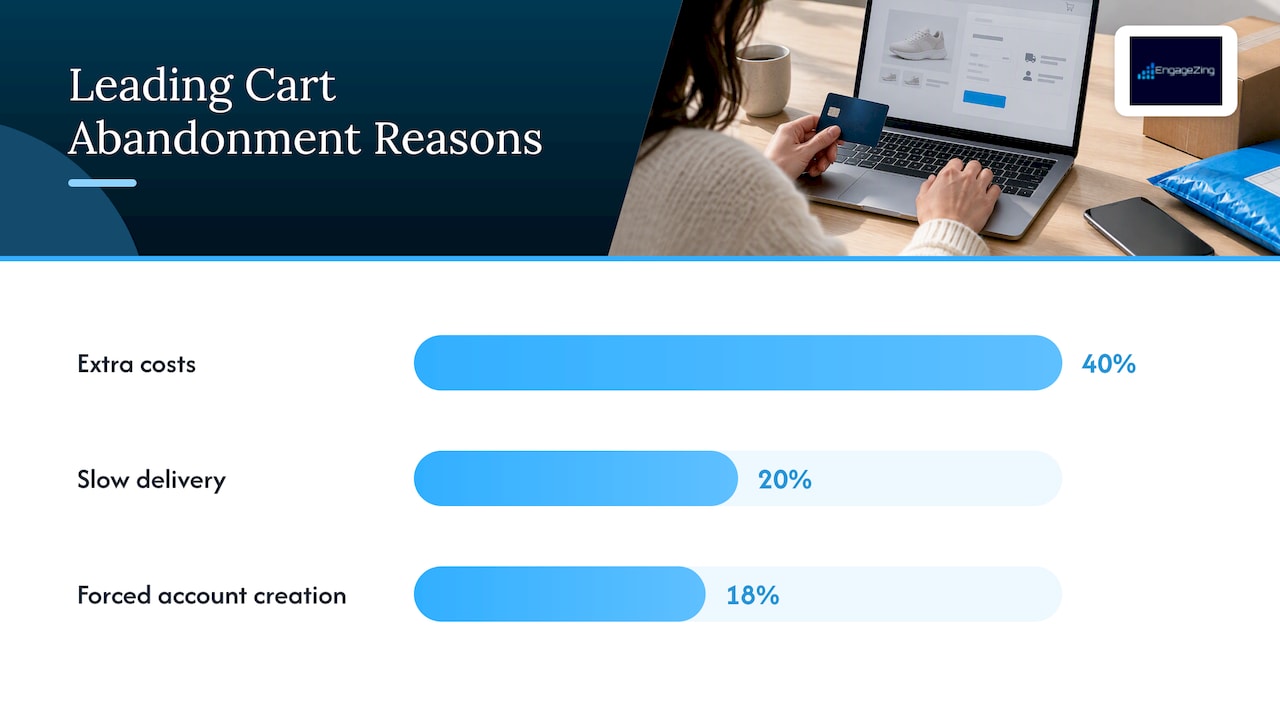
    Roughly 70% of carts are abandoned, and 40% of shoppers who leave cite extra costs such as shipping, taxes or fees as the reason (Baymard). That mean surprise costs at checkout are the single most cited reason shoppers walk away.

    The same Baymard list names the other leading causes:

    • Extra costs: high shipping, taxes or fees revealed late (40%).
    • Slow delivery: delivery that feels too slow (20%).
    • Forced account creation: being made to register before buying (18%).

    Not every abandoned cart is a lost sale you could have won. Many shoppers are exploring, saving items for later or checking prices, and no checkout redesign will convert them. The goal is to fix friction for people who are ready to buy, such as offering guest checkout so a motivated shopper does not hit a wall.

    The upside is real. Baymard’s checkout research suggests that better checkout design can improve conversion for many large sites. Its expanded 2024 checkout research documented more than 1,350 usability issues, which shows how many small frictions can pile up. Baymard’s checkout research highlights how form complexity can create friction. Simplifying checkout fields can give shoppers fewer reasons to quit.

    Cart abandonment: where most lost sales happen — overview diagram

    Prioritized CRO tactics: quick wins first, then core drivers

    Start with fixes that cost little and protect the most revenue, then move to bigger projects. Here is the order we use with clients:

    1. Show the full price early. Surface shipping, taxes and fees on the product page or cart so nothing surprises shoppers at the last step. Extra costs are the top reason carts are abandoned.
    2. Turn on guest checkout. Let shoppers buy without creating an account, and offer account creation after the order is placed.
    3. Cut checkout fields to 7 or 8. Remove anything you do not need to ship the order, and use autofill and address lookup where you can.
    4. Speed up your pages. Compress images, trim heavy scripts and test load time on a mid-range phone, not just your office laptop.
    5. Fix mobile usability. Use large tap targets, number keypads for card and phone fields, and wallet payments such as Apple Pay and Google Pay.
    6. Recover abandoned carts. Set up email and SMS reminders that bring shoppers back to the exact cart they left.
    7. Strengthen product pages. Clear photos, honest descriptions, visible reviews and trust signals such as security badges and return policies all reduce doubt. A conversion-focused build, like our Winning Websites service, puts these in the right places from the start.
    8. Improve findability. Better onsite search and clear categories help shoppers reach the right product faster.
    9. After the quick wins, move to core drivers: a full checkout redesign, pricing and offer experiments, and ongoing review collection. Our Review Generation & Reputation service automates that last part so fresh social proof keeps flowing.

      Then add testing. Rank every idea by expected revenue impact divided by the effort it takes. Run small A/B tests, change one major element at a time and measure results with the same GA4 denominator you use for reporting. Keep what wins, record what loses, and run the next test. Tests that run too briefly, or on too little traffic, mislead more than they teach.

      Pro Tip: Test checkout and cart changes before homepage changes. A gain at the bottom of the funnel affects every visitor who is already close to buying.

      Measurement checklist: GA4 events, funnels and segments

      Set up tracking before you test, or you will not know whether a change worked. Google’s developer guide to ecommerce measurement lists the core events a typical store tracks. Use this as your minimum:

      • Events to implement: view_item, add_to_cart, begin_checkout, add_shipping_info and purchase, with currency set at the event level and debug mode on while you verify.
      • Scope check: confirm whether each report uses event-scoped or item-scoped metrics, as described in the GA4 metrics guide.
      • Funnels and segments: build a checkout funnel, then segment by device, source and medium, landing page and product category.
      • Verification: compare GA4 order counts to your store platform, run an open funnel exploration to catch shoppers who return later, and review the numbers on a set monthly schedule.

      Google’s ecommerce exploration reports show the exact checkout step where shoppers drop off, which tells you what to fix first. For stores that also run affiliate or partner links, a periodic check for broken checkout and affiliate links keeps silent revenue leaks out of the picture.

      How AI and machine learning can lift your conversion rate

      AI helps most where it works on data you already collect. It does not replace good checkout design, but it can speed up the work that is hard to do by hand.

      Practical uses include product recommendations that learn from browsing and purchase behavior, search that understands what shoppers mean rather than only matching exact words, and chat assistants that answer sizing, shipping and return questions at the moment a shopper hesitates. Machine learning can also score visitors by how likely they are to buy, so you can send a timely offer to a high-intent shopper and skip discounting someone who would have purchased anyway. On the testing side, AI tools can help you spot patterns across segments faster than a spreadsheet can.

      A few cautions keep this grounded. AI is only as good as the data under it, so fix your GA4 events and denominator first. Start with one use case, measure it against a clean baseline, and keep a human reviewing what the system recommends. If an AI feature adds load time to your pages, it can cost you more than it earns.

      For small stores, the easiest starting point is an AI chatbot on product and cart pages. Our AI Sales service sets up that kind of assistant and ties it to review and follow-up automation, so questions get answered while the shopper is still deciding.

      Post-purchase experience: turn first orders into repeat orders

      Conversion does not end at the thank-you page. A shopper who has a smooth first order is far easier to win again than a stranger, so treat the days after purchase as part of your conversion strategy.

      Start with clear communication. Send an order confirmation right away, shipping updates with real tracking links, and a plain-language message if anything is delayed. Delivery speed is a leading reason people abandon carts, so honest expectations after the sale build trust for the next one.

      Then keep the relationship going:

      • Ask for a review a few days after delivery, once the product has been used.
      • Make returns easy. A simple, visible return policy lowers the fear that stops first-time buyers.
      • Send helpful follow-ups, such as care tips, refill reminders or related products that fit what the shopper bought.
      • Offer account creation after checkout, when the shopper has already committed and the benefit (faster reorders) is obvious.

      Each of these raises the odds of a second purchase without paying for a new click. Repeat customers also tend to convert at a higher rate than first-time visitors, which lifts your blended number over time.

      Our perspective: fix the leak before you chase the benchmark

      Most store owners ask whether their rate is good. We think a better question is where the money is leaking. A rate that matches the median can still hide a broken mobile checkout, and a below-average rate can be perfectly healthy for your category. That is why we begin with measurement integrity, then checkout friction, then everything else. Boosting traffic into a leaky funnel only makes the leak more expensive. If you want a second set of eyes, our Conversion Roadmap shows which fixes come first.

      Get your Roadmap Analysis from EngageZing

      We built our Roadmap Analysis for store owners who want a clear plan instead of guesses. It diagnoses where your funnel loses buyers, ranks the fixes by revenue impact and costs you nothing to start. If you are ready to act on what you read here, these are the next steps:

      • Start your analysis at Roadmap.
      • Share GA4 access or a few site snapshots.
      • Receive prioritized recommendations, and explore our 4x Conversions service if you want us to carry them out.

      Frequently Asked Questions

      What is a good ecommerce conversion rate?

      A good rate depends on your category, but a general ecommerce median sits near 2.8%, with a practical band of roughly 1.8% to 3.4%. Compare yourself to your own sub-vertical band rather than one overall average.

      How do you calculate ecommerce conversion rate?

      Divide the number of purchases by the number of sessions, then multiply by 100. Some teams use unique visitors as the denominator instead, so pick one method and use it every time. GA4 and your store platform may count visits differently, which is why a single source of truth matters.

      Is 20% or 40% a good conversion rate?

      For a typical online store, both are far above normal and usually point to a measurement issue, such as a narrow denominator or counting only highly qualified traffic. The sub-vertical benchmark data tops out around 6.2% for food and beverage. Recheck how you count before celebrating.

      Why do shoppers abandon their carts?

      The main reasons are extra costs at checkout, slow delivery and forced account creation. Baymard reports that about 70% of carts are abandoned, and many of those shoppers were only browsing. Focus on removing friction for shoppers who are ready to buy.

      Share This Article

      Found this useful? Send it to another owner who is still is losing carts at checkout.

      Share on Facebook · Share on X · Share on LinkedIn · Share on Pinterest

      Want More Information? Let’s Talk.

      If you would rather not take this on yourself, we handle it for you. Our 4X Conversions service takes care of the setup and the ongoing work, then reports back so you can see exactly what changed. You keep running your business; we keep this moving.

      Call us at 631-825-9464 or reach out here. No pressure, no obligation, and you can ask us anything — including whether this is even worth doing for a business your size.

      Looking ahead, request your roadmap analysis and we will map out a 12-month plan to close the conversion leaky bucket so more of the customers you already reach turn into booked work.


      Written by Joe Leineke · Content on this blog is generated with AI assistance and independently reviewed and fact-checked by human marketing professionals for accuracy and quality.

  • Fake Google Reviews: U.S. Small Businesses’ First 48 Hours

    Fake Google Reviews: U.S. Small Businesses’ First 48 Hours

    Small business owner reviewing suspicious online feedback

    Flag the review through your Business Profile or the Reviews Management Tool, save your evidence right away, and submit the one-time appeal if Google declines removal. Expect a wait of several days for each decision. Escalate outside Google only for extortion, impersonation or coordinated review attacks, and keep every message and screenshot as you go.

    What should you do in the first 24 to 48 hours?

    Acting promptly can help preserve evidence you may need later. Reviews can be edited or deleted by the reviewer, and the reviewer’s profile can change, so capture everything before you do anything else. Work through this list in order:

    • Take time-stamped screenshots of the review, the star rating, the date and the reviewer’s public profile, including their other reviews.
    • Save the direct URL of the review and of the reviewer’s profile in a document you can find again.
    • Pull any business records that disprove the claim: receipts, booking logs, appointment calendars, camera timestamps, staff schedules and notes from the day in question.
    • Flag the review in Google (three dots, then Report) and write down the date you did it. Check its status later in the Reviews Management Tool.
    • Draft a calm, factual public reply, but hold it until you have read the reply guidance below.
    • If the review arrives with a threat or a demand for money, do not pay. Preserve every message and contact the police.

    Pro Tip: Store your evidence in a shared folder named for the review date. If you hand the case to a manager, a lawyer or an agency later, nothing gets lost.

    Do not reply in anger, and do not contact the reviewer privately with accusations. Both moves can hand them material to use against you. Your goal is simple: a clean record and a filed report.

    How do you report a fake Google review step by step?

    Google gives business owners two main paths: reporting from the review itself and reporting from the Reviews Management Tool. Both are described in Google’s Business Profile help, which also notes that evaluating a report can take several days.

    Reporting from your Business Profile

    1. Sign in to the Google account that manages your Business Profile.
    2. Search for your business name, or open the profile from Google Maps.
    3. Find the review you want to challenge. If you have many, sort by newest.
    4. Click the three dots next to the review and choose Report review.
    5. Select the reason that best matches the problem, then submit.
    6. Write down the date and the reason you selected.
    7. Using the Reviews Management Tool

      The Reviews Management Tool is the better choice when you manage several locations or need to report more than one review. It lets you see reported reviews in one place and follow their status instead of hunting through your profile.

      1. Open the tool from Google’s Business Profile help page.
      2. Select the location you want to manage.
      3. Choose the review you want to report and select the reason.
      4. Submit, then return to the same tool to check decisions.
      5. Picking the right report category

        The reason you choose matters because Google reviews reports against specific policy categories. Match the review to the one that fits best:

        • Spam or fake content: the reviewer never visited, or posted the same text on many profiles.
        • Conflict of interest: a competitor, a former employee or someone with a personal stake wrote it.
        • Impersonation: someone posts as another person or business.
        • Off-topic: the review describes something unrelated to your business.
        • Offensive or harmful content: slurs, threats or other abusive language.

        An angry customer who really visited and had a bad experience is not a policy violation, even if you think they are unfair. Reporting an honest negative review as fake rarely works and can slow down your real cases.

        Why timing, volume and text similarity matter

        Google relies heavily on automated systems to catch fraudulent engagement, as its support pages explain. Those systems look for patterns: many reviews arriving in a short window, near-identical wording across different profiles, brand-new accounts with no history, or reviewers with no plausible connection to your location. When you report, point to those patterns in your notes. A single odd review may be hard to assess. A pattern of similar reviews can help illustrate a coordinated attack.

        Four patterns that may signal fake reviews

        If a profile receives a surge of fake reviews, Google may do more than remove them one at a time. Its restrictions policy says fake engagement can lead to profile-level actions, such as turning off new reviews, unpublishing existing ones or showing a warning. That is why a review attack can hurt even honest listings, and why you should respond quickly and keep clean records.

        Reading your report status

        After you report, the status in the Reviews Management Tool is your guide. Labels can change over time, so read the wording on screen. In general:

        • Pending or under review: Google has not decided yet. Wait and avoid re-reporting the same review repeatedly.
        • Removed: the review violated policy and is gone.
        • No policy violation found: Google reviewed the report and kept the review. This is the point at which you can look at the appeal option.
        • Appeal eligible: the review can be included in a one-time appeal.

        Log the date of every status change. If the case grows into a legal or regulatory complaint, that timeline helps.

        How do you file the one-time appeal when Google says no?

        If Google keeps a review you believe breaks its rules, you get one more chance. Google’s appeals documentation describes the process and notes that decisions can take up to several business days and that eligibility has limits. Treat the appeal as your best shot, not a formality.

        Where to find it

        Open the Reviews Management Tool and look for reviews marked as eligible for appeal. The form lets you include up to 10 reviews in one submission, which is useful when a single attack produced several posts. Only reviews you already reported and that Google declined will appear.

        What to put in the appeal

        Your evidence should be short, objective and easy for a stranger to verify. Include what applies:

        • Date-stamped screenshots showing the review and the reviewer’s profile.
        • Transaction records, booking IDs or guest lists showing no record of the reviewer.
        • Proof of a conflict of interest, such as a link between the reviewer and a competitor.
        • Examples of the same or very similar text posted across other profiles.
        • A clear timeline of when the reviews appeared.

        Leave out opinions about the reviewer’s character. Stick to what you can show.

        How to write it

        Use neutral, factual language. Name the policy category that matches, for example “impersonation” or “fake engagement,” and tie each piece of evidence to one claim. Two or three tight paragraphs usually beat a long story. Avoid threats, all caps and accusations of crimes, which make it harder for a reviewer to take your case seriously.

        What to expect on timing

        Google says review decisions can take several business days. Appeals may be denied, so keep your evidence ready for the next step. Record the submission date and each decision.

        Pro Tip: Submit related reviews together in one appeal and describe the pattern once, clearly. A reviewer who sees the full picture is more likely to recognize coordinated abuse.

        If Google ends up restricting your profile because of the surge, the restriction has its own appeal path, and a suspended profile may need to be reinstated before other appeals proceed. Check the wording in Google’s help pages and keep your account verification information current.

        When should you go to law enforcement, the FTC or a lawyer?

        Most fake reviews end with the platform. A few cases do not, and knowing the difference saves time and money. Consider escalating when you see any of these signs:

        • Someone threatens to post fake negative reviews unless you pay.
        • A wave of reviews appears from accounts that look coordinated.
        • A person impersonates you, your staff or your business.
        • A competitor or a paid broker seems to be behind the attack.

        The FTC’s questions and answers on its reviews rule state that threatening to post fake negative reviews to extract money is a serious federal crime. Victims should not pay, should document the communications, and should consider reporting to local law enforcement or federal authorities.

        How to document the case

        • Keep every message, email, text and voicemail in its original form.
        • Save payment requests and, if any money changed hands, receipts and transfer records.
        • Keep your screenshots, review URLs and Google report dates in one timeline.
        • Write a one-page summary of what happened, with dates, so an officer or investigator can read it quickly.

        File with your local police first, then ask about federal channels if the threat crosses state lines or involves organized activity. Criminal prosecutions do happen. In one Department of Justice case, a search engine optimizer admitted to extorting money from a local firm, and in another, prosecutors described a scheme built on fake accounts, fake listings and misleading reviews. Those files show that authorities take profit-driven or coordinated schemes seriously.

        Civil options and cease and desist letters

        When the author of a fake review is identifiable, such as a competitor or a former contractor, an attorney can send a cease and desist letter demanding removal and a stop to further posts. That letter can be enough to end a dispute, and it also builds a record if you later sue. Because defamation and business tort rules vary by state, talk with a licensed attorney before sending anything yourself, and never threaten a lawsuit in a public reply.

        How should you reply to a fake review in public?

        A public reply is written for everyone who reads your profile, not just the reviewer. Keep it short, factual and calm. State that you cannot find a record of the visit, invite the person to contact you, and stop there. Do not call the reviewer a liar, do not mention police or lawyers, and do not reveal private customer details.

        Here are three templates you can adapt.

        Mistaken customer:

        “Thank you for the feedback. We can’t find a record of this visit under your name and want to make it right. Please call us at the number on our profile so we can look into it.”

        Clearly fake review:

        “We take every review seriously, but we have no record of this experience and believe it may have been posted in error. We’ve reported it to Google. If you did visit us, please contact us so we can help.”

        Extortion attempt (public reply plus private step):

        “We have reported this review to Google. We stand by the service we provide and welcome any genuine customer to contact us directly.”

        Then handle the rest privately: save the threat, do not respond to the demand, and report it to the police.

        For more reply examples and workflows, this guide to fake Google review responses offers practical wording you can compare against your own.

        Do not fight fake with fake

        Never respond to a bad review by posting positive ones yourself, and never ask staff, friends or family to post reviews they did not earn. The FTC’s final rule announcement makes clear that buying or selling fake reviews is a target of enforcement, and the agency can seek civil penalties against knowing violators. A fake positive review can undermine your credibility and put you on the wrong side of the same rules you want to use.

        When to reply and when to stay quiet

        A public reply helps when it corrects clear misinformation, such as a wrong date or a service you do not offer. Silence, or a private message, is better when the review is abusive, when the reviewer is hostile, or when your reply could expose a customer’s information. If Google is likely to remove the review, you can wait for the decision before replying.

        Pro Tip: Write your reply in a document first, then read it as a stranger would. If it sounds defensive, revise it.

        How do you prevent the next fake review attack?

        Prevention is cheaper than cleanup. The goal is to spot trouble early and make your real reviews numerous and recent enough that one bad post does not define you.

        • Monitor on a schedule. Check your Google reviews and profile settings daily or weekly, and set alerts for new reviews so a sudden spike does not go unnoticed.
        • Request reviews the right way. Ask real customers by email or text after a completed service. Send one follow-up if needed, and never offer a reward that depends on a positive rating. The FTC warns against incentives conditioned on sentiment.
        • Limit access. Review who has owner or manager permissions on your Business Profile, remove former employees and agencies you no longer use, and avoid sharing logins.
        • Keep listings accurate. Wrong hours, duplicate listings and outdated phone numbers create openings for confusion and fraud. Our business listings and voice search management keeps your information consistent across directories.
        • Build a steady flow of verified reviews. A larger base of authentic feedback makes isolated fake reviews easier to spot and less damaging. Our review generation and reputation service automates compliant review requests so you do not have to chase customers manually.
        • Consider managed monitoring. When your team is stretched, a managed workflow shortens reaction time and keeps evidence organized from the first alert.

        Fake reviews can also affect how you show up in local results. Review quantity, recency and ratings are among the signals people see when they compare nearby businesses, so a flood of bad feedback can push customers toward a competitor. Pairing clean monitoring with our Near-Me Search Boost helps you stay visible while a dispute is pending.

        Where AI tools fit

        Software can help you notice patterns faster than a human scrolling through reviews: unusual spikes, repeated phrasing, or reviewers with thin histories. Treat those alerts as leads, not proof. Always check the flagged review against your own records before reporting it, because AI tools can flag honest customers too.

        What does the FTC rule mean for fake reviews?

        The FTC’s rule on consumer reviews and testimonials is the clearest federal statement on the issue. The agency’s Q&A page says the rule took effect on October 21, 2024, after the FTC published it on August 14, 2024. The rule prohibits buying or selling fake reviews, including AI-generated ones, and allows civil penalties against knowing violators. The full text is published as 16 CFR Part 465.

        The final rule document also covers buying reviews conditioned on sentiment, undisclosed insider reviews and review suppression. For you, that means a practical way to describe the problem. When you file a complaint with Google or an agency, cite the rule and explain which prohibited practice you think occurred, such as a broker selling fake reviews or a competitor paying for negative posts. The rule does not remove a review by itself. It gives your report a clear legal frame.

        A practitioner’s view on removal versus recovery

        A practitioner's view on removal versus recovery — overview diagram

        Chasing removal feels urgent, and it should be part of the plan. But the order of operations matters more than the intensity. Secure the evidence first, report second, appeal third, and monitor continuously after that. Owners who skip the evidence step often discover they have nothing to show when a reviewer deletes their profile or Google asks for proof.

        The bigger lesson is that no report process can protect a profile with few reviews. A business with a small base of recent, genuine reviews may feel the impact of each fake one more acutely than a business with a larger base. That is why I put prevention ahead of cleanup: verified requests, accurate listings and tight access controls are the long-term defense. Bring in expert help when the attack is coordinated, when there is an extortion demand, or when Google denies your appeal and the damage keeps growing.

        Frequently Asked Questions

        Can I sue someone for a fake Google review?

        You may be able to, depending on who wrote it and your state’s law. Defamation and related claims usually require proof of a false statement and harm, so speak with a licensed attorney before filing. A cease and desist letter is often a cheaper first step.

        Is faking Google reviews illegal?

        Buying or selling fake reviews is prohibited under the FTC’s rule, and the agency can seek civil penalties against knowing violators, according to its official announcement. Threatening to post fake reviews unless someone pays can also be a federal crime.

        How can I complain to Google about fake reviews?

        Report the review from your Business Profile or the Reviews Management Tool by choosing the three dots and then Report. If Google declines, use the appeal option for eligible reviews, as described in Google’s help page.

        Can fake Google reviews be traced?

        Google may have internal account data, but it does not hand that information to business owners. You can still build a case from public details, such as repeated wording and links to a competitor. For criminal matters, law enforcement can pursue records that you cannot.

        Share This Article

        Found this useful? Send it to another owner who is still the same questions keep coming up.

        Share on Facebook · Share on X · Share on LinkedIn · Share on Pinterest

        Want More Information? Let’s Talk.

        If you would rather not take this on yourself, we handle it for you. Our Review Generation & Reputation service takes care of the setup and the ongoing work, then reports back so you can see exactly what changed. You keep running your business; we keep this moving.

        Call us at 631-825-9464 or reach out here. No pressure, no obligation, and you can ask us anything — including whether this is even worth doing for a business your size.

        Looking ahead, request your roadmap analysis and we will map out a 12-month plan to close the conversion leaky bucket so more of the customers you already reach turn into booked work.


        Written by Joe Leineke · Content on this blog is generated with AI assistance and independently reviewed and fact-checked by human marketing professionals for accuracy and quality.

  • Facebook Lead Ads Cost More in 2025: Fix Form Friction Before You Spend

    Facebook Lead Ads Cost More in 2025: Fix Form Friction Before You Spend

    Small business marketer testing a lead ad form

    Facebook Lead Ads let you collect contact information through a Meta Instant Form without sending anyone away from the app, using Ads Manager to build and launch the campaign. They work best for newsletter signups, quote requests, event registrations, and sales inquiries where mobile friction kills conversions. WordStream’s 2025 Facebook ads benchmark study (1,180 U.S. campaigns) put the median cost per lead at $27.66, up 21% from the year before, so targeting and form design matter more than ever.

    How to create and launch a Facebook lead ad in Ads Manager

    Building a lead ad campaign follows a predictable sequence inside Ads Manager, and getting each step right the first time saves you from rebuilding forms or restarting learning phases later.

    1. Pick the lead generation objective. Name your campaign clearly, choose a daily or lifetime budget, and set up an A/B test if you want to compare creative or audience variants from day one.
    2. Build the ad set. Define your audience, select placements (automatic placements usually perform well for lead objectives), and choose “leads” as your delivery optimization so Meta’s algorithm chases form completions, not just clicks.
    3. Set your bid strategy and budget. Start with the lowest-cost bid strategy unless you have historical data that justifies a bid cap, and give the campaign enough daily spend to exit the learning phase within about a week.
    4. Create the ad itself. Choose your creative, then build or select an Instant Form, add a working privacy policy link (required by Meta before publishing), and write your disclosures if you are collecting sensitive information.
    5. Design the thank-you screen. Add a clear call-to-action, such as a link to your website or a phone number, so people have a next step right after submitting their information.
    6. Choose your publishing method. Most advertisers run lead ads as standard in-feed or Stories placements, but you can also embed the form on your website or share it directly from your Facebook Page for organic reach.
    7. Review and publish. Double check the Instant Form preview on mobile, confirm your pixel and Conversions API are connected, and submit the campaign for review.
    8. Meta’s own Lead Ads documentation describes this format as a privacy-conscious, in-app way to gather prospective customer information without redirecting people to a separate landing page. That in-app design is the biggest reason completion rates for lead ads tend to beat traditional landing page forms on mobile.

      Instant Form design: fields, friction, and progressive profiling

      The number and type of fields you ask for can influence your cost per lead. A newsletter signup only needs a name and email. A quote request can justify a few more fields if each one filters out poor-fit prospects. An event registration might add a date preference or guest count. Every field beyond the essentials adds friction, and friction on a mobile form shows up fast in your completion rate.

      • Keep top-of-funnel forms concise for offers like newsletters or guides.
      • Use dropdowns instead of open text fields whenever the answer fits a short list, since typing on mobile is the biggest drop-off point.
      • Reserve multi-step forms for higher-intent offers like quotes or demos, where a little extra effort signals real interest.
      • Prefill known fields such as name and email automatically through Meta’s autofill, which pulls from the person’s Facebook profile.
      • Push deeper qualification questions (budget, timeline, project details) to a follow-up call or email instead of cramming them into the form.

      Progressive profiling, where you collect basic contact details up front and gather more context later through a phone call or nurture sequence, can be a practical alternative to long forms on mobile. Place your privacy policy link and any required consent language near the submit button, visible but not interrupting the flow.

      Pro Tip: Test a shorter form against a longer version before committing to either; compare completion rates to see what works for your audience.

      Short and long lead form comparison illustration

      Targeting and audiences for lead ads

      Who you show the ad to matters as much as what the ad says. Cold audiences built on interests and demographics work well for top-of-funnel offers where you are introducing your business to new people. Warm retargeting, aimed at website visitors or people who have engaged with your Page, tends to produce higher intent leads because those people already know who you are.

      • Build lookalike audiences from your best customers, not just anyone who filled out a form, since quality in means quality out.
      • Layer offline conversion data (closed sales, not just leads) into your source audience whenever you can, so the lookalike reflects buyers, not browsers.
      • Add exclusions for existing customers or recent leads to avoid wasting spend on people already in your pipeline.
      • Narrow by relevant interests or behaviors only enough to cut obvious mismatches, since over-narrowing a lead objective often raises your cost per result.

      A practical budget split for most small and local advertisers puts the bulk of spend on a lookalike audience, a smaller slice on retargeting, and a modest test budget on a fresh cold interest audience to keep the account from going stale. Lowest-cost bidding remains the safest starting point until you have enough conversion volume to justify a bid cap or cost cap strategy.

      Creative and copy that improve lead ad conversion

      The ad someone sees before they ever reach your form decides whether they are inclined to fill it out or scroll past. Strong lead ad creative leads with the value of the offer, not a description of your business.

      1. Lead with the benefit, not the brand. A line like “Get a free quote” may be more compelling than a general statement about your services.
      2. Use a short vertical video or a single clear image. Mobile feeds reward content that is legible at a glance, and opening a video with the offer may help hold attention.
      3. Add a few short overlay bullets on the image or video. Highlighting what the person gets (a checklist, a discount, a time estimate) reduces the mental work of deciding to tap.
      4. Test headline variants against each other. Try a question format against a direct statement format and let the data tell you which your audience responds to.
      5. Keep primary text short, front-load the offer in the first line since Facebook often truncates longer text, and match your call-to-action button (“Sign Up,” “Get Quote,” “Learn More”) to what actually happens after the tap.

        Compliance and privacy for U.S. lead collection

        Collecting a name, email, or phone number through a lead ad creates real legal responsibilities, and skipping this step is the fastest way to turn a good campaign into a liability. In the United States, collecting leads for commercial purposes requires clear, conspicuous disclosure of what someone is agreeing to and a working opt-out mechanism to stay compliant with laws like the CAN-SPAM Act.

        • Always link a working privacy policy on your Instant Form; Meta requires it, and it protects you legally.
        • Include clear opt-in language for email and SMS follow-up rather than assuming silence means consent.
        • Store consent records (timestamp, form version, and exact disclosure language) so you can produce evidence if a complaint ever surfaces.
        • Get legal review before launching lead ads in regulated or sensitive verticals like financial services or health care.

        A phone number captured on a form does not automatically clear you to cold-call that person. Practitioner guidance from the FTC’s Do Not Call resources notes that calling a number on the National Do Not Call Registry still requires an established business relationship or valid consent, so your form language needs to say plainly that a representative may call.

        The median cost per lead on Facebook lead campaigns rose 21% year over year to $27.66 in 2025, per WordStream’s benchmark study of 1,180 U.S. campaigns, which makes compliant, well-documented consent even more valuable since a wasted or mishandled lead costs more than it used to.

        Lead routing and follow-up that protect lead velocity

        A lead sitting in a spreadsheet for two days is worth a fraction of one contacted in the first few minutes. You can export leads from Meta’s Lead Library as a CSV, connect a webhook to push leads instantly into a CRM, or use a native Meta integration if your CRM supports one. For speed, a webhook straight into your CRM beats manual CSV downloads every time.

        • Set up an automated acknowledgment (text or email) the moment someone submits, confirming you received their information.
        • Route qualifying leads to a human for outreach within minutes, not hours, since response speed is often the single biggest driver of contact rate.
        • Build email and SMS follow-up sequences that respect the consent language on your form rather than assuming blanket permission.
        • Feed outcomes (contacted, qualified, closed) back into your audience strategy so future lookalikes reflect real buyers.

        A marketing automation setup can help small teams without a dedicated sales operation organize follow-up. For readers exploring automated routing in more depth, this guide to lead capture automation walks through webhook-based speed-to-lead tactics in practical detail.

        Pro Tip: Set an internal rule that no lead goes more than 15 minutes without an automated touch, even if a human follow-up takes longer.

        Measurement and tracking for lead ad campaigns

        Cost per lead tells you almost nothing on its own. The number that matters is cost per qualified lead, and getting there requires connecting your ad platform to what actually happens after the form submission.

        • Install the Conversions API alongside your pixel so form completions register as server-side events, which improves accuracy as browser tracking continues to erode.
        • Upload offline conversions from your CRM back into Ads Manager so closed deals, not just form fills, get credited to the right campaign and ad set.
        • Use consistent UTM parameters and matching CRM fields to preserve source and campaign attribution as a lead moves through your pipeline.
        • Track contact rate and sales-qualified-lead rate alongside cost per lead, since a cheap lead that never answers the phone is not actually cheap.

        Setting this up correctly from the start, including Conversions API configuration for local ad accounts, makes every later optimization decision more reliable because you are optimizing toward revenue signals instead of guesswork.

        Optimization and testing checklist for ongoing improvement

        Lead ad performance rarely stays flat. Audiences fatigue, costs drift, and the only way to stay ahead is a regular testing cadence.

        1. Test form length first. Compare a minimal field set against a fuller one before drawing conclusions.
        2. Test lead magnets. A free guide or checklist attached to the offer often lifts completion rates more than any copy tweak.
        3. Test creative variants on a fixed schedule. Rotate in a new image or video regularly to fight creative fatigue.
        4. Let each test run long enough for a meaningful sample, generally until each variant has accumulated enough leads to compare contact rates, not just completions.
        5. Watch contact rate and cost per qualified lead before deciding to scale a campaign, since a high completion rate with a low contact rate usually points to a targeting problem, not a form problem.

          Pro Tip: If completion rates are strong but your sales team can’t reach anyone, check your follow-up speed before touching the ad account.

          Examples and reusable lead ad form templates

          Adapting a proven template saves time and keeps your forms focused on what actually converts.

          • Newsletter signup: name, email, and a headline like “Get weekly tips straight to your inbox,” paired with a one-line benefit statement.
          • Quote or service inquiry: name, phone, email, and one qualifying dropdown (project type or budget range), framed as “Get your free quote in 24 hours.”
          • Event registration: name, email, a dropdown for session preference, and an opt-in checkbox for reminder texts.
          • Demo request: name, work email, company size dropdown, and a CTA like “See it in action this week.”

          Agency perspective: how we approach Facebook lead ads for local businesses

          We build lead ad campaigns the same way we build everything else: form design that respects compliance requirements, routing that gets a lead to a human fast, and measurement that ties every dollar spent back to revenue instead of vanity metrics. A technically correct Instant Form means little if the lead sits unanswered for a day.

          Our Conversion Roadmap or 12-Month Growth Roadmap can map lead ad activity against actual revenue goals instead of treating cost per lead as the finish line. For small and local businesses, the outcomes we target are concrete: faster contact rates, fewer wasted leads, and a clearer line between ad spend and booked business.

          Get a Roadmap Analysis for your lead ad strategy

          If you are not sure whether your current lead ads are pulling their weight, our Roadmap Analysis can help you assess them. We can review your lead funnel from the Instant Form through follow-up and identify areas to improve.

          • An assessment of your lead capture flow, from ad creative to form fields to follow-up.
          • Guidance on consent language and privacy disclosures.
          • Recommendations on what to fix and test next.

          We pair this with our Facebook Advertising service when you want hands-on management, or our Winning Websites service when your post-click experience needs work too. Request an analysis at Roadmap and get a plan built around your business, not a generic checklist.

          Frequently Asked Questions

          What are lead ads on Facebook?

          Facebook Lead Ads are a Meta ad format that opens an Instant Form directly inside the Facebook or Instagram app, letting people submit their contact information without leaving the platform. Meta’s own Lead Ads page describes this as a privacy-conscious, lower-friction way to collect prospective customer information compared to sending traffic to an external landing page.

          How much does a Facebook lead ad cost?

          Facebook ad costs vary by industry and targeting, but the median cost per lead across industries rose 21% year over year to $27.66 in 2025, per WordStream’s benchmark study of 1,180 U.S. campaigns (industry medians range from about $3 for restaurants to about $77 for dental services). Costs for your specific campaign will depend on your audience size, competition, and form length.

          What are the major benefits of Facebook lead ads?

          The biggest benefit is reduced friction: people can submit their information inside the app, often with fields prefilled from their Facebook profile, instead of loading a separate web page. This typically improves mobile completion rates compared to traditional landing page forms, especially when the Instant Form sticks to three or four essential fields.

          How do you generate leads with Facebook ads?

          You generate leads by choosing the lead generation objective in Ads Manager, building an Instant Form with a short, relevant field set, and targeting an audience built from lookalikes of your best customers or retargeting of engaged visitors. Fast follow-up after submission, ideally within minutes, has a major impact on how many of those leads actually turn into customers.

          Authoritative resources and Meta documentation

          These sources back up the setup steps, compliance guidance, and benchmark figures referenced throughout this guide, including Meta’s official Lead Ads documentation and FTC guidance on commercial communication rules.

          Share This Article

          Found this useful? Send it to another owner who is still is still paying for form friction.

          Share on Facebook · Share on X · Share on LinkedIn · Share on Pinterest

          Want More Information? Let’s Talk.

          If you would rather not take this on yourself, we handle it for you. Our Facebook Advertising service takes care of the setup and the ongoing work, then reports back so you can see exactly what changed. You keep running your business; we keep this moving.

          Call us at 631-825-9464 or reach out here. No pressure, no obligation, and you can ask us anything — including whether this is even worth doing for a business your size.

          Looking ahead, request your roadmap analysis and we will map out a 12-month plan to close the conversion leaky bucket so more of the customers you already reach turn into booked work.


          Written by Joe Leineke · Content on this blog is generated with AI assistance and independently reviewed and fact-checked by human marketing professionals for accuracy and quality.

  • Local Schema Markup for Small Businesses: Fix Errors Before Launch

    Local Schema Markup for Small Businesses: Fix Errors Before Launch

    Local schema markup (LocalBusiness) is JSON-LD that tells search engines your business’s exact name and full postal address. Add both right now, and use the most specific subtype your business qualifies for, such as Restaurant or Dentist, instead of the generic LocalBusiness type. That single move gives search engines accurate facts to work with and opens the door to richer search results.

    What local business schema does for search and AI answers

    LocalBusiness structured data comes from the Schema, a shared set of definitions that search engines and other systems used to read your website’s content as structured facts instead of guesswork. JSON-LD is the format we recommend for delivering that vocabulary, since it sits in a single script block and does not require tagging every visible element on the page.

    Once in place, that markup feeds several places your business can show up: knowledge panels, “open now” labels in search results, local carousels, and increasingly, the AI assistants and generative answer features that pull business facts directly from structured data rather than crawling prose. A chatbot or AI search tool answering “is this pharmacy open right now” needs your hours in a predictable, machine-readable format to answer correctly.

    What markup does not do is guarantee placement. Adding LocalBusiness schema makes you eligible for certain rich results and features, it does not select you for them. Google still weighs relevance, content quality, and other ranking signals before deciding what appears in a knowledge panel or carousel.

    A few things to keep in mind as you plan your implementation:

    • Markup must describe facts that are genuinely visible on the page, not information invented for search engines.
    • The most specific subtype available unlocks category-specific properties, which can matter for how a restaurant, dentist, or spa appears in search features.
    • Eligibility is necessary but not sufficient. Clean markup gets you considered, not guaranteed.

    Required and high-value properties for your LocalBusiness markup

    Google’s structured data guidance sets a clear baseline: the `name` and `address` properties are required for any LocalBusiness object. The address should be a full `PostalAddress` object, not a flat string, with distinct `streetAddress`, `addressLocality`, `addressRegion`, `postalCode`, and `addressCountry` fields. Skipping this structure, or collapsing it into one text field, is one of the most common reasons markup fails validation.

    Beyond the required pair, a set of recommended properties meaningfully improves how your listing can appear:

    • `url`: your canonical business website address, not a social profile or directory page.
    • `telephone`: formatted with a country code so it resolves correctly regardless of where the searcher is.
    • `geo`: latitude and longitude coordinates, ideally to five decimal places or more for location precision.
    • `image`: a representative photo of your business, storefront, or primary product.
    • `openingHoursSpecification`: structured hours rather than a plain-text description.
    • `priceRange`: a short price indicator, kept under 100 characters.

    Google’s own documentation names `name` and `address` as the only required fields for LocalBusiness (Google Search Central), with properties like geo and opening hours called out as recommended additions that improve quality and visibility. That distinction matters when you are prioritizing a backlog: get the required fields flawless first, then layer in the recommended ones.

    A few formatting rules prevent silent failures. Opening hours should use 24-hour time values, since a validator will reject or misinterpret a 12-hour format with AM/PM text mixed in. Coordinates benefit from real precision rather than rounded estimates, since a geo value that only resolves to the city center defeats the purpose of including it at all. Your `priceRange` string needs to stay short and simple, something like “$$” or “$10-$30,” rather than a paragraph of pricing explanation. And the `name` value in your schema should match your Google Business Profile listing exactly. A mismatch between what your schema says and what your Business Profile says creates the kind of inconsistency that weakens local signals rather than strengthening them.

    Ready-to-use JSON-LD examples for common business types

    Seeing the structure in context makes it easier to adapt than reading property lists alone. Here is a single-location restaurant example that uses a specific subtype and includes the visual and menu-related properties that can matter for restaurant carousels:

    {
      "@context": "https://schema.org",
      "@type": "Restaurant",
      "name": "Example Bistro",
      "image": "https://example.com/images/storefront.jpg",
      "servesCuisine": "Italian",
      "address": {
        "@type": "PostalAddress",
        "streetAddress": "123 Main Street",
        "addressLocality": "Springfield",
        "addressRegion": "IL",
        "postalCode": "62704",
        "addressCountry": "US"
      },
      "telephone": "+1-217-555-0142",
      "url": "https://example.com",
      "priceRange": "$$",
      "menu": "https://example.com/menu"
    }

    A service-area business, one that travels to customers rather than operating from a storefront, drops the fixed address expectations and instead uses `areaServed`:

    {
      "@context": "https://schema.org",
      "@type": "Plumber",
      "name": "Example Plumbing Co.",
      "areaServed": ["Springfield", "Riverton", "Chatham"],
      "telephone": "+1-217-555-0199",
      "url": "https://example.com"
    }

    For hours that change seasonally, `openingHoursSpecification` with `validFrom` and `validThrough` dates is the more reliable pattern than the plain-text shorthand:

    When you template this across pages, decide early whether a property should be a single object or an array. A business with one phone number and one address uses single objects; a multi-location brand with several service areas or multiple images typically needs arrays so each location page can pull its own values from a shared structure.

    Getting local business schema live on your site

    Implementation goes smoother when you treat it as a system rather than a series of one-off edits. A practical sequence looks like this:

    1. Pick a single source of truth. Whether that is CMS custom fields, a location database, or a dedicated business registry, every schema value should pull from one place rather than being typed separately into each page.
    2. Generate JSON-LD from that source instead of hand-writing it per page. Templating prevents the slow drift that happens when someone updates a phone number on the page but forgets the matching schema field.
    3. Assign stable `@id` values to your Organization and Location nodes so the same entity can be referenced consistently across your homepage, location pages, and related content, forming a connected graph rather than disconnected fragments.
    4. Build the template once in your CMS. WordPress sites typically handle this through a theme function, a structured data plugin, or a custom field group tied to a template partial; custom CMS platforms need an equivalent componentized approach so the markup updates automatically when the underlying content does.
    5. Run a deployment checklist before publishing: visible-content parity (nothing in the markup that is not on the page), an exact name and address match with your Google Business Profile, full coordinate precision, and phone numbers formatted with country codes.
    6. Pro Tip: Store your business name and address once in a CMS field group, then reference that field group in every template that needs schema, rather than retyping values page by page.

      If your business operates across several locations, this same source-of-truth approach scales by treating each location as its own node connected back to a parent Organization. Our guide to multi-location SEO walks through the data governance side of that in more detail.

      Validating and troubleshooting your structured data

      Local business schema validation and error correction

      Once markup is live, confirming it actually works matters as much as writing it correctly in the first place. Google’s Rich Results Test checks whether your markup is valid and shows which rich result types it qualifies for, while Search Console’s enhancement reports flag indexing and processing issues over time, which catches problems that only show up after a crawl.

      Third-party validators, including tools like Greadme, run similar checks and tend to flag a consistent set of issues:

      • Incomplete `PostalAddress` objects missing one or more required sub-properties like `addressRegion` or `postalCode`.
      • Geo coordinates with insufficient decimal precision to represent a specific location.
      • Opening hours written in an invalid format, often 12-hour time values where 24-hour format is expected.
      • Markup describing content that is not actually visible anywhere on the rendered page, which can make a result ineligible even when the syntax validates cleanly.

      A schedule matters here too. Treat validation as an ongoing check rather than a one-time task: a quarterly audit, or an automated check tied to your content workflow, catches drift before it accumulates across dozens of pages.

      Keeping schema accurate as your business and site grow

      Markup that was correct on launch day degrades quietly if nobody owns it. A move, a new phone line, or a rebrand can leave your JSON-LD pointing at stale facts while the visible page has already been updated, and that kind of mismatch is exactly what weakens local signals over time.

      Assigning clear ownership solves most of this. One person or team should hold responsibility for the schema on each node type, whether that is the main Organization entity or each individual location page, with a simple agreement about who updates what when business details change.

      Reusing stable `@id` values across your site is the technical backbone of that ownership. A central entity registry, even a simple spreadsheet mapping each location to its `@id` and data fields, gives whoever maintains the site one place to check before making an update anywhere else.

      For teams running regular site updates, folding schema checks into your existing content or deployment workflow, essentially a lightweight automated test that flags a missing required property before a page goes live, catches problems far earlier than discovering them in a Search Console report weeks later. Multi-location brands benefit from nesting department or sub-location objects consistently, so a shared registry can validate each child node against the same required fields as the parent.

      What we check first and why: an agency checklist for schema rollouts

      Before we touch a line of JSON-LD for a client, we reconcile citations and the Google Business Profile listing first. Schema that contradicts a mismatched directory listing or an out-of-date Business Profile just propagates the same error in a new format. Our citation audit process exists specifically to catch those mismatches before deployment.

      From there, we build schema into the site template itself rather than treating it as an add-on, so it stays tied to the same conversion-focused layout and updates automatically as content changes. We monitor markup health alongside the rest of a client’s local presence, watching for the kind of drift that happens naturally as businesses add locations, update hours, or rebrand.

      Schema alone will not win you the map pack

      Structured data earns you eligibility, not placement. We have seen businesses with flawless JSON-LD still lose out to a competitor with stronger reviews, better citation consistency, or a more complete Google Business Profile, because schema is one input among several, not a shortcut past the others.

      The practical move is coordination: treat schema, Google Business Profile accuracy, and review generation as one connected effort rather than separate projects handled by different people on different timelines. When that coordination becomes more than you can manage in-house, that is usually the point where bringing in a specialist pays for itself.

      How we build and maintain local schema as part of your growth plan

      We handle local schema implementation as one piece of a broader local visibility plan, not as an isolated technical task. That means reconciling your Google Business Profile and citations first, building JSON-LD into your site templates so it updates automatically, and layering in multi-location data management for businesses operating across several markets.

      Review generation ties directly into this work too. Properties like `aggregateRating` depend on real, current review data, and our review automation service keeps that data flowing so your markup reflects accurate, up-to-date ratings rather than stale numbers.

      If you want a clear picture of where your current schema, citations, and Business Profile stand before committing to anything, a Roadmap Analysis walks through all of it and hands you a custom 12-month growth plan . It is built so you can see exactly what needs fixing and in what order, before spending a dollar on implementation. Request your Roadmap Analysis and we will map out the specific steps your site needs.

      Frequently Asked Questions

      What is schema markup?

      Schema markup is structured data, typically written in JSON-LD, that labels specific facts on a webpage, like a business name or address, so search engines can read them as data rather than plain text. The Schema.org vocabulary defines the standard set of types and properties used for this purpose, including LocalBusiness and its many subtypes.

      Is schema markup still relevant?

      Yes. Google’s own structured data documentation continues to require specific properties like `name` and `address` for LocalBusiness listings, and schema increasingly feeds AI-assisted search features that rely on structured facts rather than crawling unstructured page text. It remains a foundational part of how search engines and other systems interpret business information accurately.

      Can you provide an example of schema markup?

      A basic LocalBusiness example includes a `name`, a `PostalAddress` object with street, city, state, postal code, and country fields, plus recommended properties like `telephone` and `url`. A restaurant would use the more specific `Restaurant` subtype and add properties like `servesCuisine` and `menu` to take advantage of category-specific search features.

      How do I know if my website has schema markup?

      Run your page through Google’s Rich Results Test, which shows whether structured data is present and which rich result types it qualifies for. Search Console’s enhancement reports also flag existing structured data along with any processing errors over time.

      Share This Article

      Found this useful? Send it to another owner who is still the same questions keep coming up.

      Share on Facebook · Share on X · Share on LinkedIn · Share on Pinterest

      Want More Information? Let’s Talk.

      If you would rather not take this on yourself, we handle it for you. Our Business Listings & Voice Search service takes care of the setup and the ongoing work, then reports back so you can see exactly what changed. You keep running your business; we keep this moving.

      Call us at 631-825-9464 or reach out here. No pressure, no obligation, and you can ask us anything — including whether this is even worth doing for a business your size.

      Looking ahead, request your roadmap analysis and we will map out a 12-month plan to close the conversion leaky bucket so more of the customers you already reach turn into booked work.


      Written by Joe Leineke · Content on this blog is generated with AI assistance and independently reviewed and fact-checked by human marketing professionals for accuracy and quality.

  • AI Overviews and SEO for Small Businesses: Measure More Than Clicks

    AI Overviews and SEO for Small Businesses: Measure More Than Clicks

    Small business owner reviewing AI search results

    AI Overviews tend to reduce referral clicks compared with standard search results, so the single most urgent move is confirming your pages are crawlable and indexable while your Search generative AI control settings are configured the way you want them. From there, a prioritized checklist and a clear measurement plan will tell you exactly how much impact you are dealing with and what to fix first.

    What Are AI Overviews and When Do They Appear?

    AI Overviews are Google’s AI-generated summaries that appear at the top of search results, pulling together information from multiple sources and linking out to the pages they draw from. You will usually see a short summary paragraph followed by a handful of cited links, often just below the search bar and above the traditional organic results.

    They show up more often on longer, question-based searches than on short, simple ones. Research tracking this behavior found that AI summaries appeared for only 8% of one or two word searches, compared with 53% of searches using 10 or more words, and question-based searches like “why” or “how” triggered a summary roughly 60% of the time, according to Pew Research Center. That pattern matters for how you plan content: a page built to answer “what is digital accessibility” has a better shot at triggering a summary than a page targeting a one-word brand term.

    AI summary rates by search query type

    The sources Google tends to cite also follow a pattern. Large reference sites like Wikipedia, major video platforms, community forums, and government domains show up often as cited sources, according to industry reporting on the Pew findings. That concentration is worth knowing because it shapes who gets picked and why: sites with clear, well-sourced answers and strong authority signals have a real path into these citations, even without being a household name.

    How AI Overviews Work: Summarizing and Grounding Content

    Google’s generative model reads across multiple pages, synthesizes the key points into a short summary, and attaches citations to the facts it pulls in. Those citations exist so the model can point back to where a claim came from, which Google describes as part of how its AI features function across Search.

    Before any of that synthesis happens, your page has to clear a basic hurdle: it needs to be crawled, indexed, and resolved to a clean canonical URL. A page blocked by robots.txt, marked noindex, or tangled in duplicate-content signals never reaches the pool of candidates the model draws from, no matter how well written it is.

    Once a page is eligible, clarity does the rest of the work. Content organized around a direct answer near the top, followed by clearly labeled sections, gives the model an easier target to extract and attribute. Vague intros, buried conclusions, and walls of unstructured text make that extraction harder and less reliable.

    A few practical takeaways follow from this:

    • Put the direct answer in the first few sentences, not after three paragraphs of setup.
    • Use descriptive headers that match how people actually ask the question.
    • Make individual facts easy to quote on their own, since the model often lifts a sentence or two rather than a whole paragraph.
    • Support claims with links to primary sources, since grounded, well-cited pages are more attractive candidates for citation themselves.

    How to Appear in AI Overviews: A Step-by-Step Checklist

    Getting cited in an AI Overview is not luck. It comes down to technical health, content clarity, and authority signals working together, in that order of priority.

    Technical foundation, fix this first:

    1. Confirm your key pages are crawlable and indexed in Google Search Console, with no stray noindex tags or blocked paths in robots.txt.
    2. Set a clean canonical URL on every page so Google resolves duplicate or near-duplicate content to one authoritative version.
    3. Check mobile rendering, since Google indexes primarily from the mobile version of your pages.
    4. Add structured data where it applies, including FAQ, Product, or Article schema, to help Google parse your content accurately.
    5. Content clarity, build this next:

      • Open each key page with a 50 to 120 word answer that directly addresses the question in the headline or title tag.
      • Structure the rest of the page with headers phrased as natural questions, followed by short, direct answers.
      • Cite your own sources explicitly when making factual claims, rather than asserting numbers with no backing.
      • Use short bulleted steps for processes instead of dense paragraphs, since scannable formatting tends to extract more cleanly.

      Authority signals, build over time:

      • Earn mentions and links from sites with real topical authority in your space.
      • Reference primary sources like .gov, .edu, or major publications when you cite data, since those sources carry more weight as grounding material.
      • Build consistent brand mentions across the web so Google has more signals tying your name to your expertise.

      Conversion, protect the clicks you still get:

      The visitors who do click through after seeing a summary are often more decided and closer to acting, so your landing pages need to earn that attention immediately. A clear call to action, visible trust markers, and review snippets near the top of the page matter more now, not less, because every click is doing more work than it used to.

      Pro Tip: Fix crawl and index errors before touching content. A perfectly written page that Google cannot reach will never be cited, no matter how good it is.

      Once the technical basics are solid, treat content and authority fixes as ongoing work. Review your Search Console data monthly, and A/B test landing page elements like headline clarity and CTA placement every few weeks rather than overhauling everything at once.

      Measuring Performance With the Generative AI Report

      You cannot manage what you cannot see, and guessing at AI Overview impact from gut feel leads to the wrong fixes. Google’s Search Console offers a Generative AI performance report built specifically to show impressions and clicks tied to features like AI Overviews and AI Mode, broken down by page, country, and device, according to Search Console Help. That report is the authoritative source for this data. Third-party tools can estimate AI visibility, but they are guessing at something Google already measures directly for your property.

      A simple before-and-after approach works well. Pick a set of comparable queries or pages, track their AI impressions against traditional organic impressions over a few weeks, and watch how the ratio shifts as you make changes.

      | Metric | What it tells you |

      |—|—|

      | AI impressions | How often your content appears inside an AI Overview |

      | AI clicks | How many of those impressions turn into a click to your site |

      | AI CTR | Click rate specifically from AI-feature placements |

      | Overall organic CTR | Your blended click rate across all search result types |

      | Conversion rate | Whether the clicks you do get are turning into leads or sales |

      Keep the Pew Research figures in mind as a benchmark while you review this data: an 8% click rate when an AI summary is present versus 15% when it is not is a useful reference point for how much of a drop is typical versus how much is specific to your site, according to Pew Research Center.

      • Review the Generative AI performance report monthly alongside your standard Search Console performance data.
      • Watch for pages where AI impressions are climbing but clicks are flat, since that signals a summary is answering the question before anyone reaches your site.

      Controlling Inclusion: Search Generative AI Controls and Opt-Out Options

      Google gives site owners a Search generative AI control setting that determines whether your content is eligible to appear in AI features at all. Leaving it at the default allows inclusion; adjusting it restricts your content from being used as a source for AI summaries.

      Preview controls in Search Console let you check how your pages are being treated and troubleshoot cases where content you expected to be eligible is not showing up as a source.

      • Opting out means your pages cannot be cited in AI Overviews, which also means they cannot generate AI impressions or AI-driven clicks.
      • Staying opted in keeps you eligible for citation exposure, even on queries where you would not otherwise rank in the top organic positions.
      • A brand with sensitive proprietary data, or one actively weighing content-reuse concerns, may lean toward opting out, while most businesses seeking visibility benefit from staying included.

      Pro Tip: Check your preview settings before assuming you have been excluded. A misconfigured canonical tag or indexing issue often looks identical to an opt-out, but the fix is completely different.

      EngageZing’s Approach: Conversion-First Fixes and the Roadmap Analysis

      We built our process around exactly this kind of shift: fewer guaranteed clicks, higher stakes for the ones you get. Our Winning Websites service addresses the structural and conversion fixes from the checklist above, from clean page architecture to CTA placement and trust signals that help convert the visitors who do land on your site.

      We pair that with ongoing performance based SEO work, so the technical and content fixes are prioritized against real measurement, not guesswork. Clients get an audit-driven list of what to fix first, a clear implementation order, and visibility into how changes are performing over time.

      If you want a clear picture of where your site stands against this checklist, a Roadmap Analysis can map specific gaps and prioritize fixes for your business.

      AI Overviews vs. Traditional Featured Snippets

      Featured snippets pull a single excerpt from one page and display it with a clear link back to the source, usually in a box above the first organic result. AI Overviews work differently: they synthesize information from several pages at once into a new summary, with multiple citations scattered through the text rather than one dominant source.

      That difference changes the incentive. Ranking for a featured snippet rewarded having the single best, most concise answer on the page. Earning a citation in an AI Overview rewards being one of several trustworthy sources the model pulls from, which means authority and clarity matter even if you are not the single top-ranking result for that query.

      Click behavior differs too. A featured snippet still drove a visible, clickable link directly tied to one page. AI Overviews often satisfy the searcher’s question within the summary itself, which is part of why referral clicks drop when a summary appears, according to Pew Research Center. Optimizing for both still starts with the same foundation: a direct answer near the top of the page, clean structure, and credible sourcing, but AI Overviews put more weight on being one of several trusted voices rather than the single best one.

      What Successful AI Overview Citations Tend to Have in Common

      Pages that consistently earn citations in AI Overviews tend to share a few traits rather than one secret trick. They answer a specific, narrow question clearly in the first few sentences, rather than opening with a broad introduction that takes a paragraph to get to the point.

      They also tend to sit on sites with established topical authority. A page about managing local business listings has a better shot at citation when it lives on a site that consistently publishes about local marketing, compared with a one-off blog post on an unrelated domain. That lines up with the pattern of commonly cited domains, which skew toward reference sites, large platforms, and sources with deep topical focus, according to reporting on AI Overview source patterns.

      Content formatted for easy extraction shows up in citations more often, too. Pages using clear subheadings phrased as questions, short bulleted lists for steps, and specific named facts rather than vague generalities give the model something concrete to pull. A guide that says “most small business websites load in under three seconds” is harder to use than one that cites a specific, sourced figure with context attached.

      How AI Overviews Are Reshaping SEO Strategy

      AI Overviews shift the goal from ranking first to being one of the sources used in the answer, and that changes how you plan content from the start. Instead of writing broad pages aimed at ranking for a keyword, the more effective approach is building narrower pages that answer one clear question thoroughly, since those pages are easier for a generative model to extract and cite.

      It also changes how you think about traffic volume. A page that used to drive ten clicks a day from a top-three ranking might now drive six, with the rest of the demand satisfied inside the summary. That is a real shift in planning: content calendars should weigh conversion potential per click more heavily than raw search volume, since the clicks that remain are doing more work.

      Keyword research still matters, but query shape matters more than before. Long, question-based searches trigger AI summaries far more often than short ones, so understanding which of your target queries are likely to generate a summary versus a traditional result list helps you decide where to invest in answer-first content versus broader, resource-style pages.

      Best Practices for Optimizing Content for AI Overviews

      A few practices consistently separate pages that get cited from pages that get overlooked, and most of them are achievable without a full content rebuild.

      • Lead with a direct, 50 to 120 word answer to the core question before any background or context.
      • Use question-phrased headers that mirror how people actually search, not internal jargon.
      • Keep individual facts and figures stated clearly and attributed to a named source, never vague.
      • Add structured data, including FAQ schema, where your content naturally supports question-and-answer formatting.
      • Build internal links between related pages so Google understands the topical depth of your site, not just a single strong page.

      Treat these as living practices rather than a one-time project. Revisit your top pages every few months, check whether Google’s summary format has changed for your target queries, and adjust accordingly.

      Why Chasing Clicks Alone Is the Wrong Response

      Most advice about AI Overviews focuses on getting cited, as if a citation alone solves the problem. It does not. A citation without a strong landing page experience just means more people see your brand name in a summary and still do not act, which is not a win worth chasing on its own.

      The more useful shift is treating AI Overviews as a filter rather than a threat. The searchers who do click through after reading a summary have already had their basic question answered, which means they are closer to a decision. That changes what your landing pages need to do. A page built only to rank no longer gets the benefit of the doubt from a curious browser; it needs to convert someone who already knows roughly what you offer.

      Site owners who treat this purely as a ranking problem will keep optimizing for visibility while their conversion rate stays flat. The ones who adapt will run a crawl and index audit first, publish a small set of answer-first pages aimed at their highest-value queries, and turn on generative AI tracking in Search Console so every future decision is based on real data instead of assumption.

      Get a Roadmap Analysis to See Your AI Overview Risk

      If you are not sure where your site stands against any of this, our Roadmap Analysis gives you a clear answer instead of a guess. We review your crawlability, page structure, and conversion setup, then hand you a prioritized, custom 12-Month Growth Roadmap that shows exactly which pages to fix first and in what order.

      Alt text: Website owner reviewing an AI Overviews SEO roadmap and conversion checklist on a laptop.

      The analysis is built to connect directly to revenue, not just rankings, so you walk away knowing which fixes matter most for your traffic and which ones can wait. If your website itself needs structural work to convert the visitors you already have, our Winning Websites service is a natural next step after the audit.

      Request your Roadmap Analysis at Roadmap and expect a personalized breakdown within a few business days, with clear next steps and no obligation to move forward.

      Frequently Asked Questions

      Is there an AI tool for SEO?

      Yes, several tools help track AI visibility and keyword opportunities, though Google’s own Generative AI performance report in Search Console remains the authoritative source for your own site’s AI Overview data. Third-party tools, including grid-based rank tracking platforms, can supplement that data with broader market tracking.

      What is the 80/20 rule in SEO?

      A rule in SEO generally refers to the idea that a small share of your pages or keywords drive most of your traffic and conversions, so prioritizing those high-value pages tends to produce better results than spreading effort evenly. Applied to AI Overviews, it means focusing your answer-first optimization on your highest-value queries first, rather than rewriting every page at once.

      How do I optimize content for AI search?

      Open with a direct, concise answer near the top of the page, use question-phrased headers, and cite credible sources for any factual claims. Technical health matters just as much: a page has to be crawlable, indexed, and properly canonicalized before content quality even comes into play, as outlined in Google’s guidance on AI features.

      What is AI SEO called now?

      There is no single official industry term yet, though phrases like “AI Overviews SEO,” “generative engine optimization,” and “AI search optimization” are all used to describe the same practice of optimizing content to be cited by AI-generated search summaries. The underlying work, clear structure, strong sourcing, and solid technical health, stays consistent across whichever term sticks.

      Does opting out of AI Overviews protect my traffic?

      Opting out through the Search generative AI control setting prevents your pages from being cited in AI summaries, but it also removes any chance of the impressions and clicks that citation can bring. For most businesses seeking visibility, staying eligible for citation is the better default, with opt-out reserved for specific content-reuse concerns.

      Share This Article

      Found this useful? Send it to another owner who is still the same questions keep coming up.

      Share on Facebook · Share on X · Share on LinkedIn · Share on Pinterest

      Want More Information? Let’s Talk.

      If you would rather not take this on yourself, we handle it for you. Our Pay-Per-Result SEO service takes care of the setup and the ongoing work, then reports back so you can see exactly what changed. You keep running your business; we keep this moving.

      Call us at 631-825-9464 or reach out here. No pressure, no obligation, and you can ask us anything — including whether this is even worth doing for a business your size.

      Looking ahead, request your roadmap analysis and we will map out a 12-month plan to close the conversion leaky bucket so more of the customers you already reach turn into booked work.


      Written by Joe Leineke · Content on this blog is generated with AI assistance and independently reviewed and fact-checked by human marketing professionals for accuracy and quality.

  • CRM Integration for Small Businesses: Connect the Tools You Already Use

    CRM Integration for Small Businesses: Connect the Tools You Already Use

    Small business owner configuring CRM integration

    Yes, connect the tools you already use: a CRM works best when your website, inbox, calendar and accounting apps feed it automatically. Prioritize one or two high-impact connectors (website lead capture and email sync), use native connectors wherever your apps support them, and add one middleware tool like Zapier or Make for everything else. Pick a single repeatable workflow this week, such as new web leads landing straight in your CRM, and get it running before you touch anything else. (If you are still deciding whether and how to automate, start with our companion guide to CRM automation for small businesses, which covers which workflows to automate first; this piece is about wiring the tools together.)

    How Do CRM Integrations Actually Work?

    Automation decides what your CRM does for you; integration decides what your CRM knows about. This piece covers the wiring: how the apps you already pay for connect to it. Before you connect anything, it helps to know what you are choosing between. Most small-business CRM integrations fall into four categories, and each one fits a different budget and skill level.

    A native connector is a built-in link your CRM vendor already built for a popular app, like Gmail, QuickBooks, or Mailchimp. You turn it on in settings, authorize the connection, and it runs. Middleware, such as Zapier or Make, sits between apps that do not talk to each other natively. You build simple “if this happens, do that” automations without writing code. A webhook is a small message one app sends to another the instant something happens, like a new form submission. A server-to-server or API connection is a direct, authenticated link between two systems built for higher volume or more sensitive data, and it usually needs a developer.

    Here is how they stack up for a small team:

    • Native connectors: fastest to set up, lowest maintenance, but limited to what the vendor supports.
    • Middleware: flexible and affordable, ideal for non-developers, though it adds a small monthly fee and a bit of lag.
    • Webhooks: near-instant and lightweight, but they need mapping and signature verification to avoid dropped or duplicate data.
    • Server-to-server APIs: the most reliable and secure option for high volume, but they require developer time and ongoing upkeep.

    Capterra’s research on small-business CRM buyers confirms that integration with email, accounting, and website tools is now a baseline expectation, not a luxury feature, which is why starting with native connectors and middleware makes sense before anything custom.

    A few signals tell you it is time to move beyond middleware: you are processing more than a few hundred records a month, you are handling sensitive payment or health data, or your workflow needs a response in under a second. Short of those, native plus one middleware tool covers nearly every small-business case.

    Which CRM Integrations Pay Off Fastest for Small Businesses?

    Not every integration deserves your time in week one. Some save you hours; others barely move the needle. Rank them by how much manual work they remove or how directly they touch revenue.

    1. Website lead capture: every form submission becomes a CRM contact instantly, with no copy-pasting and no delayed follow-up.
    2. Email sync: your inbox and CRM share the same conversation history, so nobody has to ask “did we already talk to this person?”
    3. Calendar sync: meetings booked through your scheduling tool show up automatically on the contact record.
    4. Accounting integration: invoices and payment status flow between your CRM and QuickBooks or similar software, keeping sales and finance aligned.
    5. Phone and telephony: call logs and voicemail transcripts attach to the right contact without manual entry.
    6. Chat and review automation: new chat conversations and review requests trigger follow-up tasks automatically.
    7. Choose your first one or two based on where the manual work actually hurts. If you are retyping web form submissions into a spreadsheet every morning, lead capture is your answer. If your team spends an hour a day hunting for email threads, email sync wins.

      Here is the integration most small businesses build first: a visitor fills out your website contact form, the CRM creates a new contact automatically, assigns a follow-up task to a salesperson, and fires off an autoresponder email within seconds. That single workflow often eliminates the biggest lead-leak point in a small business: the gap between “someone showed interest” and “someone followed up.”

      Website inquiry routed to CRM task and email

      Capterra’s buyer research backs this prioritization, noting that integrations which either generate revenue or eliminate repetitive labor deliver the fastest payoff for small-business CRM users. Before locking in a CRM, it also pays to price the exact workflow you intend to automate rather than the software in general, since the real cost depends on the specific sequence of steps you are connecting, not just the monthly subscription.

      If you run email-heavy outreach alongside your CRM, a dedicated email API built for structured sending and receiving, like the agent mailbox infrastructure from Sendmux, can simplify the routing between your outreach tool and your CRM’s contact records.

      Pro Tip: Automate your highest-volume, most repetitive workflow first, not your most complex one. Quick wins build the case for everything you add later.

      A Step-by-Step Checklist for Connecting Your CRM to Existing Apps

      Treat your first CRM integration as a small project, not a weekend task. Here is the order that keeps things from breaking.

      1. Audit your current tools and fields. List every app that touches customer data today, from your email platform to your invoicing software.
      2. Choose one workflow to automate first. Resist the urge to connect everything at once.
      3. Map fields and decide data ownership. Agree on which system is the source of truth for each field, like email address or deal stage.
      4. Pick your integration method. Favor a native connector if one exists, middleware if it does not, and an API only when volume or security demands it.
      5. Set up a dedicated integration identity with least-privilege access. Never connect apps using a personal login.
      6. Test with sample data before going live. Run a handful of fake leads through the full workflow to confirm each step fires correctly.
      7. Verify webhook signatures and payload structure. This step catches silent errors that otherwise show up as missing or duplicate records weeks later.
      8. Monitor quotas, errors, and sync logs for the first two weeks. Most integration problems surface in the early days.
      9. Schedule a 30-day review. Check volume, errors, and whether the workflow is actually saving time before adding a second one.
      10. A few testing details matter more than they seem. Replaying a sample payload through your webhook, confirming signature verification, and running a sandbox test before connecting live data all reduce the risk of silent data loss or duplicate records, which is one of the most common and hardest-to-spot integration failures.

        For time budgeting, expect the following:

        • A native connector or simple middleware flow: a day or two of setup and testing.
        • A custom webhook or API integration: several weeks, depending on volume and authentication complexity.
        • A 30-day monitoring window before adding your next workflow.

        Our own pattern for small-business clients follows this same order: automate one workflow first, confirm it works cleanly, then expand.

        What Does CRM Integration Really Cost a Small Business?

        CRM pricing rarely stops at the monthly subscription. The real total cost of ownership includes several line items that are easy to underestimate when you are comparing plans.

        • Setup and migration: moving existing contacts and cleaning up duplicate records before launch.
        • Middleware subscription: a monthly fee for Zapier, Make, or a similar tool, usually tied to how many automation runs you need.
        • Per-API-call costs: some integrations charge based on volume once you exceed a free tier.
        • Developer hours: needed for any custom webhook or API work, even if only for initial setup.
        • Ongoing maintenance and monitoring: checking for broken connections, expired tokens, or failed syncs.

        Capterra’s pricing guide flags several hidden costs that catch small businesses off guard: automation run limits, record caps, extra-user fees, and SMS or email sending charges that kick in once you exceed a plan’s included volume. A detailed CRM pricing breakdown from Capterra shows these add-on costs often rival the base subscription price itself, which is why a 12-month budget walkthrough matters more than a single month’s invoice.

        A simple way to build that budget: list your CRM subscription, add your middleware subscription, estimate one month of automation runs at your expected volume, add any per-user fees for your team size, and multiply by twelve. Add a one-time line for setup and migration. That total, not the advertised monthly price, is your real first-year cost.

        Security and Data Hygiene Best Practices for an Integrated CRM

        Connecting your CRM to other apps multiplies the number of doors into your customer data, so a few basic controls go a long way.

        The NIST Cybersecurity Framework, as outlined by the FTC for small businesses, breaks protection into five practical areas: identify what data and connections you have, protect them with access controls, detect problems quickly, respond when something goes wrong, and recover without losing data. Mapping your integrations to these five areas turns a vague “be secure” goal into a checklist you can actually follow.

        • Identify: list every app connected to your CRM and what data each one can see.
        • Protect: use a dedicated integration identity for each connection with least-privilege access, not your personal login.
        • Detect: turn on logging and alerts for failed syncs or unusual access patterns.
        • Respond: have a plan for revoking and rotating credentials if one app is compromised.
        • Recover: keep a recent backup or export of your CRM data separate from the integration itself.

        Salesforce’s own developer guidance recommends a dedicated integration user and OAuth client credentials for server-to-server connections, which keeps each app’s access auditable and easy to shut off individually if something goes wrong. Separate integration identities also reduce the risk if one set of credentials is compromised, since the damage stays contained to that single connection.

        On the data hygiene side, set clear rules for which system owns which field, run periodic duplicate checks, and validate incoming data formats before they hit your CRM. A short incident checklist, who to notify and which credentials to rotate first, saves confusion if a connection is ever compromised.

        Pro Tip: Rotate API keys and integration credentials on a set schedule, not only when something breaks.

        How EngageZing Approaches CRM Integration for Small Businesses

        We follow a simple sequence with every small-business client: audit the tools already in use, connect the one integration causing the most manual work, measure the result, then scale to the next connection. That order keeps a project from stalling under too many moving pieces at once, and it is the same audit-first discipline behind our CRM automation playbook.

        We start by mapping which apps a business already relies on and identifying one connection causing the most manual work. From there, we build and test that single workflow, confirm it is capturing leads or syncing data correctly, and then move to the next priority on the list.

        This approach reflects what we have seen work across client engagements:

        • Start with the workflow that removes the most manual entry, not the most technically interesting one.
        • Measure results before adding a second automation.
        • Use native connectors and middleware for most small-business needs, reserving custom API work for higher-volume or security-sensitive cases.

        Clients working with us on broader digital marketing campaigns have reported significant gains in online performance, a figure tied to our overall service mix rather than integration work alone.

        A short paid engagement with our team typically starts with an audit of your current tools and workflows, followed by implementation of one or two priority integrations and a review period to confirm they are working as intended. Our business operating system approach applies that same audit-first discipline to the broader set of operations a small business runs day to day.

        The Real Mistake Small Businesses Make With CRM Integration

        Most advice on this topic treats integration as an all-or-nothing technical project: connect everything, map every field, and launch a fully automated system on day one. That approach is backward for a small team. The businesses that get the most value start absurdly small, often with a single workflow, and resist adding a second integration until the first one is proven.

        The conventional wisdom also overweights the integration method itself, debating native versus API versus middleware, when the bigger risk is almost always unclear field ownership. Two systems arguing about which one holds the “correct” phone number causes more damage than a slightly slower sync.

        If you take one thing from this playbook, prioritize ruthlessly. Pick the workflow draining the most manual hours, automate only that, and give it thirty days before touching anything else. Speed comes from restraint here, not from connecting every tool you own at once.

        Get a Roadmap Analysis Before You Integrate

        Before you connect a single app, it helps to see exactly where your current website and customer workflows are leaking leads. Our Roadmap Analysis gives you a personalized look at your online presence and maps directly into our Conversion Roadmap and 12-Month Growth Roadmap services, so you know which integration to prioritize first instead of guessing.

        To get the most out of your analysis, have a few things ready: a list of the tools your business currently uses, the one workflow you most want automated, and a sample of recent leads or contacts. If your website itself needs work before lead capture can shine, our Winning Websites team builds sites designed to feed clean data straight into your CRM.

        Ready to see your results? Get your Roadmap Analysis and talk with one of our local experts about your next step.

        Frequently Asked Questions

        What is a good CRM for a small business?

        A good small-business CRM is one that natively connects to the tools you already use, like your email, calendar, and website forms, without requiring custom development. Look for straightforward field mapping and a pricing structure that will not surprise you as your contact list grows.

        Will CRM be replaced by AI?

        CRM platforms are increasingly building AI features directly into contact management, follow-up suggestions, and automation, rather than being replaced by AI. The practical shift for small businesses is a CRM that automates more of the manual work, not a new category of software taking its place.

        How much does a CRM cost for a small business?

        Total CRM cost includes more than the advertised subscription: setup and migration, a middleware subscription if you use one, per-API-call charges past a free tier, and fees for extra users or automation runs. Capterra’s CRM pricing guide breaks down these recurring and hidden costs in detail.

        Which CRM is best for small business?

        The best choice depends on which tools you need it to connect with, since integration support varies by vendor. Capterra’s small-business CRM research found that integration with email, accounting, and website lead capture tools is a baseline expectation across leading small-business CRM options.

        Share This Article

        Found this useful? Send it to another owner who is still is still copy-pasting between apps.

        Share on Facebook · Share on X · Share on LinkedIn · Share on Pinterest

        Want More Information? Let’s Talk.

        If you would rather not take this on yourself, we handle it for you. Our Business OS (uBOS) service takes care of the setup and the ongoing work, then reports back so you can see exactly what changed. You keep running your business; we keep this moving.

        Call us at 631-825-9464 or reach out here. No pressure, no obligation, and you can ask us anything — including whether this is even worth doing for a business your size.

        Looking ahead, request your roadmap analysis and we will map out a 12-month plan to close the conversion leaky bucket so more of the customers you already reach turn into booked work.


        Written by Joe Leineke · Content on this blog is generated with AI assistance and independently reviewed and fact-checked by human marketing professionals for accuracy and quality.

  • Generative Engine Optimization: 3 Tactics Small Businesses Can Test

    Generative Engine Optimization: 3 Tactics Small Businesses Can Test

    Small business owner checking AI search results

    Generative engine optimization, or GEO, is the practice of making web pages citation worthy so AI answer engines like Google’s AI Overviews choose to reference them. GEO builds on SEO rather than replacing it, according to Google Search Central. Start by auditing the pages tied directly to conversions and adding evidence an AI model can attribute to you by name.

    What generative engine optimization means and why visibility looks different now

    Generative engines work like a black box. You feed them a question, and a model synthesizes an answer from multiple sources, deciding on its own which pages deserve a citation and which get ignored. That decision process is opaque, which is exactly why GEO treats visibility as something you test for rather than something you can guarantee.

    Researchers behind the GEO-bench study measure visibility using metrics like attributed word count and citation prominence: how much of the AI’s answer traces back to your page, and how high up that citation appears. Their findings show combined tactics can significantly lift visibility in generative responses in benchmark tests, though results vary by domain.

    What tends to move the needle:

    • Combining citations, statistics, and direct quotations rather than relying on one tactic alone.
    • Writing content that reads as a clear, attributable source rather than a vague summary.
    • Testing by domain, since a tactic that works for one industry may underperform in another.

    SEO vs. GEO: what still matters and what changes

    Keep the fundamentals. Google’s own guidance on generative AI features confirms that eligibility for AI Overviews still depends on being indexed and meeting standard technical requirements. No special AI-only markup exists.

    What still matters:

    • Crawlability and indexability of the page.
    • Clean internal linking that signals topical depth.
    • Page experience: load speed, mobile usability, readable structure.

    What GEO adds on top:

    • Tight topic match between the page and the exact question a user might ask.
    • Explicit facts: prices, dates, service areas, and other details a model can lift verbatim.
    • Completeness and trust cues, like proof points and sourced claims.

    Skip the shortcuts that promise more than they deliver. There is no special llms.txt file or AI-only markup Google requires, and keyword stuffing does nothing for citation odds. It never did much for rankings either.

    Why GEO matters: business impact and what to measure instead of clicks

    Click behavior is shifting. Pew Research found that users are less likely to click a result when an AI summary already answers their question on the results page. That changes the math on what a page is worth.

    Combined GEO tactics can raise visibility in AI-generated answers significantly in benchmark testing, though the gain varies by domain. That is the kind of lift worth chasing, but only if you are tracking the right outcome.

    Raw clicks undercount what is actually happening. A page can get cited inside an AI answer, build trust with a reader, and drive a conversion days later without ever registering a click in your analytics. That means shifting measurement toward mentions, citations, and assisted conversions instead of pageviews alone.

    Search Console also gives you a lever: a generative AI control that lets you include or exclude your site from AI features. Opting out removes you from generative-feature impressions entirely but does not touch your regular Search rankings, a trade-off worth weighing deliberately rather than by default.

    Why GEO matters: business impact and what to measure instead of clicks — overview diagram

    Prioritized GEO strategies to increase citation odds

    Not every tactic carries equal weight. A large-scale study across six AI models and 252,000 trials identified four factors that consistently drove first-citation preference. Treat these in order:

    1. Topic match: the page answers the exact question being asked, not an adjacent one.
    2. Explicit price mention: a stated cost outperforms vague pricing language.
    3. Recency or timestamp: a visible, current date signals freshness to the model.
    4. List position: where a fact sits in a list or page affects whether it gets picked up.
    5. Completeness and trust cues: once the first four are in place, thorough coverage and credible proof points add secondary gains.
    6. Write assertions the way you would explain a fact to a colleague: a clear subject, a precise figure, an actual date. “Our review service starts at a flat monthly rate, updated this quarter” gives a model something concrete to quote. A vague sentence about being “industry-leading” gives it nothing.

      Structured data earns its keep when it clarifies facts a model already needs, like service details or business hours. It does little when it is bolted onto thin content that lacks explicit, attributable facts in the first place.

      Pro Tip: Write your most important page facts, like price and service area, as standalone sentences a model could lift word for word.

      How to perform GEO work on your important pages

      Run this as a repeatable workflow, not a one-time cleanup.

      1. Audit: pick the pages tied to actual conversions, then check what a generative engine currently cites for related questions and where your page falls short.
      2. Rewrite: add explicit evidence. Timestamps, prices, service details, and specific proof points, written as complete sentences rather than scattered bullet fragments.
      3. Link internally: point from related pages toward your strongest, most citation-ready content, the way our local marketing strategies guide connects supporting pages back to a core service.
      4. Check technical basics: confirm the page is indexed, uses semantic HTML, and carries structured data that reflects real facts. Then check your Search Console generative AI control setting.
      5. Test: run a controlled comparison between the optimized page and a baseline, tracking citation share and downstream conversions over several weeks.
      6. Pro Tip: Treat each rewrite as a hypothesis. Note what changed, then check citation share before touching the page again.

        How to measure GEO: reports, KPIs, and experiments worth running

        Start with Search Console’s Generative AI performance report alongside your analytics platform’s conversion and assisted-channel data. Neither tool alone tells the full story.

        Track these regularly:

        • Citation mentions and citation share for your priority pages.
        • Time on page and engagement after a citation-driven visit.
        • Conversion quality, not just conversion count.
        • Branded search demand, which often rises after a citation exposes your name to new audiences.

        Industry coverage of Google’s AI Mode opt-out control confirms that excluding a site forfeits generative-feature impressions entirely. That is a real cost to weigh before opting out.

        A short test looks like this: hold a control page steady, optimize a matched page using the tactics above, then compare citation share and conversion lift over a fixed window, typically four to six weeks, before drawing conclusions.

        How we implement GEO for local and small-business clients

        We built our approach around the pages that actually drive revenue for small and local businesses, not every page on a site. Our work includes:

        • A Conversion Roadmap that flags which service pages are losing ground in AI-driven search.
        • Review generation workflows that create the trust cues generative engines look for.
        • AI-driven business operations support that keeps facts like pricing and availability current across your site, enhanced by AI visibility tools for marketers.
        • Site and service-page optimization through our Winning Websites service, built for indexability and clear, attributable content.

        Pro Tip: Check your highest-converting service page first. If it lacks a visible price, date, or service area, that is your starting point.

        Treat GEO as a testing discipline, not a checklist

        The biggest mistake we see is treating GEO like a one-time fix: add a quote, add a date, move on. The research says otherwise. Visibility gains vary by domain, which means a tactic that worked for a competitor’s blog might do nothing for your service page.

        Focus your effort on pages tied to conversions and, where relevant, local intent. Measure citation share and conversion quality before you trust raw click counts. GEO rewards the teams willing to run small experiments and adjust, not the ones chasing a universal formula.

        Get a Roadmap Analysis built around your highest-value pages

        We built our Conversion Roadmap to find exactly where your site is losing ground, whether that’s a generative engine skipping your page or a local search missing your listing entirely. The findings are tailored to your market rather than providing a generic report.

        What the Roadmap Analysis covers:

        • A review of your top conversion pages against current GEO and SEO signals.
        • Specific gaps in pricing, service details, and trust cues that could be costing you citations.
        • A prioritized plan, not a long list of theoretical fixes.

        Our AI Sales tools and Near-Me Search Boost service build directly on these findings for businesses ready to move fast. Request your Roadmap Analysis and see exactly what to fix first.

        Frequently Asked Questions

        What is generative engine optimization in simple terms?

        Generative engine optimization is the practice of structuring and writing content so AI answer engines can find, understand, and cite it as a source. It builds on traditional SEO rather than replacing it, since pages still need to be indexed and technically sound before they can be cited, according to Google Search Central.

        How is GEO different from traditional SEO?

        Traditional SEO focuses on ranking in a list of links, while GEO focuses on being the source an AI model quotes or paraphrases inside its generated answer. The signals overlap heavily, but GEO places extra weight on explicit facts like prices and dates, along with topical precision, according to citation research across six AI models.

        Does keyword stuffing help with generative engine optimization?

        No. Google’s guidance states there is no special AI-only markup or keyword tactic that improves citation odds, and stuffing content with repeated phrases tends to hurt readability without helping visibility. Clear, factual writing with specific details performs better than repetitive phrasing.

        How do I measure whether my GEO efforts are working?

        Track citation mentions and citation share using Search Console’s Generative AI performance report, paired with conversion data from your analytics platform. Watch conversion quality and branded search demand over time, since AI summaries reduce click-through on traditional results, making raw clicks an unreliable measure on their own.

        Should I exclude my site from Google’s generative AI features?

        Excluding your site removes it from AI Overviews and AI Mode impressions but does not affect your standard search rankings. Most businesses choose to stay included, since opting out forfeits generative-feature visibility entirely without any ranking benefit in return.

        Where to go deeper on generative engine optimization

        For readers who want the primary research and official guidance behind these recommendations, start with Google’s own documentation on generative AI eligibility, the academic GEO-bench study on visibility metrics, and the citation-driver research across multiple AI models. Each source informed the prioritization in this guide.

        Share This Article

        Found this useful? Send it to another owner who is still is invisible to AI search.

        Share on Facebook · Share on X · Share on LinkedIn · Share on Pinterest

        Want More Information? Let’s Talk.

        If you would rather not take this on yourself, we handle it for you. Our Pay-Per-Result SEO service takes care of the setup and the ongoing work, then reports back so you can see exactly what changed. You keep running your business; we keep this moving.

        Call us at 631-825-9464 or reach out here. No pressure, no obligation, and you can ask us anything — including whether this is even worth doing for a business your size.

        Looking ahead, request your roadmap analysis and we will map out a 12-month plan to close the conversion leaky bucket so more of the customers you already reach turn into booked work.


        Written by Joe Leineke · Content on this blog is generated with AI assistance and independently reviewed and fact-checked by human marketing professionals for accuracy and quality.

  • Small Business Chatbot CRM Integration: Capture Leads, Cut Data Entry

    Small Business Chatbot CRM Integration: Capture Leads, Cut Data Entry

    Small business owner configuring chatbot CRM integration

    Connecting a chatbot to your CRM turns ordinary chat sessions into contextual, trackable conversations that write directly into your customer records with AI lead sync and automation. That connection speeds up the path from first message to closed deal or resolved ticket. Teams see faster response times, better qualified leads, and far fewer manual data entry tasks once the bot and CRM talk to each other.

    What a CRM-connected chatbot is and why teams integrate one

    A CRM-connected chatbot reads and writes customer records in real time. When someone starts a chat, the bot pulls up their history, open tickets, or deal stage, then logs new details back into the CRM as the conversation unfolds. That two-way flow is what separates a true integration from a standalone chat widget that forgets everything after the session ends.

    Most businesses pursue this setup for three reasons:

    • Capture and qualify leads automatically, without a rep manually re-typing form fields.
    • Speed up support by giving the bot (and any human who takes over) full context instantly.
    • Replace repetitive manual CRM updates with automated, trackable events.

    A B2B software company might use this to route a demo request straight to the right sales rep’s pipeline. A local service business might use it to log an appointment request as a qualified lead the moment someone asks about pricing.

    How integration works: systems, data flows, and common architectures

    Every chatbot CRM integration follows a similar sequence, even when the tools behind it differ.

    1. The bot identifies the user, usually by email, phone number, or an existing CRM record match.
    2. It pulls relevant CRM context, like deal stage, past tickets, or purchase history.
    3. It generates a response informed by that context.
    4. It logs the event and updates the CRM record, whether that’s a new lead, a note, or a ticket.
    5. Several architectures can carry that data flow. A native connector links the chatbot platform and CRM directly, with minimal setup. A direct API integration gives developers more control over exactly which fields sync and how. Webhooks fire events (a new lead, a completed booking) to trigger CRM actions in real time. Middleware or iPaaS tools sit between multiple systems when more than one platform needs to stay in sync. Some setups use an agent-based proxy to manage more complex, multi-step workflows.

      Wherever a generative model sits in this chain, it should only see the CRM fields it needs to answer the question at hand, not the full customer record.

      Selective CRM fields reaching a chatbot model

      Common integration options and connectors

      Picking the right connection method comes down to how much control you need versus how fast you need to launch.

      • Native connectors: the fastest path for standard CRMs and common use cases like lead capture or basic support routing.
      • Direct API integrations: better for custom field mapping and tighter access control, though they take more setup time.
      • Webhooks: ideal for triggering events like ticket creation or escalation the moment something happens in the chat.
      • Middleware or iPaaS platforms: useful when a chatbot needs to coordinate with a CRM, a help desk, and a marketing tool all at once.

      Hosted chatbot models, where conversations run through a third-party provider’s servers, raise a separate question: how much customer data is shared with that provider, and under what consent terms. That’s worth confirming before you sign on with any platform.

      Pro Tip: Start with a native connector if one exists for your CRM. You can always move to a custom API integration later once you know exactly which fields matter.

      Step-by-step implementation checklist for a successful chatbot CRM integration

      A successful rollout follows a predictable sequence:

      1. Define the measurable outcomes you want: faster lead response, fewer manual updates, higher ticket deflection.
      2. Audit your CRM data model. Identify the identity keys (email, phone, account ID) and required fields the bot will read or write.
      3. Map every event the bot will trigger, such as new leads, ticket creation, or status updates, and define a clear handoff point to a human agent.
      4. Choose your integration method (native connector, API, webhook, or middleware) and provision scoped API credentials, never a full-access admin key.
      5. Test with realistic conversations. Confirm CRM writes land correctly and check how the system handles errors or missing data.
      6. Deploy, monitor logs closely in the first weeks, and set a recurring cadence to review and refine the flows.
      7. Teams that launch with two prioritized conversational flows and one clear project owner tend to reach usable results faster, with far less scope creep than teams trying to automate everything at once.

        Security, privacy, and governance: essential controls for AI-CRM integrations

        Protecting customer data through this kind of integration isn’t optional, and it starts with how credentials and data access are scoped.

        • Use least-privilege API credentials, scoped to only the CRM fields and actions the bot actually needs.
        • Avoid sending unnecessary personal information to third-party models; redact or tokenize sensitive fields before they leave your system.
        • Set clear retention and deletion policies, and account for COPPA requirements if there’s any chance the chatbot interacts with users under 13.
        • Keep audit trails for every CRM write the bot makes, and monitor model access as part of your broader incident response plan.

        Model-as-a-service providers often use customer conversations to refine their own models, which creates real privacy exposure if those practices aren’t disclosed, a risk the FTC has flagged directly. The NIST AI Risk Management Framework recommends defining clear acceptable-use policies for generative AI interfaces and folding that governance into your broader enterprise risk process, a useful baseline for any team connecting a chatbot to live customer data.

        Measuring success: KPIs and metrics to track after integration

        Once your integration is live, a handful of metrics tell you whether it’s actually working.

        • Operational: ticket deflection rate, average handle time, escalation rate.
        • Revenue: qualified leads captured, conversion rate lift, time-to-contact for new leads.
        • Quality: CSAT or NPS scores on bot-handled sessions, plus false positive and false negative rates on routing decisions.

        Name your events clearly from day one, things like “bot_lead_created,” “bot_escalation,” and “bot_session_csat,” so your dashboards stay readable as volume grows. Review these numbers on a set cadence, and give any A/B test enough sample size before drawing conclusions.

        How we implement integrations and what sets our approach apart

        Our team builds chatbot CRM integrations as part of a broader AI agent setup, paired with CRM automation work and our Conversion Roadmap and 12-month Growth Roadmap planning process.

        • We start every project with two prioritized conversational flows and one clear project owner, which keeps timelines tight and avoids scope creep.
        • We design access controls and data handling around least-privilege principles from the first integration test.
        • We track the same KPIs we recommend here: lead capture, conversion lift, and support deflection, so results are measurable from week one.

        Clients working with us on conversion-focused projects have reported up to fourfold gains in online performance, and our chatbot lead generation guide covers specific flow examples worth reviewing before kickoff.

        Agency versus in-house: a quick take on who should build this

        Agency versus in-house: a quick take on who should build this — overview diagram

        Small and local businesses usually move faster with a managed partner. Building and maintaining a chatbot CRM integration in-house means owning the API credentials, the data mapping, and the ongoing monitoring, work that competes with whatever your team is already doing. An in-house build makes more sense when you have dedicated engineering resources or strict data-residency requirements that call for full internal control.

        For most teams, the practical next step is a short scoping conversation before committing to either path.

        Get a Roadmap Analysis before you build anything

        We offer a Roadmap Analysis that maps out exactly where your chatbot and CRM setup stands today, and where the gaps are costing you leads.

        Once we’ve reviewed your current setup, we can point you toward the services that fit best, whether that’s our AI agent integration, a full Conversion Roadmap, or a Winning Websites rebuild designed around where your chatbot sits in the customer journey.

        • Get a clear picture of your current lead capture gaps.
        • See a 12-month Growth Roadmap built around your actual CRM setup.
        • Walk away with a specific plan, not a generic audit.

        Visit our roadmap analysis page to get started .

        Frequently Asked Questions

        Can you create a CRM with AI?

        AI tools can help build custom fields, automate workflows, and generate reports within an existing CRM, but most businesses integrate AI chatbots with established CRM platforms rather than building a CRM from scratch. The practical path for most teams is connecting a chatbot to a CRM like Salesforce or HubSpot through a native connector or API.

        Which API is best for chatbots?

        There’s no single best API. The right choice depends on your CRM platform and how much control you need over field mapping; platforms like Microsoft Dynamics 365 document their virtual agent configuration in detail, which is a useful reference point regardless of which CRM you use.

        What is CRM integration?

        CRM integration means connecting your CRM to another tool, like a chatbot, email platform, or help desk, so data flows between them automatically instead of requiring manual entry. For chatbots specifically, that means the bot can read customer context and write new information back into CRM records in real time.

        Will CRM be replaced by AI?

        AI is changing how CRMs get used, automating data entry and surfacing context faster than manual processes allow, but it’s enhancing CRM platforms rather than replacing them. Large organizations continue to rely on established CRM infrastructure, including Salesforce’s cloud environment, while layering AI tools like chatbots on top.

        Share This Article

        Found this useful? Send it to another owner who is still has a chatbot that talks but never syncs.

        Share on Facebook · Share on X · Share on LinkedIn · Share on Pinterest

        Want More Information? Let’s Talk.

        If you would rather not take this on yourself, we handle it for you. Our 4X Conversions service takes care of the setup and the ongoing work, then reports back so you can see exactly what changed. You keep running your business; we keep this moving.

        Call us at 631-825-9464 or reach out here. No pressure, no obligation, and you can ask us anything — including whether this is even worth doing for a business your size.

        Looking ahead, request your roadmap analysis and we will map out a 12-month plan to close the conversion leaky bucket so more of the customers you already reach turn into booked work.


        Written by Joe Leineke · Content on this blog is generated with AI assistance and independently reviewed and fact-checked by human marketing professionals for accuracy and quality.

  • Protect Your Match Rate: Conversion Tracking Setup With GTM for 2026

    Protect Your Match Rate: Conversion Tracking Setup With GTM for 2026

    Retailer configuring GTM conversion tracking on laptop

    The fastest path to reliable Google Ads measurement runs through Google Tag Manager: create a conversion action to get your Conversion ID and Label, deploy the conversion tag alongside a Conversion Linker tag, turn on account-level enhanced conversions, and wire everything to your consent platform before you publish. Before you touch GTM, confirm you have your Conversion ID and Label, a clear conversion page or trigger event, Conversion Linker ready to deploy, and a consent management platform you can connect. This guide walks through each step with 2026’s unified enhanced conversions setting in mind.

    Create the conversion action in Google Ads and capture your IDs

    Everything starts inside Google Ads, under Goals and Conversions. From there, you create a new conversion action and tell Google Ads what counts as a win: a purchase, a lead form, a signup, or a phone call. The category you choose affects how Google Ads reports and optimizes toward that action, so pick the one that actually matches the business outcome you want more of.

    During setup, you’ll also choose a counting method. “One” counts a single conversion per click or interaction, which fits lead forms and purchases. “Every” counts every instance, which works better for something like repeat ad clicks on a subscription signup. Get this wrong and your numbers will look inflated or deflated compared to what actually happened on your site.

    Once the conversion action is created, Google Ads generates two values you’ll need for the next step: a Conversion ID, which is tied to your account, and a Conversion Label, which is specific to that individual conversion action. Copy both. You’ll paste them directly into the Google Ads Conversion Tracking tag in Tag Manager, and getting a digit wrong here is one of the more common reasons conversions silently fail to record.

    A few fields are easy to overlook but matter a lot for clean reporting:

    • Conversion value: leave this field blank and Google Ads reports a value of zero for every conversion, even if a real transaction happened, so set a default value or pass a dynamic one from your site.
    • Attribution window: the default click-through window shapes which conversions get credited to which campaigns, so review it against your typical sales cycle.
    • Include in Conversions: toggling this off removes the action from your main reporting column without deleting the underlying data, useful for secondary actions you still want to track separately.

    Before you leave the conversions section, turn on enhanced conversions at the account level. As of an April 2026 update, Google Ads unified the web and leads enhanced conversions settings into a single account-level on/off switch. This means you no longer configure enhanced conversions action-by-action, and Google Ads can accept user-provided data from website tags, Data Manager, and API connections at the same time. If you had enhanced conversions configured under the old per-action system, clean up those legacy settings now. Leaving them in place alongside the new account-level toggle can create conflicting signals.

    Turning this on will likely prompt you to accept the Customer Match and Data Processing Terms if you haven’t already. That acceptance is required before any hashed customer data can flow into your conversion reporting, so don’t skip it even if it feels like paperwork.

    Finally, check account access before you move to Tag Manager. You’ll need Standard or Admin access in Google Ads to create and edit conversion actions, and Edit or Publish rights in the Tag Manager container you’re about to work in. If you’re an agency managing a client’s account, request access early. Permission delays are a surprisingly common reason conversion tracking projects stall for a week longer than they should.

    Add the Google Ads conversion tag in Google Tag Manager

    With your Conversion ID and Label in hand, the actual tag configuration in GTM is straightforward, but the details around triggers and variables are where most setups go wrong. A practical GTM walkthrough for Google Ads conversion tracking confirms the same core sequence agencies use daily: create the conversion action first, then build the tag around it.

    Here’s the build sequence:

    1. Open Tag Manager and create a new tag. Name it clearly, something like “Google Ads – Purchase Conversion,” so anyone auditing the container later knows what it does without opening it.
    2. Choose Tag Configuration, then select Google Ads Conversion Tracking from the tag type list.
    3. Enter your Conversion ID and Conversion Label exactly as copied from Google Ads. A single transposed digit here means the tag fires but nothing gets recorded.
    4. Set Conversion Value and Currency using variables rather than hardcoded numbers whenever the transaction amount changes per purchase. Pull these from your dataLayer using a Data Layer Variable.
    5. Add a Transaction ID variable if your checkout flow can push the same event twice, which guards against duplicate conversions.
    6. Choose your trigger. For an order confirmation or thank-you page, a Page View trigger scoped to that URL works well. For a button click, like a quote request that doesn’t redirect, use a Click trigger or a custom event pushed to the dataLayer at the moment of submission.
    7. Save, then move to Conversion Linker. Create a second tag, select the Conversion Linker type, and set it to fire on All Pages rather than just the conversion page.
    8. Preview before publishing. Use GTM’s built-in Preview and Debug mode to load your site, trigger the conversion event, and confirm both the conversion tag and Conversion Linker fired with the expected variable values.
    9. Publish the container once Preview confirms everything is firing correctly and the values look right.
    10. Conversion Linker stores ad click information in first-party cookies, commonly named with a `_gcl_` prefix, so that your conversion tag can later attribute the conversion back to the ad click that drove it. It supports cross-domain linking and cookie prefix or domain overrides for more complex site structures, and because it needs to catch click data on any page a visitor might land on, firing it on All Pages is the standard practice rather than the exception.

      If you’re also running a Google tag directly, sequence matters. Set it to fire on the Initialization trigger scoped to All Pages so it loads ahead of other tags, which avoids missed data on fast-loading pages.

      Pro Tip: Name every variable and trigger with a consistent prefix like “GA – ” or “Ads -” so a future audit of your container takes minutes instead of hours.

      If you run a lot of PPC campaigns across match types, cleaner conversion data also sharpens your bidding and match-type decisions, since accurate signals are what automated bid strategies actually optimize against.

      Set up enhanced conversions for web in GTM

      Enhanced conversions close the gap left by cookie restrictions and ad blockers by matching hashed first-party customer data, like email addresses, against signed-in Google accounts. The 2026 change to how this works is worth understanding before you build anything.

      Hashed customer data matched to signed-in accounts

      Google Ads unified enhanced conversions for web and for leads into one account-level setting rather than a per-conversion-action toggle. Existing users are migrated automatically, but if old action-level configurations are still sitting in your account, they can conflict with the new unified setting, so clear them out.

      Inside GTM, Google Ads Help describes three implementation methods for enhanced conversions on web:

      • Automatic detection scans your checkout or lead form for standard fields like email and phone, requiring the least setup but the least control.
      • CSS selector or JavaScript variable mapping lets you point directly at the form fields or dataLayer values that hold customer data, giving you more reliability on custom-built forms.
      • Code snippet lets you pass unhashed or pre-hashed customer data directly, and this method is prioritized over automatic detection when both are present.

      Email is the preferred data point for matching, since it has the highest match rate on its own. When email isn’t available, name and address fields together can support matching, though they generally need to be paired rather than used alone. Google normalizes and hashes unhashed data automatically, so unless your internal privacy policy requires pre-hashing before data leaves your server, sending it unhashed through the code snippet method is usually simpler and just as secure.

      Enhanced conversions must be enabled at the account level, and “Allow user-provided data capabilities” needs to be turned on in both Google Ads and coordinated with how your Google tag or GTM container is configured. Skipping this account-level step is the single most common reason a technically correct GTM setup still shows no enhanced conversions data.

      One validation detail separates a working setup from a broken one: open your browser’s network tab, trigger a conversion, and check the outgoing conversion request for a parameter called `em` that begins with something like `tv.1~em`. If that parameter is missing or empty, enhanced conversions data isn’t being sent, even if the base conversion tag fired correctly.

      Google also offers an enhanced conversions diagnostic tool inside the Conversions workspace, which flags mismatches and missing fields without requiring you to dig through network requests manually.

      Consent Mode: basic vs advanced, and what it means for your data

      Consent Mode changes what your tags are allowed to do before a visitor makes a choice, and how they behave afterward. Google’s Consent Mode documentation lays out two implementation paths, and picking the right one has a direct effect on how much conversion data you keep.

      • Basic implementation blocks tags entirely until a visitor grants consent, which is simpler to build but means zero measurement for any visitor who hasn’t yet responded to your consent banner.
      • Advanced implementation loads tags immediately with default denied states, then updates those states once the visitor responds, which lets Google send consent pings and conduct measurement without cookies even before consent is granted.

      Advanced mode is the one worth the extra setup time, because it enables better advertiser-specific modeling of conversions when ad_storage is denied, instead of losing that visitor’s data entirely.

      Implementing this in GTM involves setting default consent state early, using `gtag(‘consent’, ‘default’, …)` or Tag Manager’s `setDefaultConsentState` API, then updating it once your consent management platform reports a decision through `updateConsentState`. Sequencing matters here: load the Google tag on the Initialization trigger scoped to All Pages so defaults are set before anything else fires, and if your CMP loads asynchronously, use the `wait_for_update` parameter so tags briefly hold rather than firing with no consent signal at all.

      Consent state also interacts directly with enhanced conversions and with parameters like `ads_data_redaction` and `restricted_data_processing`, which further limit what data leaves the browser for visitors in regions with stricter privacy rules.

      Pro Tip: If your consent banner loads through GTM itself rather than a separate script tag, use Tag Manager’s community consent templates to keep default and update calls inside the same container you’re already auditing.

      The practical takeaway for bidding: when consent is denied, you don’t lose visibility entirely under advanced mode, you get modeled conversions instead of exact counts, which is still usable for Smart Bidding even if it reads differently in your reports than a granted-consent conversion.

      For a deeper look at fixing consent-related tagging gaps specifically for remarketing, our guide to Consent Mode and Google Ads remarketing covers the CMP-side configuration in more detail.

      Server-side tagging and Conversion Linker: when they’re worth the setup

      Server-side tagging routes your tag firing through a server container you control, rather than relying entirely on the visitor’s browser. It requires both a web container, which collects the data, and a server container, which processes it and fires tags according to your consent rules. If you’re already running GA4, the server container can host a GA4 client to receive that traffic before passing it along.

      The appeal is real: better performance since fewer third-party scripts load directly in the browser, and more control over exactly what data gets sent where and under what consent conditions. The cost is also real. Server-side tagging needs ongoing maintenance, a subdomain or hosting setup, and someone who understands both the web and server container configuration well enough to debug it when something breaks. For a small business running a handful of campaigns, a correctly built GTM-first setup usually delivers most of the benefit without that overhead.

      Conversion Linker deserves its own note here because it’s often misunderstood as optional. Conversion Linker tags store ad click information in first-party cookies and local storage, letting your conversion tag later connect a sale back to the ad click that caused it.

      • Deploy it on All Pages, not just your conversion page, since you can’t predict which page a visitor lands on after clicking an ad.
      • For cross-domain setups, such as a site with a separate checkout subdomain, configure cookie domain and path overrides so the linker data survives the handoff between domains.
      • If a Google tag already fires on every page, a separate Conversion Linker tag becomes less strictly necessary, but deploying one anyway is still considered reliable practice.
      • In server-side setups, Conversion Linker and consent signals both need to pass through to the server container correctly, or attribution breaks even when the base conversion data looks fine.

      Testing and validation checklist for conversion tracking

      Publishing a tag isn’t the finish line. Confirm it actually works before you trust the numbers it produces.

      1. Open GTM Preview mode and step through the conversion flow on your site, confirming the conversion tag and Conversion Linker both fire and that variables like value and transaction ID are populated, not blank.
      2. Use Tag Assistant or your browser’s Network tab to find the outgoing request to googleadservices.com, and inspect it for the hashed `em` parameter if you’re running enhanced conversions.
      3. Check Google Ads Conversion Diagnostics, a built-in reporting view that flags setup issues, and give the system 24 to 72 hours before expecting conversions to show up in standard reports.
      4. Test with consent granted and consent denied separately, confirming tags behave correctly in both states rather than only testing the easy path.
      5. Repeat the test on mobile, across any cross-domain checkout steps, and through a second full purchase or lead submission to confirm the setup holds for recurring flows, not just a single pass.
      6. A few specific failure signs to check for while you’re in there: a Conversion Value of 0 when a real transaction happened, usually caused by a missing dynamic value variable. Duplicate conversions logged for a single transaction, usually from a tag firing on both a page load and a redundant click trigger. And a missing transaction ID, which prevents deduplication logic from catching repeat fires on page refresh.

        Troubleshooting quick fixes for the top conversion-tracking problems

        Most conversion tracking issues fall into a short list of repeat offenders.

        • Tags not firing: confirm the trigger conditions actually match the page or event, check that the GTM container is published rather than sitting in a draft version, and verify the container snippet is installed on every page it needs to be.
        • Duplicate conversions: look for more than one tag or dataLayer push targeting the same event, and add a transaction ID variable to your conversion tag so repeat fires on the same order get deduplicated automatically.
        • No conversions recording at all: double-check the Conversion ID and Label match exactly what’s in Google Ads, confirm Conversion Linker is deployed, and verify your trigger actually fires on the correct page or event rather than a similar one.
        • Enhanced conversions data missing: confirm the customer data, like email, is actually available in the dataLayer or on the page at the moment the tag fires, then inspect the network request for the hashed `em` parameter to see if it’s present at all.
        • Consent-related gaps: confirm your CMP is actually calling the consent update function, and that the timing of that update lines up with when your tags fire rather than happening well after the fact.

        If you’ve worked through this list and conversions are still inconsistent, an outside audit tool can help catch what a manual check misses. A conversion audit approach that turns site events into a prioritized fix backlog is one option worth looking at if you want a structured second pass.

        How we help: audits, fixes, and the Conversion Roadmap

        We start every conversion tracking audit the same way: checking tag health across the container, confirming Conversion Linker is deployed correctly, reviewing whether enhanced conversions are active at the account level, auditing CMP integration against actual tag behavior, and flagging where server-side tagging would meaningfully help versus where it would just add maintenance.

        What that audit typically surfaces:

        • A prioritized fix list, ranked by what’s costing you the most conversion data right now versus what’s a smaller cleanup item.
        • A short test plan mapped to your specific checkout or lead flow, not a generic checklist.
        • Clear implementation steps your team or developer can follow without guessing at GTM configuration details.

        Our Conversion Roadmap builds directly on this audit work, giving you a concrete, prioritized plan rather than a vague list of suggestions. For businesses ready to go further, our 12-month Growth Roadmap extends that same prioritization into ongoing campaign and site strategy, and our High Converting Website Mockup service applies the same measurement-first thinking to page design itself, so conversion data stays clean as your site evolves.

        Prioritize measurement resiliency first

        If you only fix one thing this year, turn on the unified enhanced conversions setting early. It costs little to configure and directly protects your match rate as browser restrictions tighten, and waiting until your numbers look off is always more expensive than setting it up correctly the first time.

        Server-side tagging is tempting to reach for immediately, but for most small teams it’s the wrong first move. A clean GTM-first implementation, done properly with Conversion Linker and consent-aware sequencing, solves the bulk of measurement problems without the ongoing maintenance a server container demands. Save server-side for when you’ve outgrown what a browser-based setup can reliably deliver, not as a starting point.

        For a team with one person splitting time between marketing and everything else, the honest priority order is: get the base conversion tag firing correctly, turn on enhanced conversions, wire up Consent Mode properly, and only then consider anything more advanced. Measurement that works reliably at a basic level beats a sophisticated setup that nobody has time to maintain.

        Get a Roadmap Analysis from EngageZing

        We know conversion tracking setup can feel like one more technical task competing for your time, and we’re ready to take it off your plate. Our Roadmap Analysis gives you a prioritized, step-by-step plan built specifically around your site and your campaigns, not a generic checklist.

        • Request a tagging health check as your starting point, and we’ll flag exactly where conversion data is leaking.
        • Get a custom 12-Month Growth Roadmap built around what we find, with no cost and no obligation to sign up for anything.
        • See hidden gaps in your current setup before they cost you another month of inaccurate campaign data.

        Start your Roadmap Analysis and get a clear, prioritized action plan for your conversion tracking setup.

        Frequently Asked Questions

        When should I use conversion tracking?

        Use conversion tracking from the moment you launch any paid campaign, since without it you’re optimizing spend based on clicks rather than actual results like purchases or leads. It’s equally valuable for organic and email efforts once you want to connect traffic to real business outcomes rather than just visits.

        How do I set up conversion tracking for app downloads?

        App conversion tracking typically runs through a dedicated SDK or a third-party mobile measurement partner connected to your Google Ads account, rather than the website-focused GTM setup covered in this guide. The core principle still applies: define the conversion event clearly, such as an install or in-app purchase, and confirm it’s firing correctly before trusting the reported numbers.

        How do I set up conversion tracking in Facebook ads?

        Facebook (Meta) conversion tracking uses its own pixel and Conversions API rather than Google’s Conversion ID and Label system, though the underlying logic of defining an event and validating it before trusting the data carries over directly. If you’re running both Google and Meta campaigns, keep your event naming and value logic consistent across both platforms so your reporting stays comparable.

        How do you track conversions?

        You track conversions by defining the action that counts as a result, like a purchase or lead form submission, then deploying a tag through a system like Google Tag Manager that fires when that action happens and reports it back to the ad platform. Validation matters just as much as setup: confirm the tag fires correctly and the data it sends matches what actually happened on your site.

        Share This Article

        Found this useful? Send it to another owner who is still is trusting untested tracking.

        Share on Facebook · Share on X · Share on LinkedIn · Share on Pinterest

        Want More Information? Let’s Talk.

        If you would rather not take this on yourself, we handle it for you. Our Google Advertising service takes care of the setup and the ongoing work, then reports back so you can see exactly what changed. You keep running your business; we keep this moving.

        Call us at 631-825-9464 or reach out here. No pressure, no obligation, and you can ask us anything — including whether this is even worth doing for a business your size.

        Looking ahead, request your roadmap analysis and we will map out a 12-month plan to close the conversion leaky bucket so more of the customers you already reach turn into booked work.


        Written by Joe Leineke · Content on this blog is generated with AI assistance and independently reviewed and fact-checked by human marketing professionals for accuracy and quality.

  • Decision Makers: Six Steps to Turn Journey Mapping into Local Wins

    Decision Makers: Six Steps to Turn Journey Mapping into Local Wins

    Decision makers sorting a customer journey map

    Customer journey mapping is a structured, visual way to reveal which customer touchpoints drive revenue and which waste resources. The method works because it forces a side-by-side view of what customers actually do, feel, and need at each stage, so you can prioritize fixes instead of guessing. This guide walks through the steps, templates, and KPIs that turn a map into measurable improvement.

    What customer journey mapping means and which map type to choose

    A customer journey map is a visual record of the steps a customer takes to reach a goal, paired with their actions, emotions, and the touchpoints they encounter along the way. Most teams build two versions: the planned journey, which is how the business expects customers to move through a process, and the actual journey, which is what customers really do. Research into Customer Journey Analysis shows these two versions rarely match, and the gaps between them are often where the best opportunities hide, according to academic research on customer journey analysis.

    Several map formats serve different purposes:

    • Timeline maps show a simple left-to-right sequence of stages, good for quick alignment discussions.
    • Swimlane maps add horizontal rows for departments or systems, useful when multiple teams touch the same journey.
    • Experience maps focus on emotions and pain points across a broader, often non-linear experience.
    • Service blueprints add a backstage layer showing the people, systems, and processes behind each customer-facing step.
    • Gartner’s Buy, Own, Advocate framework organizes touchpoints around the full relationship rather than a single transaction, which works well for subscription or repeat-purchase businesses, as described in Gartner’s CX journey mapping research.

    Pick a timeline map for a fast workshop, a swimlane or service blueprint when ownership questions need answers, and an experience map when the goal is uncovering emotional friction rather than process gaps.

    Why journey mapping pays off: outcomes and ROI signals

    Journey mapping earns its place on the roadmap because it changes what gets funded. Teams that map journeys tend to make better cross-functional decisions, since a shared visual gives marketing, sales, and support a common reference point instead of three separate opinions about where customers struggle.

    Academic research shows customer journey management capability raises firm performance through higher customer loyalty, though it also increases coordination costs across departments, according to research published in the Journal of the Academy of Marketing Science. That tradeoff matters for decision-makers: mapping is a high-ROI activity when the touchpoint investments it points to are value-anchored, meaning the team picks interventions by expected payoff rather than by whichever department complains loudest.

    Mapping also pays off fastest in omnichannel contexts. A 2025 study on omnichannel experience found that thematic cohesion, consistency, context sensitivity, and connectivity between touchpoints are what separate a strong customer experience from a disjointed one, per MDPI’s 2025 research on omnichannel customer experience. A journey map is the clearest way to see whether those four qualities actually exist across your channels or only inside individual departments.

    Why journey mapping pays off: outcomes and ROI signals — overview diagram

    The components every effective journey map needs

    A map that looks polished but skips key fields will not survive contact with a budget meeting. Every usable map needs a horizontal axis covering the customer’s experience and a vertical axis covering what the business must do to support it.

    On the customer side, include:

    • Persona and scenario, naming who is journeying and toward what goal.
    • Stages, the major phases the customer moves through.
    • Touchpoints, every specific interaction within each stage.
    • Customer actions, what the customer does at each touchpoint.
    • Emotions, plotted as a simple line showing highs and lows.

    On the operational side, add an owner for each stage, the systems involved, and the KPI that will tell you whether that stage is working. Skipping this managerial layer is the single biggest reason maps get built once and never used again, since nobody is accountable for acting on what the map reveals.

    Once the fields are filled in, prioritize touchpoints with a simple impact-versus-effort view: touchpoints with high customer impact and low fix effort move first, high-impact and high-effort items become pilot projects, and low-impact items get parked.

    Pro Tip: Score every touchpoint on a 1-5 scale for both impact and effort before your first prioritization meeting, so the conversation starts from data instead of opinion.

    Building the map: a six-step process you can repeat

    A customer journey map built without a defined process tends to reflect internal assumptions more than customer reality. A seven-step method from Rutgers Business Review, condensed here into six practical steps, gives you a repeatable sequence from goal-setting through measurement, as outlined in Rutgers Business Review’s guide to customer purchase journey mapping.

    1. Set goals and scope. Decide which persona and which scenario you are mapping. A map that tries to cover every customer and every goal at once will be too broad to act on.
    2. Gather mixed-methods data. Combine qualitative sources like customer interviews and support transcripts with quantitative sources like analytics, CRM records, and voice-of-customer surveys. Practitioners who rely on a single data source tend to misallocate improvement effort, since qualitative interviews reveal why something happens while analytics confirm how often, according to research on mapping the customer journey in retail.
    3. Map the as-is journey. List every touchpoint across each stage, including channels customers use that your team may not officially support.
    4. Score touchpoints and plot emotions. Apply the impact-versus-effort scoring from the previous section, and layer in the emotional line so low points are visible at a glance.
    5. Design the to-be journey. For each high-priority touchpoint, assign an owner, define the target experience, and write a small pilot experiment rather than a full rollout.
    6. Measure and set refresh triggers. Track the KPI tied to each stage, and define events that will trigger a re-map, such as a new product launch, a channel shift, or a sustained drop in a key metric.
    7. A few guardrails keep this process honest:

      • Avoid mapping from internal assumptions alone; validate every stage against real customer research.
      • Treat the first map as a draft for stakeholder review, not a finished deliverable.
      • Keep the pilot small enough to launch within a single quarter.

      Many CJMs fail because they assume every customer follows the same linear path, when in practice segments diverge early and reconverge later, so segment-specific personas matter more than a single master journey, per research on building a realistic customer journey map.

      Templates and annotated examples worth adapting

      A good template anatomy has a horizontal axis for stages and touchpoints, a vertical axis for owners and systems, and an overlay row for the KPI tied to each stage. That overlay is what separates a template teams actually revisit from one that gets filed away.

      Match the template to the question you are answering:

      1. Timeline templates fit fast alignment workshops where the goal is agreeing on stages.
      2. Swimlane templates fit journeys that cross departments, since each lane shows who owns what.
      3. Service blueprint templates fit journeys where backstage breakdowns, like a slow fulfillment system, are suspected drivers of a poor front-stage experience.
      4. Two short examples show how this plays out:

        • B2B buying journey: stages run from Awareness through Evaluation, Decision, and Onboarding. The Evaluation stage touchpoint “vendor demo” often scores high impact and moderate effort, since a scripted demo improvement is cheaper than a sales process overhaul but moves the needle on conversion.
        • Retail purchase-to-loyalty journey: stages run from Discovery through Purchase, Post-Purchase, and Loyalty. The Post-Purchase touchpoint “order status communication” frequently scores high impact and low effort, since automated updates are inexpensive to build and directly reduce the support contacts that erode loyalty.

        Both examples share a pattern: the highest-value fix is rarely the most visible touchpoint. It is usually the one connecting two stages that currently have no owner.

        Measuring success: KPIs, dashboards, and refresh timing

        A map without measurement is a diagram, not a management tool. Track KPIs at two levels: overall map health and individual touchpoint performance.

        At the map level, watch:

        • Net Promoter Score (NPS) for overall relationship sentiment.
        • Customer Satisfaction (CSAT) for stage-specific sentiment.
        • Conversion rate for how many customers complete the intended path.

        At the touchpoint level, watch abandonment and time-to-value for the specific step you changed. Cart abandonment is one of the most tracked conversion metrics globally, and teams running an e-commerce purchase journey should pull current figures from Statista’s tracking of online shopping cart abandonment rates before setting a pilot target, since benchmarks shift year to year.

        A minimal dashboard needs only three things: the KPI, the touchpoint it is tied to, and the date of the last map update. That link between metric and map change is what proves a pilot worked, rather than leaving the result open to debate.

        Refresh the map on a fixed annual cadence at minimum, and immediately after any major event: a new product launch, a channel change, or a sustained KPI drop. Companies that refresh maps regularly report stronger returns from the exercise than those that build one map and never revisit it.

        Pitfalls that stall journey maps and practices that keep them alive

        The most common failure is scope creep: a map meant to cover one persona’s onboarding slowly expands to cover every customer type and every lifecycle stage, and the project collapses under its own weight. A close second is assuming every customer follows the same linear path, which produces a map that looks tidy but does not match what support tickets and analytics actually show.

        Missing ownership is the third major pitfall. A map with no named owner per stage becomes a one-time workshop output rather than a living tool.

        Best practices that prevent this:

        • Keep the first map narrow: one persona, one scenario.
        • Use mixed methods so qualitative insight and quantitative data check each other.
        • Launch prioritized pilots instead of full redesigns.
        • Secure an executive sponsor who reviews KPI movement on a set schedule.

        Pro Tip: Put the map’s refresh date and KPI dashboard link on the same page the executive sponsor already checks weekly, so review becomes a habit rather than an extra task.

        How mapping findings become measurable local-digital wins

        For small and local businesses, journey maps tend to surface the same handful of quick wins: weak near-me discovery, thin or inconsistent reviews, a website that loses visitors before they convert, and chat or contact touchpoints nobody is actually monitoring. Each of those maps cleanly onto a specific fix.

        • A discovery gap in the Awareness stage usually points to business listings and voice search work and a near-me search boost.
        • A trust gap before Purchase usually points to structured review generation.
        • A conversion gap on-site usually points to a Winning Websites redesign.
        • A post-purchase service gap often points to AI chatbot setup for faster response.

        Teams also increasingly need their discovery touchpoints to show up well in AI-assisted search tools. This shift is covered in Authority Engine’s analysis of AI visibility and the buyer journey.

        Pro Tip: Run your first pilot on whichever touchpoint scored highest for impact and lowest for effort, since an early visible win builds the case for funding the next one.

        A practitioner’s take on making maps stick

        The maps that actually change a business are small and boring at first. Pick one persona, one journey, one metric, and assign a single owner before the workshop ends, not after. Most teams that fail at this do so because they try to map everything and own nothing.

        If resources are tight, start at the touchpoint where customers already drop off, since that data exists in your analytics today and needs no new research to find. For teams that want an outside set of eyes on prioritization, a Roadmap review can shortcut weeks of internal debate.

        How EngageZing turns journey priorities into results

        The Conversion Roadmap offers a solution when you have a map, a prioritized list of touchpoints, and a question about which fix to run first. We turn that list into concrete, measurable projects, whether that means closing a discovery gap through pay-per-result SEO, building out review generation, or redesigning a conversion page as part of Winning Websites.

        Significant gains in online performance can follow once highest-impact touchpoints are addressed. Our Roadmap Analysis gives you a custom 12-Month Growth Plan built around your own priority list, before you commit to anything.

        • Start with the touchpoints your map already flagged as high impact.
        • Get the Roadmap Analysis matched to those priorities.
        • Launch a pilot with a local account manager who tracks the KPI with you.

        Request your Roadmap Analysis at Roadmap and get a plan built around the touchpoints that matter most to your business.

        Frequently Asked Questions

        What are the 7 steps to map the customer journey?

        A widely cited framework from Rutgers Business Review breaks the process into mapping touchpoints, measuring their strengths and weaknesses, and quantifying the benefits and costs of fixing each one, detailed in Rutgers Business Review’s seven-step process. This guide condenses that sequence into six practical steps covering goal-setting, data collection, as-is mapping, scoring, to-be design, and measurement.

        What is customer journey mapping?

        Customer journey mapping is a visual method for documenting the stages, touchpoints, actions, and emotions a customer experiences while pursuing a goal with a business. It helps teams see where the planned experience diverges from what customers actually do, which is often where the best improvement opportunities exist.

        What are the 5 main points of a customer journey?

        Most journey maps capture five core elements: the persona and scenario, the stages of the journey, the specific touchpoints within each stage, the customer’s actions, and their emotional state throughout. A strong map also adds a backstage layer showing the owners, systems, and KPIs supporting each stage.

        What are the 4 stages of customer journey mapping?

        A common structure covers Awareness, Consideration, Purchase, and Post-Purchase or Loyalty, though some frameworks, like Gartner’s Buy, Own, Advocate model, group these differently to fit subscription or repeat-purchase relationships. The right stage count depends on the scenario being mapped rather than a fixed rule.

        Share This Article

        Found this useful? Send it to another owner who is still is mapping the journey from memory.

        Share on Facebook · Share on X · Share on LinkedIn · Share on Pinterest

        Want More Information? Let’s Talk.

        If you would rather not take this on yourself, we handle it for you. Our 4X Conversions service takes care of the setup and the ongoing work, then reports back so you can see exactly what changed. You keep running your business; we keep this moving.

        Call us at 631-825-9464 or reach out here. No pressure, no obligation, and you can ask us anything — including whether this is even worth doing for a business your size.

        Looking ahead, request your roadmap analysis and we will map out a 12-month plan to close the conversion leaky bucket so more of the customers you already reach turn into booked work.


        Written by Joe Leineke · Content on this blog is generated with AI assistance and independently reviewed and fact-checked by human marketing professionals for accuracy and quality.

  • Online Reputation Management for Home Service Businesses: Turning Reviews Into Booked Jobs

    Online Reputation Management for Home Service Businesses: Turning Reviews Into Booked Jobs

    By Joe Leineke | October 6, 2026
    This article was AI-assisted and human-reviewed by EngageZing Marketing.

    Hi there! If you run a plumbing, HVAC, roofing, electrical, landscaping, cleaning, or pest control company, your next booked job may begin with a homeowner checking your reviews from the Google map.

    That is where online reputation management becomes a revenue process, not just a rating to monitor. Your review count, review recency, responses, and local search presence work together to help a homeowner choose you, call you, and schedule service.

    Close the Conversion Leaky Bucket With a Free Roadmap Analysis

    Your business may already be getting search visibility, calls, or website visits. The next step is making more of those opportunities turn into booked jobs.

    Our free roadmap analysis provides a digital analysis and a personalized 12-month business growth roadmap. It is designed to show you how to close the conversion leaky bucket, increase leads, and create more sales, without you having to become a marketing expert.

    Get your free digital analysis and 12-month roadmap today. It is practical, forward-looking, and no-pressure.

    How a Homeowner Chooses a Contractor From the Map

    A homeowner searching “AC repair near me” or “plumber in [city]” usually sees several businesses together in the map results. Before calling, they compare a few quick signals:

    • Star rating
    • Total review count
    • How recently reviews were posted
    • Whether the business responds
    • Photos, services, hours, and contact details
    • How easy it is to call or request an estimate

    A single five-star review can look good, but it does not tell the same story as dozens of recent reviews from customers who needed similar work. Review volume and recency show that your company is active, trusted, and still serving homeowners today.

    That is why a steady review pattern usually works better than collecting reviews in one burst and then going quiet.

    Your Review Generation & Reputation program should support the full pipeline: request feedback, monitor new reviews, respond professionally, and help you turn customer experiences into visible trust signals.

    Vector illustration of a completed home service job flowing into a smartphone review request for online reputation management

    Ask for Reviews at the Right Moment

    The best time to ask for a review is shortly after the job is complete, when the homeowner has seen the result and the service experience is still fresh.

    For example:

    1. Your technician completes the repair, installation, cleanup, or inspection.
    2. The customer confirms that the work is complete and understands the next steps.
    3. You send a short, friendly review request by text or email.
    4. The customer taps a direct link and leaves feedback from a phone.

    Keep the message simple:

    Thanks for choosing us today. If you were happy with your service, would you share your experience in a quick Google review? Your feedback helps other homeowners know what to expect.

    Ask every customer consistently. Do not pressure people, offer rewards in exchange for positive reviews, or ask only customers you expect to be happy. A clear, neutral request protects trust and gives you honest feedback you can use to improve operations.

    You can connect review requests to your existing customer process so your team does not have to remember every follow-up manually. We handle the system for you, while you stay focused on scheduling, crews, estimates, and completed work.

    Make Review Generation Part of the Job Workflow

    Your review process should not depend on one busy office manager remembering to send messages at the end of every day.

    Build the request into the workflow:

    • Add a review request after a completed job in your CRM.
    • Let technicians send a request when the customer confirms satisfaction.
    • Follow up once if the customer has not responded.
    • Track which services and locations generate the most feedback.
    • Review the results each month.

    The goal is not to chase a perfect rating. The goal is to create a dependable flow of real customer experiences that supports your reputation and gives future buyers useful information.

    Reviews that mention specific services (such as water heater replacement, roof repair, furnace installation, lawn treatment, or deep cleaning) can also help prospects quickly see that you handle the work they need.

    Respond to Positive and Negative Reviews

    Your response is public marketing copy. Future customers may read it before they ever visit your website.

    For positive reviews, thank the customer and refer naturally to the service they received. For example:

    Thank you for trusting us with your furnace repair, Sarah. We appreciate your kind words and are glad your home is comfortable again.

    This shows appreciation while reinforcing the type of service you provide.

    For negative reviews, respond calmly and promptly. Avoid arguing, blaming the customer, or discussing private account details in public. A helpful response can:

    • Acknowledge the concern
    • Apologize when appropriate
    • Explain that you want to review the situation
    • Provide a direct contact path
    • Move the detailed conversation offline

    You do not need to win an argument in the review section. You need to show future customers that your company listens, takes responsibility, and works toward a solution.

    Vector illustration of a home service contractor replying to a customer review as part of online reputation management

    Use Reviews to Improve Local Search Visibility

    Reviews are not the only factor in local search rankings. Google also considers relevance, distance, business information, and the overall prominence of your company.

    Still, reviews help connect those signals to the homeowner’s decision. A complete profile with accurate services, strong photos, recent reviews, and thoughtful responses gives both searchers and search engines more useful information.

    Keep your business name, phone number, hours, service areas, and categories consistent across directories. Business Listings & Voice Search can help you manage business information across multiple platforms from one source.

    You can also strengthen visibility for searches such as:

    • “Electrician near me”
    • “Emergency plumber in [city]”
    • “Roofing contractor near me”
    • “Pest control company open now”
    • “HVAC repair in [service area]”

    A coordinated Near-Me Search Boost strategy helps improve your map visibility, while Pay-Per-Result SEO can support broader local search terms.

    The result is a stronger path from search to trust to contact.

    Put Your Best Reviews Where Customers Make Decisions

    Your Google Business Profile is important, but your website also needs to carry the trust forward.

    Place relevant reviews near:

    • Service descriptions
    • Estimate request forms
    • Click-to-call buttons
    • Emergency service information
    • Financing or pricing explanations
    • Location pages

    A homeowner reading about drain cleaning should see feedback from customers who hired you for drain cleaning, not only a general company testimonial.

    Your Winning Website should make the next step clear. Your 4x-Conversions strategy can help reduce hesitation with better page structure, stronger calls to action, and trust elements placed where visitors need them.

    Team reviewing customer feedback and reputation performance on a shared dashboard

    Track the Numbers That Lead to Booked Jobs

    A high rating is useful, but it is not the only number worth watching. Track the full reputation-to-revenue pipeline:

    • New reviews each month
    • Review recency
    • Average rating
    • Response rate
    • Response time
    • Calls from your business profile
    • Estimate requests
    • Booked jobs connected to review activity

    If reviews are increasing but calls are not, your profile, website, offer, or booking process may need attention. If calls are increasing but bookings are falling, your response time, phone handling, or estimate process may be the next opportunity.

    This is how online reputation management becomes practical. You are not collecting reviews just to fill a dashboard. You are using customer feedback to help more homeowners choose your business and move forward.

    Frequently Asked Questions

    How many reviews does a home service business need?

    There is no single number that guarantees more booked jobs. A consistent flow of recent, genuine reviews is generally more convincing than a large number of old reviews with no recent activity.

    Are recent reviews more important than a perfect rating?

    Recent reviews help show that your company is active and still delivering service. A slightly lower rating with strong review volume and fresh feedback can appear more credible than a perfect rating supported by only a few reviews.

    Should I respond to every Google review?

    Yes, responding to every review gives you a chance to thank customers and show future prospects that you pay attention. Keep replies professional, specific, and free of private customer information.

    Can I ask every customer for a review?

    You can ask customers consistently and neutrally for honest feedback, as long as you follow the policies of the review platform. Do not pressure customers, create fake reviews, or offer incentives only for positive feedback.

    Share This Article

    Facebook | X | LinkedIn | Pinterest

    Want More Information? Let's Talk.

    Hi there! If you want more information about turning customer reviews into more calls and booked jobs, reach out to EngageZing Marketing at 631-825-9464 or visit https://www.engagezing.com/contact-us.

    Our Review Generation & Reputation service can help you create a steady review process, respond with confidence, and build stronger local trust. You can also email joe.leineke@engagezing.com with your questions. There is no pressure, no hidden fee discussion, and no need to become an expert before you get started.

  • Get valid A/B test results: 6 steps for small businesses

    Get valid A/B test results: 6 steps for small businesses

    Two landing page variants in testing workspace

    A/B testing is a randomized experiment that shows which version of a page, email, or ad variant causally improves a chosen business metric. It replaces guesswork with evidence. The single most important thing to get right before you launch a test is picking one clear success metric and confirming your tracking captures it correctly, because no amount of traffic fixes a test built on the wrong measurement.

    What A/B testing means and the core concepts behind it

    Every A/B test compares a control (the current experience) against one or more treatments (the new version you want to evaluate). Visitors get randomly assigned to one group or the other, and random assignment is what lets you claim the result caused the change in behavior rather than just coinciding with it. According to the Practical Guide to Controlled Experiments on the Web, controlled experiments are the gold standard for establishing causality on the web because randomization cancels out the countless other factors that differ between visitors.

    A few distinctions matter once you move past the basics:

    • Exposure versus inclusion: only visitors who actually saw the variant should count toward your results, not everyone who was technically eligible.
    • Traffic allocation: how you split visitors between control and treatment, commonly 50/50 for a single test.
    • Multivariate testing: testing multiple elements (headline, image, button) in combination to see how they interact, which needs more traffic than a simple two-way test.
    • Split-URL testing: sending visitors to entirely separate page URLs rather than swapping elements on one page, useful for major redesigns.

    The last concept you need before running anything is the Overall Evaluation Criterion, or OEC: the single metric that defines success for the test. Everything else, click rates, time on page, scroll depth, are supporting metrics that helps explain the result, not define it. Teams that skip this step often end up arguing about which number matters after the test ends, which defeats the purpose of testing in the first place.

    The statistics that decide whether your result is real

    Statistical significance tells you how likely it is that the difference you observed would happen by chance alone if there were truly no effect. The Shopify guide to A/B testing notes that ecommerce teams commonly use 95% confidence as a practical threshold, but that threshold always trades off against statistical power, your ability to detect a real effect when one exists.

    Two kinds of mistakes can derail a test:

    • Type I error (false positive): concluding there’s a winner when there isn’t one.
    • Type II error (false negative): missing a real improvement because your test lacked the power to detect it.

    Power depends heavily on sample size, and sample size depends on how small an effect you’re trying to detect.

    Statistic Callout: Low win rates raise the stakes for rigor. Industry experience documented in research on false positives in A/B tests shows that many experimentation programs see win rates of only 10% to 20%, meaning most tests don’t produce a statistically significant improvement at all. That low baseline makes sloppy testing practices especially dangerous, because a handful of false positives can look like real progress when they’re actually noise.

    As a practical heuristic, know your baseline conversion rate before you start, decide the smallest lift that would actually be worth implementing, and calculate the minimum visitors per variant from there rather than running a test for an arbitrary number of days.

    How to run an A/B test: a step-by-step checklist

    A reliable test follows the same sequence every time, regardless of whether you’re testing a headline or a checkout flow.

    1. Define the business goal and translate it into an OEC. If the goal is more revenue per visitor, your OEC might be revenue per session, not clicks.
    2. Form a testable hypothesis. State the metric you expect to move and the direction: “Changing the CTA color to red will increase click-through rate on the signup button.”
    3. Design your variants and choose a traffic split. The Practical Guide to Controlled Experiments on the Web recommends a 50/50 split because it maximizes statistical power. Skewed splits, like 90/10, lengthen the runtime needed roughly in proportion to how uneven the allocation is.
    4. Calculate sample size and set a run duration up front. Lock this in before launch so you’re not tempted to stop early.
    5. Instrument your analytics correctly. Tag exposure events precisely, run QA checks across devices and browsers, and confirm both variants fire tracking identically before real traffic arrives.
    6. Monitor without peeking, then analyze and act. Check your OEC and guardrail metrics at the pre-set end date, not daily, and either implement the winner, iterate on a partial insight, or discard the idea and record what you learned.
    7. For a landing page test tied to paid traffic, the structure doesn’t change, only the variable being tested does. Our Facebook Advertising work, for example, often starts with testing ad creative and landing page headlines together before scaling spend.

      Pro Tip: Write your hypothesis and your stop criteria down before launch, so you’re not rationalizing a weak result after the fact.

      Common pitfalls that turn a good test into a false win

      Most bad A/B test conclusions don’t come from bad luck. They come from predictable mistakes.

      • Peeking at results early. Checking significance daily and stopping as soon as you see a “win” inflates your false positive rate far beyond the 5% you think you’ve accepted. Research on sequential testing and false positives points to sequential testing methods, which allow legitimate early stopping with statistical safeguards built in, as the correct fix rather than informal peeking.
      • Exposure and inclusion leaks. If users who never actually saw the treatment still get counted in its results, your numbers are measuring the wrong population.
      • Misreading metrics. A spike in one metric can come with an offsetting drop in another; the ACM research on metric interpretation pitfalls identifies this as a leading cause of wrong conclusions in large-scale experimentation programs.
      • Running overlapping tests without checking for interaction effects. Two simultaneous tests on the same page can contaminate each other’s results.

      The fix for most of these isn’t more sophisticated math, it’s discipline: set your sample size and end date before launch, define your OEC and guardrail metrics in advance, and resist the urge to declare victory the moment a dashboard turns green.

      What low-traffic sites and small teams should do differently

      Classic A/B testing assumes enough visitors to detect small differences reliably. Most small businesses don’t have that volume, and trying to force textbook A/B testing onto a site with a few hundred visitors a month usually ends in inconclusive tests that waste months. The Practical Guide to Controlled Experiments on the Web suggests the better move for lower-traffic situations is testing bigger, higher-impact changes rather than small tweaks, since large effects are easier to detect with limited data.

      A few adjustments help stretch limited traffic further:

      • Reduce variance by filtering your OEC to only exposed users and removing bot or low-quality traffic from your sample.
      • Pick a sharper OEC, like completed purchases instead of a vaguer engagement score, so the signal isn’t buried in noise.
      • Test on a targeted segment (your highest-intent traffic source, for example) rather than everyone, which concentrates the effect you’re trying to measure.

      When traffic genuinely can’t support a valid test, qualitative research and straightforward funnel fixes, like removing an unnecessary form field, often deliver more reliable gains than a test doomed to run inconclusively for months.

      Pro Tip: If a test would need more visitors than your site sees in six months, skip it and fix the obvious friction point instead.

      This is the exact gap our Winning Websites service is built to close for small business clients: we prioritize structural, high-impact changes first, then layer in testing once there’s enough traffic to make it statistically meaningful.

      Ethical considerations and privacy in A/B testing

      Running an experiment on real visitors carries a responsibility that’s easy to overlook in the rush to ship a test. Any data collected during a test, click behavior, purchase history, email engagement, should be handled under the same privacy standards you’d apply anywhere else on your site: clear disclosure in your privacy policy, consent mechanisms where your jurisdiction requires them, and no collection of more personal data than the test actually needs.

      Tests that touch pricing, eligibility, or anything that could materially disadvantage one group of users deserve extra scrutiny. Showing different prices to different visitors without disclosure, for instance, raises fairness questions that a simple conversion lift doesn’t justify on its own. A good rule: if you’d be uncomfortable explaining the test to the visitors in it, reconsider the design.

      Data handling matters just as much after the test ends. Store only what you need to analyze results, anonymize or aggregate where possible, and avoid repurposing experiment data for unrelated marketing uses without separate consent. None of this requires a legal team for a typical headline or layout test, but it does require treating your visitors’ data with the same care you’d want applied to your own.

      Ethical considerations and privacy in A/B testing — overview diagram

      What to do after the test ends

      A statistically significant result is the start of a decision, not the end of one. Before rolling a winning variant out to 100% of traffic, consider running a short validation test, especially if the original result was a close call or the sample size was on the smaller side. This catches results that were more luck than signal.

      If the test was a clear, strong winner, implement it and move on, documenting the hypothesis and result so the learning isn’t lost. If it was inconclusive or only marginally positive, decide deliberately: iterate on the idea with a sharper hypothesis, archive it as a lesson, or extend the run if you genuinely need more data and can afford the wait.

      For bigger changes, like a full checkout redesign, a staged rollout (25%, then 50%, then 100%) lets you catch problems a full launch would have hidden, while still moving faster than running a second full-length test. Whatever you decide, the goal is the same: treat every experiment, win or lose, as an input to the next one rather than a one-off verdict.

      Reading results beyond the p-value

      A p-value tells you whether an effect is likely real, not whether it’s big enough to matter. This is why effect size, the actual magnitude of the difference, deserves at least as much attention as significance.

      Confidence intervals add the context a single significance threshold leaves out.

      Put together, the full read on a test result includes three things: is it statistically significant, how large is the effect in terms that matter to the business (revenue, signups, retained customers), and how wide is the uncertainty around that estimate. Skipping any one of the three risks either chasing noise or underselling a genuinely useful win.

      Choosing metrics: primary versus secondary

      Every test needs exactly one primary metric, the OEC, decided before the test launches. This is the number that determines whether the test wins, loses, or is inconclusive. Trying to run a test with three or four metrics all treated as equally important usually ends in a debate after the fact about which one “really” counts, which is a sign the OEC wasn’t picked clearly enough in the first place.

      Secondary metrics still matter, but their job is different: they explain why the primary metric moved, or flag side effects the OEC alone wouldn’t catch. A checkout test might have “completed purchases” as the primary metric and “average order value” or “cart abandonment rate” as secondary metrics that add context to the headline result.

      Guardrail metrics are a specific kind of secondary metric worth calling out separately. The ACM research on metric interpretation pitfalls describes these as the metrics that catch harmful tradeoffs, like a page that boosts short-term clicks while quietly increasing complaint rates or reducing long-term engagement. A good metric plan sets guardrails before the test launches, not after a worrying number shows up in the data.

      Primary secondary and guardrail metric structure

      Tools commonly used to run A/B tests

      The right tool depends more on your traffic volume and technical setup than on brand reputation. Website-level testing tools generally fall into a few categories: visual editors that let non-developers build variants without touching code, server-side testing frameworks that developers implement directly for more complex changes, and analytics platforms with built-in experimentation features that connect test results directly to existing dashboards.

      For email, most email marketing platforms include native A/B testing for subject lines, send times, or content blocks, which is often the easiest entry point for a small business just getting started with testing. Our Email Marketing work frequently starts here, since subject-line tests need far less traffic to reach a meaningful result than a full landing page redesign.

      Whatever tool you choose, the feature that matters most isn’t the visual polish, it’s whether the tool correctly randomizes visitors, tracks exposure accurately, and reports confidence intervals alongside significance, not just a binary “winner” badge. A tool that hides the uncertainty behind a flashy result encourages exactly the kind of overconfident decisions that good testing is supposed to prevent.

      Why testing without a plan wastes more than it saves

      Most small businesses that try A/B testing on their own don’t fail because the concept is too complex. They fail because they test too many things at once, stop tests too early, or measure a metric that doesn’t connect to revenue. A hypothesis without a clear OEC is just a guess with extra steps.

      Our work building Conversion Roadmap strategies and Winning Websites for local businesses starts by identifying the highest-leverage changes first, the ones worth testing because the potential lift justifies the traffic and time required. Clients have reported significant gains in online performance once the right structural changes were prioritized and measured correctly.

      Turning testing into a growth plan with EngageZing

      We built our services around the reality that most small businesses don’t have the traffic or time to run a textbook testing program on their own, and don’t need to in order to grow. Instead of guessing which page element to change next, we start with a Roadmap Analysis that identifies specific gaps costing you conversions.

      From there, our services turn those findings into action:

      • Conversion Roadmap: a prioritized plan showing which changes to your site or funnel will move the metrics that matter most.
      • Growth Roadmap: a longer-term plan that sequences bigger structural changes alongside ongoing optimization.
      • Winning Websites: website builds designed around conversion from the start, aiming to reduce the need for extensive testing later.
      • Instrumentation and analytics setup: establishing tracking to accurately measure key metrics before running tests.

      For landing pages built around paid traffic, the Google Ads landing page guide from Forge Web Studio is a useful reference for structuring the kind of high-converting templates worth testing against.

      Request your Roadmap Analysis today and get a clear, prioritized plan for what to fix, test, and build next.

      Frequently Asked Questions

      What is A/B testing in statistics?

      In statistics, A/B testing is a randomized controlled experiment comparing two groups, a control and a treatment, to determine whether an observed difference in outcomes is statistically significant rather than due to chance.

      Is A/B testing free?

      The experiment itself costs nothing beyond your time and traffic, since it’s a method rather than a product. Many testing tools offer free tiers for basic tests, though advanced features like multivariate testing or sequential analysis often require a paid platform.

      What does the B stand for in A/B testing?

      The “B” refers to the second variant being tested, the treatment, as opposed to “A,” which represents the control or existing version. The naming is purely a labeling convention for comparing two options, not an abbreviation of another term.

      What is the difference between hypothesis testing and A/B testing?

      Hypothesis testing is the broader statistical framework for determining whether an observed effect is likely real, used across science, research, and business. A/B testing is a specific application of hypothesis testing to compare two versions of a product, page, or campaign, using random assignment to establish causality.

      Share This Article

      Found this useful? Send it to another owner who is still is changing two things at once.

      Share on Facebook · Share on X · Share on LinkedIn · Share on Pinterest

      Want More Information? Let’s Talk.

      If you would rather not take this on yourself, we handle it for you. Our 4X Conversions service takes care of the setup and the ongoing work, then reports back so you can see exactly what changed. You keep running your business; we keep this moving.

      Call us at 631-825-9464 or reach out here. No pressure, no obligation, and you can ask us anything — including whether this is even worth doing for a business your size.

      Looking ahead, request your roadmap analysis and we will map out a 12-month plan to close the conversion leaky bucket so more of the customers you already reach turn into booked work.


      Written by Joe Leineke · Content on this blog is generated with AI assistance and independently reviewed and fact-checked by human marketing professionals for accuracy and quality.

  • Google Ads Management for Home Service Contractors: Turning Clicks Into Booked Jobs

    Google Ads Management for Home Service Contractors: Turning Clicks Into Booked Jobs

    Hi there! If you own a plumbing, HVAC, roofing, electrical, landscaping, cleaning, or pest control company, you already know that a click is not the goal. A booked job is the goal.

    A real Google Ads Management Service helps you turn high-intent searches into phone calls, estimates, scheduled appointments, and revenue, not just traffic. EngageZing’s Google Advertising team manages the details behind the campaign so you can stay focused on customers and your crew.

    What a Real Google Ads Management Service Does Differently

    “Set it and forget it” advertising can spend your budget quickly while sending you unclear reports and low-quality inquiries.

    A managed campaign works differently. It connects your advertising to the way your business actually operates:

    • Which services you want more of
    • Which cities and ZIP codes you serve
    • Whether you need emergency calls or planned projects
    • Which leads become estimates and booked jobs
    • When your team is available to answer the phone

    You get a practical system that is monitored, adjusted, and explained in plain language. Our team handles campaign setup, ad copy, search terms, targeting, conversion tracking, and ongoing improvements for you.

    Track Calls, Forms, and Real Jobs

    For most home service companies, the phone is still the fastest path from search to sale. That means measuring clicks alone is not enough.

    A strong campaign tracks:

    • Calls from ads
    • Calls from your website
    • Form submissions
    • Estimate requests
    • Scheduled appointments
    • Qualified leads
    • Booked and completed jobs

    Call tracking shows which campaigns, services, and locations generate real opportunities. If a person searches for “emergency plumber near me,” calls your business, and schedules a repair, that outcome should be connected to the original campaign.

    This gives you better answers than “we received 200 clicks.” You can see which ad produced the call, whether the call was qualified, and whether it became a job.

    Illustration showing the path from Google search click to tracked call, booked appointment, and completed home service job

    Your reports should focus on useful numbers such as cost per qualified lead, cost per booked job, and revenue by service, not vanity metrics that do not help you make decisions.

    Target Your Actual Service Area

    A homeowner outside your coverage area is not a valuable lead. A campaign that targets an entire county, state, or broad radius can waste money on calls you cannot serve.

    Your campaigns should reflect your real service map.

    That may include:

    • Separate targeting for each city or ZIP code
    • Radius targeting around your office
    • Exclusions for areas you do not serve
    • Ads customized for local neighborhoods
    • Location settings that prioritize people who are actually in your service area

    You can also filter out searches that are unlikely to become customers. Negative keywords such as “DIY,” “training,” “jobs,” “salary,” and “how to” help protect your budget from irrelevant searches.

    The result is simple: more of your budget goes toward homeowners who need your service now or are actively planning a project.

    If you qualify, Local Service Ads can complement standard Google Ads by placing your business prominently in local results and connecting you with customers looking for nearby providers.

    Separate Emergency Calls From Planned Projects

    An emergency plumbing call and a roof replacement search should not be managed the same way.

    Emergency services are urgent. A customer with no heat, a burst pipe, or an electrical outage wants a fast response. Your ad should emphasize availability, speed, live phone support, and same-day service when you offer it.

    Planned jobs require a different approach. Someone researching HVAC replacement, landscaping, pest control, or a new roof may want financing, warranties, photos, reviews, service details, and an estimate.

    Separating these campaigns allows you to customize:

    • Keywords
    • Ad messages
    • Landing pages
    • Bids and budgets
    • Call schedules
    • Follow-up processes
    • Lead qualification questions

    You can prioritize emergency campaigns during the hours your team can respond quickly. Planned-project campaigns can guide homeowners toward estimate forms, consultations, or scheduled appointments.

    This structure helps you avoid sending every visitor to the same generic page with the same message.

    Make the Next Step Easy

    Getting someone to your website is only part of the work. The page must help them take action quickly.

    A conversion-focused landing page should make it easy to:

    • Call your business
    • Request an estimate
    • Schedule a service
    • See your service area
    • Understand what happens next
    • Review your experience and guarantees
    • Find answers without searching through the entire website

    The form should be short and practical. Ask for the information your team needs to respond, not a long list of questions that slows the customer down.

    Your phone number should be easy to find on mobile. Your offer should match the search. If the ad says “Emergency AC Repair,” the visitor should land on a page about emergency AC repair, not a general homepage.

    4x-Conversions supports this part of the process by helping your website capture and qualify more visitors, including after business hours. You can give customers a fast way to ask questions, request help, or begin booking while your team is busy in the field.

    Lead Handling Turns Interest Into Revenue

    Even the best ad cannot book a job if the lead sits unanswered.

    Your process should define what happens when:

    1. A call comes in
    2. A form is submitted
    3. The team misses the call
    4. An estimate is sent
    5. The customer needs time to decide

    For emergency leads, fast response matters. A missed call should receive a prompt callback or text confirmation. For planned projects, follow-up can include estimate reminders, scheduling options, and helpful answers.

    Every lead should have a clear status, such as:

    New → Contacted → Qualified → Estimate Scheduled → Booked → Completed

    This makes it easier to see where opportunities are moving forward and where customers need additional support. We can help you connect campaign reporting with the lead-handling process so you know more than how many people clicked.

    Your paid campaigns can also work alongside long-term visibility. Pay-Per-Result SEO helps build organic search visibility for selected keywords, giving you another way to attract customers over time.

    Review the Numbers and Improve the Campaign

    A managed campaign should never remain unchanged for months.

    Your team should regularly review:

    • Search terms
    • Lead quality
    • Call recordings and outcomes
    • Cost per qualified lead
    • Cost per booked job
    • Service-area performance
    • Ad schedules
    • Landing-page conversion rates
    • Budget by service

    If “water heater replacement” produces profitable jobs while a broad “plumber” campaign produces poor calls, your budget and messaging should reflect that difference.

    You should also have access to clear reporting and an account manager who can explain what is happening without making you become a marketing expert. No hidden fees, no confusing dashboards, and no pressure to manage every detail yourself.

    Close the Conversion Leaky Bucket With a Free Growth Roadmap

    Your Google Ads can create more opportunities, but the full customer journey determines how many become sales. The next step is to understand where your market can grow and how your advertising, website, follow-up, and local visibility can work together.

    Get your free digital analysis and 12-month business growth roadmap. It is designed to guide you in closing the conversion leaky bucket, so more leads move toward more sales with a clear, forward-looking plan.

    You will receive practical insight into your digital presence, market opportunities, and recommended growth priorities. There is no obligation, no sales pressure, and you can review the plan before deciding what support you want.

    With the right Google Ads Management Service, you do not have to watch clicks disappear into a report. You can build a measurable path from search to call, from call to appointment, and from appointment to booked job.

    Frequently Asked Questions

    How much budget do I need to start Google Ads?

    Most home service companies can start with a focused budget if they target the right services and service areas. The exact amount depends on your market, your competition, and how many leads you want each month, but the goal is to start with enough budget to gather useful data and real calls.

    How fast can I see calls and booked jobs?

    Google Ads can begin generating calls shortly after your campaign is live, especially for urgent services. Booked jobs can happen quickly too, but better results usually come after the campaign has enough time for adjustments, tracking, and lead-quality review.

    Do Google Ads still help if I already rank on Google?

    Yes, they often do. Ads can help you show up more prominently for high-intent searches, protect visibility from competitors, and drive more calls for priority services even when your organic rankings are already strong.

    Can I run Google Ads myself?

    You can, but it takes time and regular attention to avoid wasted spend. Many business owners would rather stay focused on estimates, scheduling, and operations while an experienced team manages the campaign and reporting.

    Share This Article

    Share on Facebook | Share on X | Share on LinkedIn | Share on Pinterest

    Want More Information? Let's Talk.

    Call EngageZing at 631-825-9464, or reach our team through the website at https://www.engagezing.com/contact-us. You can get free advice, no obligation, and practical help without pressure.

    The same team can also help you with Google Advertising, Local Service Ads, and 4x-Conversions if you want support with those too.

  • Cut Admin 60% to 80% With AI Call Transcription and CRM Triggers

    Cut Admin 60% to 80% With AI Call Transcription and CRM Triggers

    AI call transcription turns spoken meetings and calls into searchable transcripts, concise summaries, and extracted action items. Sales, support, and internal teams save hours each week on note-taking and follow-up, since the system captures what was said and flags what needs to happen next. Accuracy, legal considerations, and integration choices still matter, and we cover each one below.


    TL;DR:

  • Most tools achieve accuracy up to 99% under ideal conditions, but background noise and overlapping speech can significantly increase error rates.
  • Use dedicated microphones and build custom vocabularies to improve transcript reliability, especially for technical terms and proper names.
  • Real-time captions help during calls, but teams mostly rely on post-call summaries to capture decisions and action items efficiently.
  • Compliance and privacy risks vary by state, making it essential to obtain consent and set strict access controls before recording or transcribing calls.
  • Costs depend on call volume and pricing models, with per-minute, per-user, and enterprise plans; additional expenses include storage, review, and automation.

  • What AI call transcription does and where teams use it

    At its core, AI call transcription converts audio into text, then layers on structure: speaker labels, timestamps, summaries, and highlighted action items. Some tools work in real time, showing captions as the call happens, while others process the recording afterward and deliver a polished transcript within minutes.

    The outputs matter more than the raw text. A verbatim transcript is useful for compliance review, but a short summary with three bullet action items is what a sales rep actually reads before a follow-up call. Teams get the most value from:

    • Sales calls: capturing objections, pricing discussions, and next steps without manual note-taking.
    • Support tickets: attaching a searchable transcript to a case so the next agent has full context.
    • Meeting minutes: turning a standing weekly call into a searchable record of decisions.
    • Interviews and compliance logs: creating a defensible, timestamped record for HR or legal review.

    Once transcripts pile up, they become a searchable knowledge base. A support lead can search “refund policy” across six months of calls instead of asking around, and a sales manager can pull every call where a competitor’s name came up.

    Key features to prioritize when evaluating AI call transcription

    Not every transcription tool behaves the same way once it hits daily use. A few features decide whether the tool becomes part of the workflow or gets abandoned after a month.

    • Real-time versus post-call processing: live captions help during the call, but most teams rely on the post-call summary for follow-up.
    • Speaker diarization: accurate speaker labels matter most on multi-person calls where attribution affects who owns a follow-up task.
    • Summarization quality: a good summarizer pulls out decisions and action items, not just a condensed version of the transcript.
    • Native integrations: a tool that connects directly to your conferencing platform and CRM saves far more time than one requiring manual uploads.
    • Security controls: look for encryption at rest and in transit, retention settings you control, and access logs you can audit.
    • API access and export formats: if you plan to build automation downstream, confirm the tool exports to formats your other systems can ingest.

    Pro Tip: Test a tool on a messy, multi-speaker call before buying. Clean demo audio hides problems that show up the moment three people talk over each other.

    Accuracy, limitations, and how to improve transcription quality

    Top-tier transcription systems report accuracy up to about 99% under ideal conditions, but real-world calls rarely offer ideal conditions. Background noise, overlapping speech, strong accents, and industry jargon all push error rates up, and a system tuned for general conversation often stumbles on product names or technical terms.

    A few practical steps raise reliability without changing vendors:

    • Use a dedicated microphone instead of a laptop’s built-in mic, especially for conference room calls.
    • Ask speakers to avoid talking over each other, since overlapping speech is the single biggest cause of transcription errors.
    • Build a custom vocabulary list for product names, acronyms, and client names the tool would otherwise mishear.

    For anything feeding into compliance or legal records, add a human review step for low-confidence segments rather than trusting the transcript blindly. When piloting a tool, sample a batch of calls, track the word-error rate against a manual review, and set an acceptance threshold before rolling it out company-wide.

    Legal and privacy checklist for U.S. users

    There is no federal rule banning individuals from recording phone conversations, but state laws vary, and several states require consent from every party on the call. Before you record or transcribe anything, check your state’s requirements rather than assuming a one-party consent rule applies everywhere.

    A few habits keep you on solid ground:

    • Announce recording at the start of the call, or send calendar notice in advance.
    • Get written consent for sensitive calls, such as those involving health or financial details.
    • Set retention windows, limit access to transcripts, and keep an audit log if you operate in a regulated industry.

    When in doubt, loop in legal or compliance before transcription becomes a standard part of your call process.

    How to choose and integrate transcription into your workflows

    A short pilot beats a long evaluation spreadsheet. Here is a practical path from first test to company-wide rollout:

    1. Map the goal: decide whether you need searchable records, faster follow-up, CRM automation, or all three.
    2. Prioritize features: rank real-time captions, diarization, summarization, and security based on your actual use case.
    3. Test integrations: confirm the tool connects natively to your conferencing platform and CRM before committing.
    4. Check security and SLAs: review encryption, retention controls, and uptime commitments in writing.
    5. Run a 30-day pilot: track time saved, transcript accuracy, and the percentage of action items correctly captured.
    6. Report results: compare pilot metrics against your baseline before expanding to the full team.
    7. AI transcription adoption can cut administrative work tied to meeting documentation by 60% to 80%, which is the kind of number worth tracking from day one of a pilot rather than assuming it will show up later.

      Set your success metrics before the pilot starts, not after. Time saved per rep, error rate against manual transcripts, and action-item capture rate give you a clear basis for deciding whether to scale the tool or try another one.

      How to choose and integrate transcription into your workflows — overview diagram

      Cost expectations: pricing models and how to estimate monthly cost

      Pricing for AI call transcription generally falls into a few shapes, and the right one depends on call volume and team size.

      • Per-minute pricing: pay only for transcribed audio, which suits teams with unpredictable or seasonal call volume.
      • Per-user subscriptions: a flat monthly fee per seat, common for sales and support teams with steady usage.
      • Enterprise flat licensing: a negotiated rate for large volumes, often bundled with dedicated support.
      • Hybrid models: a base subscription plus overage charges for minutes beyond a set allowance.

      Beyond the sticker price, a few costs sneak up on buyers: raw audio storage fees, API call charges if you build custom automation, human review for sensitive calls, and compliance archiving if you operate in a regulated industry. As a rough forecast, a 20-person sales team averaging 50 call minutes per rep per day works out to roughly 1,000 minutes daily, or about 22,000 minutes a month, before storage and review costs are added. A framework for mapping AI productivity gains to cost per employee can help you turn that raw number into a defensible budget line.

      EngageZing’s take: transcription as a marketing and local visibility asset

      We see transcription as more than a note-taking convenience. A transcribed sales call can trigger a review request the moment a customer mentions satisfaction, and a support call transcript can feed the kind of local relevance signals that strengthen near-me search visibility. Teams that prioritize native integrations over manual uploads tend to actually use the automation instead of letting transcripts sit unread.

      How EngageZing can help you put transcription to work

      Picking the right transcription tool is only half the job. Connecting it to your CRM, review requests, and local visibility campaigns is where the real time savings show up, and that integration work is exactly what we handle every day for local businesses.

      If you want a clear plan for turning call data into booked business, start with a Roadmap Analysis and we will map out where transcription and automation fit into your growth plan .

      Frequently Asked Questions

      Can AI transcribe phone calls?

      Yes, AI transcription tools can transcribe phone calls in real time or shortly after the call ends, producing a text version along with speaker labels and timestamps. Many tools also generate summaries and action items automatically from the same recording.

      Are AI transcribers legal?

      There is no federal law against recording phone calls, but state laws vary and some states require consent from every party on the call. Check your state’s specific rules before recording, and when in doubt, announce the recording or get written consent.

      Can I transcribe audio with AI?

      Yes, AI transcription tools accept uploaded audio and video files and convert them into searchable text, often supporting multiple languages and media formats. Most tools also let you export the transcript for use in other systems.

      How can I transcribe a call for free?

      Several transcription tools offer free tiers with limited monthly minutes, and some note-taking apps include basic transcription for light use. For regular business use, a paid plan typically delivers better accuracy and faster turnaround than a free tier.

      Share This Article

      Found this useful? Send it to another owner who is still lets good call details vanish.

      Share on Facebook · Share on X · Share on LinkedIn · Share on Pinterest

      Want More Information? Let’s Talk.

      If you would rather not take this on yourself, we handle it for you. Our AI Gent service takes care of the setup and the ongoing work, then reports back so you can see exactly what changed. You keep running your business; we keep this moving.

      Call us at 631-825-9464 or reach out here. No pressure, no obligation, and you can ask us anything — including whether this is even worth doing for a business your size.

      Looking ahead, request your roadmap analysis and we will map out a 12-month plan to close the conversion leaky bucket so more of the customers you already reach turn into booked work.


      Written by Joe Leineke · Content on this blog is generated with AI assistance and independently reviewed and fact-checked by human marketing professionals for accuracy and quality.

  • How to Choose the Best Local SEO Agency (Compared)

    How to Choose the Best Local SEO Agency (Compared)

    Hi there! Choosing a local SEO agency can feel like a big decision, especially when every provider promises better rankings, more traffic, and new leads.

    You are busy running your business. You should not have to become an SEO expert just to understand where your marketing budget is going. The right agency will explain the plan clearly, handle the work for you, and connect its activity to results that matter: calls, bookings, form submissions, store visits, and sales.

    This guide compares the most important factors so you can choose a local SEO agency with confidence.

    Start With Your Local Growth Goals

    Before you compare agencies, decide what you want local SEO to accomplish.

    Your goal may be to:

    • Appear more often in Google Maps and the local Map Pack
    • Rank for searches such as “plumber near me” or “dentist in [city]”
    • Generate more calls, appointments, and website enquiries
    • Improve your Google Business Profile
    • Get more positive customer reviews
    • Correct inaccurate business listings
    • Promote several locations
    • Turn more website visitors into customers

    A strong agency will ask about your goals before recommending a package. It should not immediately push a standard plan that looks the same for every business.

    The best local SEO strategy is personalized to your industry, service area, competition, website, and customers.

    Understand What Local SEO Includes

    Local SEO is more than adding keywords to a website. It helps your business appear when nearby customers search for the products or services you provide.

    Google explains that local results are mainly influenced by relevance, distance, and prominence. Complete business information, positive reviews, website authority, and a strong online presence all help Google understand whether your business is a good match for a search.

    When comparing agencies, look for a complete local SEO service that includes the following.

    Google Business Profile Optimization

    Your Google Business Profile is often one of the first things a potential customer sees. It can show your address, hours, phone number, website, services, photos, reviews, and more.

    Ask whether the agency will help you:

    • Select accurate business categories
    • Add and update services
    • Improve your business description
    • Publish relevant photos and posts
    • Monitor questions and reviews
    • Track calls, website clicks, and direction requests
    • Keep hours and contact information accurate

    You can also review Google’s official tips for improving local rankings.

    Local Listings and Business Information

    Your business information may appear across directories, maps, social networks, voice assistants, and industry websites. Inconsistent names, addresses, phone numbers, or hours can create confusion for customers and search engines.

    A capable agency should help you manage this information from a central system. EngageZing’s Business Listings & Voice Search service distributes business information across more than 70 websites and platforms, helping you update important details from one source. If you want even more visibility for location-based intent, Near-Me Search Boost can help your business appear more often when customers search nearby.

    This is especially helpful if you:

    • Have more than one location
    • Change business hours regularly
    • Offer seasonal promotions
    • Have updated your phone number or address
    • Want to improve voice and “near me” discovery

    Localized Website Content

    Your website should clearly explain what you offer, where you work, and how customers can contact you.

    Your agency may create or improve:

    • Service pages
    • City and location pages
    • Neighborhood-focused content
    • FAQ sections
    • Contact and booking pages
    • Internal links
    • Page titles and descriptions
    • Mobile experiences

    The goal is not to fill pages with repetitive keywords. The goal is to give visitors useful answers and make it easy for them to take the next step.

    If your website receives traffic but few enquiries, SEO may not be the only issue. You may also need conversion improvements through EngageZing’s 4x-Conversions service or a stronger site foundation with Winning Websites.

    Want help spotting what is slowing results down? Request EngageZing’s free roadmap analysis for a digital analysis plus a 12-month business growth roadmap that helps close the leaky bucket between traffic and sales, so you can get more leads and more sales without you having to become an SEO expert.

    Side-by-side local SEO agency comparison with performance dashboards and checklists

    Compare Agencies by Local Expertise

    Some agencies offer local SEO as a small part of a broad digital marketing package. Others focus heavily on local search, maps, business listings, and reputation management.

    Neither model is automatically right or wrong. The important question is whether the agency understands your local market.

    Ask:

    • Have you worked with businesses in my industry?
    • Do you have experience in my city or service area?
    • Can you show local SEO case studies?
    • How do you track Map Pack and Google Maps visibility?
    • How do you measure calls, bookings, and leads?
    • Who will manage my account?
    • How often will we discuss progress?

    Be careful with vague case studies that show only general website traffic. Traffic can increase without producing better leads. Ask for examples connected to practical outcomes such as more calls, form fills, bookings, or qualified enquiries.

    Local experience matters because search behavior, competitors, service areas, and customer expectations vary from one market to another.

    Compare Pricing and Deliverables

    Local SEO pricing can vary based on your location, industry, competition, number of services, and number of business locations.

    Common pricing models include:

    • Monthly retainers
    • One-time local SEO audits
    • Project-based website or listing work
    • Performance-based SEO
    • Bundled SEO and advertising services

    Broad industry comparisons often place small-business local SEO somewhere between approximately $300 and $1,500 per month, depending on the scope of work. Multi-location and highly competitive campaigns generally cost more.

    Do not compare only the monthly price. Compare what you receive for that price.

    Ask each agency to explain:

    • How many pages or listings will be optimized
    • How often your Google Business Profile will be updated
    • Whether review generation is included
    • Whether technical website issues will be addressed
    • What content will be created
    • Which tracking tools are used
    • Whether there is a minimum contract term
    • What happens if you decide to cancel

    EngageZing offers a results-oriented Pay Per Result SEO program. If you want to pair organic visibility with faster lead generation, you can also connect SEO with Google Advertising, Facebook Advertising, or Local Service Ads. The service page states that many campaigns range from $650 to $950 per month for selected keywords, with payment tied to agreed ranking results. Your campaign still needs to be evaluated based on your business goals and search market.

    Clear deliverables reduce risk. No hidden fees and flexible terms make it easier for you to move forward with confidence.

    Review Reputation and Customer Feedback

    An agency’s own reputation can tell you a lot about its communication, reliability, and service quality.

    Look for detailed reviews that mention:

    • Local ranking improvements
    • More phone calls or leads
    • Better Google Business Profile visibility
    • Strong communication
    • Clear reporting
    • Fast support
    • Industry-specific expertise

    Short testimonials that only say “great service” do not provide much useful information. Look for specific experiences and outcomes.

    You should also ask how the agency will improve your reputation. Ethical review generation should make it easier for satisfied customers to share honest feedback. It should never rely on fake reviews, misleading tactics, or review manipulation.

    EngageZing’s Review Generation & Reputation service can automate personalized review requests through SMS or email, helping you save time while staying connected with customers. If your brand also needs stronger protection across search and review platforms, this same Review Generation & Reputation service adds another layer of support.

    Local business represented through maps, review stars, listings, and connected digital platforms

    Demand Simple, Useful Reporting

    You should never have to guess whether your agency is working.

    A useful local SEO report may include:

    • Local keyword rankings
    • Google Maps or Map Pack visibility
    • Google Business Profile calls
    • Website clicks
    • Direction requests
    • Organic traffic
    • Form submissions
    • Booking activity
    • New reviews and rating changes
    • Completed website and listing improvements

    Ask whether you will receive a monthly report, dashboard access, or regular strategy calls. You should also be able to ask questions and receive plain-language answers. A good agency should make performance easy to follow, whether the work includes local SEO services, listings management, review generation, or paid campaigns.

    A ranking report alone is not enough. Rankings matter, but the real goal is to attract the right customers and help them contact you.

    Your agency should show what it did, explain why it matters, and connect progress to your business objectives.

    Know the Red Flags

    The wrong agency can waste time, money, and trust. Watch for these warning signs:

    • Guaranteed number-one rankings in a very short time
    • No explanation of the work included
    • Vague answers about reporting
    • Long contracts with unclear cancellation terms
    • Pressure to buy unnecessary services
    • Fake reviews or questionable link-building promises
    • No access to your accounts or marketing data
    • Reports filled with technical terms but no business outcomes
    • No dedicated contact person
    • Prices that are unusually low with almost no deliverables

    Google states that businesses cannot request or pay for a better local ranking directly. A professional agency should explain that SEO takes consistent work and that results depend on your market, competitors, website, reputation, and search behavior.

    Local SEO Agency Comparison Checklist

    What to compare Strong sign Warning sign
    Local expertise Experience with your industry and market Generic SEO package for every business
    Google Business Profile Categories, services, posts, photos, reviews, and insights Little or no profile management
    Listings Accurate information across directories and maps No plan for inconsistent listings
    Website work Helpful local pages and conversion improvements Keyword changes without visitor-focused content
    Reviews Ethical review requests and reputation support Fake reviews or review manipulation
    Reporting Rankings, calls, clicks, leads, and completed work Only a basic ranking spreadsheet
    Communication Dedicated account manager and regular check-ins Slow replies or unclear ownership
    Pricing Clear monthly tasks, terms, and expectations Low price with vague scope
    Compliance Honest strategy that follows search guidelines Secret hacks or unrealistic guarantees

    Why EngageZing May Be the Right Fit

    You need more than a vendor that sends a report once a month. You need a team that understands your goals and helps manage the moving parts of your digital growth.

    EngageZing combines local SEO, business listings, review generation, reputation management, paid advertising, conversion optimization, and professional websites. You can also use Near-Me Search Boost to strengthen your visibility for location-based searches, Winning Websites to improve your online presence, and Website Accessibility to create a more usable experience for more visitors.

    Our approach is results-oriented and supported by dedicated marketing experts. We can review your current marketing, identify opportunities, and recommend a practical plan without requiring you to become an expert. Our free roadmap analysis gives you a digital analysis plus a 12-month business growth roadmap to help close the leaky bucket between traffic and sales.

    Imagine having one team to help you:

    • Improve local search visibility
    • Keep business information accurate
    • Generate more customer reviews
    • Build a stronger website
    • Track marketing performance
    • Connect SEO with advertising and conversions

    Get Your Personalized Local SEO Plan

    The best local SEO agency is the one that understands your business, explains the work clearly, measures meaningful results, and provides support when you need it.

    You do not need to make the decision alone. Contact EngageZing to discuss your goals, request free advice, or get your free roadmap analysis: a digital analysis plus a 12-month business growth roadmap focused on helping you get more leads and more sales.

    Connect with our experts today: without pressure, hidden fees, or confusing jargon. If you want a clearer path to more leads and more sales before investing more in SEO, request EngageZing’s free roadmap analysis today.

    Sources and Further Reading

    Frequently Asked Questions

    How much does local SEO cost each month?

    For many small businesses, local SEO often falls somewhere between a few hundred dollars and around $1,500 per month, depending on your market, competition, and how much work is included. The key is not just the price. You want to know exactly what the agency is doing for you each month.

    How long does it take to see local SEO results?

    Most businesses start seeing movement within a few months, but stronger results usually build over time as listings, website pages, reviews, and visibility improve together. If someone promises instant results, that is usually a warning sign rather than a real plan.

    Do I still need SEO if I already rank on Google?

    Usually, yes. Ranking for your business name or a few searches is not the same as consistently showing up for the services and locations that bring new customers. Local SEO helps you protect what is already working while improving visibility, leads, and sales from more searches.

    How can I tell if my current SEO agency is doing real work?

    Ask for clear examples of completed work, not just a ranking chart. A good agency should be able to show you updates to your Google Business Profile, website improvements, listing fixes, review activity, and reporting that connects the work to calls, leads, or sales.

    Want More Information? Let's Talk.

    Hi there! If you would like help choosing the right next step, call EngageZing at 631-825-9464 or reach our team through the website at https://www.engagezing.com/contact-us. You can get free advice, with no obligation and no pressure.

    Our team can also help you with Pay Per Result SEO, Google Advertising, and Facebook Advertising.

    If you want the clearest path to more leads and more sales, request EngageZing’s free roadmap analysis for a digital analysis plus a 12-month business growth roadmap that helps close the leaky bucket between traffic and sales.


  • Reply in 1 Hour, Yelp Optimization for U.S. Service Businesses

    Reply in 1 Hour, Yelp Optimization for U.S. Service Businesses

    Yes, an optimized Yelp page that’s complete, photo-rich, and responsive produces local leads for service businesses. The realistic payoff is more qualified leads and more quote requests, not overnight traffic. Start with three quick wins: claim your page, add photos with captions, and turn on Request a Quote with a fast reply process. Today, update your hours and contact info, then upload five photos.


    TL;DR:

  • Optimizing your Yelp profile by claiming it, updating contact details, and uploading at least five photos can increase your chances of attracting quality leads.
  • Responding to quote requests within an hour and maintaining active message replies significantly improves lead conversion rates.
  • Reviews that are authentic and solicited through compliant methods boost credibility, while fake or incentivized reviews carry legal and policy risks.
  • Paid advertising works best when your organic profile is complete and optimized; only then do Yelp Ads effectively amplify your reach.
  • Maintaining consistently updated information and engagement on Yelp helps sustain lead flow and improves your local discovery visibility.

  • Why Yelp still matters for service businesses

    Yelp visits skew toward people who are ready to hire, not people browsing for fun. Most searches on the platform don’t even include a business name, which tells you people are discovering providers, not just looking one up.

    Yelp reports that 83% of users who find a business on the platform go on to hire or buy from that business, according to Yelp’s own data. That single figure explains why an incomplete or neglected profile is a real cost, not a minor inconvenience. Every unanswered message or missing photo is a lost shot at a buyer who was already leaning toward saying yes.

    Home repair, legal services, salons, auto shops, and contractors tend to see the strongest returns because these are high-consideration, trust-dependent purchases. People researching a plumber or a divorce attorney read reviews more carefully than someone picking a coffee shop, and they act faster once they find someone who looks responsive and reliable. If your business falls into one of these categories, Yelp optimization earns a higher spot on your to-do list than it might for, say, a retail boutique with lower stakes per transaction.

    How Yelp’s recommendation software shapes what customers see

    Yelp doesn’t show every review a business receives. Its recommendation software evaluates reviews using hundreds of signals and filters out ones it can’t verify as reliable, labeling them “not recommended” rather than deleting them outright. This isn’t a punishment for bad reviews specifically. A glowing five-star review can get filtered too if it lacks the reliability signals the software looks for, such as a reviewer’s activity history on the platform.

    Illustration of reviews passing through a reliability filter

    One detail matters more than most owners realize: Yelp’s software treats advertisers and non-advertisers the same. Paying for ads does not change which reviews get filtered or recommended. If you assumed ad spend buys better review visibility, it doesn’t, and that fact should shape how you prioritize organic profile work.

    Beyond reviews, the signals that drive discovery include your chosen categories and listed services, the quality and quantity of your photos, how consistently you respond to messages, and whether features like Request a Quote are turned on. Yelp’s algorithm rewards completeness and activity, not just star rating.

    Five signals influencing Yelp business discovery

    The customer journey on Yelp moves fast once someone decides to reach out. A person comparing three plumbers at 9 PM on a Tuesday is often ready to book the first one who responds. That moment-to-action dynamic is why response time functions almost like a ranking factor in practice, even when it isn’t one in the formal algorithm. A profile that looks great but goes quiet for two days loses leads to a competitor who replies in twenty minutes.

    A prioritized Yelp profile optimization checklist for service businesses

    Work through these steps in order. Each one builds on the last, and skipping ahead to photos before your basic listing is accurate wastes the effort.

    1. Claim and verify your listing. Confirm your business name, address, and phone number match exactly what’s on your website and other directories.
    2. Lock down your core details. Set accurate hours, your website link, and a clearly defined service area so Yelp can match you to the right local searches.
    3. Choose categories and list services. Pick the categories that match what you actually do, then add specific services or specialties in your profile so customers understand your full scope.
    4. Write a clear “From the business” description. Use plain language that includes the services and neighborhoods you serve, written for a person skimming on their phone rather than a search engine.
    5. Upload a range of high-quality photos with captions. Include completed work, your team in action, your storefront or vehicle, and before-and-after shots when relevant. Yelp’s own guidance notes that having at least one photo correlates with roughly 128% more calls to a business page.
    6. Enable messaging and Request a Quote. Set a response time goal, ideally under one hour, and assign a specific person to own replies.
    7. Draft reply templates in advance. Prepare two or three short, personalized-sounding responses for common quote requests so you’re not writing from scratch every time.
    8. Add attributes and business highlights. Flag things like free estimates, emergency availability, or licensing, since these details help you stand out in a results list.
    9. Keep special hours current. Update holiday hours and temporary closures so customers don’t show up or message you when you’re unavailable.
    10. Set a monitoring cadence. Check your inbox daily, respond to new reviews weekly, and refresh photos or service details monthly.
    11. Pro Tip: Save your Request a Quote replies as drafts you can personalize in under a minute. Speed and a human touch both matter.

      For businesses juggling listings across multiple platforms, keeping your name, address, and phone number consistent everywhere (not just on Yelp) also supports how business listings and voice search tools interpret your location data.

      How to get more Yelp reviews the right way

      More reviews help, but how you get them matters legally and practically. In August 2024, the FTC finalized a rule that strengthens its authority to penalize businesses for fake or bought reviews, with real civil penalties on the table for violators. Yelp has its own long-standing policies against soliciting reviews in exchange for anything of value, and the two sets of rules reinforce each other.

      Compliant ways to grow your review count:

      • Ask customers in a neutral way, without specifying a star rating or offering a reward.
      • Add a QR code or signage at your location that links directly to your Yelp profile.
      • Follow up after a job is complete with a simple message inviting honest feedback.
      • Make leaving a review easy by sending a direct link rather than vague instructions.

      What to avoid entirely: paying for reviews, offering discounts in exchange for a positive review, asking employees or friends to post reviews, and using AI tools to generate review text. All of these carry policy and legal risk under the FTC’s updated rule, and Yelp’s recommendation software is generally good at catching patterns that look coordinated or inauthentic.

      If you use review-generation automation to send follow-up requests, keep it limited to neutral invitations and maintain a record of when and how each request went out; consider tools like Presly for Home Services — Social Media Scheduling for Contractors to automate customer follow-ups and social proof workflows effectively. A clean audit trail protects you if a review’s authenticity is ever questioned. Our review generation and reputation approach is built around exactly this kind of compliant, documented process.

      Responding to negative reviews and reporting policy violations

      A negative review is not a crisis. It’s an opportunity to show every future reader how you handle problems. Yelp’s guidance recommends replying publicly first, then following up with a direct message to work toward a resolution privately.

      1. Thank the reviewer for the feedback, even when it stings.
      2. Acknowledge the specific issue without getting defensive or disputing details publicly.
      3. Offer a next step, such as a refund, a redo, or an invitation to discuss the issue directly.
      4. Move detailed back-and-forth to a direct message so the public response stays short and professional.
      5. Keep legally risky language out of your replies entirely. Don’t admit fault in ways that could be used against you, and don’t accuse the reviewer of lying, even if you believe they are.

        Reserve formal reporting for reviews that violate Yelp’s content guidelines, such as reviews from someone who was never a customer, reviews containing hate speech, or reviews posted by a competitor. A simple disagreement about service quality is not grounds for a report and Yelp will typically leave it up.

        When you do report something, document the issue: save screenshots, note dates, and keep any records that support your claim. Assign one person on your team to own review monitoring, log every incident that needs a response, and follow up once the private conversation reaches a resolution.

        Illustration of a documented review reporting workflow

        Paid features that boost lead generation

        Yelp Ads and the Upgrade Package amplify whatever your profile already shows, which means a weak or incomplete page should never go first into paid promotion. Yelp Ads place your business in sponsored result placements, run on a flexible monthly budget model, and are designed to work alongside an already-strong organic page.

        • Fix your profile basics (photos, hours, categories, description) before spending a dollar on ads.
        • Use Request a Quote as your primary lead-capture tool, since it lets customers reach out directly through the platform.
        • Reply to quote requests with specific, project-relevant answers rather than generic templates, since faster and more personal replies convert noticeably better.
        • Track messages received, quote-to-booking conversion, and calls generated so you know whether ad spend is paying off.

        If your profile is solid and you want to extend your reach beyond Yelp’s organic placements, our near-me search boost service focuses on exactly this kind of geography-targeted visibility.

        How we help service businesses win on Yelp

        We offer a bundled approach including profile audits, optimization, compliant review-generation support, and response playbooks as one coordinated plan rather than leaving owners to piece it together. We build this into a search box optimization process that covers categories, descriptions, and the discovery signals Yelp’s software weighs most heavily.

        Some clients have reported significant gains in online performance after combining profile fixes with ongoing review and response management. A roadmap analysis typically maps out 30, 60, and 90-day milestones, starting with the basics and building toward sustained lead flow.

        What matters most if you’re a busy owner

        If you only do one thing this week, claim your page, add five photos, turn on messaging, and commit to replying to quote requests within an hour. That single habit shift changes more outcomes than any one-time profile tweak.

        After that, keep a simple rhythm: check your inbox daily, respond to reviews weekly, and refresh a photo or two monthly. Reputation built this way compounds. Shortcuts that chase fast reviews or ignore FTC and Yelp rules tend to collapse the moment they’re noticed.

        How EngageZing can help you get more from Yelp

        We built our Conversion Roadmap specifically for owners who want the checklist above done for them rather than squeezed in between jobs. Our relevant services include:

        • Review Generation & Reputation, for compliant review growth and response management.
        • Near-Me Search Boost, for broader local visibility beyond Yelp alone.
        • Search Box Optimization, for the categories, keywords, and descriptions that affect discovery.

        Our roadmap analysis walks through where your current Yelp presence is losing leads and what to fix first, with no cost and no obligation. Head to Grow to request your roadmap analysis and see exactly where your Yelp page stands.

        Frequently Asked Questions

        Do people still use Yelp in 2026?

        Yes, Yelp remains an active discovery tool for local services, with most searches on the platform not including a specific business name, which points to real discovery behavior rather than lookup traffic. Service categories like home repair, legal, and personal care continue to see meaningful engagement from Yelp searchers.

        What does Gen Z use instead of Yelp?

        Younger searchers often supplement Yelp with social platforms and map-based search for recommendations, but this shift varies widely by service category and local market. For most home services, legal, and professional categories, Yelp and Google remain the primary discovery channels regardless of the searcher’s age.

        What is replacing Yelp?

        No single platform has replaced Yelp for local service discovery. Owners typically see the best results by maintaining a strong presence across Yelp, Google Business Profile, and relevant social channels rather than betting on one replacing another.

        Does anybody still use Yelp?

        Yes. Yelp reports that 83% of people who find a business on the platform go on to hire or buy from that business, which reflects active and high-intent usage rather than a declining platform.

        How quickly should I respond to a Yelp message or quote request?

        Aim to reply within an hour whenever possible, since faster and more specific responses meaningfully improve your odds of converting a lead. Yelp’s own guidance emphasizes that quick, thoughtful responses signal strong customer service to prospects comparing multiple providers.

        Share This Article

        Found this useful? Send it to another owner who is still is leaving Yelp leads on the table.

        Share on Facebook · Share on X · Share on LinkedIn · Share on Pinterest

        Want More Information? Let’s Talk.

        If you would rather not take this on yourself, we handle it for you. Our Review Generation & Reputation service takes care of the setup and the ongoing work, then reports back so you can see exactly what changed. You keep running your business; we keep this moving.

        Call us at 631-825-9464 or reach out here. No pressure, no obligation, and you can ask us anything — including whether this is even worth doing for a business your size.

        Looking ahead, request your roadmap analysis and we will map out a 12-month plan to close the conversion leaky bucket so more of the customers you already reach turn into booked work.


        Written by Joe Leineke · Content on this blog is generated with AI assistance and independently reviewed and fact-checked by human marketing professionals for accuracy and quality.