Category: Uncategorized

  • Online Reputation Management for Home Service Businesses: Turning Reviews Into Booked Jobs

    Online Reputation Management for Home Service Businesses: Turning Reviews Into Booked Jobs

    By Joe Leineke | October 6, 2026
    This article was AI-assisted and human-reviewed by EngageZing Marketing.

    Hi there! If you run a plumbing, HVAC, roofing, electrical, landscaping, cleaning, or pest control company, your next booked job may begin with a homeowner checking your reviews from the Google map.

    That is where online reputation management becomes a revenue process, not just a rating to monitor. Your review count, review recency, responses, and local search presence work together to help a homeowner choose you, call you, and schedule service.

    Close the Conversion Leaky Bucket With a Free Roadmap Analysis

    Your business may already be getting search visibility, calls, or website visits. The next step is making more of those opportunities turn into booked jobs.

    Our free roadmap analysis provides a digital analysis and a personalized 12-month business growth roadmap. It is designed to show you how to close the conversion leaky bucket, increase leads, and create more sales, without you having to become a marketing expert.

    Get your free digital analysis and 12-month roadmap today. It is practical, forward-looking, and no-pressure.

    How a Homeowner Chooses a Contractor From the Map

    A homeowner searching “AC repair near me” or “plumber in [city]” usually sees several businesses together in the map results. Before calling, they compare a few quick signals:

    • Star rating
    • Total review count
    • How recently reviews were posted
    • Whether the business responds
    • Photos, services, hours, and contact details
    • How easy it is to call or request an estimate

    A single five-star review can look good, but it does not tell the same story as dozens of recent reviews from customers who needed similar work. Review volume and recency show that your company is active, trusted, and still serving homeowners today.

    That is why a steady review pattern usually works better than collecting reviews in one burst and then going quiet.

    Your Review Generation & Reputation program should support the full pipeline: request feedback, monitor new reviews, respond professionally, and help you turn customer experiences into visible trust signals.

    Vector illustration of a completed home service job flowing into a smartphone review request for online reputation management

    Ask for Reviews at the Right Moment

    The best time to ask for a review is shortly after the job is complete, when the homeowner has seen the result and the service experience is still fresh.

    For example:

    1. Your technician completes the repair, installation, cleanup, or inspection.
    2. The customer confirms that the work is complete and understands the next steps.
    3. You send a short, friendly review request by text or email.
    4. The customer taps a direct link and leaves feedback from a phone.

    Keep the message simple:

    Thanks for choosing us today. If you were happy with your service, would you share your experience in a quick Google review? Your feedback helps other homeowners know what to expect.

    Ask every customer consistently. Do not pressure people, offer rewards in exchange for positive reviews, or ask only customers you expect to be happy. A clear, neutral request protects trust and gives you honest feedback you can use to improve operations.

    You can connect review requests to your existing customer process so your team does not have to remember every follow-up manually. We handle the system for you, while you stay focused on scheduling, crews, estimates, and completed work.

    Make Review Generation Part of the Job Workflow

    Your review process should not depend on one busy office manager remembering to send messages at the end of every day.

    Build the request into the workflow:

    • Add a review request after a completed job in your CRM.
    • Let technicians send a request when the customer confirms satisfaction.
    • Follow up once if the customer has not responded.
    • Track which services and locations generate the most feedback.
    • Review the results each month.

    The goal is not to chase a perfect rating. The goal is to create a dependable flow of real customer experiences that supports your reputation and gives future buyers useful information.

    Reviews that mention specific services (such as water heater replacement, roof repair, furnace installation, lawn treatment, or deep cleaning) can also help prospects quickly see that you handle the work they need.

    Respond to Positive and Negative Reviews

    Your response is public marketing copy. Future customers may read it before they ever visit your website.

    For positive reviews, thank the customer and refer naturally to the service they received. For example:

    Thank you for trusting us with your furnace repair, Sarah. We appreciate your kind words and are glad your home is comfortable again.

    This shows appreciation while reinforcing the type of service you provide.

    For negative reviews, respond calmly and promptly. Avoid arguing, blaming the customer, or discussing private account details in public. A helpful response can:

    • Acknowledge the concern
    • Apologize when appropriate
    • Explain that you want to review the situation
    • Provide a direct contact path
    • Move the detailed conversation offline

    You do not need to win an argument in the review section. You need to show future customers that your company listens, takes responsibility, and works toward a solution.

    Vector illustration of a home service contractor replying to a customer review as part of online reputation management

    Use Reviews to Improve Local Search Visibility

    Reviews are not the only factor in local search rankings. Google also considers relevance, distance, business information, and the overall prominence of your company.

    Still, reviews help connect those signals to the homeowner’s decision. A complete profile with accurate services, strong photos, recent reviews, and thoughtful responses gives both searchers and search engines more useful information.

    Keep your business name, phone number, hours, service areas, and categories consistent across directories. Business Listings & Voice Search can help you manage business information across multiple platforms from one source.

    You can also strengthen visibility for searches such as:

    • “Electrician near me”
    • “Emergency plumber in [city]”
    • “Roofing contractor near me”
    • “Pest control company open now”
    • “HVAC repair in [service area]”

    A coordinated Near-Me Search Boost strategy helps improve your map visibility, while Pay-Per-Result SEO can support broader local search terms.

    The result is a stronger path from search to trust to contact.

    Put Your Best Reviews Where Customers Make Decisions

    Your Google Business Profile is important, but your website also needs to carry the trust forward.

    Place relevant reviews near:

    • Service descriptions
    • Estimate request forms
    • Click-to-call buttons
    • Emergency service information
    • Financing or pricing explanations
    • Location pages

    A homeowner reading about drain cleaning should see feedback from customers who hired you for drain cleaning, not only a general company testimonial.

    Your Winning Website should make the next step clear. Your 4x-Conversions strategy can help reduce hesitation with better page structure, stronger calls to action, and trust elements placed where visitors need them.

    Team reviewing customer feedback and reputation performance on a shared dashboard

    Track the Numbers That Lead to Booked Jobs

    A high rating is useful, but it is not the only number worth watching. Track the full reputation-to-revenue pipeline:

    • New reviews each month
    • Review recency
    • Average rating
    • Response rate
    • Response time
    • Calls from your business profile
    • Estimate requests
    • Booked jobs connected to review activity

    If reviews are increasing but calls are not, your profile, website, offer, or booking process may need attention. If calls are increasing but bookings are falling, your response time, phone handling, or estimate process may be the next opportunity.

    This is how online reputation management becomes practical. You are not collecting reviews just to fill a dashboard. You are using customer feedback to help more homeowners choose your business and move forward.

    Frequently Asked Questions

    How many reviews does a home service business need?

    There is no single number that guarantees more booked jobs. A consistent flow of recent, genuine reviews is generally more convincing than a large number of old reviews with no recent activity.

    Are recent reviews more important than a perfect rating?

    Recent reviews help show that your company is active and still delivering service. A slightly lower rating with strong review volume and fresh feedback can appear more credible than a perfect rating supported by only a few reviews.

    Should I respond to every Google review?

    Yes, responding to every review gives you a chance to thank customers and show future prospects that you pay attention. Keep replies professional, specific, and free of private customer information.

    Can I ask every customer for a review?

    You can ask customers consistently and neutrally for honest feedback, as long as you follow the policies of the review platform. Do not pressure customers, create fake reviews, or offer incentives only for positive feedback.

    Share This Article

    Facebook | X | LinkedIn | Pinterest

    Want More Information? Let's Talk.

    Hi there! If you want more information about turning customer reviews into more calls and booked jobs, reach out to EngageZing Marketing at 631-825-9464 or visit https://www.engagezing.com/contact-us.

    Our Review Generation & Reputation service can help you create a steady review process, respond with confidence, and build stronger local trust. You can also email joe.leineke@engagezing.com with your questions. There is no pressure, no hidden fee discussion, and no need to become an expert before you get started.

  • Google Ads Management for Home Service Contractors: Turning Clicks Into Booked Jobs

    Google Ads Management for Home Service Contractors: Turning Clicks Into Booked Jobs

    Hi there! If you own a plumbing, HVAC, roofing, electrical, landscaping, cleaning, or pest control company, you already know that a click is not the goal. A booked job is the goal.

    A real Google Ads Management Service helps you turn high-intent searches into phone calls, estimates, scheduled appointments, and revenue, not just traffic. EngageZing’s Google Advertising team manages the details behind the campaign so you can stay focused on customers and your crew.

    What a Real Google Ads Management Service Does Differently

    “Set it and forget it” advertising can spend your budget quickly while sending you unclear reports and low-quality inquiries.

    A managed campaign works differently. It connects your advertising to the way your business actually operates:

    • Which services you want more of
    • Which cities and ZIP codes you serve
    • Whether you need emergency calls or planned projects
    • Which leads become estimates and booked jobs
    • When your team is available to answer the phone

    You get a practical system that is monitored, adjusted, and explained in plain language. Our team handles campaign setup, ad copy, search terms, targeting, conversion tracking, and ongoing improvements for you.

    Track Calls, Forms, and Real Jobs

    For most home service companies, the phone is still the fastest path from search to sale. That means measuring clicks alone is not enough.

    A strong campaign tracks:

    • Calls from ads
    • Calls from your website
    • Form submissions
    • Estimate requests
    • Scheduled appointments
    • Qualified leads
    • Booked and completed jobs

    Call tracking shows which campaigns, services, and locations generate real opportunities. If a person searches for “emergency plumber near me,” calls your business, and schedules a repair, that outcome should be connected to the original campaign.

    This gives you better answers than “we received 200 clicks.” You can see which ad produced the call, whether the call was qualified, and whether it became a job.

    Illustration showing the path from Google search click to tracked call, booked appointment, and completed home service job

    Your reports should focus on useful numbers such as cost per qualified lead, cost per booked job, and revenue by service, not vanity metrics that do not help you make decisions.

    Target Your Actual Service Area

    A homeowner outside your coverage area is not a valuable lead. A campaign that targets an entire county, state, or broad radius can waste money on calls you cannot serve.

    Your campaigns should reflect your real service map.

    That may include:

    • Separate targeting for each city or ZIP code
    • Radius targeting around your office
    • Exclusions for areas you do not serve
    • Ads customized for local neighborhoods
    • Location settings that prioritize people who are actually in your service area

    You can also filter out searches that are unlikely to become customers. Negative keywords such as “DIY,” “training,” “jobs,” “salary,” and “how to” help protect your budget from irrelevant searches.

    The result is simple: more of your budget goes toward homeowners who need your service now or are actively planning a project.

    If you qualify, Local Service Ads can complement standard Google Ads by placing your business prominently in local results and connecting you with customers looking for nearby providers.

    Separate Emergency Calls From Planned Projects

    An emergency plumbing call and a roof replacement search should not be managed the same way.

    Emergency services are urgent. A customer with no heat, a burst pipe, or an electrical outage wants a fast response. Your ad should emphasize availability, speed, live phone support, and same-day service when you offer it.

    Planned jobs require a different approach. Someone researching HVAC replacement, landscaping, pest control, or a new roof may want financing, warranties, photos, reviews, service details, and an estimate.

    Separating these campaigns allows you to customize:

    • Keywords
    • Ad messages
    • Landing pages
    • Bids and budgets
    • Call schedules
    • Follow-up processes
    • Lead qualification questions

    You can prioritize emergency campaigns during the hours your team can respond quickly. Planned-project campaigns can guide homeowners toward estimate forms, consultations, or scheduled appointments.

    This structure helps you avoid sending every visitor to the same generic page with the same message.

    Make the Next Step Easy

    Getting someone to your website is only part of the work. The page must help them take action quickly.

    A conversion-focused landing page should make it easy to:

    • Call your business
    • Request an estimate
    • Schedule a service
    • See your service area
    • Understand what happens next
    • Review your experience and guarantees
    • Find answers without searching through the entire website

    The form should be short and practical. Ask for the information your team needs to respond, not a long list of questions that slows the customer down.

    Your phone number should be easy to find on mobile. Your offer should match the search. If the ad says “Emergency AC Repair,” the visitor should land on a page about emergency AC repair, not a general homepage.

    4x-Conversions supports this part of the process by helping your website capture and qualify more visitors, including after business hours. You can give customers a fast way to ask questions, request help, or begin booking while your team is busy in the field.

    Lead Handling Turns Interest Into Revenue

    Even the best ad cannot book a job if the lead sits unanswered.

    Your process should define what happens when:

    1. A call comes in
    2. A form is submitted
    3. The team misses the call
    4. An estimate is sent
    5. The customer needs time to decide

    For emergency leads, fast response matters. A missed call should receive a prompt callback or text confirmation. For planned projects, follow-up can include estimate reminders, scheduling options, and helpful answers.

    Every lead should have a clear status, such as:

    New → Contacted → Qualified → Estimate Scheduled → Booked → Completed

    This makes it easier to see where opportunities are moving forward and where customers need additional support. We can help you connect campaign reporting with the lead-handling process so you know more than how many people clicked.

    Your paid campaigns can also work alongside long-term visibility. Pay-Per-Result SEO helps build organic search visibility for selected keywords, giving you another way to attract customers over time.

    Review the Numbers and Improve the Campaign

    A managed campaign should never remain unchanged for months.

    Your team should regularly review:

    • Search terms
    • Lead quality
    • Call recordings and outcomes
    • Cost per qualified lead
    • Cost per booked job
    • Service-area performance
    • Ad schedules
    • Landing-page conversion rates
    • Budget by service

    If “water heater replacement” produces profitable jobs while a broad “plumber” campaign produces poor calls, your budget and messaging should reflect that difference.

    You should also have access to clear reporting and an account manager who can explain what is happening without making you become a marketing expert. No hidden fees, no confusing dashboards, and no pressure to manage every detail yourself.

    Close the Conversion Leaky Bucket With a Free Growth Roadmap

    Your Google Ads can create more opportunities, but the full customer journey determines how many become sales. The next step is to understand where your market can grow and how your advertising, website, follow-up, and local visibility can work together.

    Get your free digital analysis and 12-month business growth roadmap. It is designed to guide you in closing the conversion leaky bucket, so more leads move toward more sales with a clear, forward-looking plan.

    You will receive practical insight into your digital presence, market opportunities, and recommended growth priorities. There is no obligation, no sales pressure, and you can review the plan before deciding what support you want.

    With the right Google Ads Management Service, you do not have to watch clicks disappear into a report. You can build a measurable path from search to call, from call to appointment, and from appointment to booked job.

    Frequently Asked Questions

    How much budget do I need to start Google Ads?

    Most home service companies can start with a focused budget if they target the right services and service areas. The exact amount depends on your market, your competition, and how many leads you want each month, but the goal is to start with enough budget to gather useful data and real calls.

    How fast can I see calls and booked jobs?

    Google Ads can begin generating calls shortly after your campaign is live, especially for urgent services. Booked jobs can happen quickly too, but better results usually come after the campaign has enough time for adjustments, tracking, and lead-quality review.

    Do Google Ads still help if I already rank on Google?

    Yes, they often do. Ads can help you show up more prominently for high-intent searches, protect visibility from competitors, and drive more calls for priority services even when your organic rankings are already strong.

    Can I run Google Ads myself?

    You can, but it takes time and regular attention to avoid wasted spend. Many business owners would rather stay focused on estimates, scheduling, and operations while an experienced team manages the campaign and reporting.

    Share This Article

    Share on Facebook | Share on X | Share on LinkedIn | Share on Pinterest

    Want More Information? Let's Talk.

    Call EngageZing at 631-825-9464, or reach our team through the website at https://www.engagezing.com/contact-us. You can get free advice, no obligation, and practical help without pressure.

    The same team can also help you with Google Advertising, Local Service Ads, and 4x-Conversions if you want support with those too.

  • How to Choose the Best Local SEO Agency (Compared)

    How to Choose the Best Local SEO Agency (Compared)

    Hi there! Choosing a local SEO agency can feel like a big decision, especially when every provider promises better rankings, more traffic, and new leads.

    You are busy running your business. You should not have to become an SEO expert just to understand where your marketing budget is going. The right agency will explain the plan clearly, handle the work for you, and connect its activity to results that matter: calls, bookings, form submissions, store visits, and sales.

    This guide compares the most important factors so you can choose a local SEO agency with confidence.

    Start With Your Local Growth Goals

    Before you compare agencies, decide what you want local SEO to accomplish.

    Your goal may be to:

    • Appear more often in Google Maps and the local Map Pack
    • Rank for searches such as “plumber near me” or “dentist in [city]”
    • Generate more calls, appointments, and website enquiries
    • Improve your Google Business Profile
    • Get more positive customer reviews
    • Correct inaccurate business listings
    • Promote several locations
    • Turn more website visitors into customers

    A strong agency will ask about your goals before recommending a package. It should not immediately push a standard plan that looks the same for every business.

    The best local SEO strategy is personalized to your industry, service area, competition, website, and customers.

    Understand What Local SEO Includes

    Local SEO is more than adding keywords to a website. It helps your business appear when nearby customers search for the products or services you provide.

    Google explains that local results are mainly influenced by relevance, distance, and prominence. Complete business information, positive reviews, website authority, and a strong online presence all help Google understand whether your business is a good match for a search.

    When comparing agencies, look for a complete local SEO service that includes the following.

    Google Business Profile Optimization

    Your Google Business Profile is often one of the first things a potential customer sees. It can show your address, hours, phone number, website, services, photos, reviews, and more.

    Ask whether the agency will help you:

    • Select accurate business categories
    • Add and update services
    • Improve your business description
    • Publish relevant photos and posts
    • Monitor questions and reviews
    • Track calls, website clicks, and direction requests
    • Keep hours and contact information accurate

    You can also review Google’s official tips for improving local rankings.

    Local Listings and Business Information

    Your business information may appear across directories, maps, social networks, voice assistants, and industry websites. Inconsistent names, addresses, phone numbers, or hours can create confusion for customers and search engines.

    A capable agency should help you manage this information from a central system. EngageZing’s Business Listings & Voice Search service distributes business information across more than 70 websites and platforms, helping you update important details from one source. If you want even more visibility for location-based intent, Near-Me Search Boost can help your business appear more often when customers search nearby.

    This is especially helpful if you:

    • Have more than one location
    • Change business hours regularly
    • Offer seasonal promotions
    • Have updated your phone number or address
    • Want to improve voice and “near me” discovery

    Localized Website Content

    Your website should clearly explain what you offer, where you work, and how customers can contact you.

    Your agency may create or improve:

    • Service pages
    • City and location pages
    • Neighborhood-focused content
    • FAQ sections
    • Contact and booking pages
    • Internal links
    • Page titles and descriptions
    • Mobile experiences

    The goal is not to fill pages with repetitive keywords. The goal is to give visitors useful answers and make it easy for them to take the next step.

    If your website receives traffic but few enquiries, SEO may not be the only issue. You may also need conversion improvements through EngageZing’s 4x-Conversions service or a stronger site foundation with Winning Websites.

    Want help spotting what is slowing results down? Request EngageZing’s free roadmap analysis for a digital analysis plus a 12-month business growth roadmap that helps close the leaky bucket between traffic and sales, so you can get more leads and more sales without you having to become an SEO expert.

    Side-by-side local SEO agency comparison with performance dashboards and checklists

    Compare Agencies by Local Expertise

    Some agencies offer local SEO as a small part of a broad digital marketing package. Others focus heavily on local search, maps, business listings, and reputation management.

    Neither model is automatically right or wrong. The important question is whether the agency understands your local market.

    Ask:

    • Have you worked with businesses in my industry?
    • Do you have experience in my city or service area?
    • Can you show local SEO case studies?
    • How do you track Map Pack and Google Maps visibility?
    • How do you measure calls, bookings, and leads?
    • Who will manage my account?
    • How often will we discuss progress?

    Be careful with vague case studies that show only general website traffic. Traffic can increase without producing better leads. Ask for examples connected to practical outcomes such as more calls, form fills, bookings, or qualified enquiries.

    Local experience matters because search behavior, competitors, service areas, and customer expectations vary from one market to another.

    Compare Pricing and Deliverables

    Local SEO pricing can vary based on your location, industry, competition, number of services, and number of business locations.

    Common pricing models include:

    • Monthly retainers
    • One-time local SEO audits
    • Project-based website or listing work
    • Performance-based SEO
    • Bundled SEO and advertising services

    Broad industry comparisons often place small-business local SEO somewhere between approximately $300 and $1,500 per month, depending on the scope of work. Multi-location and highly competitive campaigns generally cost more.

    Do not compare only the monthly price. Compare what you receive for that price.

    Ask each agency to explain:

    • How many pages or listings will be optimized
    • How often your Google Business Profile will be updated
    • Whether review generation is included
    • Whether technical website issues will be addressed
    • What content will be created
    • Which tracking tools are used
    • Whether there is a minimum contract term
    • What happens if you decide to cancel

    EngageZing offers a results-oriented Pay Per Result SEO program. If you want to pair organic visibility with faster lead generation, you can also connect SEO with Google Advertising, Facebook Advertising, or Local Service Ads. The service page states that many campaigns range from $650 to $950 per month for selected keywords, with payment tied to agreed ranking results. Your campaign still needs to be evaluated based on your business goals and search market.

    Clear deliverables reduce risk. No hidden fees and flexible terms make it easier for you to move forward with confidence.

    Review Reputation and Customer Feedback

    An agency’s own reputation can tell you a lot about its communication, reliability, and service quality.

    Look for detailed reviews that mention:

    • Local ranking improvements
    • More phone calls or leads
    • Better Google Business Profile visibility
    • Strong communication
    • Clear reporting
    • Fast support
    • Industry-specific expertise

    Short testimonials that only say “great service” do not provide much useful information. Look for specific experiences and outcomes.

    You should also ask how the agency will improve your reputation. Ethical review generation should make it easier for satisfied customers to share honest feedback. It should never rely on fake reviews, misleading tactics, or review manipulation.

    EngageZing’s Review Generation & Reputation service can automate personalized review requests through SMS or email, helping you save time while staying connected with customers. If your brand also needs stronger protection across search and review platforms, this same Review Generation & Reputation service adds another layer of support.

    Local business represented through maps, review stars, listings, and connected digital platforms

    Demand Simple, Useful Reporting

    You should never have to guess whether your agency is working.

    A useful local SEO report may include:

    • Local keyword rankings
    • Google Maps or Map Pack visibility
    • Google Business Profile calls
    • Website clicks
    • Direction requests
    • Organic traffic
    • Form submissions
    • Booking activity
    • New reviews and rating changes
    • Completed website and listing improvements

    Ask whether you will receive a monthly report, dashboard access, or regular strategy calls. You should also be able to ask questions and receive plain-language answers. A good agency should make performance easy to follow, whether the work includes local SEO services, listings management, review generation, or paid campaigns.

    A ranking report alone is not enough. Rankings matter, but the real goal is to attract the right customers and help them contact you.

    Your agency should show what it did, explain why it matters, and connect progress to your business objectives.

    Know the Red Flags

    The wrong agency can waste time, money, and trust. Watch for these warning signs:

    • Guaranteed number-one rankings in a very short time
    • No explanation of the work included
    • Vague answers about reporting
    • Long contracts with unclear cancellation terms
    • Pressure to buy unnecessary services
    • Fake reviews or questionable link-building promises
    • No access to your accounts or marketing data
    • Reports filled with technical terms but no business outcomes
    • No dedicated contact person
    • Prices that are unusually low with almost no deliverables

    Google states that businesses cannot request or pay for a better local ranking directly. A professional agency should explain that SEO takes consistent work and that results depend on your market, competitors, website, reputation, and search behavior.

    Local SEO Agency Comparison Checklist

    What to compare Strong sign Warning sign
    Local expertise Experience with your industry and market Generic SEO package for every business
    Google Business Profile Categories, services, posts, photos, reviews, and insights Little or no profile management
    Listings Accurate information across directories and maps No plan for inconsistent listings
    Website work Helpful local pages and conversion improvements Keyword changes without visitor-focused content
    Reviews Ethical review requests and reputation support Fake reviews or review manipulation
    Reporting Rankings, calls, clicks, leads, and completed work Only a basic ranking spreadsheet
    Communication Dedicated account manager and regular check-ins Slow replies or unclear ownership
    Pricing Clear monthly tasks, terms, and expectations Low price with vague scope
    Compliance Honest strategy that follows search guidelines Secret hacks or unrealistic guarantees

    Why EngageZing May Be the Right Fit

    You need more than a vendor that sends a report once a month. You need a team that understands your goals and helps manage the moving parts of your digital growth.

    EngageZing combines local SEO, business listings, review generation, reputation management, paid advertising, conversion optimization, and professional websites. You can also use Near-Me Search Boost to strengthen your visibility for location-based searches, Winning Websites to improve your online presence, and Website Accessibility to create a more usable experience for more visitors.

    Our approach is results-oriented and supported by dedicated marketing experts. We can review your current marketing, identify opportunities, and recommend a practical plan without requiring you to become an expert. Our free roadmap analysis gives you a digital analysis plus a 12-month business growth roadmap to help close the leaky bucket between traffic and sales.

    Imagine having one team to help you:

    • Improve local search visibility
    • Keep business information accurate
    • Generate more customer reviews
    • Build a stronger website
    • Track marketing performance
    • Connect SEO with advertising and conversions

    Get Your Personalized Local SEO Plan

    The best local SEO agency is the one that understands your business, explains the work clearly, measures meaningful results, and provides support when you need it.

    You do not need to make the decision alone. Contact EngageZing to discuss your goals, request free advice, or get your free roadmap analysis: a digital analysis plus a 12-month business growth roadmap focused on helping you get more leads and more sales.

    Connect with our experts today: without pressure, hidden fees, or confusing jargon. If you want a clearer path to more leads and more sales before investing more in SEO, request EngageZing’s free roadmap analysis today.

    Sources and Further Reading

    Frequently Asked Questions

    How much does local SEO cost each month?

    For many small businesses, local SEO often falls somewhere between a few hundred dollars and around $1,500 per month, depending on your market, competition, and how much work is included. The key is not just the price. You want to know exactly what the agency is doing for you each month.

    How long does it take to see local SEO results?

    Most businesses start seeing movement within a few months, but stronger results usually build over time as listings, website pages, reviews, and visibility improve together. If someone promises instant results, that is usually a warning sign rather than a real plan.

    Do I still need SEO if I already rank on Google?

    Usually, yes. Ranking for your business name or a few searches is not the same as consistently showing up for the services and locations that bring new customers. Local SEO helps you protect what is already working while improving visibility, leads, and sales from more searches.

    How can I tell if my current SEO agency is doing real work?

    Ask for clear examples of completed work, not just a ranking chart. A good agency should be able to show you updates to your Google Business Profile, website improvements, listing fixes, review activity, and reporting that connects the work to calls, leads, or sales.

    Want More Information? Let's Talk.

    Hi there! If you would like help choosing the right next step, call EngageZing at 631-825-9464 or reach our team through the website at https://www.engagezing.com/contact-us. You can get free advice, with no obligation and no pressure.

    Our team can also help you with Pay Per Result SEO, Google Advertising, and Facebook Advertising.

    If you want the clearest path to more leads and more sales, request EngageZing’s free roadmap analysis for a digital analysis plus a 12-month business growth roadmap that helps close the leaky bucket between traffic and sales.

  • 90 Day Roadmap to Generate Service Business Leads Without Extra Staff

    90 Day Roadmap to Generate Service Business Leads Without Extra Staff

    Decorative service lead roadmap title card

    Most service businesses should prioritize local organic search with a complete Business Profile, one paid channel for fast demand, and lead capture automation on the website. Your single next step: audit your local listings today and add a chat or booking widget so no inquiry goes unanswered. Measure success with one KPI first: how fast you respond to a new lead.


    TL;DR:

  • Focusing on local search and Google Business Profiles generates long-term visibility without ongoing costs, making it ideal for appointment-driven services.
  • Paid channels like local service ads provide immediate leads from high-intent searches but require a dedicated landing page and prompt follow-up to convert efficiently.
  • Building a referral or partnership network produces high-quality leads with less ongoing ad spend, though it takes time to develop consistent results.
  • Implementing chatbots and booking widgets ensures continuous lead capture outside business hours, with measurable success driven by response speed.
  • Conducting a quick, 30-day testing of one paid channel with a fixed budget prevents wasted spend and helps identify the most effective lead source for scaling.

  • Top lead channels for service businesses: strengths and best-fit use cases

    Every channel does something different. The trick is matching the channel to your sales cycle, your ticket size, and how fast your team can respond.

    Local organic search and your Google Business Profile deliver the best return for most appointment-driven businesses. A complete, accurate profile with regular review activity increases visibility in local search results, and it costs nothing but time. Google’s own guidance confirms that profile completeness and active review responses help local ranking, which makes this the first fix for almost any service business.

    Paid search and local service ads work well when you need leads fast and can afford to pay for intent. Someone searching “plumber near me” at 9 PM is ready to book, and a well-targeted ad puts you in front of them immediately. Industry benchmark data shows paid channels often carry a larger share of marketing-sourced pipeline when a business depends on marketing rather than word of mouth for its lead flow.

    Paid social fits businesses with a visual service or a clear offer, think home renovation before-and-afters or a limited-time consultation discount. Creative that shows real results outperforms generic stock photography, and a simple lead form beats sending traffic to a slow landing page.

    Referral programs and strategic partnerships produce some of the highest-quality leads because someone already vouches for you. A landscaper partnering with a real estate agent, or a bookkeeper partnering with a business attorney, creates a steady trickle of pre-qualified prospects without ongoing ad spend.

    Events and webinars suit higher-ticket professional services like financial planning, legal consulting, or B2B services with longer sales cycles. A single well-run webinar can fill a pipeline for months when the topic solves a specific, painful problem.

    Email and review generation build trust and drive repeat business. Regular, compliant email nurtures existing contacts, while a steady flow of new reviews reassures prospective clients before they ever call.

    Chatbots and booking widgets capture leads the moment they show interest, day or night. Many prospects browse after business hours, and a bot that can answer basic questions or grab a phone number keeps that interest from going cold.

    • Local organic and listings: lowest cost, best for long-term visibility.
    • Paid search or local service ads: fastest path to high-intent leads.
    • Referrals and partnerships: highest lead quality, slowest to build.
    • Chatbots and booking tools: capture leads around the clock without added staff.

    How to choose channels and set a realistic budget for your business

    Start by matching channels to two things: your average sale value and your team’s actual capacity to follow up. A $150 service call and a $15,000 remodel need different playbooks. If your average job is small, you need volume and automation. If it’s large, you need fewer, better-qualified leads and a salesperson who can close them.

    Budget in bands rather than a fixed number, since your market and competition shift what “enough” looks like.

    1. Entry band: mostly free or low-cost tactics, Google Business Profile optimization, review requests, and organic content. Expect slow, steady growth over two to three months.
    2. Scale band: add one paid channel, typically local service ads or search ads, alongside the free tactics. Expect measurable lead flow within four to six weeks.
    3. Accelerate band: run paid search, paid social, and a referral program together, with a dedicated intake process. Expect the fastest growth but also the highest management overhead.

Before you spend a dollar, check readiness: do you have a way to capture a lead on your website, a person or system that responds within an hour, and a way to track where each lead came from? Skipping this step wastes the budget you do spend.

Pro Tip: Test one new channel for 30 days with a fixed budget before deciding whether to scale it. A small, honest test beats a big guess.

Tactical playbook: 8 proven tactics with setup checklists and KPIs

Each tactic below includes what you need to start, what to do in the first 30 and 90 days, and the one number to watch.

1. Optimized service pages and local listings. Every service you offer deserves its own page with your service area, pricing range if possible, and a clear call to action. Setup requires a website with editable pages and a claimed Google Business Profile. In the first 30 days, fill out every profile field and publish one page per core service. By day 90, add location-specific pages if you serve multiple areas. Watch organic call and form volume.

2. PPC search and local service ads. These put you at the top of search results for people actively looking to hire. You need a landing page built for conversion, a tracking number, and a starting budget. In the first 30 days, launch one tightly targeted campaign around your highest-margin service. By day 90, pause underperforming keywords and shift spend to what converts. Watch cost per lead.

  • Assets needed: dedicated landing page, call tracking, budget commitment.
  • 30-day step: launch a single, focused campaign.
  • 90-day step: reallocate budget based on real cost per lead.

3. Targeted social lead ads. Facebook and Instagram lead ads work well for visual or promotional services. You need three to five creative variations and a simple lead form that asks only for name, phone, and service needed. Test creative weekly for the first 30 days, then scale the winner through day 90. Watch cost per qualified lead, not just cost per lead, since social platforms can generate volume with lower intent.

4. Chatbots and 24/7 capture. A chatbot on your website can answer FAQs, collect contact information, and even book appointments while you sleep. Setup requires a chatbot tool connected to your calendar or CRM. Chatbot lead capture tools can qualify and book leads around the clock, which matters since a large share of service inquiries happen outside business hours. In the first 30 days, install the widget and script basic qualifying questions. By day 90, refine the script based on which questions actually lead to booked jobs. Watch after-hours lead capture rate.

Illustration of chatbot qualification and booking flow

5. Referral program design. A structured referral program turns happy clients into a lead source. You need a simple incentive, a way to track who referred whom, and a short script your team can use to ask for referrals. Launch the ask process in the first 30 days. By day 90, formalize the incentive and start tracking referral-to-close rate. Watch number of referrals per month.

6. Review generation. Reviews build trust before a prospect ever calls. Automating review requests after every completed job removes the guesswork. Set up an automated request tool in the first 30 days. By day 90, respond to every review, positive or negative, since Google’s guidance shows active review management supports local visibility. Watch review count and average rating monthly.

7. Email nurture and reactivation. Not every lead books immediately. A nurture sequence keeps you top of mind, and a reactivation campaign can revive old leads who went quiet. Every email must comply with the CAN-SPAM Act, which requires identifying the message as an advertisement, including a valid postal address, and honoring opt-out requests within 10 business days. Build a three-email nurture sequence in the first 30 days. By day 90, add a reactivation campaign for leads older than 90 days. Watch open rate and reply rate.

8. Events, webinars, and partnerships. For higher-ticket or professional services, a webinar on a specific problem can generate dozens of qualified leads from one session. Partnerships with complementary businesses extend your reach without ad spend. Plan one event or partnership outreach push in the first 30 days. By day 90, run the event and follow up with every attendee within 48 hours. Watch attendee-to-consultation rate.

One in-house tip for the on-site work: businesses using search box optimization alongside these service pages often see stronger on-site conversion because visitors find what they need faster.

Outbound and paid channels remain primary pipeline drivers, but the gap between generating interest and converting it into sales-ready leads is where most businesses lose ground, according to the 2025 B2B pipeline generation benchmark data. Qualification, covered next, closes that gap.

Measuring and qualifying leads: simple scoring and must-track KPIs

A lead is not a customer, and treating every inquiry the same way wastes your follow-up time. Split leads into two buckets: a marketing qualified lead (MQL) has shown interest, maybe by filling out a form or downloading a guide, while a sales qualified lead (SQL) has the budget, timeline, and fit to actually book. The 2025 B2B Pipeline Generation Benchmark Report notes that many organizations struggle to convert MQLs into SQLs, which is exactly why a simple scoring system matters even for a small team.

Track four numbers no matter how small your operation is.

  • Cost per lead: total spend divided by number of leads from that channel.
  • Lead-to-booking rate: the percentage of leads that become booked appointments.
  • First-response time: how quickly your team replies to a new inquiry.
  • Close rate: the percentage of booked appointments that become paying jobs.

A simple scoring rubric works without any software. Score each lead on three factors: source quality (a referral scores higher than a cold social click), stated intent (someone who asked for pricing scores higher than someone who just asked a question), and budget or fit (does the job match what you actually offer and charge).

| Dashboard column | What it captures |

|—|—|

| Lead source | Where the lead originated |

| Intent signal | Action taken (call, form, chat) |

| Response time | Minutes or hours to first contact |

| Score | Combined source, intent, and fit rating |

| Outcome | Booked, lost, or still in progress |

Fast response time matters more than almost any other factor in this list, since a prospect who contacts three competitors usually books with whoever answers first.

Common mistakes, realistic costs, and timeline expectations

The most expensive mistake in lead generation is not spending on the wrong channel, it’s failing to follow up fast enough once a lead comes in. Second on the list: chasing every channel at once instead of mastering one. Third: ignoring your online reputation while pouring money into ads that send traffic to a business with no reviews.

  • No follow-up system: leads go cold within hours if nobody responds.
  • Channel-hopping: switching tactics every few weeks before any of them get a fair test.
  • Ignoring reviews: a poor or thin review profile undercuts every other channel’s performance.
  • Skipping basic research: guessing at your audience instead of confirming who actually buys.

Cost and timeline expectations follow the same bands from earlier: entry-level tactics take two to three months to show steady results, a scaled paid channel typically shows measurable lead flow within four to six weeks, and an accelerated multi-channel push shows the fastest growth but demands the most oversight.

A little market research goes a long way toward avoiding wasted spend. Professionals such as market research analysts specialize in studying customer preferences and forecasting which strategies will land, and their median pay reflects the value of that skill set when you’re deciding whether to hire in-house or outsource. Smaller shops sometimes contract with local firms like [The Best KC’s list of Kansas City market research firms] rather than build the skill internally.

90-day roadmap: weekly milestones to generate and qualify leads fast

A focused 90 days beats a scattered year. Here’s the sequence.

  1. Weeks 1 to 4: Audit your Google Business Profile and every local listing for accuracy. Add a chat or booking widget to your website. Launch one paid test, either local service ads or a narrow search campaign, with a fixed budget.
  2. Weeks 5 to 8: Review the first month’s data and cut what isn’t working. Optimize your best-performing ad creative and landing page. Start referral outreach with existing clients and push automated review requests.
  3. Weeks 9 to 12: Tighten your lead scoring rubric based on which leads actually closed. Run one webinar, event, or partnership outreach push. Review your full 90-day results and decide which channel to scale next.
  4. Pro Tip: Block 15 minutes every Friday to review your KPI dashboard. Small weekly checks catch problems before they become quarterly disasters.

    By the end of week 12, you should know which channel produced your cheapest, fastest-closing leads, and that’s the one worth scaling first.

    Author perspective: why service-business lead gen needs a different, pragmatic playbook

    Most lead generation advice is written for companies with a marketing department and a six-month runway. Service businesses don’t have that luxury. You need leads this month, and you need to answer the phone before your competitor does.

    The businesses that win aren’t the ones running the most channels, they’re the ones that pick one, follow up within minutes, and measure just enough to know what’s working. Complexity is not a strategy. A simple system, run consistently, beats a sophisticated one that nobody checks.

    Focus first. Scale second. Measure the whole way through.

    Frequently Asked Questions

    How much do lead generation services cost?

    Costs vary widely by channel and business size, ranging from low-cost organic tactics to paid campaigns that scale with budget. EngageZing’s Conversion Roadmap and 12-Month Growth Roadmap are available at no cost, giving you a baseline before committing spend elsewhere.

    What is the biggest mistake in lead generation?

    The most common and costly mistake is failing to follow up quickly once a lead comes in, since interest fades fast when nobody responds. A close second is spreading effort across too many channels instead of mastering one before scaling.

    Which lead generation service is the best?

    The best choice depends on your business type, sale value, and how fast you need results, so no single service fits everyone. EngageZing offers a free Conversion Roadmap that identifies which specific gaps, like listings, reviews, or website conversion, are costing you leads right now.

    How much is the salary of a market research analyst?

    Pay for market research analysts varies by experience and location, according to the U.S. Bureau of Labor Statistics. Smaller service businesses often outsource this work to local firms rather than hire a dedicated analyst.

    Do I need to follow email marketing laws for lead nurture campaigns?

    Yes, any commercial email you send must comply with the CAN-SPAM Act, which requires identifying the message as an ad, including a valid postal address, and honoring opt-out requests within 10 business days. This applies to B2B nurture emails as well as consumer marketing.

    Share This Article

    Found this useful? Send it to another owner who is still letting leads sit unanswered until they go cold.

    Share on Facebook · Share on X · Share on LinkedIn · Share on Pinterest

    Want More Information? Let’s Talk.

    If you would rather not take this on yourself, we handle it for you. Our 4X Conversions service takes care of the setup and the ongoing work, then reports back so you can see exactly what changed. You keep running your business; we keep this moving.

    Call us at 631-825-9464 or reach out here. No pressure, no obligation, and you can ask us anything — including whether this is even worth doing for a business your size.

    Looking ahead, request your free roadmap analysis and we will map out a 12-month plan to close the conversion leaky bucket so more of the customers you already reach turn into booked work.


    Written by Joe Leineke · Content on this blog is generated with AI assistance and independently reviewed and fact-checked by human marketing professionals for accuracy and quality.

  • Stop Lawsuits and Lost Sales: ADA Website Compliance for U.S. Sites

    Stop Lawsuits and Lost Sales: ADA Website Compliance for U.S. Sites

    Stop Lawsuits and Lost Sales: ADA Website Compliance for U.S. Sites

    ADA website compliance title card

    If you run a website for a business open to the public or a government agency, you have accessibility obligations today, and the practical standard to follow is the Web Content Accessibility Guidelines at Level AA. The Department of Justice treats WCAG as the roadmap even where a binding rule does not yet exist for your entity type. Start with an automated audit, fix the one to three user journeys that matter most, and publish an accessibility statement while you keep working.


    TL;DR:

  • State and local government websites must meet WCAG 2.1 AA standards by April 26, 2027 for large entities and April 26, 2028 for smaller ones; private businesses follow guidance but no fixed deadline exists.
  • Most accessibility issues can be addressed through quick fixes like alt text, labels, and contrast adjustments on key transaction pages to mitigate legal risk and improve user experience.
  • Automated audits identify surface problems but must be complemented with manual testing using assistive technology and real users to ensure full compliance and usability.
  • Settlement agreements show that ongoing monitoring, reporting, and third-party testing are critical components of defending against enforcement and lawsuits.
  • Cost-effective resources include free scans, basic accessibility guidelines, and prioritizing high-impact pages, with full remediation plans recommended for ongoing compliance and legal protection.

  • Who the ADA covers online and what the DOJ currently requires

    The ADA splits obligations into two titles, and both reach your website. Title II covers state and local government entities: city offices, public schools, transit agencies, courts. Title III covers businesses open to the public, often called “places of public accommodation,” which includes most retail, hospitality, healthcare, and service websites.

    For Title II, the DOJ has drawn a clear line. Its final web rule adopts WCAG 2.1 Level AA as the technical standard for state and local government websites and mobile apps. The rule was published on April 24, 2024, but the compliance dates were later extended through an interim final rule. Larger public entities, those serving populations of 50,000 or more, now have until April 26, 2027. Smaller entities and special districts have until April 26, 2028. If you manage a government site, mark these dates and start planning backward from them now, because a two-year runway disappears fast once you factor in procurement, development cycles, and testing.

    Title III is different. The DOJ has not issued a binding technical rule for private businesses, but its own guidance on web accessibility points businesses toward WCAG 2.1 and 2.2 AA as the practical benchmark, and settlement agreements consistently require it. In plain terms: there’s no single law that names WCAG for your business, but every enforcement action treats it as the standard anyway. Adopting it voluntarily is the lowest-risk path.

    Two related concepts matter for web content specifically:

    • Effective communication requires that people with disabilities receive information as effectively as anyone else, which extends to how your site presents forms, alerts, and account information.
    • Reasonable modification means adjusting policies or practices, such as offering an alternative way to complete a task, when a digital barrier would otherwise block access.

    Both principles show up in real settlements, and both are easier to satisfy when accessibility is part of your site from the start rather than bolted on after a complaint.

    What ADA-compliant websites look like in practice

    WCAG organizes accessibility around four principles: content must be perceivable, operable, understandable, and robust. That’s the framework, but it only means something once it’s translated into things a developer or content editor can actually check.

    Here’s the checklist that covers the majority of real-world issues:

    • Alt text on every meaningful image, so screen reader users get the same information sighted users do.
    • Full keyboard access, meaning every link, button, and form field works without a mouse.
    • Labeled form fields, so a screen reader announces what each input expects.
    • Captions and transcripts for video and audio content.
    • Semantic headings that follow a logical order (H1, then H2, then H3) instead of skipping levels for visual style.
    • Careful ARIA use, added only when native HTML can’t do the job, since misapplied ARIA often breaks more than it fixes.
    • Sufficient color contrast between text and its background, especially for buttons and form labels.
    • Visible, logical focus order so keyboard users can see where they are on the page.
    • Accessible PDFs, tagged with proper reading order and alt text, or replaced with HTML content where possible.

    Not every page deserves equal attention right away. Prioritize the flows that carry legal and business weight: checkout and payment, account registration, appointment scheduling, and any form that gathers contact information or completes a transaction. These are the pages where a blocked user is most likely to file a complaint, and they’re also the pages where a fix pays off fastest in completed transactions. A blog post with a missing alt tag is a problem. A checkout button a keyboard user can’t reach is a liability and a lost sale in the same moment.

    Your remediation roadmap: audit, prioritize, fix, test, maintain

    Treat accessibility like any other technical debt project: scope it, sequence it, and assign owners.

    1. Map your site and flag high-risk pages. Build or pull your existing site map, then flag pages tied to transactions, account access, and lead generation as high priority.
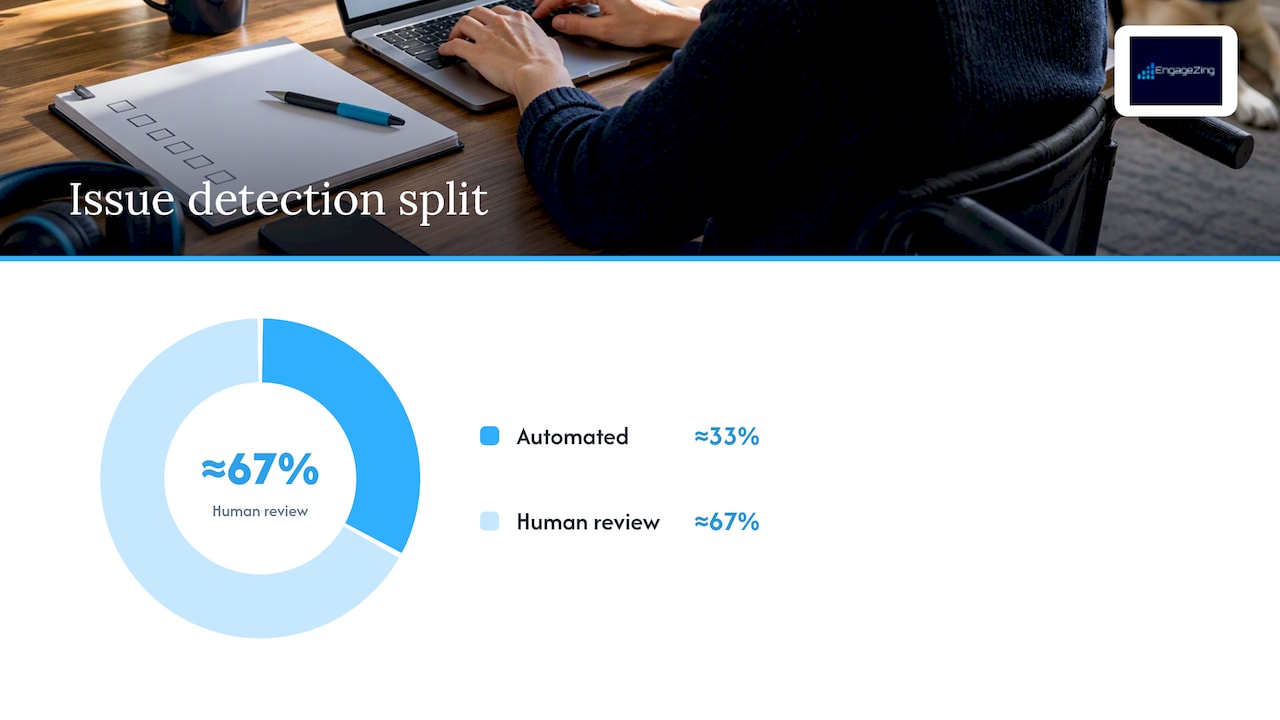
    2. Run a mixed audit. Automated tools give you broad coverage fast, but they only catch about a third of real issues. Pair them with manual code review and, where budget allows, testing by people who actually use assistive technology.
    3. Score each issue with a simple rubric. Weigh legal risk, business impact, and fix complexity. A missing form label on your contact page scores high on all three; a decorative image with no alt text scores low.
    4. Sequence fixes by size. Quick wins (alt text, labels, contrast) can often ship within days. Structural fixes (heading order, focus management) take longer. Full rebuilds (a custom widget with no keyboard support) belong on a separate timeline with real budget behind them.
    5. Assign owners and dates, not just a shared backlog item. Accessibility work stalls when no one is accountable for it.
    6. Document as you go. Publish an accessibility statement, set up a grievance or feedback channel, and keep records of what you fixed and when. The DOJ’s guidance for state and local government sites recommends this same approach for smaller entities: set a policy, fix new content as it’s created, prioritize existing content, offer alternatives where a fix isn’t immediate, and train your team.
    7. Pro Tip: Fix the checkout, login, and contact forms before touching decorative content. Legal exposure and lost conversions both concentrate in the pages where money or data changes hands.

      If you work with outside vendors or contractors on your site, build accessibility requirements into those contracts now, not after a complaint arrives.

      Your remediation roadmap: audit, prioritize, fix, test, maintain — overview diagram

      Testing and monitoring: what to run, and how often

      Automated scanners are the fastest way to find a large batch of common issues, things like missing alt text, low contrast, and unlabeled fields. Run them on every code push if you can, and do a full site scan monthly at minimum. But automated tools have real limits: they can’t tell you whether a screen reader announces a form correctly or whether a keyboard user can actually complete checkout, and DOJ guidance and practitioner consensus both stress that manual and real-user testing are essential to catch what scanners miss.

      Manual testing should cover:

      • Screen reader checks using tools like NVDA or VoiceOver on your most-used pages.
      • Keyboard-only navigation through every critical flow, with no mouse at all.
      • Zoom and contrast checks at 200% browser zoom to confirm nothing breaks or disappears.

      For user testing, recruit a small group of people who use assistive technology daily and have them complete specific tasks, like scheduling an appointment or finishing checkout. Set a remediation timeline for whatever they flag, and treat critical failures (a blocked purchase path) differently from minor ones (an awkward but usable form). Track completion rates and issue counts over time so you can show a testing history if you’re ever asked to demonstrate good faith effort.

      What DOJ settlements reveal about enforcement and risk

      Real settlement agreements give the clearest picture of what regulators and courts expect. The settlement between the United States and Hy-Vee is a useful model: it requires WCAG 2.1 AA conformance, a mix of automated and manual testing, user testing by people with disabilities, an independent accessibility consultant, and periodic reporting to DOJ.

      What DOJ settlements reveal about enforcement and risk — overview diagram

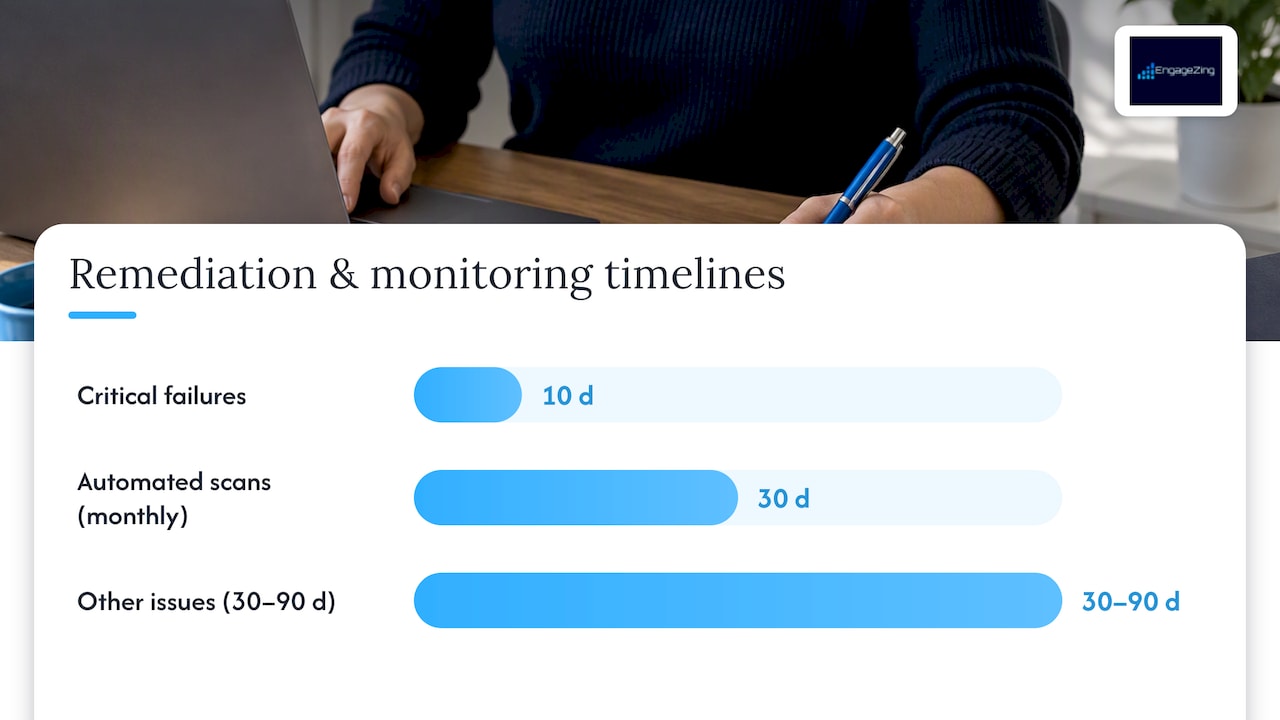
      Settlement remediation timelines often separate issues by severity, with critical failures resolved in 10 days and other issues addressed within 30 to 90 days, according to DOJ settlement agreements including Hy-Vee and CVS. That kind of staged timeline is a reasonable template for your own remediation plan even if you never face a complaint.

      Recurring elements across these settlements include:

      • A specific WCAG conformance target, almost always 2.1 AA.
      • Ongoing monitoring, not a one-time fix, often including monthly automated scans.
      • Third-party or independent testing, sometimes with a named consultant.
      • Public reporting or documentation showing progress against the plan.

      The pattern matters beyond the two named companies. It tells you that documentation, not just the fix itself, is what protects you if a complaint ever lands. Private lawsuits under Title III are common and separate from DOJ enforcement entirely, so a documented, ongoing accessibility program is your best defense whether the challenge comes from a regulator or a plaintiff’s attorney.

      Resources and low-cost options for small teams

      You don’t need a large budget to make real progress. Start with the official sources: ADA.gov’s web accessibility guidance, the W3C’s WCAG documentation, and Section 508 materials from the U.S. Access Board all describe the technical standards in plain terms.

      For tools, layer them:

      • Free automated scanners (many browser extensions) catch the low-hanging issues first.
      • Paid remediation platforms, including partners like AccessWiser, combine audits, fixes, and ongoing monitoring for teams that don’t have in-house developers.
      • Overlay widgets promise a quick fix but often fail to resolve underlying code issues, so treat them as a supplement, never a substitute for real remediation.

      If budget is tight, prioritize your top three conversion flows, add captions to existing video, publish a short accessibility statement with a contact method, and ask a local disability organization if they can connect you with testers.

      Why accessibility work benefits from local marketing expertise

      Accessibility fixes and conversion improvements aren’t separate projects, they’re the same project. A form a screen reader can complete is also a form more people finish. Our approach to website accessibility pairs technical remediation with local account management, so fixes get made with your actual customers and your actual market in mind, not a generic checklist.

      — Joe Leineke

      Get a free Roadmap Analysis for your website

      If you would rather have a team handle the audit, the prioritization and the fixes for you, our Website Accessibility service maps out exactly where your site stands and what to fix first — with a local account manager and a recurring check, not a one-off report.

      EngageZing

      Start with our roadmap analysis and get a prioritized plan with clear next steps — no cost and no obligation. You can also read more about our Website Accessibility service to see what a full engagement includes.

      This article is general information, not a substitute for advice from a qualified lawyer. Consult a qualified legal professional about your own circumstances before acting on anything here.

      Sources

      Frequently Asked Questions

      What is the deadline for ADA website compliance?

      Deadlines currently apply to state and local government websites under the DOJ’s Title II rule: entities serving 50,000 or more people must comply by April 26, 2027, and smaller entities or special districts have until April 26, 2028, according to the DOJ’s web rule fact sheet. Private businesses under Title III have no fixed deadline, but DOJ guidance and settlements treat WCAG 2.1 AA as the standard to meet now.

      Does the ADA legally require WCAG 2.1 AA for all websites?

      WCAG 2.1 AA is legally required for state and local government websites under the DOJ’s Title II rule. For private businesses under Title III, there is no binding technical rule yet, but DOJ guidance and consistent settlement terms treat WCAG 2.1 AA as the practical standard.

      What happens if my website is not ADA compliant?

      Non-compliance can lead to private lawsuits under Title III or DOJ enforcement action, both of which often result in settlement agreements requiring WCAG conformance, testing, and monitoring. Settlement terms commonly include remediation timelines as short as 10 days for critical issues and up to 90 days for others.

      How much does an ADA website audit cost?

      Audit costs vary widely depending on site size, whether you use automated tools alone or add manual and user testing, and whether you hire a consultant. A free roadmap analysis is available, giving you a prioritized starting point at no cost.

      Do accessibility overlay widgets make a website ADA compliant?

      Overlay widgets can help with some surface-level issues, but they typically don’t fix underlying code problems like poor heading structure or inaccessible forms. Most accessibility guidance and settlement patterns point to a mix of automated tools, manual code review, and real user testing as the reliable path to compliance.

      Recommended

      Share This Article

      Found this useful? Send it to another owner who is still carrying accessibility risk they have never checked.

      Share on Facebook · Share on X · Share on LinkedIn · Share on Pinterest

      Want More Information? Let’s Talk.

      If you would rather not take this on yourself, we handle it for you. Our Website Accessibility service takes care of the setup and the ongoing work, then reports back so you can see exactly what changed. You keep running your business; we keep this moving.

      Call us at 631-825-9464 or reach out here. No pressure, no obligation, and you can ask us anything — including whether this is even worth doing for a business your size.

      Looking ahead, request your free roadmap analysis and we will map out a 12-month plan to close the conversion leaky bucket so more of the customers you already reach turn into booked work.


      Written by Joe Leineke · Content on this blog is generated with AI assistance and independently reviewed and fact-checked by human marketing professionals for accuracy and quality.

  • Automate One Workflow First, CRM Automation for Small Businesses

    Automate One Workflow First, CRM Automation for Small Businesses

    Decorative CRM automation title card

    CRM automation uses software to run repeatable customer-management work so teams respond faster and make fewer errors. It handles the routine parts of sales and service, capturing data, routing leads, and sending follow-ups, so people spend their time on decisions that actually need a human. AI now adds suggestions and scoring on top of that, but it works best as an assistant and not as a replacement for judgment.


    TL;DR:

  • Automation works best when focused on a single process like lead routing or follow-up sequencing before expanding to broader workflows.
  • Ensuring data quality through validation and deduplication is critical to prevent silent trigger failures and maintain reliable automation.
  • Starting with narrow, measurable pilots allows you to track specific metrics such as response time and lead conversion before full-scale deployment.
  • Human oversight remains essential for high-value or sensitive customer interactions, with AI primarily assisting in repetitive, data-driven tasks.
  • Successful CRM automation requires clear rules, phased implementation, strong governance, and ongoing monitoring of key performance metrics.

  • What CRM automation is and why it matters

    CRM automation is software-driven execution of the repeatable work behind managing customers: capturing and updating records, assigning leads, creating tasks, sending follow-ups, escalating service cases, and triggering reports. It spans sales, service, marketing, and everything that happens after the sale closes, according to Salesforce’s best-practice guidance.

    It’s easy to confuse this with marketing automation, but the two solve different problems. Marketing automation nurtures prospects before they become leads. CRM automation takes over once a contact enters your pipeline, managing the operational handoffs between marketing, sales, and support.

    The payoff shows up in a few concrete ways:

    • Faster response times, since new leads get routed and assigned without waiting on a manual review.
    • Fewer manual errors, because data entry and record updates happen automatically instead of through repeated copy-paste.
    • Better scaling, since your team can handle more accounts without adding headcount for administrative work.
    • Consistent follow-through, so no lead or service case falls through the cracks because someone forgot a step.

    Core automation types and practical use cases

    Some automations deliver quick wins. Others take more setup but pay off strategically. Here’s how they typically break down by role:

    1. Automatic data capture and enrichment. Forms, chat, and email interactions feed directly into CRM records, so reps stop retyping information they already have.
    2. Lead routing and scoring. New leads get assigned to the right rep based on territory, deal size, or fit, while scoring flags which ones deserve attention first, a task business development reps rely on daily.
    3. Follow-up sequences and task creation. Missed calls or unanswered emails trigger automatic reminders or scheduled outreach, keeping account executives from losing momentum on active deals.
    4. Service-case escalation. Support tickets that sit unresolved past a threshold get flagged to a manager automatically, which matters most for customer success teams managing renewal risk.
    5. Renewal and expansion alerts. Contracts approaching their end date trigger notifications so account teams can act before a customer lapses instead of after.
    6. Marketing teams benefit too: automated lead handoffs mean fewer qualified prospects sit untouched in a shared inbox. According to Salesforce, common automation categories include data capture, workflow triggers, lead scoring and routing, follow-up communications, task management, and data maintenance, the same categories that show up across most CRM deployments regardless of industry.

      How CRM automation works: components, integrations, and AI’s role

      Underneath any automated workflow, a few building blocks do the work: the CRM record itself, a workflow engine that watches for triggers, and connectors or APIs that link the CRM to outside systems. A trigger, say, a form submission or a deal stage change, fires a rule, and the rule executes an action: assign a record, send an email, create a task.

      Integration patterns tend to follow a similar pattern across businesses:

      • Email and calendar sync so outreach and meetings log automatically.
      • Web forms feed new leads directly into the pipeline.
      • Telephony systems log call outcomes without manual entry.
      • Marketing automation platforms hand off qualified leads to sales.
      • Chatbots capture initial inquiries and route them to the right queue.

      AI’s role sits on top of this structure. Forrester’s analysis of the CRM market notes that AI is more likely to augment CRM than replace it, with the practical model being human-in-the-loop: AI prepares work, scores leads, and suggests next actions, while people govern exceptions and high-stakes decisions. McKinsey’s research on B2B growth finds the strongest AI-CRM opportunities sit in account research, relationship mapping, and internal-process streamlining, tasks that combine repetitive analysis with data the CRM already holds, while relationships and negotiations stay firmly in human hands.

      Pro Tip: Start AI features on internal tasks like research and prioritization before letting them touch customer-facing messages.

      Practical implementation checklist and phased roadmap

      A phased rollout beats a big-bang launch almost every time. Salesforce’s guidance lays out a sequence worth following closely:

      • Define business outcomes before touching any settings: what should get faster or more accurate?
      • Map the current process so you know which steps are manual and which already work.
      • Select minimal required integrations rather than connecting every tool you own.
      • Clean and map your data so automations trigger on accurate fields.
      • Configure roles, triggers, and approvals, then pilot one workflow at a time.
      • Train users on the new process before expanding scope.
      • Measure results, then expand to the next workflow.

      One workflow automated well beats five automated poorly. Practitioner evidence, per Salesforce, shows better results from automating a narrow, measurable process first, like lead routing or follow-up sequencing, rather than attempting a full rollout at once.

      Track a specific set of metrics throughout the pilot: response time, lead-to-opportunity conversion, pipeline velocity, adoption rate, duplicate record rate, and automation error rate. These numbers tell you whether the automation is actually working or just running.

      CRM pilot workflow branching into performance metrics

      A reasonable pilot runs a single workflow for several weeks with a clear owner, a data steward checking record quality, and a defined success threshold before expanding to the next process. Assign these roles before you start, not after something breaks.

      Why CRM automation fails and how to avoid it

      Most failed automation projects trace back to a handful of repeating causes, and each has a known fix.

      • Data quality problems. Duplicate records, inconsistent fields, and missing owners break triggers silently. Validation rules, deduplication routines, and a designated data steward catch these before they cascade.
      • Overengineering. Piling on features the team doesn’t need adds complexity without adding value. Forrester warns that unchecked feature growth undermines CRM value, and recommends automating to a clearly defined operating model instead of chasing capabilities.
      • Adoption gaps. Reps ignore workflows they don’t understand or trust. Short, role-specific training sessions tied to real deals work better than generic onboarding.
      • Untested integrations. A broken connector can silently stop leads from routing for days. Test integrations on a small data set first, and keep a rollback plan ready.

      Pro Tip: Assign one person as the data steward for your CRM before you automate anything else.

      Best practices and governance for responsible automation

      Automation needs rules, not just workflows. Academic research on AI integration in CRM recommends ethics-by-design, centralized customer data, and ongoing user involvement as the foundation for durable value, and warns that pilots tend to fail when governance and retraining get skipped.

      Build these guardrails in from the start:

      • Require human approval on high-risk or high-value customer interactions before AI-suggested actions go out automatically.
      • Set access controls so only the right people can view or edit sensitive customer data.
      • Assign data stewards to run recurring audits and catch quality drift early.
      • Set a retraining cadence for any AI scoring or suggestion models, since customer behavior shifts over time.
      • Review privacy and security settings whenever a new integration or AI feature gets added.

      For ongoing oversight, track the same core metrics used during the pilot: response time, conversion rate, adoption, duplicate rate, and automation error rate. The general guidance recommends phased deployments of 12 to 18 months for agentic AI features, keeping human review in place for consequential interactions throughout that window.

      Pragmatic takeaways from an implementer

      The businesses that get CRM automation right almost always start narrower than they think they should. One workflow, clearly measured, beats a platform-wide rollout that nobody fully understands. Pick the process causing the most pain, usually lead response time or follow-up consistency, automate that single piece, and measure it against a real baseline before adding anything else.

      Human-in-the-loop isn’t a compliance checkbox. It’s the difference between AI that makes your team faster and AI that quietly makes decisions nobody signed off on. Keep people reviewing anything customer-facing or high-value, and let automation handle the repetitive middle steps. That balance, not the number of features you turn on, determines whether the investment pays off.

      Frequently Asked Questions

      What is CRM automation?

      CRM automation is software that runs repeatable customer-management tasks such as data capture, lead routing, follow-up sequences, and service-case escalation. It spans sales, service, marketing, and post-sale operations, reducing manual work and response delays.

      What are the four types of CRM?

      CRM systems are generally grouped by function: operational (managing day-to-day sales, marketing, and service processes), analytical (analyzing customer data for insights), collaborative (sharing customer information across teams), and strategic (focused on long-term customer relationship planning). Most modern CRM platforms blend elements of all four rather than fitting neatly into one category.

      What are the top CRM tools?

      The best CRM tool depends on your team size, budget, and the specific workflows you need to automate, since no single platform fits every business model. Rather than chasing a ranked list, focus on matching a platform’s automation and integration capabilities to your actual process, .

      Will CRM be replaced by AI?

      AI is more likely to augment CRM systems than replace them. The practical model is human-in-the-loop, where AI handles scoring and suggested actions while people manage exceptions and high-stakes customer decisions.

      How do I know if my CRM automation pilot is working?

      Track response time, lead-to-opportunity conversion, adoption rate, duplicate record rate, and automation error rate throughout the pilot. If these metrics improve against your baseline within the first few weeks, the workflow is ready to expand.

      For a closer look at where your own CRM setup stands, start with a free roadmap analysis.

      Share This Article

      Found this useful? Send it to another owner who is still running five disconnected tools to manage customers.

      Share on Facebook · Share on X · Share on LinkedIn · Share on Pinterest

      Want More Information? Let’s Talk.

      If you would rather not take this on yourself, we handle it for you. Our Business OS (uBOS) service takes care of the setup and the ongoing work, then reports back so you can see exactly what changed. You keep running your business; we keep this moving.

      Call us at 631-825-9464 or reach out here. No pressure, no obligation, and you can ask us anything — including whether this is even worth doing for a business your size.

      Looking ahead, request your free roadmap analysis and we will map out a 12-month plan to close the conversion leaky bucket so more of the customers you already reach turn into booked work.


      Written by Joe Leineke · Content on this blog is generated with AI assistance and independently reviewed and fact-checked by human marketing professionals for accuracy and quality.

  • Avoid $500–$1,500 TCPA Fines: SMS Marketing for Small Businesses

    Avoid $500–$1,500 TCPA Fines: SMS Marketing for Small Businesses

    Decorative SMS compliance title card

    SMS marketing is one of the highest-engagement channels available to small businesses, but it only works when you start with compliant opt-ins and carrier registration. Skip that foundation and your messages get filtered before customers ever see them. The right sequence is simple: collect proper consent, register your brand and campaign through The Campaign Registry, then pilot a narrow use case inside your CRM before scaling spend.


    TL;DR:

  • Proper consent and registration through The Campaign Registry are essential to prevent messages from being filtered or violating laws.
  • The most effective SMS use cases include appointment reminders, order updates, limited-time promotions, and quick customer support interactions.
  • Ongoing compliance measures such as suppression lists, time-zone enforcement, opt-out handling, and detailed audit trails are crucial for legal and deliverability reasons.
  • Launching a compliant program requires carefully planned steps: defining use cases, building opt-in flows, registering campaigns, and pilot testing with a small, engaged segment.
  • Costs involve registration fees, per-message charges plus carrier surcharges, and operational expenses like consent management, with volume and scale significantly affecting overall spending.

  • Why SMS Marketing Works for Small Businesses

    Text messages get opened. That’s the entire case for SMS marketing small business owners keep hearing about, and it holds up under scrutiny. People check texts within minutes, not the hours or days it can take for an email to surface in a crowded inbox. That immediacy is why roughly three-quarters of businesses now use SMS marketing, and many report strong return on investment when the program is run correctly.

    The channel earns its keep on specific jobs, not blanket promotion. Four use cases consistently outperform:

    • Appointment reminders that cut no-shows for service businesses like salons, clinics, and auto shops.
    • Shipping and order updates that reduce “where is my package” support tickets.
    • Limited-time promotions sent to opted-in customers who already expect deals from you.
    • Two-way customer support for quick questions that don’t need a phone call.

    Compare that to email marketing, where open rates hover well below text response rates and inbox competition is fierce. SMS vs. email marketing isn’t really a rivalry. They serve different moments. Email carries long-form content and visual offers; SMS carries urgency. The smartest small businesses run both, timing SMS for time-sensitive nudges and email for everything that needs more room to breathe.

    Measuring performance means tracking a specific set of numbers, not vanity metrics:

    • Delivery rate — the percentage of messages that actually reach a handset, which tells you if carrier filtering is a problem.
    • Click-through rate — how many recipients tap your link.
    • Conversion rate — how many of those clicks turn into a booking, sale, or renewal.
    • Opt-out rate — a rising number here means you’re messaging too often or the content missed the mark.
    • Revenue per message — the clearest ROI signal once you have a few campaigns under your belt.

    One caution belongs here before anything else: over-messaging kills programs faster than any technical failure. A customer who gets three promotional texts in a week will opt out, and once they do, you can’t get them back without fresh consent.

    Regulatory and Carrier Compliance Every Sender Must Handle

    Three separate systems govern text messaging in the United States, and a small business needs to satisfy all three, not just the one that seems most relevant. Miss any piece and your messages either violate federal law or simply never arrive.

    Three-layer SMS compliance framework

    TCPA: the legal baseline

    The Telephone Consumer Protection Act, enforced by the FCC, requires prior express written consent before you send marketing texts. That consent has to be specific: the person needs to know what kind of messages they’re agreeing to receive, and it needs to come before the first message goes out, not after.

    The penalty structure is severe by design. TCPA violations carry statutory damages of $500 to $1,500 per message, with no aggregate cap. A single careless campaign sent to a few thousand unconsented contacts can generate liability that dwarfs a small business’s annual marketing budget.

    Consent has to be documented, not just collected. A compliant program includes clear opt-in language that identifies your business, describes the type and frequency of messages, and gets stored with a timestamp. If a customer disputes ever opting in, your records are the only defense you have.

    A2P 10DLC: the carrier gatekeeper

    Separate from federal law, every business sending text messages to consumers now has to register through The Campaign Registry, the system that underpins Application-to-Person 10 Digit Long Code (A2P 10DLC) messaging. Unregistered traffic is increasingly blocked outright by major carriers, regardless of whether the content itself is legal.

    Registration happens in two layers: you register your business as a “brand,” then register each messaging use case as a “campaign” under that brand. Carriers vet both, checking your consent flows, sample messages, and website disclosures before approving traffic. Prepare those documents before you start the registration process, because incomplete submissions are the top reason launches stall for weeks.

    CTIA principles: the deliverability layer

    Even a fully TCPA-compliant, fully registered campaign can get filtered if it violates CTIA Messaging Principles, the carrier-facing standards that govern content and sender behavior. Legal analysts increasingly warn that compliance has to be operational, not just a legal checkbox, because carriers filter based on their own risk models.

    Carriers flag content under the SHAFT categories: Sex, Hate, Alcohol, Firearms, and Tobacco. A promotional text that references any of these, even innocently, risks silent filtering. Your dashboard might show “sent” while the carrier never delivers it, so monitoring delivery reports at the carrier level matters more than trusting your platform’s send confirmation.

    The operational checklist

    Beyond registration, carriers and regulators expect ongoing controls baked into your sending process:

    • Suppression lists that immediately remove anyone who opts out, across every campaign you run.
    • Time-zone enforcement so messages never land outside a recipient’s local quiet hours.
    • Any-method opt-out handling, meaning STOP, unsubscribe, or even a plain-English “please stop texting me” all have to trigger removal.
    • Audit trails that log consent capture, opt-out timestamps, and message history for every contact.

    Keep that audit trail for several years, not just a few months. TCPA demand letters and class actions can reach back further than most small businesses expect, and a missing timestamp is the difference between a quick dismissal and a costly settlement.

    How Do You Launch a Compliant SMS Program?

    Building your first campaign in the right order prevents almost every common failure. Follow these steps and you’ll have a working, defensible program before you send a single promotional message.

    1. Decide your use case first. Transactional messages, like order confirmations, have lighter consent requirements than marketing texts. Know which one you’re building before you write a single opt-in form.
    2. Build a compliant opt-in flow. Website checkboxes should read something like: “By checking this box, I agree to receive marketing text messages from [Business Name] at the number provided. Message and data rates may apply. Reply STOP to opt out.” Point-of-sale sign-ups and keyword opt-ins (texting a word to a number) need the same disclosure, spoken or printed. Store the timestamp, IP address, and exact form language used at the moment of consent.
    3. Register your brand and campaign. Work with your messaging platform, known as a Communication Service Provider, to submit your brand details and campaign use case to The Campaign Registry. Have your privacy policy, terms of service, and sample messages ready. This step alone often takes one to two weeks longer than businesses expect when documentation is incomplete.
    4. Configure platform controls. Set up suppression lists, time-zone based quiet hours, automated STOP and HELP keyword parsing, and real-time opt-out processing before your first send.
    5. Pilot with a small segment. Send to your most engaged customers first. This step validates message content and surfaces operational errors, like reassigned phone numbers or slow opt-out processing, before you’re exposed at full volume.
    6. Pro Tip: Run your pilot against a segment of customers who bought or booked in the last 30 days. They already trust you, which means your opt-out rate during the pilot will reflect message quality, not audience mismatch.

      Once your pilot clears a week or two with clean delivery and a low opt-out rate, expand to the next segment. Resist the urge to blast your full list on day one. A slow ramp is what catches problems while they’re still cheap to fix.

      What Does SMS Marketing Cost a Small Business?

      Budgeting for text message marketing for small businesses means accounting for three separate cost categories, and skipping any one of them is how businesses get surprised by their first invoice.

      • One-time registration fees cover brand verification and campaign registration through The Campaign Registry, plus possible vetting fees if your platform charges separately for expedited review.
      • Per-message costs include your platform’s per-SMS rate plus a carrier surcharge that varies by carrier and message volume; these fees stack per message sent, so volume forecasting matters.
      • Operational costs cover consent management tooling, periodic compliance audits, and, for many small businesses, a modest legal review of opt-in language before launch.

      A realistic pilot budget for a single location testing appointment reminders and one monthly promotion should account for registration fees, a low-volume messaging plan, and a small buffer for platform fees while you learn your actual send volume. Steady operation across a full customer list raises the per-message total but usually lowers the effective cost per conversion, since your list is warmer and better segmented. A business scaling across multiple locations or adding transactional triggers on top of promotions should expect the largest jump in the per-message and platform-fee categories, since that’s where volume compounds fastest.

      Making SMS Part of Your Marketing Stack

      SMS delivers the most value when it isn’t a standalone tool bolted onto your business. Connecting it to the systems you already run turns one channel into a coordinated program.

      Four integrations matter most for small business mobile marketing: your CRM, so every text ties back to a customer record; your eCommerce platform, so cart and order events can trigger automatic messages; your booking or scheduling software, so appointment reminders send themselves; and your helpdesk, so two-way texting from customers routes to a real person instead of a dead end.

      Automation is where the time savings actually show up. Once connected, a few patterns cover most small business needs:

      • Transactional triggers that fire automatically on order confirmation, shipping, or appointment booking.
      • Abandoned-cart flows that text a reminder a few hours after a customer leaves items unpurchased.
      • Re-engagement campaigns aimed at customers who haven’t interacted in 60 or 90 days.
      • Two-way conversational flows that let customers reply to confirm, reschedule, or ask a quick question.

      A business operations platform that centralizes these connections makes it far easier to see which text actually drove a sale, rather than guessing. Attribution matters here specifically because SMS often works alongside other channels; a customer might see your text, then convert through email or a follow-up call. Track revenue per message alongside your other KPIs so you’re crediting the channel accurately, not double-counting.

      Data hygiene deserves a permanent spot on your calendar too. Phone numbers get reassigned to new owners more often than most business owners realize, and texting someone who never opted in because they inherited an old number creates real legal exposure. Run periodic checks against your suppression list and remove numbers that bounce or go inactive for extended stretches.

      Phone number suppression screening flow

      Best Practices, Templates, and Red Flags to Avoid

      The gap between an SMS program that drives revenue and one that quietly bleeds subscribers usually comes down to message quality, not strategy. A few working templates illustrate the difference.

      Appointment reminder: “Hi [Name], this is a reminder for your appointment with [Business] on [Date] at [Time]. Reply C to confirm or call us to reschedule. Reply STOP to opt out.”

      Shipping update: “[Business]: Your order #[Number] has shipped and should arrive by [Date]. Track it here: [link]. Reply STOP to unsubscribe.”

      Show this text at checkout. Reply STOP to opt out.

      Every template leads with value, states a clear action, and includes the opt-out line, which isn’t optional. For businesses juggling frequent scheduling, a dedicated reminder workflow can cut no-show rates significantly without adding staff workload.

      Frequency and timing rules matter as much as wording. Keep promotional sends to a handful per month at most, and never send outside a recipient’s local morning-to-evening window. A 7 a.m. promo text to someone on the East Coast might land at 4 a.m. for a customer who moved to the West Coast, and that alone generates opt-outs.

      • Segment by purchase history or appointment type so messages feel relevant, not generic.
      • Personalize with the customer’s name and specific product or service details when your platform supports it.
      • Never mix promotional content into a transactional message; a shipping confirmation with a coupon buried inside it confuses consent categories and increases legal risk.
      • Watch for weak consent language during setup, like a pre-checked box or vague terms; carriers reject these during vetting far more often than businesses expect.

      Pro Tip: Read every promotional message out loud before sending. If it sounds like you’re shouting a deal at a stranger rather than reminding a customer you know, rewrite it.

      Sources

      Frequently Asked Questions

      Is SMS Marketing Illegal?

      No, SMS marketing is legal in the United States, but it’s tightly regulated. You need prior express written consent before sending marketing texts, and TCPA violations carry statutory damages of $500 to $1,500 per message with no cap on total liability.

      How Much Does SMS Marketing Cost?

      Costs break into three parts: one-time brand and campaign registration fees, per-message platform rates plus carrier surcharges, and operational costs like consent management or compliance review. Budgets vary by message volume, so forecasting your expected send volume before choosing a platform tier avoids surprise bills.

      What Are Some Good SMS Marketing Apps for Small Businesses?

      The right platform depends on your use case, but look for one with built in A2P 10DLC registration support, suppression list management, and CRM integration rather than a bare-bones sending tool. If you’d rather not manage platform selection and registration yourself, EngageZing’s managed setup handles that evaluation and configuration directly through a free roadmap analysis at roadmap.engagezing.com.

      Is SMS Getting Phased On?

      No, adoption is climbing, not fading. Roughly three-quarters of businesses now use SMS marketing, and engagement rates remain far higher than most other direct marketing channels when programs stay compliant and relevant.

      What’s the Difference Between SMS and Email Marketing?

      SMS and email serve different moments rather than competing for the same job. SMS gets read within minutes and works best for urgent, short messages like reminders and time-limited promos, while email handles longer content and visual offers that don’t need instant attention.

      Share This Article

      Found this useful? Send it to another owner who is still sending texts they hope are compliant.

      Share on Facebook · Share on X · Share on LinkedIn · Share on Pinterest

      Want More Information? Let’s Talk.

      If you would rather not take this on yourself, we handle it for you. Our Business OS (uBOS) service takes care of the setup and the ongoing work, then reports back so you can see exactly what changed. You keep running your business; we keep this moving.

      Call us at 631-825-9464 or reach out here. No pressure, no obligation, and you can ask us anything — including whether this is even worth doing for a business your size.

      Looking ahead, request your free roadmap analysis and we will map out a 12-month plan to close the conversion leaky bucket so more of the customers you already reach turn into booked work.


      Written by Joe Leineke · Content on this blog is generated with AI assistance and independently reviewed and fact-checked by human marketing professionals for accuracy and quality.

  • Audit First: Fix Tier 1 Local Citations for Small Businesses

    Audit First: Fix Tier 1 Local Citations for Small Businesses

    Audit First: Fix Tier 1 Local Citations for Small Businesses

    Local citation audit title card illustration

    A local citation is any online mention of your business name, address, and phone number, whether it links back to your site or not. Consistent citations tell Google your business is real and where it actually operates, which directly affects your map-pack rankings. If you’ve never checked yours, start with an audit today: search your business name and phone number, note every listing, and flag anything that doesn’t match.


    TL;DR:

  • Consistent business NAP data across major platforms and aggregators is essential for improving local map-pack rankings and attracting nearby customers.
  • Audit your existing citations by searching your business name and phone number in quotes on Google and review high-traffic profiles manually for accuracy.
  • Focus on fixing top-tier profiles like Google, Yelp, and Apple first, then update data aggregators before adding relevant niche directories to build local relevance.
  • Ongoing management is crucial because public edits and outdated feeds can reintroduce errors, requiring regular re-checks and standardized formatting practices.
  • Dedicated citation management services treat it as an ongoing operation to maintain visibility rather than a one-time fix, especially for multi-location or competitive markets.

  • What Is a Local Citation, Exactly?

    A local citation is any web mention of your business’s name, address, and phone number, known in the industry as NAP data. Citations come in three forms: structured (a formatted directory listing like a Yelp profile), unstructured (a mention buried in a blog post or news article), and implied (a listing that shows your name and address but skips the phone number, letting context fill the gap).

    Citations aren’t backlinks. Many carry no clickable link at all, and their value comes from data consistency rather than authority transfer. They’re also not the same as your Google Business Profile, which is a single, more powerful listing you directly manage. Here’s how the pieces differ:

    • NAP fields: name, address, phone, the core three Google cross-checks
    • Optional fields: hours, categories, website URL, photos, and short descriptions
    • Citations vs. backlinks: citations validate identity, backlinks pass authority
    • Citations vs. GBP: GBP is a controlled profile, citations are scattered third-party mentions

    Why Do Local Citations Matter for Local SEO?

    Consistent NAP data across the web builds Google’s confidence that your business exists at the address you claim, which improves map-pack accuracy for searches near you. Mismatched addresses or old phone numbers create doubt, and doubt shows up as lower visibility in local results.

    Citations pay off in ways beyond rankings, too. A directory listing often puts you in front of customers who leave reviews, and some directories send direct referral traffic on their own. The suggested benchmark for many small businesses is 30 to 50 accurate citations spread across general, industry, and local platforms, but accuracy always outweighs volume.

    Citation categories and accuracy benchmark

    Citation cleanup matters most in three situations: you just opened and have no footprint yet, you run multiple locations that multiply your risk of errors, or you compete in a crowded market where every ranking signal counts.

    What Types of Citations Should You Know?

    Think of citations in tiers. Tier 1 covers major platforms like Google Business Profile and Yelp. Tier 2 covers data aggregators that feed hundreds of smaller sites. Tier 3 covers niche and local directories tied to your industry or city.

    • Structured citation: your business listed in a formatted directory profile with clear NAP fields
    • Unstructured citation: your address mentioned in a local news article or community blog post
    • Implied citation: a directory entry showing your name and address but leaving out the phone number

    How Do You Audit Your Existing Citations?

    Start by searching your exact business name in quotation marks, then repeat the search with your phone number in quotes. Phone-number searches often surface old listings tied to a former business name or a disconnected number that a name-only search would miss entirely. Check the Tier 1 platforms manually, since automated tools sometimes miss recent edits on these high-traffic sites.

    1. Search your business name in quotes across Google.
    2. Search your phone number in quotes, including any old numbers.
    3. Visit each Tier 1 profile directly and record what you find.
    4. Log every listing in a spreadsheet: site, URL, current NAP, correct NAP, and status.
    5. Sort by priority. Fix Tier 1 errors and glaring mismatches first, then chase duplicates.
    6. Automation tools speed up discovery across dozens of smaller directories, but they can’t replace a manual look at your highest-traffic profiles.

      Pro Tip: Search your phone number, not just your business name. Legacy listings under an old name or address almost always show up under the number first.

      How Do You Build and Prioritize New Citations?

      Building citations works best as a sequence, not a shopping spree. A common, efficient path is to audit first, fix Tier 1, cascade through aggregators, then fill in niche directories, because doing it in reverse wastes time correcting the same error five times over.

      1. Fix your Tier 1 profiles first: Google Business Profile, Bing Places, Apple Business Connect, Facebook, and Yelp.
      2. Submit corrected NAP data to major data aggregators, since many smaller directories pull straight from these feeds.
      3. Add niche and local directories relevant to your industry or city, which build topical relevance beyond generic listings.
      4. Skip mass-listing packages that dump your business into hundreds of low-quality sites with no editorial standards.
      5. If you hire outside help, insist on shared login access and a full record of every profile created or edited.
      6. Quantity chasing is the single most wasted dollar in citation building. A batch of 200 low-quality listings does less for your rankings than 30 accurate ones on directories real customers actually browse.

        Why Do Citations Need Ongoing Management?

        Citation work doesn’t end once you’ve corrected everything. Some platforms allow public edits or crowdsourced corrections, which means a well-meaning stranger, or a competitor, can quietly change your listed hours or address. Old data feeds also resurface outdated information months after you thought it was fixed.

        • Recheck your Tier 1 profiles and top aggregators every quarter at minimum.
        • Assign one person, even part-time, to own citation checks so nothing falls through the cracks.
        • Standardize formatting everywhere: pick “St” or “Street” and stick with it, always include suite numbers, and use one consistent phone format.

        Pro Tip: If you outsource citation management, require a spreadsheet of every URL touched and shared login credentials for any new profiles. Without that, you lose the ability to fix things yourself later.

        Which Sites and Tools Should You Check First?

        Start with the platforms that carry the most weight in local search, then work outward.

        • Google Business Profile: the single most influential listing for map-pack visibility
        • Apple Business Connect: powers listings across Apple Maps and Siri results
        • Bing Places: smaller share of search traffic, but still feeds voice assistants and some directories
        • Facebook Business: doubles as a citation and a discovery channel for local reviews
        • Yelp: heavily weighted in local algorithms and a common data source for other directories

        Beyond these five, major data aggregators like Data Axle, Neustar, and Foursquare distribute your NAP data to dozens of smaller sites automatically, which is why fixing errors at the aggregator level saves you from chasing the same fix fifty times. A niche directory, like a regional chamber of commerce site or an industry-specific listing service, tends to add more value than another generic directory once your Tier 1 and aggregator data are clean.

        How Long Does Citation Cleanup Take to Pay Off?

        A thorough audit for a single-location business typically takes a few hours of focused work, though directory approvals can take a few days to a few weeks to reflect changes. Ranking benefits from citation cleanup generally show up within six to twelve weeks when paired with other local SEO work like review generation.

        DIY citation cleanup costs you time instead of money, while paid services vary widely depending on how many locations and directories are involved. Track map-pack ranking position, GBP calls and direction requests, and referral traffic from directory sites to know if the work is paying off.

        What Agency Work Teaches You About Citations

        Citation cleanup rarely delivers its full value as a one-time project. At EngageZing, we treat it as ongoing operations, because public edits and stale data feeds keep undoing the fixes you made last quarter. Clients who pair citation correction with review generation and Google Business Profile optimization consistently see faster, more durable gains in local visibility than citation cleanup alone produces.

        The businesses that struggle most are the ones treating citations as a “set it and forget it” checkbox. They’re not.

        — Joe Leineke

        How EngageZing Handles Business Listings for You

        EngageZing is the alternative to a traditional agency for local citation cleanup: instead of a one-time project you’ll need to redo in a year, our Business Listings & Voice Search service treats your NAP data as ongoing operational work, with a local account manager watching for the public edits and duplicate listings that quietly undo your fixes.

        EngageZing

        Every engagement begins with a free roadmap analysis that maps where your citations, reviews and Google Business Profile stand, then builds a 12-month plan for growth. Once you’re set up, you get shared login access to every profile we touch, an audit report showing what changed and why, and a recurring check-in cadence instead of a single invoice and a goodbye email.

        Ready for a clear plan? Start with a roadmap analysis and see exactly where your local listings are losing visibility — plus a 12-month path to close the gap.

        How EngageZing Handles Business Listings for You — overview diagram

        Sources

        The claims and figures in this guide draw on the following sources, worth bookmarking if you want to go deeper on citation strategy:

        If you’re refining how your listing descriptions appear once citations are corrected, a tool like Premium Web Tools’ SERP snippet preview shows how your title and description render before you publish changes.

        Frequently Asked Questions

        What Does Local Citation Mean?

        A local citation is any online mention of your business name, address, and phone number, whether or not it links back to your website. It can appear as a structured directory listing, an unstructured mention in an article, or an implied reference that skips one NAP field.

        What Are Some Good Local Citation Sites?

        Start with the “big five”: Google Business Profile, Apple Business Connect, Bing Places, Facebook, and Yelp, since these carry the most weight for local rankings. From there, major data aggregators like Data Axle and Foursquare, plus niche directories tied to your industry, round out a solid list.

        Where Can I Search for Citations?

        Search your exact business name in quotation marks, then repeat the search using your phone number in quotes, since legacy listings under an old name often surface only under the number. Manually check each Tier 1 platform directly, since automated tools sometimes lag behind recent edits.

        Can I Do Local SEO Myself?

        Yes, small business owners regularly audit and fix their own citations using a spreadsheet, exact-match searches, and the step-by-step workflow above. It takes a few hours for a single location, though ongoing management and multi-location businesses often benefit from a managed service like Business Listings & Voice Search once the workload grows.

        Recommended

        Share This Article

        Found this useful? Send it to another owner who is still fighting the same outdated listing.

        Share on Facebook · Share on X · Share on LinkedIn · Share on Pinterest

        Want More Information? Let’s Talk.

        If you would rather not take this on yourself, we handle it for you. Our Business Listings & Voice Search service takes care of the setup and the ongoing work, then reports back so you can see exactly what changed. You keep running your business; we keep this moving.

        Call us at 631-825-9464 or reach out here. No pressure, no obligation, and you can ask us anything — including whether this is even worth doing for a business your size.

        Looking ahead, request your free roadmap analysis and we will map out a 12-month plan to close the conversion leaky bucket so more of the customers you already reach turn into booked work.


        Written by Joe Leineke · Content on this blog is generated with AI assistance and independently reviewed and fact-checked by human marketing professionals for accuracy and quality.

  • Dentists: 2026 Local SEO Checklist Focused on GBP, Reviews & Pages

    Dentists: 2026 Local SEO Checklist Focused on GBP, Reviews & Pages

    Decorative dental SEO checklist title card

    Local SEO for dentists comes down to three levers in 2026: a complete Google Business Profile, steady review velocity, and service pages built for the exact queries patients type. Fix your GBP fields correctly and you can see movement in local pack positions within 30 to 90 days, especially when paired with a consistent flow of new reviews. Everything else, citations, backlinks, social media, supports those three but rarely outruns them. Start with the priority checklist below.


    TL;DR:

  • Consistently fixing your Google Business Profile fields, especially categories, services, and photos, leads to local pack improvements within three months.
  • Maintaining a steady stream of recent reviews, with a specific request timing within 48 hours of visits, significantly boosts short-term rankings.
  • Building targeted service pages with FAQ schema, local keywords, and clear conversion elements helps your practice get cited by AI and search engines.
  • Regular citation audits and schema validation prevent ranking penalties caused by mismatched NAP details and technical errors.
  • Engaging in local sponsorships and ensuring mobile site speed enhances local relevance signals and patient conversion.

  • The Priority Local SEO Checklist for Dentists This Month

    Most practices try to fix everything at once and finish nothing. Work this list in order, because each step compounds on the one before it.

    1. Audit and fix your Google Business Profile. Confirm your primary category (usually “Dentist” or a specialty like “Cosmetic Dentist”), add every relevant secondary category, list your actual services, rewrite your business description, and update hours and holiday closures. Acceptance criteria: profile shows 100% complete in GBP’s own dashboard with no pending suggestions.
    2. Build a review request workflow. Set a target of a steady flow of new reviews monthly, scaled to your patient volume, and send requests within 48 hours of the visit. Acceptance criteria: a documented process your front desk follows without prompting, tracked weekly.
    3. Develop service pages aligned with common patient queries. Pair each core service (implants, Invisalign, emergency dentistry) with your city name, and add an FAQ section. Acceptance criteria: one indexed page per priority service, each answering at least five patient questions.
    4. Run a citation audit. Pull your NAP (name, address, phone) from your top ten directory listings and correct every mismatch. Acceptance criteria: identical NAP across Google, Healthgrades, Yelp, and your state dental association listing.
    5. Layer in schema, Google Posts, and Q&A management. Add structured data to your site, post to GBP weekly, and seed 10 to 15 common questions in your GBP Q&A section before patients ask them publicly. Acceptance criteria: Rich Results Test passes with no errors, and posts show a consistent weekly cadence.
    6. Google Business Profile signals account for roughly one-third of local pack ranking weight, which is why step one carries more weight than everything after it combined, according to Pete Johnson’s dental SEO guide.

      Pro Tip: Assign one person, not “the team,” to own the review and GBP posting cadence. Shared ownership is why most practices’ profiles go stale within three months.

      Google Business Profile: Exact Fields to Complete and Common Errors to Fix

      The Local 3-Pack captures the majority of clicks on “dentist near me” searches, and the practices that win those top three spots almost always have GBP fields that a rushed competitor skipped, per the Dental Map Pack field guide from Lasso MD. Getting these fields right is not optional polish. It is the highest-leverage task on your list.

      • Categories: pick one accurate primary category, then add every applicable secondary category (Pediatric Dentist, Emergency Dental Service, Cosmetic Dentist) that genuinely reflects what you offer.
      • Services list: name around a dozen individual services, each with a 100 to 200 character description that includes what the procedure treats and who it’s for.
      • Business description: use the full up to the full character limit allowed, lead with your primary service and city, and avoid generic filler about “quality care.”
      • Attributes: toggle on “accepting new patients,” list languages spoken, and confirm accessibility attributes if they apply.
      • Photos: keep a robust number of recent photos consistently refreshed, showing your team, office, and equipment, not stock imagery.
      • Posts and Q&A: publish a Google Post weekly and seed 10 to 15 common patient questions (insurance accepted, walk-in availability, pediatric services) before real patients ask them in public view.
      • Top-ranking practices consistently populate multiple named services and maintain recent photos and posts, a pattern detailed in Seolyf’s dental GBP benchmark report. Skipping any one of these fields is the single most common reason a practice with great reviews still sits in position five or six.

        Reviews and Reputation: Building Recency, Not Just Volume

        Review recency and velocity carry more short-term ranking weight than your total review count. A practice with older reviews loses ranking weight compared to a more recent steady stream of new reviews, a pattern confirmed by Lasso MD’s local ranking analysis.

        • Set a velocity target. Aim for a consistent number of new reviews each month, adjusted to practice size, scaled to your patient volume and appointment count.
        • Time your request. Send it within 48 hours of the visit, while the experience is still fresh, using SMS or email with a direct link straight to your GBP review form.
        • Ask for specifics. Coach patients to mention the actual service (a crown, a cleaning, an emergency visit) rather than a generic “great experience,” since service-specific language helps you rank for those exact procedure searches.
        • Standardize negative review responses. Respond within 24 hours, acknowledge the concern without getting defensive, and move detailed complaints to a phone call rather than a public back-and-forth.
        • A steady monthly cadence compounds ranking benefits far more reliably than a one-time push for fifty reviews after a slow quarter, according to Seolyf’s benchmark data. Automating the request timing removes the biggest point of failure: front-desk staff forgetting to ask. A review generation and reputation workflow built around post-visit timing keeps that cadence steady without adding to your team’s workload.

          Pro Tip: Keep a saved response template for negative reviews, but never copy it word-for-word twice in a row. Google and patients both notice canned replies.

          Website and Service Pages That Google and AI Actually Cite

          Each service page should target one primary keyword: the service paired with your city, like “dental implants in [your city],” not a vague “our services” page trying to rank for everything at once. Priority services (implants, Invisalign, emergency care, cosmetic dentistry) deserve pages in the long-form pages sufficient to thoroughly answer patient questions, long enough to answer real patient questions without padding.

          • Add an FAQ section to every service page and mark it up with FAQPage schema, along with Service schema describing the procedure, provider, and area served.
          • Link service pages to each other and back to your homepage using descriptive anchor text, not “click here.”
          • Keep conversion elements above the fold: click-to-call button, online booking link, current hours, and accepted insurance plans.
          • Include a short section addressing cost or insurance questions directly, since that’s one of the most common reasons a page fails to convert visitors into calls.
          • Top-ranking practices pair full GBP service lists with long-form pages in this range specifically to get picked up in AI-generated answers, not just traditional rankings, per Seolyf’s benchmark findings. A conversational assistant like Konvuno on your service pages can also answer basic insurance and scheduling questions on the spot, which keeps hesitant visitors from bouncing to a competitor’s site.

            Citations, Schema, and Technical Quick Checks

            Citation hygiene matters, but it’s a lower-weight lever than GBP or reviews, and incorrect listings can actively drag your rankings down instead of just failing to help. Fix the following before you worry about anything else technical:

            • Audit your key directory listings, especially Healthgrades, your state dental association, Yelp, and BBB, for exact NAP matches.
            • Implement LocalBusiness/Dentist, Service, Person, FAQPage, and Review schema across your site.
            • Validate every schema type with Google’s Rich Results Test before considering the job done.
            • Avoid duplicate city pages with near-identical content. Google treats these as doorway pages and can suppress them entirely.
            • Check mobile page speed and confirm canonical tags point to the correct URL on every service page.
            • A small set of accurate, high-quality citations outperforms a hundred purchased directory listings with mismatched phone numbers, according to Seolyf’s benchmark data. A business listings and voice search service can handle this audit across dozens of directories at once, which saves hours of manual cross-checking.

              Measurement, Timelines, and KPIs to Track Progress

              Track these numbers monthly, not the vanity metrics your analytics dashboard highlights by default:

              • GBP impressions, calls, and direction requests pulled straight from your GBP insights panel.
              • New reviews per month, measured against your velocity target, not just a running total.
              • Branded search volume as a proxy for growing name recognition in your area.
              • Booked new-patient conversions, tracked back to source through your intake form.
              • Expect GBP fixes and review momentum to show measurable movement in 30 to 90 days. Service pages and schema typically need 60 to 120 days before AI systems start citing them consistently. Backlinks and broader domain authority take three to six months or longer. Add one line to your intake form asking “how did you hear about us,” since branded search and direct visits become more valuable proxies for SEO health as AI Overviews reduce organic click-through rates.

                Optimizing for “Near Me” Dental Searches and Voice Search

                “Near me” searches skip straight to the Map Pack, which means your GBP proximity signals and category accuracy matter more here than almost anywhere else in local SEO. Google weighs three factors for these queries: how close your practice is to the searcher, how relevant your categories and services are to the query, and how prominent your profile is based on reviews and citations.

                Three factors influencing near me dental searches

                Voice search adds a layer on top of that. When someone asks a smart speaker or their phone “what’s the closest dentist open now,” the assistant pulls directly from your GBP hours, categories, and review data, then reads back a single answer rather than a list of ten results. That makes accurate, current hours and a complete services list even more critical than they are for typed searches, where a searcher can scroll past a small gap.

                Practices that keep their profile precise for these moment-driven queries tend to capture last-minute patients that a competitor with an outdated “open now” status misses entirely. Emergency dental services benefit most here, since a patient in pain rarely scrolls past the first result. A near-me search optimization service focuses specifically on tightening these proximity and category signals so your practice surfaces for exactly this kind of urgent, high-intent search.

                Leveraging Local Sponsorships and Community Involvement for SEO

                Sponsoring a youth sports league, a school fundraiser, or a local charity 5K does more for local SEO than most practices realize, because it generates something search engines value highly: genuine local backlinks and mentions from other locally relevant websites. When a Little League team lists your practice as a sponsor on their site, that’s a citation-adjacent signal reinforcing your presence in that specific geographic market.

                Community involvement also feeds your review pipeline indirectly. Patients who see your name on a local scoreboard or a school newsletter tend to trust you more before they ever sit in your chair, which shows up later in review sentiment and referral volume. Look for sponsorship opportunities that come with a website mention or a logo link back to your site, not just a banner at an event, since the digital footprint is what actually helps your rankings.

                Local news coverage works the same way. A press mention a free dental day for underserved families, or a quote from your practice in a local paper’s back-to-school piece, creates the kind of natural, high-authority local link that’s difficult to build through outreach alone. These efforts won’t move your rankings as fast as fixing your GBP profile, but they build the kind of durable local authority that citations and paid links can’t replicate.

                Leveraging Local Sponsorships and Community Involvement for SEO — overview diagram

                Mobile Optimization Considerations for Local Dental SEO

                Most patients searching for a dentist are on their phone, often mid-toothache, standing in a parking lot, or scrolling between meetings. If your site takes more than a few seconds to load or makes them pinch and zoom to find your phone number, they’ll back out and call the next practice in the Map Pack instead.

                Mobile page speed directly affects both user experience and how Google evaluates your site for ranking purposes. Compress images, eliminate unnecessary scripts, and test your core pages, especially your homepage and top service pages, on an actual phone rather than just a desktop browser’s mobile preview.

                Beyond speed, design for the thumb, not the mouse. Your click-to-call button should sit within easy reach near the top of the screen on every page, not buried in a footer. Booking widgets need to work without horizontal scrolling, and your address should link directly to map navigation apps. A website built around mobile usability and conversion turns casual mobile visitors into booked appointments instead of losing them to a faster-loading competitor.

                Using Social Media to Support Local SEO Visibility

                Social media doesn’t move your Google rankings directly the way GBP fields or reviews do, but it plays a supporting role that compounds over time. Active Facebook and Instagram profiles with your correct address, hours, and phone number reinforce the same NAP consistency signals search engines look for elsewhere, and they give patients another place to find and verify your practice before they call.

                Posting patient success stories (with permission), behind-the-scenes team content, or quick educational tips about oral health keeps your practice visible in local feeds and gives satisfied patients an easy way to tag your practice, which extends your reach into their own social circles. That kind of organic sharing often introduces your practice to potential patients who’d never search “dentist near me” directly but see a friend’s tagged post and remember your name later.

                Encourage patients to check in or tag your location when they post about their visit. Each tagged post acts as a small, ongoing local relevance signal and gives you fresh, authentic content to repost, which keeps your own profiles active without demanding new content from scratch every week.

                Competitor Analysis Tailored to Local Dental Markets

                Start by identifying who actually occupies the Map Pack for your top three to five target queries, not just who you assume your competitors are. The dentist you consider your biggest local rival on price or reputation might not even show up for “emergency dentist near me,” while a practice you’ve never heard of dominates that exact search.

                Once you’ve identified your real digital competitors, compare their GBP completeness against yours: how many services they’ve listed, how recent their photos and posts are, and how their review velocity compares to your own monthly numbers. This gap analysis tells you exactly where to focus effort instead of guessing.

                Look at their service pages too. If a competing practice has a 1,500 word page on dental implants with FAQ schema and yours is a two-paragraph blurb, that’s a specific, fixable gap rather than an abstract complaint about “needing more SEO.” Revisit this analysis quarterly, since Map Pack rankings shift as competitors update their own profiles, and a practice that seemed dominant six months ago may have let their review cadence slip.

                EngageZing’s Practical Approach to Dental Local SEO

                The checklist above works because it mirrors recommended campaign building practices: fix the GBP first, layer in a steady review cadence, then build out service pages that answer real questions. Practices we work with tend to focus their first 90 days on exactly those three levers before spending a dollar on anything else, because that sequence is what actually moves the Map Pack. Pay-per-result SEO ties our work directly to the rankings and calls it produces, not to hours billed.

                Sources

                Cross-check your GBP against the Dental Map Pack field guide and Seolyf’s GBP optimization guide. Validate schema with Google’s Rich Results Test.

                • Dental Map Pack: 2026 Local SEO Field Guide | Lasso MD
                • Frequently Asked Questions

                  What Is Local SEO for Dentists?

                  Local SEO for dentists is the practice of optimizing your Google Business Profile, reviews, website, and citations so your practice appears in local search results and the Map Pack when nearby patients search for dental care. It combines profile management, reputation building, and location-specific website content rather than general national SEO tactics.

                  How Much Does Dental SEO Cost?

                  Dental SEO costs vary widely by agency and scope, ranging from a few hundred dollars a month for basic citation cleanup to several thousand for full-service campaigns covering GBP, reviews, and content. EngageZing’s pay-per-result SEO model ties cost to measurable outcomes rather than a flat retainer, with exact pricing available through a free roadmap analysis.

                  How Much Should I Pay for Local SEO?

                  What you should pay depends on your market’s competitiveness and how much of the work (GBP management, review requests, page content) you can handle in-house versus needing done for you. A results-tied model, where you pay based on rankings, calls, or leads generated, protects you from paying for effort that never produces visible movement in the Map Pack.

                  Do Dentists Need SEO?

                  Dentists need local SEO because the Local 3-Pack captures the majority of clicks on searches like “dentist near me,” and practices absent from those top three spots miss the majority of high-intent patient traffic, per Lasso MD’s field guide. Without an optimized GBP, steady reviews, and service pages matched to real queries, a practice effectively becomes invisible to patients actively searching for care nearby.

                  Share This Article

                  Found this useful? Send it to another owner who is still losing patients to the practice down the road.

                  Share on Facebook · Share on X · Share on LinkedIn · Share on Pinterest

                  Want More Information? Let’s Talk.

                  If you would rather not take this on yourself, we handle it for you. Our Review Generation & Reputation service takes care of the setup and the ongoing work, then reports back so you can see exactly what changed. You keep running your business; we keep this moving.

                  Call us at 631-825-9464 or reach out here. No pressure, no obligation, and you can ask us anything, including whether this is even worth doing for a business your size.

                  Looking ahead, request your free roadmap analysis and we will map out a 12-month plan so more of the customers you already reach turn into booked work.


                  Written by Joe Leineke · Content on this blog is generated with AI assistance and independently reviewed and fact-checked by human marketing professionals for accuracy and quality.

  • 30/60/90 Service Area SEO to Rank Without a Storefront

    30/60/90 Service Area SEO to Rank Without a Storefront

    30/60/90 Service Area SEO to Rank Without a Storefront

    Service-area SEO title card illustration

    If you run a service-area business, your first three moves are simple: hide your address and configure a proper service-area profile on Google Business Profile, publish unique city and service pages on your website instead of one generic “areas we serve” list, and build a review pipeline that gets customers naming their city. Do those three things well and you’ll outrank competitors who only did one. Skip the third and Google has almost no way to know you actually work in Reading or Riverside.


    TL;DR:

  • Properly configuring your Google Business Profile to hide your address and define up to 20 relevant service areas limits suspension risk and boosts local relevance.
  • Building city-specific pages with unique local content, testimonials, and real job photos improves Google rankings and avoids doorway page penalties.
  • Obtaining reviews that mention specific cities and building citations in local directories strengthen your geographic signals and ranking authority.
  • Use localized content formats like FAQs, seasonal checklists, and schema markup with service areas to increase visibility in regional searches.
  • Expect to see noticeable ranking improvements within two to three months, with consistent review and citation growth being essential for sustained success.

  • What Are Service-Area and Hybrid Business Profiles on Google?

    A service-area business (SAB) travels to the customer instead of the other way around. Plumbers, electricians, mobile pet groomers, HVAC techs, and cleaning crews are classic examples. A hybrid business does both: it has a real, staffed location customers can visit AND it dispatches technicians to homes across a wider region. A landscaping company with a retail nursery counts as hybrid. A locksmith who works entirely from a van does not.

    Google’s policy on this is specific, and getting it wrong triggers suspensions that can take weeks to resolve.

    • Hide your address if you never serve customers at that location, even if you technically have an office there.
    • One Google Business Profile per staffed location. No stacking multiple listings at one address to cover different service names.
    • Never list a PO box or an unstaffed virtual office as your business address.
    • You get up to 20 service areas, entered as cities or postal codes, not neighborhoods or vague radius claims.
    • Google explicitly disallows adding entire states or countries as service areas, and recommends keeping your service area within about a two-hour driving distance of your base.

    Quick stat: Google reiterated the two-hour driving guideline and the state/country ban in a 2025 policy update, which means businesses still listing “Texas” or “Southeast US” as a service area are running on outdated advice and risking a profile flag.

    The most common suspension trigger is a mismatch between what you claim and what a Google moderator can verify. If your listed address is a rented mailbox but your profile says “visit us,” expect a suspension notice. The fix is almost always the same: hide the address, confirm your service areas match where you genuinely dispatch technicians, and remove any language implying walk-in service you don’t offer.

    How Do You Set Up and Optimize a Service-Area GBP?

    Claiming and verifying a hidden-address profile takes a bit more patience than a standard listing, since Google can’t send a postcard to a location you’re not displaying publicly. Video verification or phone verification is common for SABs, and it can take several business days.

    Here’s the sequence that gets service-area businesses ranking fastest:

    1. Claim and verify your profile, choosing the hidden-address option during setup if you don’t serve walk-ins.
    2. Pick your primary category carefully. “Plumber” outranks “Contractor” for plumbing searches almost every time, because specificity wins.
    3. Write your business description around service and geography naturally. Mention your core service and two or three anchor cities in plain language, not as a keyword dump.
    4. Fill out the Services section completely. List every discrete service you offer with a short description, since this field feeds directly into how Google matches you to search queries.
    5. Upload real job photos regularly, not stock images. Before/after shots from actual jobs in your service cities carry more weight than a logo and a headshot.
    6. Post weekly using GBP Posts, referencing completed jobs, seasonal offers, or service updates.
    7. Turn on messaging and respond fast. Response time is a ranking and conversion factor Google tracks.
    8. Pro Tip: Name-drop the actual city or neighborhood in your GBP posts and Q&A answers whenever it’s true. “We repaired a burst pipe in Maple Heights this week” tells Google far more than “we serve the greater metro area.”

      How Do You Build Service-Area Pages Without Triggering Doorway Penalties?

      Your website is your storefront when you don’t have a physical one. Treat the homepage as a hub that links out to individual city or service pages, each one built to answer a real question a customer in that specific place would ask.

      Homepage linked to city service pages

      The mistake almost every SAB makes is the “city swap” page: the same 400 words with the city name find-and-replaced twenty times. Google’s helpful content classifiers are built to catch exactly this, and near-duplicate service pages get penalized as doorway pages.

      Each city page needs its own substance:

      • A specific local problem your service solves there (hard water in one town, older knob-and-tube wiring in another).
      • Your actual service scope and response times for that area.
      • A localized FAQ, two or three questions unique to that city’s housing stock, permits, or climate.
      • Real job photos captioned with the neighborhood where the work happened.
      • A genuine customer testimonial from someone in that city, not a generic quote reused site-wide.

      Pro Tip: If you can’t fill a page with at least one hyper-local detail, a real ZIP-specific permit rule, a neighborhood landmark, a seasonal quirk, don’t build the page yet. A thin page hurts more than no page.

      Skip city pages for towns where you’ve done fewer than a handful of jobs. A page with no real evidence behind it reads as filler to both Google and to a homeowner deciding whether to call you, and service-area page best practices consistently point to substance over volume. Structure internal links so every city page connects back to the relevant service page and the homepage, not just a flat sitemap dump.

      How Do Reviews and Citations Prove You Serve a City?

      Reviews mentioning a specific city or neighborhood do more for local rankings than a generic five-star rating ever will. When you ask for a review, ask ethically and specifically: “Would you mind mentioning the Elmwood job in your review?” works far better than a blanket request, because it prompts customers to name the place without you writing the review for them.

      Citations matter just as much, and they need to be built one city at a time rather than dumped into a handful of national directories.

      • Local chamber of commerce listings in each priority city.
      • Neighborhood-specific directories and community boards.
      • Industry directories that let you specify service areas, not just a headquarters address.
      • Local networking platforms, which can also surface local partnership and citation opportunities worth building relationships around.

      Respond to every review within a day or two, thanking the customer and, when natural, reinforcing the city name in your reply. Plan review requests on a steady drip rather than a batch, since a sudden spike of forty reviews in one week looks less organic to both customers and Google than a consistent trickle. Geographic review signals combined with city-specific citations are what offset the natural disadvantage of not having a storefront near the searcher.

      What Content and Schema Signals Boost Geographic Relevance?

      Beyond city pages, a handful of content formats consistently move the needle for service-area rankings. City-specific how-to posts, seasonal maintenance checklists tied to a region’s climate, and troubleshooting guides for problems common in a particular area all give Google fresh, genuinely local text to index.

      On the technical side, LocalBusiness schema markup should include your `serviceArea` property listing cities or postal codes, without exposing a `streetAddress` field if you’re operating as a hidden-address SAB. Geo-tagged job photos with location data in the EXIF file add another small but real signal.

      • City-specific FAQ pages answering questions unique to that market.
      • Seasonal checklists (gutter cleaning before fall storms, AC tune-ups before a heat wave).
      • GBP Posts referencing completed jobs by neighborhood name.
      • Schema markup listing service areas without a physical address field.

      Quick stat: The majority of web traffic now arrives on mobile devices, so every city page needs a tap-to-call button and fast load times above the fold, or you’ll lose the exact searcher this whole strategy is built to capture.

      How Do You Track Whether Your Service Area SEO Is Working?

      Set a 30/60/90 day cadence and measure the right numbers at each stage, because early SAB movement looks different from a storefront business ranking in the map pack.

      1. Days 1 to 30: Watch GBP Insights for impressions, direction requests, and calls. This is your baseline.
      2. Days 30 to 60: Track city-specific keyword rankings and Search Console query data to see which pages are gaining impressions.
      3. Days 60 to 90: Measure conversion rate by landing page in Google Analytics, comparing leads generated per city page against the traffic each one gets.
      4. Expect meaningful map pack movement to take two to three months, not two to three weeks. Reviews and citations compound slowly, and Google needs repeated signals before it trusts a new geographic claim.

        Agency Perspective: A 30/60/90 Starter Plan

        A phased rollout keeps a small team from trying to fix everything simultaneously and getting nowhere.

        • Days 1 to 30: Fix GBP configuration, correct service areas, hidden address if applicable, complete services list.
        • Days 30 to 60: Publish three to five city pages with real local detail and launch review requests mentioning cities.
        • Days 60 to 90: Build city-specific citations and start tracking keyword movement by location.

        EngageZing’s Business Listings & Voice Search service handles phase one’s configuration work. Review Generation & Reputation automates the city-mention review requests in phase two. Pay Per Result SEO and Near-Me Search Boost programs pick up phase three’s citation building and ongoing rank tracking.

        Pro Tip: If you’re doing this alone, don’t try to launch all three phases at once. A half-finished GBP fix plus five thin city pages will underperform one fully correct GBP profile plus two genuinely strong city pages.

        Why Focus Beats Coverage for Service-Area Businesses

        The instinct to list all 20 allowed service areas on day one is almost always wrong. A service-area business with a small marketing budget wins by proving traction in three or four cities first, real reviews, real citations, real rankings, before spreading thin across a dozen more.

        Opening a staffed location only makes sense once one city consistently generates enough call volume to justify the overhead. Until then, resource allocation should follow the data: put the next dollar into whichever city page is already showing impressions in Search Console, not the one you wish were performing.

        How EngageZing Applies This Playbook for You

        EngageZing is the alternative to hiring a full internal marketing team for service-area SEO: one local account manager coordinates your GBP setup, city pages, and review pipeline instead of you juggling three separate vendors or a stack of DIY tools. The services map directly to what this article covers: Business Listings & Voice Search for your GBP and citation foundation, Review Generation & Reputation for the city-mention review flow, and Pay Per Result SEO plus Near-Me Search Boost for the ongoing city-page and ranking work.

        You can absolutely implement every step in this playbook yourself with time and consistency. If you’d rather have a local expert build and manage it for you, EngageZing offers a free personalized gap analysis that reviews your current GBP setup, city page coverage, and review velocity against what’s actually needed to rank in your market. Head to Grow for a free analysis, and get a clear picture of what’s working, what’s costing you visibility, and where to focus first.

        Sources

        Frequently Asked Questions

        What is the service area of a business?

        A service area is the set of cities, neighborhoods, or postal codes where a business travels to perform work, rather than a fixed address customers visit. Google lets service-area businesses list up to 20 such areas using cities or postal codes.

        What is SEO for local service businesses?

        It’s the set of practices, correct Google Business Profile configuration, unique city landing pages, city-specific reviews, and local citations, that helps a non-storefront business rank for searches in the areas it actually serves. EngageZing structures this work around a phased 30/60/90 rollout covering listings, reviews, and ongoing SEO.

        What does “service area” mean on Google Business Profile?

        It’s the field where you define exactly which cities or postal codes you serve, separate from your business address, which you can hide entirely if you don’t accept walk-in customers. Google disallows listing entire states or countries and recommends staying within roughly a two-hour drive of your base.

        Should I hide my address on Google Business Profile?

        Yes, if you don’t serve customers at that physical location, hiding your address is required by Google’s guidelines and helps you avoid a profile suspension. Hybrid businesses with a staffed, signed storefront can keep their address visible alongside a service area.

        How long does it take to rank a service-area business locally?

        Most businesses see initial GBP insight movement within 30 days, but meaningful map pack ranking changes for city terms typically take two to three months as reviews and citations accumulate. A 30/60/90 day tracking cadence gives a realistic view of early versus longer-term progress.

        Recommended

        Share This Article

        Found this useful? Send it to another owner who is still trying to rank for every city they serve at once.

        Share on Facebook · Share on X · Share on LinkedIn · Share on Pinterest

        Want More Information? Let’s Talk.

        If you would rather not take this on yourself, we handle it for you. Our Near-Me Search Boost service takes care of the setup and the ongoing work, then reports back so you can see exactly what changed. You keep running your business; we keep this moving.

        Call us at 631-825-9464 or reach out here. No pressure, no obligation, and you can ask us anything — including whether this is even worth doing for a business your size.

        Looking ahead, request your free roadmap analysis and we will map out a 12-month plan to close the conversion leaky bucket so more of the customers you already reach turn into booked work.


        Written by Joe Leineke · Content on this blog is generated with AI assistance and independently reviewed and fact-checked by human marketing professionals for accuracy and quality.