Author: Joe Leineke

  • Fix Tagging and Consent Mode for Google Ads Remarketing in 2026

    Fix Tagging and Consent Mode for Google Ads Remarketing in 2026

    Remarketing tagging and consent title card

    Google Ads remarketing lets you re-engage past visitors across Google Search, Display, YouTube, and Gmail by matching a Google tag or Customer Match list to your ad targeting. Start by installing the Google tag (directly or through Google Tag Manager) so it starts populating audiences immediately, then layer in a Customer Match list from your customer database. Everything else, from bidding to creative, builds on those two audience sources.


    TL;DR:

  • Remarketing performance relies heavily on properly segmented audiences, with cart abandoners and past customers requiring aggressive bids and tailored messaging.
  • Dynamic remarketing is essential for large catalogs, requiring exact product ID matches, approval in Merchant Center, and a properly configured product feed.
  • Proper setup of tags, consent mode, and privacy compliance is critical, with verification needed to prevent silent failures and audience size shrinkage over time.
  • Campaign structure should differentiate intent tiers and align bid strategies accordingly, avoiding broad “all visitors” audiences that dilute the impact.
  • Creative should focus on urgency and trust for high-impact audiences, with rotation to prevent ad fatigue and improve engagement.

  • What Types of Google Ads Remarketing Should You Use?

    Not every remarketing type fits every business, and picking the wrong one wastes budget fast. Here’s how the main formats break down and when each one earns its place in your account:

    • Standard remarketing shows display or video ads to past site visitors as they browse other sites and apps. It’s the baseline, and almost every advertiser should have it running.
    • Dynamic remarketing shows the exact products or services a visitor viewed, pulled live from a product feed. This is close to mandatory for ecommerce and travel businesses with large catalogs, since generic ads underperform badly against personalized ones once a catalog exceeds a few dozen SKUs.
    • RLSA (remarketing lists for search ads) lets you adjust bids or show tailored ads to past visitors when they search on Google again. This is one of the highest-ROI moves available because you’re bidding on people who already know your brand, often letting you outbid competitors on generic terms only for warm traffic.
    • Video remarketing targets people who watched your YouTube videos or interacted with your channel, useful for building awareness funnels before a search or display push.
    • Customer Match uses your own customer data (emails, phone numbers, mailing addresses) to reach existing customers or leads across Search, YouTube, Gmail, and Display, independent of whether they’ve visited your site recently.

    Most accounts run standard and dynamic remarketing together as the always-on layer, then add RLSA to protect and extend search performance.

    How Do You Build and Segment Remarketing Audiences?

    Audience quality determines almost everything downstream, more than creative, more than bidding. The two foundational sources work differently, and mixing them up leads to messy targeting.

    Your Google tag builds audiences based on real-time site behavior, capturing page views, events, and conversions as they happen. GA4 audiences, by contrast, are built from behavioral and event data inside Google Analytics and then exported into Google Ads, giving you more flexible segmentation logic (like combining page views with session duration or purchase value). Customer Match works differently again: it’s a first-party data upload rather than a behavioral signal, and it supports a maximum membership duration of 540 days, far longer than most site-based lists.

    A practical segmentation approach looks like this:

    1. Cart abandoners (7 to 14-day window): high intent, recent, deserves your most aggressive bids and a promotional message.
    2. Pricing or product page visitors (14 to 30-day window): warm but not yet convinced, good candidate for testimonials or comparison-focused creative.
    3. General site visitors (30 to 90-day window): the broadest pool, best used for awareness-tier bidding rather than hard selling.
    4. Past customers via Customer Match (up to 540 days): ideal for cross-sell, renewal, or loyalty campaigns rather than first-time-purchase messaging.

If any single list is too small to serve ads reliably, consolidate it into a broader tier rather than leaving it dormant. Google’s remarketing documentation notes that Display generally needs around 100 active users to activate, and Search and YouTube surfaces often require larger pools still.

Pro Tip: Don’t let “All Visitors” become your default audience. Treat it as a data-collection pool only. It’s too broad for meaningful bidding decisions and dilutes your budget across people with wildly different intent levels.
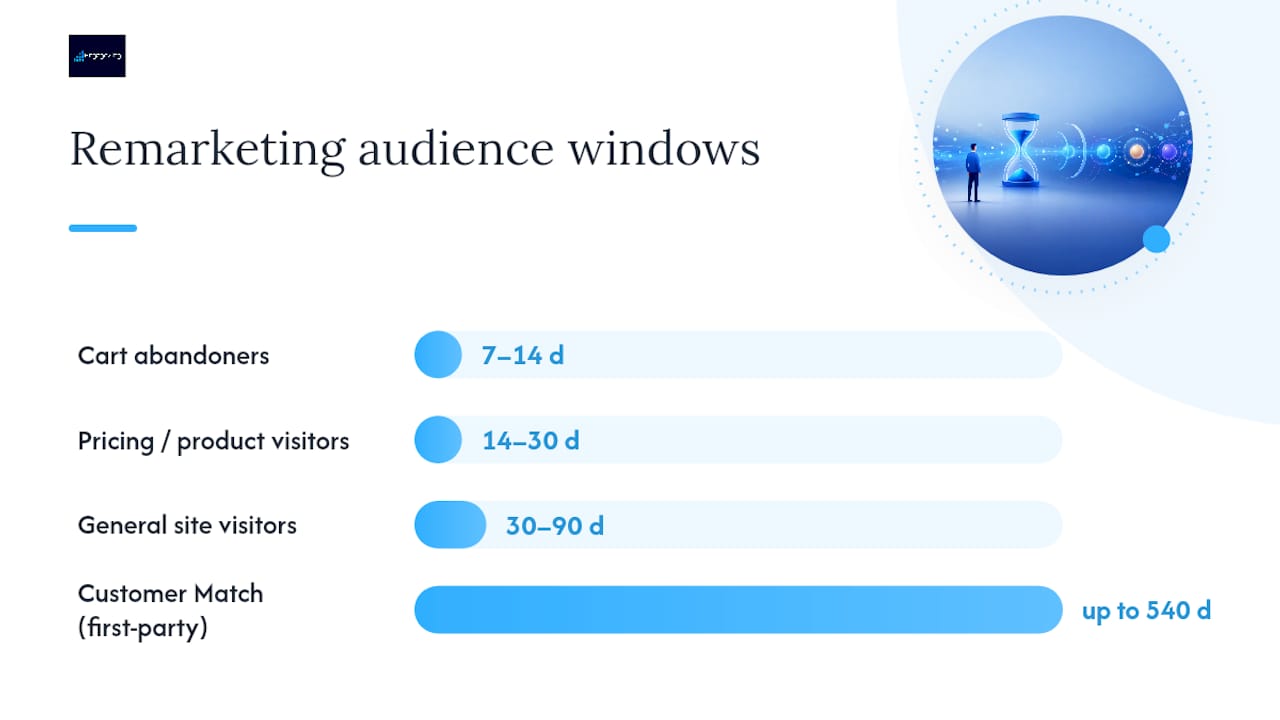
How Do You Build and Segment Remarketing Audiences? — overview diagram

How Do You Set Up the Google Tag and Consent Mode?

Tracking infrastructure is where most remarketing programs quietly break. The setup itself isn’t complicated, but skipping verification steps causes silent failures that go unnoticed for weeks.

Here’s the practical sequence:

  • Retrieve your Google tag from Google Ads under Tools and Settings > Audience Manager > Audience Sources, then install it directly on your site or, more commonly, deploy it through Google Tag Manager for easier management across pages.
  • For dynamic remarketing, add custom parameters to the tag (like `ecomm_prodid`, `ecomm_pagetype`, and `ecomm_totalvalue`) so the tag can report which products a visitor viewed.
  • Link your GA4 property to Google Ads inside the GA4 admin panel, then activate the specific audiences you want to share for targeting.
  • Enable Consent Mode so tag behavior adjusts automatically based on a visitor’s cookie consent status, which keeps you compliant while still collecting modeled conversion data where consent is denied.
  • Test everything using Google Tag Assistant or the GTM preview mode before launching, and check the Audience Manager dashboard a few days later to confirm lists are actually populating.

Consent Mode and first-party data now form the durable core of remarketing architecture as privacy rules continue tightening across markets. Accounts that skip Consent Mode setup often see audience sizes quietly shrink over time as browsers restrict third-party tracking, with no obvious error message pointing to the cause.

What Does Dynamic Remarketing Require From Your Product Feed?

Dynamic remarketing depends entirely on your Merchant Center feed talking to your site tag correctly, and this is where the most common technical failures happen.

Your feed needs, at minimum, a product ID, title, image link, price, and availability status for every item you want to show in ads. The critical detail: the `ecomm_prodid` value fired by your site tag must match the `id` field in your Merchant Center feed exactly, character for character. A mismatch here is the single most common reason dynamic ads fail to populate, even when the tag and feed both appear to be working independently.

Dynamic remarketing becomes necessary rather than optional once your catalog passes roughly 20 to 30 products, since manually building creative variations at that scale isn’t realistic. Smaller catalogs or service businesses can often get by with standard remarketing and strong static creative instead.

If dynamic ads aren’t showing, check these in order:

  • Confirm the feed is approved and active in Merchant Center, not sitting in a disapproved or pending state.
  • Verify `ecomm_prodid` values on your site match your feed IDs exactly.
  • Check that the feed is linked to the correct Google Ads account and campaign.
  • Confirm your audience list has met the minimum size threshold to serve.

How Should You Structure Remarketing Campaigns and Bids?

Structure and bidding decisions should follow intent tiers, not just audience size. Lumping cold and hot traffic into one ad group forces a single bid strategy to serve incompatible goals, which almost always underperforms a segmented approach.

  1. Separate campaigns by intent heat. Run cart abandoners and past customers in their own campaign with aggressive bids, and keep broad site visitors in a lower-bid, awareness-focused campaign.
  2. Match bidding strategy to conversion volume. Smart Bidding strategies like Target ROAS or Target CPA perform best once a campaign has roughly 30 conversions in a 30-day window; below that, Maximize Conversions or manual CPC gives you more stable control while data accumulates.
  3. Feed Performance Max campaigns your remarketing audiences as signals, not hard targeting. PMax treats these lists as a starting point for its own machine-learning expansion rather than a fixed boundary.
  4. Set frequency caps early, starting around 3 to 5 impressions per user per week for standard remarketing, then adjust based on click-through decay you observe in reporting.
  5. Allocate budget by audience heat, weighting spend toward your highest-intent segments first and treating broad awareness audiences as the flexible remainder.
  6. Pro Tip: If your remarketing CTR drops sharply after the first few days a user enters an audience, that’s ad fatigue, not audience quality. Tighten your frequency cap before you touch bids or creative.

    What Makes Remarketing Ad Creative Actually Work?

    Creative for remarketing should acknowledge that the viewer already knows your brand. Generic top-of-funnel messaging wastes the advantage a warm audience gives you.

    • Build Responsive Display Ads with at least 5 headlines, 5 descriptions, and multiple image and logo sizes so Google’s system has enough variation to test combinations.
    • Write cart-abandoner messaging around urgency and reassurance (“still available,” “complete your order,” a limited-time incentive if your margins support one).
    • Write low-intent audience messaging around education and trust (reviews, guarantees, case studies) rather than a hard sell they’re not ready for.
    • Rotate creative every 2 to 4 weeks to avoid banner blindness, and run at least two message angles simultaneously to see which resonates with each segment.

    How Do You Measure and Optimize a Remarketing Campaign?

    Different audience tiers need different success metrics, and judging every campaign against the same KPI leads to bad decisions.

    • High-intent audiences (cart abandoners, past customers): judge on conversion rate and CPA or ROAS, since these viewers should convert at meaningfully higher rates than cold traffic.
    • Mid-intent audiences (pricing or product page visitors): watch CTR and CVR together to see whether creative or targeting is the weak point.
    • Broad awareness audiences: CTR and view-through conversions matter more here than immediate CPA, since the goal is influence over the eventual conversion path, not instant return.

    Treat view-through conversions as directional evidence rather than a hard revenue number, and keep your attribution window consistent (7 or 30 days is standard) so period-over-period comparisons stay honest. Google Ads’ audience reporting views let you break performance down by list, which is where optimization decisions should actually happen, since aggregate campaign numbers can hide a strong list dragged down by a weak one.

    A workable cadence: check audience-level performance weekly, adjust bids or budgets biweekly, and refresh creative monthly unless CTR decay forces an earlier change.

    What Are the Privacy and Policy Rules for Remarketing?

    Google enforces specific rules around remarketing data, and violations can disable audience lists or, in repeated cases, suspend the account entirely.

    • Customer Match access requires meeting policy and payment-history standards, and certain advanced targeting features unlock only after 90 days of account history and $50,000 in lifetime spend; accounts below that threshold can still use Customer Match for Observation and Exclusions.
    • Never pass personally identifiable information like emails or phone numbers in URL parameters; Customer Match data must be uploaded through approved, hashed methods.
    • Exclude recent converters, employees, and internal traffic from every remarketing list by default, since serving ads to people who already bought (or who work for you) wastes budget and skews performance data.
    • Google’s personalized advertising policy also restricts targeting based on sensitive categories and requires proper consent disclosures for users in the EEA and UK.
    • If Google flags a policy issue, review the specific violation notice in your account, correct the data handling practice named, and request a policy review rather than resubmitting blindly.

    Key Google Resources for Remarketing Setup

    A handful of official pages cover almost everything you’ll need to verify as you build out remarketing: eligibility rules, tag installation steps, and the personalized advertising policies that govern how you can use customer data.

    Sources

    Frequently Asked Questions

    What Is Remarketing in Google Ads?

    Remarketing in Google Ads is a targeting method that shows ads to people who’ve already interacted with your website, app, or YouTube content, using a Google tag, GA4 audience, or Customer Match list to identify them.

    Can You Retarget With Google Ads?

    Yes. Google Ads supports retargeting (the same concept as remarketing) across Search, Display, YouTube, and Gmail, using standard, dynamic, RLSA, video, or Customer Match audience types depending on your goal.

    How Do I Set Up Remarketing for Google Ads?

    Install the Google tag directly or through Google Tag Manager, let it collect visitor data for a few days, then build audience segments in Audience Manager and add them to a campaign with tailored bids and creative. For dynamic remarketing, you’ll also need a Merchant Center feed with product IDs matching your tag’s `ecomm_prodid` parameter.

    Is $20 a Day Good for Google Ads Remarketing?

    A $20 daily budget can work for a small remarketing audience with a narrow, high-intent list like cart abandoners, but it’s often too limited for broader site-visitor audiences or dynamic remarketing across a large catalog. Budget adequacy depends more on your audience size and cost-per-click than on a fixed dollar benchmark, and an account audit can tell you whether your current spend matches your audience’s actual size and intent.

    Share This Article

    Found this useful? Send it to another owner who is still retargeting the same people with the same ad.

    Share on Facebook · Share on X · Share on LinkedIn · Share on Pinterest

    Want More Information? Let’s Talk.

    If you would rather not take this on yourself, we handle it for you. Our Google Advertising service takes care of the setup and the ongoing work, then reports back so you can see exactly what changed. You keep running your business; we keep this moving.

    Call us at 631-825-9464 or reach out here. No pressure, no obligation, and you can ask us anything — including whether this is even worth doing for a business your size.

    Looking ahead, request your free roadmap analysis and we will map out a 12-month plan to close the conversion leaky bucket so more of the customers you already reach turn into booked work.


    Written by Joe Leineke · Content on this blog is generated with AI assistance and independently reviewed and fact-checked by human marketing professionals for accuracy and quality.
  • Facebook Ads Cost: How US SMBs Should Budget $500–$1,000 in 2026

    Facebook Ads Cost: How US SMBs Should Budget $500–$1,000 in 2026

    Decorative Facebook advertising budget title card

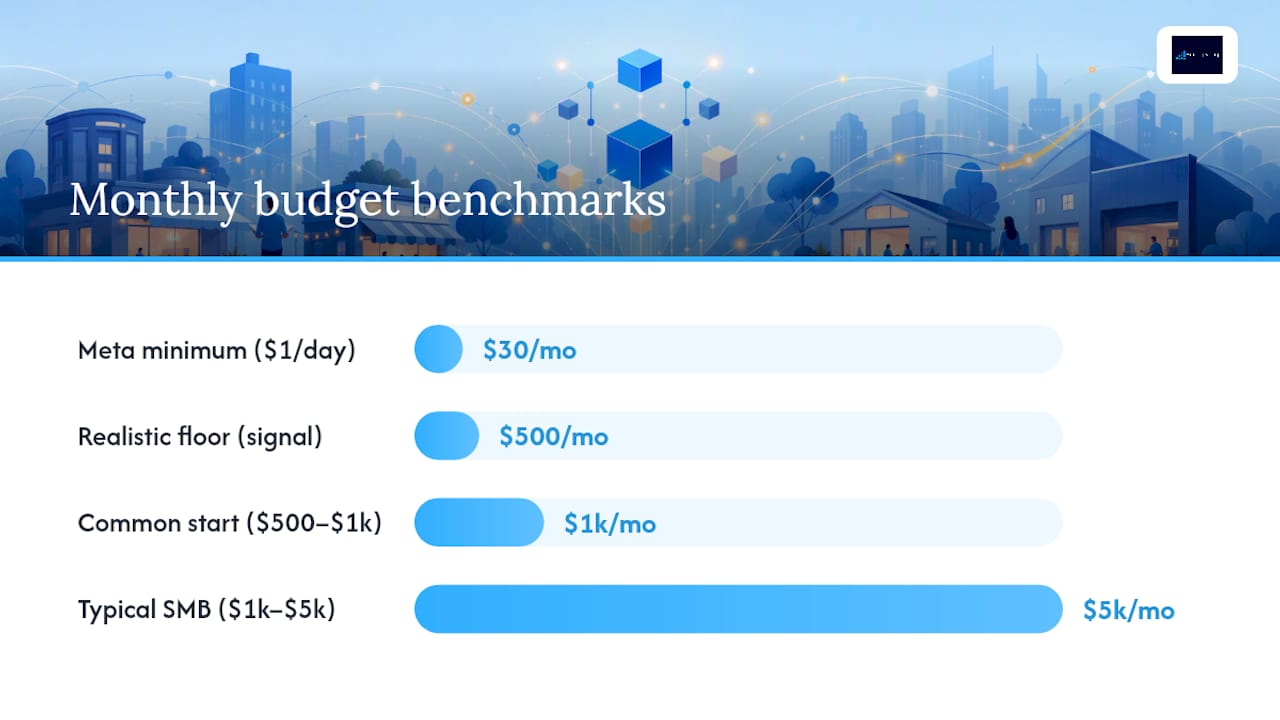
    For a small business, the practical floor to get real signal is $500 to $1,000 a month, and the rule that matters more than any single number is simple: scale spend only after you have proof it works. That is a recommended approach to managing every Meta ads engagement.


    TL;DR:

  • Small businesses should spend at least $500 to $1,000 monthly on Facebook ads to gather meaningful data and exit the learning phase efficiently.
  • CPMs average around $14, but costs can double for smaller audiences or less engaging creative, making audience targeting and freshness crucial.
  • Narrow targeting increases CPM, but broader audiences with high-quality creative often result in better overall efficiency and lower costs per conversion.
  • Higher industry CPMs, such as for finance and legal services, often exceed $20, with CPA targets above $100, requiring careful budget sizing based on margins.
  • Always scale ad spend only after confirming steady CPA and conversion proof over at least 50 events, avoiding abrupt increases that reset learning and spike costs.

  • How Much Do Facebook Ads Cost in 2026? Benchmarks You Can Trust

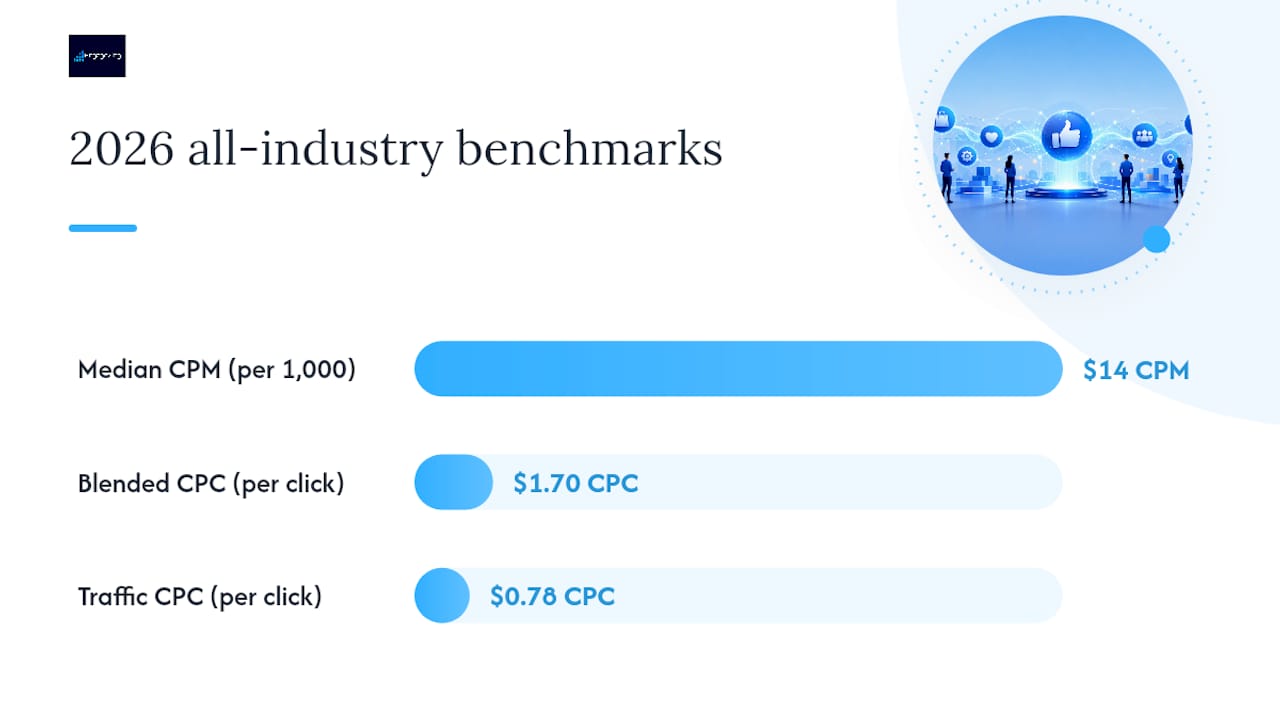
    Costs climbed faster than results across the platform this year. All-industry median CPM sits near $14, with blended CPC around $1.70 and traffic-specific CPC closer to $0.78.

    2026 Facebook advertising cost benchmarks

    Those numbers only mean something in context. A $14 CPM sounds cheap until you realize your account is paying $22 to reach the same 1,000 people your competitor reaches for $11, because your audience is smaller or your creative is stale. Read your own account against the benchmark, not the other way around.

    Objective changes everything. Traffic campaigns keep CPC low but convert weakly, while conversion-optimized campaigns cost more per click yet usually deliver a lower effective CPA because Meta’s delivery system is hunting for buyers, not clickers. Placement matters just as much. Facebook Feed and Instagram Feed tend to run higher CPMs with stronger CTR, while Reels and Stories often come in cheaper on a per-impression basis but demand sharper, native-feeling creative to convert.

    Seasonality adds another layer. Fourth-quarter demand from every retailer chasing holiday shoppers pushes CPMs up across nearly every vertical, sometimes 30% to 50% above summer baselines. If you are budgeting for November and December, build in that spike now rather than getting surprised by it later.

    A few quick reads on these numbers:

    • If your CPM is double the median but your CTR is strong, you are likely fighting a small or overly niche audience, not a bad ad.
    • A CPA far above $38 with a healthy CPC usually points to a weak landing page or offer, not a targeting problem.
    • ROAS under 1.9x is not automatically bad. It depends entirely on your margin, which the next section walks through.

    What Actually Moves Your CPM, CPC, and CPA

    CPM is the cleanest signal of auction pressure you have. It reflects how many advertisers are competing for the same eyeballs, and it moves for reasons that have nothing to do with your ad quality: seasonality, industry demand, and how many other businesses are bidding on your exact audience right now.

    Audience size and targeting granularity are the biggest levers you control. Narrow an audience down to a tight geographic radius plus three interest layers, and you shrink the pool Meta can bid into, which usually pushes CPM up. Broader audiences with strong creative frequently outperform narrow ones on cost, because Meta’s algorithm has more room to find efficient placements.

    Ad relevance and creative fatigue drive cost just as hard as targeting does. An ad that earns strong engagement gets rewarded with cheaper delivery. The same ad run for six straight weeks to the same audience will see CTR decay and CPM creep, even with zero changes to your targeting. Systematic creative and placement testing between Reels and Feed can cut CPM by 20% to 40%, but only when creative gets refreshed regularly and matches the placement’s native format.

    Measurement shifts have quietly raised reported CPA without anyone touching their targeting. Shorter attribution windows and privacy-driven data loss mean fewer conversions get counted even when sales did not actually drop. That is one reason benchmarks show CPA rising faster than CPM.

    Three warning signs to watch weekly:

    • Frequency climbing above 3 to 4 while CTR falls: your audience is worn out.
    • CTR dropping for two straight weeks with no creative changes: creative fatigue, not audience fatigue.
    • CPA widening while CPC stays flat: your funnel below the click is the problem, not the ad.

    Pro Tip: Before you touch your targeting, check your ad relevance diagnostics in Ads Manager. A drop in quality ranking almost always shows up as rising CPM before it shows up anywhere else.

    How to Size a Facebook Ads Budget That Actually Makes Sense

    Most budget mistakes start with picking a round number instead of working backward from a business goal. A defensible budget starts with three questions and ends with a number you can justify to a partner or a spreadsheet.

    1. Set your target. Decide how many new customers or leads you need this month. A local HVAC company might need 15 new jobs; an ecommerce store might need 200 orders.
    2. Set your allowable cost. Look at your margin and figure out the maximum you can pay per lead or per acquisition and still hit a break-even ROAS or better. If your average order profit is $60, you cannot sustainably pay $80 in CPA.
    3. Multiply to get spend. Target customers times allowable CPA equals your required monthly ad spend, adjusted for your actual funnel conversion rate from lead to sale.
    4. Here is that math worked two ways:

      That local service number lines up closely with what most small businesses actually budget, which tends to fall between $1,000 and $5,000 a month, with $500 to $1,000 as a common starting test range. A $1-a-day budget is technically possible to launch, but it rarely generates enough events for Meta’s algorithm to learn who converts. Meta’s own delivery system needs roughly 50 optimization events per week to exit the learning phase and stabilize costs, and a dollar a day almost never gets you there.

      $500 a month is the realistic workable floor for most service businesses that want signal within four to six weeks, not just impressions.

      How to Size a Facebook Ads Budget That Actually Makes Sense — overview diagram

      Facebook Ads Cost by Industry and Campaign Goal

      Benchmarks flatten out real differences between industries, and those differences are large enough to change your entire budget conversation. Finance, insurance, and legal services post the highest CPMs and CPCs on the platform, often two to three times the platform median, because those industries compete for high-value customers with long sales cycles and fierce bidding. Apparel and food brands sit well below the median, often because purchase decisions are impulsive and cheap to trigger.

      Rough ranges for common US verticals:

      • Apparel and ecommerce: CPM often $6 to $12, CPA frequently under $30 for impulse-priced goods.
      • Home and garden: CPM $10 to $18, with CPA varying widely by average order value.
      • Beauty and personal care: CPM $8 to $15, strong performance on Reels placements.
      • Health and wellness: CPM $12 to $20, higher scrutiny from Meta’s ad review adds friction.
      • B2B and SaaS: CPM $15 to $25, CPA often $80 or higher due to longer consideration cycles.
      • Finance, insurance, and legal: CPM $20 and up, CPA frequently exceeding $100.

      Objective changes the math within any of those verticals. The cheaper click is not the cheaper outcome.

      Placement follows the same logic. A low CPM placement like Marketplace or Audience Network can look attractive on a report, but if it converts at a fraction of the rate of Feed placements, the true cost per sale ends up higher despite the lower sticker price per impression.

      Testing and Scaling Without Blowing Up Your Costs

      That allocation mirrors what a $500 starter test typically looks like in practice, and it protects you from over-investing in retargeting pools that are too small to spend meaningfully anyway.

      1. Hold changes for 72 hours minimum. Every edit resets some or all of the learning phase, which delays the ~50 weekly events Meta needs to stabilize delivery.
      2. Judge proof, not hope. A campaign has proof when CPA holds steady across at least 50 conversions, not three good days in a row.
      3. Scale in 20% to 30% increments, not by doubling budget overnight, which tends to reset learning and spike CPA.
      4. Set a rollback trigger. If CPA rises more than 25% for three consecutive days after a budget increase, roll back to the prior spend level.
      5. Track blended ROAS across channels, not just Meta’s reported number, since platform-reported results can overstate impact.
      6. Pro Tip: Turn on Conversions API before you scale anything. It closes the gap between what actually happened and what the ad platform can see, which is where a lot of “rising CPA” turns out to be a measurement problem, not a performance one. Keep blended attribution in the reporting and that ROAS number stays honest as spend grows.

        The One Budget Habit That Actually Matters

        Every SMB owner asks “how much should I spend?” The better question is “how do I know when to spend more?” Run the goal-based math from the budget-sizing section above before you touch your daily budget. Then commit to one rule: never increase spend without proof the current spend is already working.

        Sources

        Frequently Asked Questions

        Is $10 a Day Enough for Facebook Ads?

        Ten dollars a day can launch a campaign, but it rarely generates enough weekly events to stabilize the learning phase, so expect noisy, unreliable cost data rather than a fair test of performance.

        How Much Does 1,000 Views Cost on Facebook Ads?

        The 2026 median CPM sits near $14 per 1,000 impressions, though the actual cost for your account depends heavily on your industry, audience size, and creative quality.

        Is It Worth Paying for Ads on Facebook?

        For most small businesses, yes, but only when the budget is sized against a real allowable cost per acquisition. A $38 median CPA only makes sense if your margin per sale comfortably clears that number.

        Is $500 Enough for Facebook Ads?

        Five hundred dollars a month is a realistic floor to start testing creative and audiences, and it matches what many small businesses use as a starting test range, though $1,000 to $5,000 a month is more typical once a campaign proves itself.

        Share This Article

        Found this useful? Send it to another owner who is still guessing at a Meta budget.

        Share on Facebook · Share on X · Share on LinkedIn · Share on Pinterest

        Want More Information? Let’s Talk.

        If you would rather not take this on yourself, we handle it for you. Our Facebook Advertising service takes care of the setup and the ongoing work, then reports back so you can see exactly what changed. You keep running your business; we keep this moving.

        Call us at 631-825-9464 or reach out here. No pressure, no obligation, and you can ask us anything — including whether this is even worth doing for a business your size.

        Looking ahead, request your free roadmap analysis and we will map out a 12-month plan to close the conversion leaky bucket so more of the customers you already reach turn into booked work.


        Written by Joe Leineke · Content on this blog is generated with AI assistance and independently reviewed and fact-checked by human marketing professionals for accuracy and quality.
  • 3 Local SEO Moves + 30/60/90 Checklist: Get More Calls for Plumbers

    3 Local SEO Moves + 30/60/90 Checklist: Get More Calls for Plumbers

    Decorative plumbing and local SEO title card

    Google Business Profile optimization is the highest-impact lever for local SEO for plumbers, followed by review generation and citation consistency. Fix those three and most plumbers see measurable movement in calls within 3 to 6 months. The proof points to track: profile completeness, a review count in the 40 to 80 range, and consistent NAP data across every listing.


    TL;DR:

  • Most plumbers see ranking improvements within 3 to 6 months by fully optimizing their Google Business Profile, generating reviews, and maintaining citation consistency.
  • Completing and verifying the GBP, accurately categorizing services, and regularly updating attributes and Q&A sections are essential for local SEO success.
  • Building dedicated service and city pages, ensuring fast mobile page load times, and linking them to the site significantly boost local rankings.
  • Maintaining consistent NAP data across high-value directories and actively managing reviews are critical to prevent ranking drops caused by conflicting listings.
  • Sequentially fixing the profile, reviews, and citations provides a strong foundation, with content and social media as amplifiers rather than initial priorities.

  • What’s the Fastest Path to Ranking a Plumbing Business Locally?

    Ranking locally isn’t complicated, but it is sequential; leveraging AI for SEO can speed content production and optimization for service area pages. Skip steps and you stall out with a half-finished Google Business Profile and three reviews from your cousin. Here’s the order that actually works, broken into a 30/60/90 day plan.

    First 30 days:

    • Claim and fully verify your Google Business Profile, correcting your service area and hours.
    • Audit your name, address, and phone number (NAP) across your top 10 listings and fix mismatches.
    • Set accurate emergency hours and after-hours call routing if you offer 24/7 service.
    • Days 30 to 60:

      • Build 3 to 6 dedicated service area pages (drain cleaning, water heater repair, emergency plumbing) for your top cities.
      • Launch a review request workflow that texts customers within hours of job completion.
      • Days 60 to 90 and beyond:

        • Start local link outreach: sponsorships, supplier pages, and chamber memberships.
        • Set up call tracking and review your KPI dashboard monthly.
        • How Do You Claim and Optimize a Google Business Profile for Plumbing?

          Your Google Business Profile is the single biggest lever in local SEO for plumbers, and most owners leave half of it blank. A complete profile with regular activity outperforms a bare-bones listing almost every time, regardless of how old the business is.

          Here’s the build-out, in order:

          1. Claim and verify correctly. If you work from a truck and don’t take walk-ins, mark your business as a service-area business and hide your street address. Storefront plumbers with a public office should verify as a standard local business.
          2. Set your primary category to “Plumber.” Add secondary categories only if they’re accurate, such as “Drainage service” or “Water damage restoration service.” Don’t stack categories that don’t reflect real work.
          3. Fill out every service line item. List each service you offer, not a vague summary. Google matches searches like “sump pump installation near me” against these fields directly.
          4. Add attributes that matter. “Open 24 hours,” “veteran-owned,” “identifies as women-owned” all help you match niche searches and build trust signals in the Local Pack.
          5. Write a real business description, upload recent job photos (not stock trucks), and post weekly updates about seasonal services or promotions.
          6. Pre-fill your own Q&A section. Answer the questions customers actually ask (“Do you charge for estimates?”) before a stranger posts something inaccurate.
          7. Turn on GBP messaging and check your Insights dashboard weekly to see how customers are finding and contacting you.
          8. Google’s own guidance on posts, verification, and messaging features confirms these levers are built specifically to surface active, complete profiles over dormant ones, according to a recent Google small business bulletin. Pre-populated Q&A and service-specific posts also feed Google’s AI overviews, which matters more every quarter as voice and AI-driven search grow.

            Pro Tip: Match every GBP service line item to an actual page on your website. A mismatch between what your profile lists and what your site covers creates a relevance gap that quietly suppresses your Map Pack ranking.

            What Website Changes Actually Help Plumbers Rank?

            Your website needs to do two things at once: tell Google exactly what you do and where, and convert the visitor who’s already decided to call someone. Most plumber websites do neither well.

            Build a service plus city page model. Every core service (drain cleaning, water heater repair, sewer line replacement) needs its own page for every city you serve. Each page should include:

            • Local proof (a job photo or a review from that specific city)
            • A visible price range, even a rough one
            • A click-to-call button above the fold
            • Title tags should follow a tight formula: “Emergency Plumber in [City] | 24/7 Service | [Company Name].” Your H1 should mirror that intent without stuffing keywords, and every city page should link back to a central “Service Areas” hub.

              Add `LocalBusiness` or `PlumbingService` schema, plus `openingHoursSpecification` markup so Google can confirm your hours match what’s on GBP. FAQ schema on service pages helps you show up in expanded snippets. Michigan Tech University’s SEO guidance confirms mobile-first design and correct schema.org usage are foundational, not optional, for local ranking.

              Fast page load times are essential, especially on mobile devices. A slow mobile page loses the exact customer with a burst pipe who won’t wait. Pair fast load times with sticky click-to-call buttons and you convert far more of your existing traffic without spending another dollar on ads. EngageZing’s website design work is built around exactly this mobile speed and conversion standard.

              How Do You Fix Inconsistent Business Listings?

              An inconsistent NAP (name, address, phone) across directories confuses Google about which listing is authoritative, and that confusion caps your ranking regardless of how good your GBP looks. This is one of the most overlooked pieces of local search for plumbers, mostly because it’s tedious, not because it’s hard.

              Run a manual audit of your top 15 to 20 listings first. Look specifically for:

              • “St.” versus “Street” or “Ave” versus “Avenue” abbreviation mismatches
              • Missing or inconsistent suite/unit numbers
              • Old phone numbers from a previous call-tracking setup
              • Business name variations (“Smith Plumbing” vs “Smith Plumbing LLC”)
              • Priority directories for plumbers include Yelp, YellowPages, Angi, the Better Business Bureau, and your local chamber of commerce. These sites carry weight specifically because they’re recognized as high-value citation sources for trade businesses, and Google cross-references them when confirming your business details.

                For fewer than 20 listings, fix them manually. Once you’re managing 50 or more across multiple locations, a tool like BrightLocal or Whitespark saves hours and flags new mismatches automatically. Either way, re-audit quarterly. Directories change formatting, get scraped incorrectly, or duplicate old listings without warning. EngageZing’s business listings and voice search management handles this cleanup and ongoing monitoring for owners who don’t want to chase down 40 directories by hand.

                How Many Reviews Does a Plumber Need to Rank Well?

                Review count, velocity, and recency directly influence Local Pack placement, and plumbing businesses with 40 to 80 reviews collected steadily outperform competitors who have more total reviews but no recent activity. Aim to add 4 to 8 new reviews a month. Rating matters too: going from 4.2 to 4.6 stars is worth real calls, because homeowners comparing three plumbers on a map screen read the star average before they read anything else.

                Build the ask into your workflow instead of hoping customers remember:

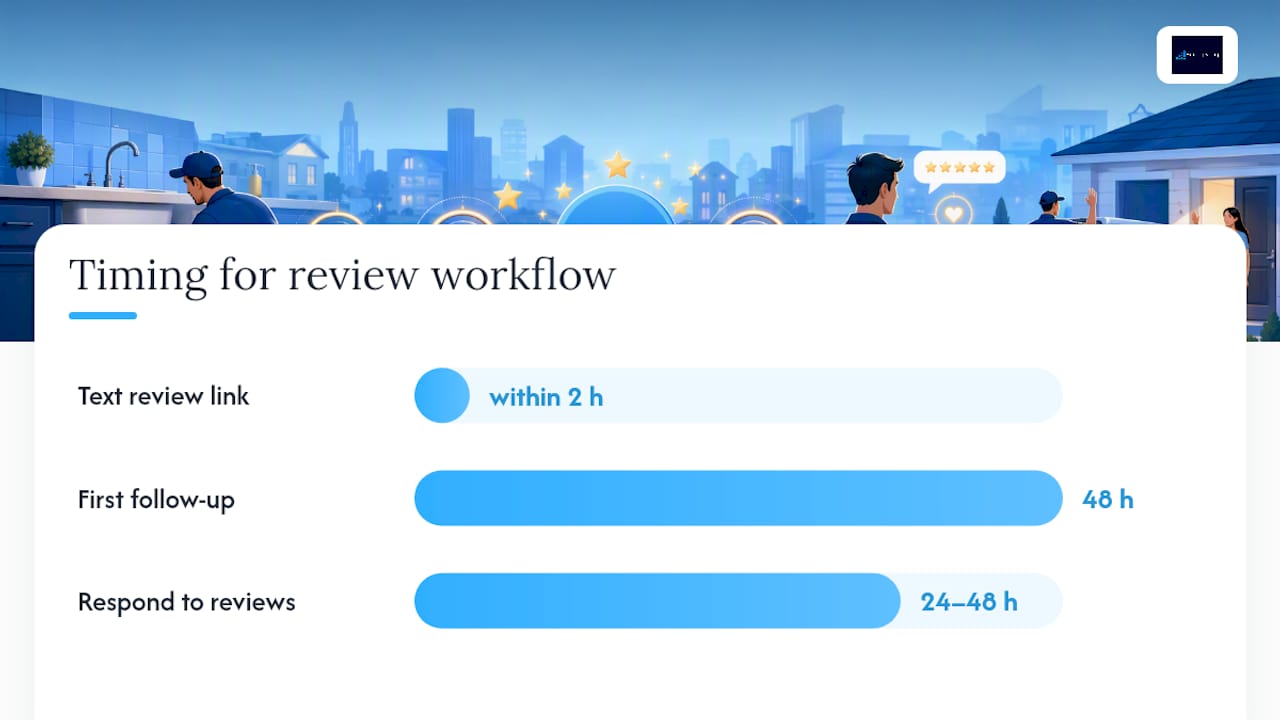
                1. Text the review link within two hours of job completion, while the fixed leak or the installed water heater is still top of mind.
                2. Train technicians on a short verbal ask, something as simple as, “If you were happy with the work today, a quick Google review helps us a lot.”
                3. Follow up once, 48 hours later, if no review has come in. Don’t send a third reminder.
                4. Respond to every review within 24 to 48 hours, positive or negative, using the customer’s first name and a specific detail from the job.
                5. Negative reviews need a calm, factual response, not a defensive one. Acknowledge the issue, state what you did or will do about it, and move the conversation offline with a phone number. Only request removal through Google’s process when the review violates policy (fake, posted by a non-customer, or contains abusive language) rather than because it’s simply unflattering.

                  Pro Tip: A short, specific response to a negative review often does more for conversion than ten glowing five-star reviews. Prospective customers read the response as much as the complaint. EngageZing’s review generation and reputation management service automates the ask and flags reviews that need a fast response.

                  How Many Reviews Does a Plumber Need to Rank Well? — overview diagram

                  Which Local Partnerships Actually Move the Needle?

                  Local links tell Google your business is a real, established part of the community, not just a website that exists. Even a handful of strong local links can accelerate movement in the Local Pack when your GBP and citations are already solid.

                  Tactics worth your time:

                  • Sponsor a local youth sports team or community event for a homepage mention and a backlink.
                  • Get listed on supplier or manufacturer “find a contractor” pages if you carry their products.
                  • Build relationships with property managers and real estate agents who need a reliable plumber for turnovers and inspections.
                  • Ask satisfied commercial clients for a short case study or testimonial you can host on a dedicated page, then request they link to it.
                  • Sponsorship and directory links tend to help Maps ranking most, since they reinforce local relevance signals. Guest content or a detailed case study picked up by a local news outlet or trade blog does more for organic authority beyond the Map Pack. Pursue both, but don’t confuse one for the other when you’re measuring results.

                    How Do You Track Whether Local SEO Is Working?

                    Set a monthly rhythm and stick to it. The KPIs that matter for plumbers are GBP calls, website calls, booked jobs, map clicks, and profile views, tracked separately so you know which channel is actually producing.

                    Set up call tracking with unique phone numbers for GBP, your website, and any paid ads, so you can separate Maps leads from organic and paid leads. Without that split, you’re guessing.

                    Monthly checklist:

                    • Review GBP Insights for call and direction-request trends.
                    • Confirm review velocity is on pace (new reviews added, not just total count).
                    • Spot-check 5 to 10 citations for new inconsistencies.
                    • Identify which service pages are driving the most calls and which keywords are bringing in traffic.
                    • EngageZing’s Local Service Ads setup pairs well with this tracking model when you want paid visibility layered on top of organic gains during slower ranking months.

                      How Does EngageZing Approach Local SEO for Plumbers?

                      The process starts with cleanup, not content. GBP corrections come first, since a messy profile undermines every other tactic. Citation fixes follow, then a review generation system, then service-area page builds, then tracking, and finally Local Service Ads if the market calls for faster visibility.

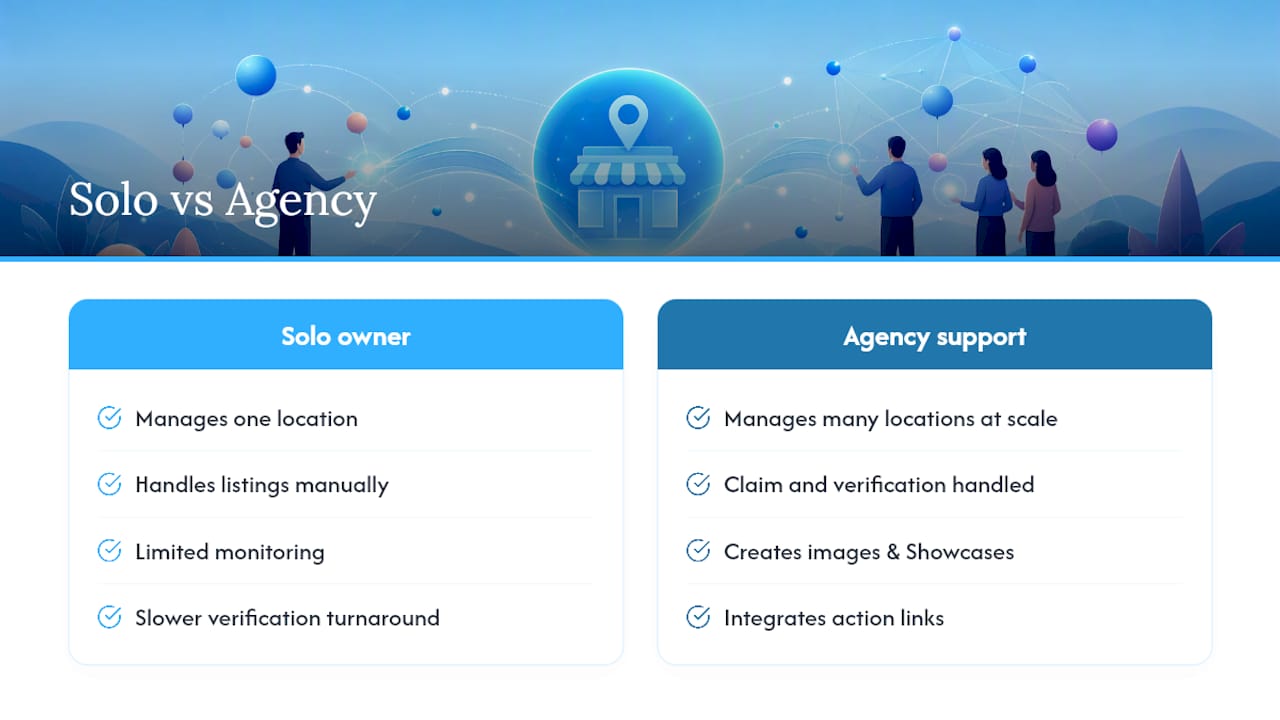
                      A plumber with three trucks and one call center doesn’t need the same 12-month content plan as a five-location regional company. The deliverables should match the size of the operation, not a generic package.

                      EngageZing positions its pay-per-result SEO model, review generation automation, and AI-driven operations tools as options within that process, not guarantees of a specific ranking outcome. A solo plumber with time and patience can DIY most of this over a few months. An owner running multiple trucks with no time for GBP audits or review follow-up is usually better served handing the cleanup and tracking to a team that does it daily. Initial deliverables from an agency engagement should include a GBP audit, a citation report, and a review workflow set up within the first two to three weeks.

                      Does Social Media Actually Help a Plumber’s Local Rankings?

                      Social media doesn’t move your Google ranking directly, but it builds the brand signals and referral traffic that support everything else you’re doing. A plumber who posts job photos, storm-prep tips, and quick before/after videos on Facebook and Instagram stays visible to past customers who search your name directly later, which itself is a ranking signal Google notices.

                      Focus on Facebook first for most plumbing businesses, since local homeowners in the 35 to 65 age range still use it heavily for neighborhood recommendations and local group posts. Instagram works well for visual before/after content, especially bathroom remodels or fixture upgrades. Skip platforms that don’t match your customer base just to say you’re “active everywhere.”

                      Practical moves that work:

                      • Post short videos explaining common issues (why your water heater is leaking, what a running toilet costs you monthly).
                      • Share seasonal reminders (frozen pipe prevention in January, sump pump checks before spring rain).
                      • Respond to every comment and message, even simple ones, since responsiveness shows up in a platform’s own engagement signals.
                      • Join local Facebook community groups and answer plumbing questions genuinely, without a hard sales pitch attached.
                      • Consistency beats frequency here. Three solid posts a week for a year outperforms a burst of daily posts for two weeks followed by silence.

                        How Should Plumbers Optimize for Voice Search?

                        Voice queries skew conversational and urgent: “who’s a plumber near me open right now” or “how much does it cost to fix a leaking pipe.” Optimizing for these means writing content the way customers actually talk, not the way you’d write a title tag.

                        FAQ sections on your service pages should answer real spoken questions directly, in full sentences, since voice assistants pull answers from clear, direct text rather than fragmented bullet phrases. “How much does emergency plumbing cost in [city]?” followed by a two-sentence answer with a real price range performs better for voice than a vague paragraph about your company’s values.

                        Your GBP hours and attributes need to be airtight, because voice search leans hard on structured data to answer “open now” and “near me” queries. A mismatch between your listed hours and your actual hours doesn’t just annoy a caller. It causes the assistant to skip you for a competitor with cleaner data.

                        Local, natural phrasing matters more than keyword density for voice. Write your service descriptions the way you’d explain the job over the phone, and use the neighborhood or city name naturally rather than forcing it into every sentence. Schema markup, particularly FAQ and LocalBusiness schema, gives voice assistants a clean, structured source to pull from instead of guessing at your page’s intent.

                        What Seasonal Tactics Work Best for Plumbing SEO?

                        Plumbing demand swings hard by season, and your GBP posts, ads, and service pages should swing with it instead of staying static year round.

                        Winter is frozen pipe and no-heat-emergency season. Post proactively about pipe insulation and space heater safety in late fall, then shift GBP posts to “24/7 emergency service” messaging once temperatures drop. Spring brings sump pump failures and water heater replacements after a hard winter; this is the window for maintenance-plan promotions. Summer shifts toward irrigation, outdoor fixture work, and AC-adjacent plumbing (condensate lines). Fall is prep season: winterization services, gutter and drain checks before the next freeze.

                        Seasonal plumbing SEO priorities calendar

                        Update your GBP posts monthly to match whatever season is actually driving calls in your market, and build a simple promotional calendar so you’re not scrambling to write a post the week of the first freeze warning. A modest seasonal discount (“$25 off drain cleaning through October”) posted directly to GBP and pinned to your homepage captures searchers comparing multiple plumbers in the moment.

                        Track which seasonal pages and posts actually generate calls year over year, then double down on what worked and drop what didn’t. Seasonal content compounds: a well-built “frozen pipe repair” page keeps ranking every winter with almost no extra work once it’s live.

                        The Playbook Works, But Sequence Beats Speed

                        Most plumbers who fail at local SEO don’t fail from lack of effort. They fail from doing everything at once, badly, instead of doing three things well in order. A half-finished GBP profile, twelve reviews from six months ago, and a homepage with no service pages will not outrank a competitor who nailed the fundamentals first.

                        The conventional advice oversells content volume and undersells consistency. A plumber does not need fifty blog posts. A plumber needs a complete GBP, a review count that climbs every month, and NAP data that matches everywhere it appears. Everything else, including social media and seasonal campaigns, is a multiplier on a foundation that either exists or doesn’t.

                        If you take one thing from this playbook, take the order: profile first, reviews second, citations and service pages third. Owners who reverse that order and chase link-building or paid ads before fixing the basics tend to waste budget propping up a weak foundation instead of building on a strong one.

                        Sources

                        • Google small business bulletin (GBP tips)
                        • Michigan Tech University — SEO guidance
                        • Yelp
                        • Frequently Asked Questions

                          How much should I pay for local SEO?

                          Costs vary widely by market and provider, ranging from a few hundred dollars monthly for basic citation management to several thousand for full-service SEO with content and link building. Pay-per-result models, like the one EngageZing offers, tie cost more directly to actual ranking and call improvements rather than a flat retainer.

                          Who should I contact for plumbing SEO help in the United States?

                          Look for an agency with specific local SEO experience in the trades, not a generalist marketing firm. EngageZing offers local account management and services built specifically around plumbing and other service-based businesses.

                          What is the best way to advertise as a plumber?

                          A combination of an optimized Google Business Profile, Local Service Ads, and word-of-mouth driven by strong reviews outperforms any single channel alone. Emergency and seasonal searches respond especially well to Local Service Ads paired with a well-built service page underneath.

                          Share This Article

                          Found this useful? Send it to another owner who is still running three trucks and no listing strategy.

                          Share on Facebook · Share on X · Share on LinkedIn · Share on Pinterest

                          Want More Information? Let’s Talk.

                          If you would rather not take this on yourself, we handle it for you. Our Near-Me Search Boost service takes care of the setup and the ongoing work, then reports back so you can see exactly what changed. You keep running your business; we keep this moving.

                          Call us at 631-825-9464 or reach out here. No pressure, no obligation, and you can ask us anything, including whether this is even worth doing for a business your size.

                          Looking ahead, request your free roadmap analysis and we will map out a 12-month plan so more of the customers you already reach turn into booked work.


                          Written by Joe Leineke · Content on this blog is generated with AI assistance and independently reviewed and fact-checked by human marketing professionals for accuracy and quality.
  • Scalable Multi Location SEO for Brands: Master Data, GBP, Reviews

    Scalable Multi Location SEO for Brands: Master Data, GBP, Reviews

    Scalable Multi Location SEO for Brands: Master Data, GBP, Reviews

    Multi-location SEO title card illustration

    Verify a Google Business Profile for every physical storefront, publish one canonical location page per address, and keep NAP details identical everywhere they appear. Layer in a steady review program per location, and you’ve built the foundation that moves rankings. Most brands see local-pack movement within a few months of sustained, consistent activity, not overnight.


    TL;DR:

  • Verifying every Google Business Profile and linking it to location-specific pages is essential to maximize local-pack visibility, especially when managing many storefronts.
  • Location pages should contain at least 300 words of unique, locally relevant content, with optimized schema markup and authentic photos to avoid being filtered as doorway pages.
  • Consistent NAP details across key directories and extracting reviews at a rate of at least two per month per location significantly strengthen local trust signals and rankings.
  • Managing citations at scale requires auditing primary data sources, correcting mismatches, and using citation management platforms for efficiency as the business grows beyond a few locations.
  • Focusing effort on high-revenue and highly competitive markets yields the greatest impact, with the initial priority being verification, data parity, and review velocity for each storefront.

  • What Does Multi-Location SEO Actually Require?

    Multi-location SEO needs its own playbook because a single-location tactic breaks the moment you add a second address. What works for one storefront (a solid homepage, one Google Business Profile, a handful of citations) turns into a liability at scale if every location shares the same thin content or conflicting phone numbers. Google evaluates each location as a separate entity, which means duplicated effort isn’t a shortcut. It’s a penalty waiting to happen.

    Six pillars hold up a functioning multi-location program, and the Foragentis six-pillar framework confirms location pages and Google Business Profile management carry the most operational weight of the six:

    • Location pages — one unique, canonical page per physical address
    • GBP network management — verification, categories, and consistent linking across every profile
    • Citations and NAP consistency — matching name, address, and phone across every directory
    • Review generation — steady monthly velocity per storefront, not just high totals
    • Site architecture — a URL structure that avoids cannibalization
    • Measurement and scale — KPIs and a repeatable rollout process

    If you’re managing five locations or fifty, three fixes deliver outsized results inside a 30 to 90 day window. First, verify any Google Business Profile still sitting in “pending” or unclaimed status. Second, audit and correct your top 10 NAP mismatches per location across the directories that matter most. Third, set a firm target of at least a couple of new reviews per month per location and put location-specific review links in front of customers.

    The most common failure isn’t neglect. It’s templated location pages that swap out a city name and phone number while leaving everything else identical. That dilutes the very authority you’re trying to build, and it’s the single fastest way to have your location pages ignored, or worse, filtered out as doorway pages.

    What Should Every Location Page Include?

    Each location page needs to read like it was written by someone who has actually walked into that storefront. Google’s own multi-location SEO guidance treats generic, duplicated location content as a doorway-page risk, and that risk is entirely avoidable with the right structure.

    Start with the URL pattern. A subfolder structure like `yourdomain.com/locations/city-name/` keeps everything under one root domain, which preserves the authority you’ve already built rather than splitting it across separate URLs. Canonicalize each page to itself, never to a hub page, so search engines index every location independently.

    Every page on your network should include these elements without exception:

    • An H1 that names the city and the core service (e.g., “Emergency Plumbing in Denver”)
    • Full NAP details matching your Google Business Profile exactly
    • Hours of operation, including holiday exceptions
    • Geo-coordinates and an embedded map
    • Driving directions from major nearby landmarks
    • Original photos of that specific location, staff, and storefront
    • Staff bios for that location’s team
    • Testimonials or review excerpts from customers at that address
    • 300 to 800+ words of unique content covering local specifics: parking, neighborhood landmarks, service-area nuances, or community involvement

    | Element | Minimum requirement | Common mistake |

    |—|—|—|

    | Unique word count | 300–800+ words | Copy-pasted boilerplate with city name swapped |

    | Schema markup | LocalBusiness with sameAs to GBP | Missing schema or shared across pages |

    | Photos | Location-specific, unedited stock swaps | Reused corporate stock photography |

    | Testimonials | Location-tagged reviews only | Mixed reviews from unrelated stores |

    | NAP | Exact match to GBP and citations | Suite number or phone format mismatch |

    LocalBusiness schema needs to include your business name, address, phone, hours, geo-coordinates, and a `sameAs` link pointing directly to that location’s Google Business Profile. That `sameAs` connection is what tells Google’s entity-matching systems that the page and the profile represent the same real-world place, which reduces the chance either gets treated as duplicate or low-trust content.

    How Do You Manage Google Business Profiles at Scale?

    Every physical storefront needs its own verified Google Business Profile. That’s not optional, and it’s the single fastest lever for local-pack visibility across a multi-location network. Bulk verification through Google’s location group tools works for most storefronts, but Google requires manual video or postcard verification for newly opened locations, businesses in certain regulated categories, or profiles flagged for suspicious activity.

    Category selection matters more than most operators realize. Choose the primary category that most precisely matches your core service, then layer in two or three secondary categories that capture adjacent services customers search for. Attributes deserve the same attention: accessibility features, accepted payment types, and specific services offered all feed into how Google matches your profile to a searcher’s query.

    Pro Tip: Audit your GBP website field across every location. If even 10% of your profiles link to the homepage instead of their specific canonical location page, you’re actively working against your own local-pack rankings. Practitioner testing shows misaligned GBP links can suppress rankings that correctly aligned links would otherwise support.

    Run through this checklist across your network:

    • Confirm every GBP status shows “verified,” not “pending”
    • Set primary category first, then add relevant secondary categories
    • Select every applicable attribute (accessibility, payment, service options)
    • Point the website field to the exact canonical location page URL
    • Post updates at least weekly with location-specific photos and offers

    Posting cadence sounds minor, but profiles with regular activity and fresh photos tend to hold local-pack position more consistently than dormant ones. A weekly post with real photos from that specific storefront beats a monthly corporate graphic every time.

    How Do You Fix NAP Consistency Across Every Location?

    Citation inconsistency is quiet damage. No single wrong phone number tanks a location overnight, but dozens of small mismatches across directories erode the trust signals Google uses to confirm your business is real and stable. Fixing it follows a clear sequence:

    1. Gather your top 20 directories per location. Start with Google Business Profile, Bing Places, Apple Maps, Yelp, and the major data aggregators, then add industry-specific directories relevant to your category.
    2. Check formatting against your master record. Suite numbers, abbreviations (“St.” vs. “Street”), and phone formatting all need to match exactly, not just approximately.
    3. Find and flag duplicate listings. Duplicate profiles for the same address split review signals and confuse the entity-matching process Google relies on.
    4. Track propagation timing. Corrections at primary data sources like Google and the major aggregators can take several weeks to ripple through secondary directories.
    5. For remediation, correct the primary sources first: Google Business Profile, then the data aggregators that feed hundreds of smaller directories automatically. Submit suppression requests for duplicates you can’t merge directly. Once you’re managing 20 or more locations, manual correction becomes impractical, and a citation platform like Yext or Uberall starts to pay for itself in time saved. Choose a platform based on three criteria: how many directories it actually covers, how fast corrections propagate, and how well it integrates directly with your Google Business Profile network. Managed business listings and voice search services can also handle this layer if you’d rather not run the audit in-house.

      How Many Reviews Does Each Location Need Per Month?

      Set a floor of two new reviews per month for every location, and push that to four to eight per month in competitive markets where every nearby competitor is also actively collecting reviews. Review recency and velocity function as a stronger short-term ranking signal than your historical total, according to Search Engine Journal’s multi-location analysis, which means a location with 40 reviews and none in the past six months can lose ground to a newer competitor collecting five reviews a month.

      The tactics that actually move that number:

      • Location-specific review links, generated separately for each address, so feedback lands on the correct GBP
      • QR codes at checkout counters or on receipts, pointing straight to that location’s review link
      • Automated post-service email or SMS requests sent within 24 hours of a completed transaction
      • Direct prompts from staff at the point of service, which consistently outperform passive signage

      Pro Tip: Track your response rate as closely as your review count. Aim to respond to every negative review within 48 hours, acknowledging the issue specifically rather than with a generic apology. A fast, specific response often does more for a hesitant customer reading it later than the original review did.

      Managed review generation and reputation services exist precisely because doing this manually across a dozen locations eats an operations team’s week fast.

      How Many Reviews Does Each Location Need Per Month? — overview diagram

      Should You Use Subfolders or Separate Domains for Locations?

      One domain with a `/locations/` subfolder structure is the right default for nearly every multi-location business. Splitting locations across separate domains fragments the domain authority you’re trying to build and forces you to earn trust signals from zero, repeatedly, for every new market you enter.

      The internal linking pattern should follow a clear hierarchy: homepage links to your `/locations/` hub, the hub links to every individual location page, and each location page links back up to the hub plus sideways to nearby locations and relevant service pages. Every internal link should point to the canonical version of a page, never to a duplicate or a parameter-variant URL.

      • Homepage → `/locations/` hub → individual location pages
      • Each location page → 2 to 3 nearby locations (geographic proximity, not alphabetical)
      • Each location page → relevant service pages for that specific address
      • Service-location pages (e.g., `/locations/denver/emergency-repair/`) only when that combination has genuinely distinct local content to justify a standalone page

      That last point is where doorway risk creeps back in. Publishing a service-location page for every service and city combination, regardless of whether there’s anything unique to say, creates dozens of thin pages that dilute your site’s overall authority instead of building it.

      What Local Content Actually Moves Rankings?

      Not all local content earns its keep. Neighborhood-specific pages, localized case studies, location-tagged FAQs, event pages tied to a specific store, and individual staff profiles all provide genuine local signals that a generic corporate blog post never will.

      The allocation that works in practice: aim for 30% to 50% unique local content on your highest-priority location pages, and centralize broader topics (industry trends, company news, general how-to guides) on your main blog or resource hub. Duplicating that broad content across every location page splits your internal link equity and actively reduces local rankings, according to practitioner analysis of multi-location sites.

      • Neighborhood or service-area pages tied to real geographic detail
      • Localized case studies featuring that specific location’s customers
      • Location-specific FAQs addressing questions unique to that market
      • Event or seasonal pages tied to that storefront’s actual activity
      • Staff profiles with names, roles, and photos from that specific team

      AI-driven search raises the stakes here. Search systems increasingly rely on structured local facts and schema accuracy to decide which location page gets surfaced in an AI Overview or a voice response, and templated pages without distinct local signals simply don’t get picked.

      What Metrics Should You Track Per Location?

      Six numbers tell you whether a location page and its Google Business Profile are working: local-pack rank, GBP impressions, GBP actions (calls, direction requests, website clicks), organic visits to the location page itself, review velocity, and a citation accuracy score across your top directories.

      | Metric | What it tells you | Target cadence |

      |—|—|—|

      | Local-pack rank | Visibility for core local queries | Weekly check |

      | GBP impressions | Search and Maps visibility | Monthly review |

      | GBP actions | Calls, directions, site clicks | Monthly review |

      | Organic visits to location page | Site-level local SEO health | Monthly review |

      | Review velocity | Fresh trust signals | 2+ per month minimum |

      | Citation accuracy score | NAP consistency across directories | Quarterly audit |

      Use this data to prioritize, not just to report. Rank locations by revenue potential, local competitive intensity, and current performance gaps, then put your team’s limited hours against the weakest-performing, highest-potential markets first rather than spreading effort evenly across every storefront.

      How Do You Operate Multi-Location SEO at Scale?

      Once you’re past a handful of locations, spreadsheets and memory stop working. You need a master data repository holding the fields that feed everything downstream: business name, address, phone, hours, geo-coordinates, GBP profile ID, canonical page URL, and the local manager’s contact information. That single source of truth is what a six-pillar operational framework points to as the difference between a program that scales cleanly and one that drifts into inconsistency location by location.

      Prioritize rollout and maintenance work using three factors: revenue potential of the market, competitive intensity in that local-pack, and how far the location currently sits below your best-performing stores.

      • Build the master repo before touching citation platforms or bulk GBP tools
      • Adopt automation (citation management, bulk GBP edits) once you’re past roughly 15 to 20 locations
      • Assign a content owner responsible for location page quality
      • Assign a location manager responsible for local reviews and GBP posts
      • Keep a central operations role owning the master repo and reporting cadence

      What I’d Fix First on Any Multi-Location Audit

      Every audit I run starts in the same place: confirm every Google Business Profile is actually verified, then check whether each profile’s website link points to its correct canonical location page. That single misalignment, a GBP pointing to the homepage instead of its own city page, quietly caps how high that location can rank no matter how good the on-page content is. Fixing it is often the fastest visible win in the entire program.

      Beyond that first fix, the mantra I’d hand any team managing more than a handful of storefronts is simple: fix data parity, build review velocity, and prioritize markets by impact. Everything else in this playbook is detail work in service of those three moves.

      Get a Free Analysis of Your Location Network

      A managed service is a direct alternative to hiring an in-house team to manage this playbook location by location. Instead of your staff manually auditing citations, chasing GBP verifications, and requesting reviews across a growing store count, EngageZing runs it as a managed program with local account management built in.

      EngageZing

      The core services map directly onto what this article covers, including business listings and voice search for citation and NAP management, pay-per-result SEO for ongoing location-page optimization, review generation and reputation management for monthly velocity targets, near-me search boost for GBP and local-pack performance, and local service ads as a paid complement where organic alone isn’t fast enough. If you’re managing more than a few storefronts and want to see exactly where your network is leaking rankings, head to Grow for a free analysis. Or start with Business Listings & Voice Search to see how citation management works location by location.

      Where to Go for Primary Documentation

      Before rolling out changes across dozens of locations, check implementation details against primary sources rather than relying on secondhand summaries.

      Sources

      Frequently Asked Questions

      Is SEO dead or still evolving?

      SEO isn’t dead, it’s shifting toward entity-based and AI-driven search, which raises the value of structured, accurate local data rather than lowering the value of SEO overall.

      Do I need a separate Google Business Profile for each location?

      Yes. Every physical storefront needs its own verified Google Business Profile because Google evaluates each location as a distinct entity for local-pack rankings.

      How many reviews should each location get per month?

      Aim for a minimum of a couple of new reviews per month per location, and more frequent reviews if you’re competing in a crowded local market.

      Should I use subfolders or separate domains for multiple locations?

      Use one domain with `/locations/` subfolders for nearly every multi-location business. It’s the structure that preserves domain authority instead of splitting it across separate sites.

      What are the four main types of SEO?

      The four commonly recognized types are on-page SEO, off-page SEO (including citations and backlinks), technical SEO, and local SEO, which is the category multi-location strategy falls under.

      What is the 80/20 rule as it applies to multi-location SEO?

      Roughly 20% of your locations, usually the highest-revenue or highest-competition markets, tend to drive the majority of your program’s impact, which is why prioritizing effort by revenue potential and competitive intensity matters more than spreading work evenly.

      Recommended

      Share This Article

      Found this useful? Send it to another owner who is still running the same playbook location by location.

      Share on Facebook · Share on X · Share on LinkedIn · Share on Pinterest

      Want More Information? Let’s Talk.

      If you would rather not take this on yourself, we handle it for you. Our Business Listings & Voice Search service takes care of the setup and the ongoing work, then reports back so you can see exactly what changed. You keep running your business; we keep this moving.

      Call us at 631-825-9464 or reach out here. No pressure, no obligation, and you can ask us anything — including whether this is even worth doing for a business your size.

      Looking ahead, request your free roadmap analysis and we will map out a 12-month plan to close the conversion leaky bucket so more of the customers you already reach turn into booked work.


      Written by Joe Leineke · Content on this blog is generated with AI assistance and independently reviewed and fact-checked by human marketing professionals for accuracy and quality.
  • Start With Two Flows and One Owner: Small Business Marketing Automation

    Start With Two Flows and One Owner: Small Business Marketing Automation

    Decorative marketing automation title card

    Marketing automation earns its keep once your small business already has consistent leads and a reason for people to opt in. If that’s true for you, start with a welcome sequence paired with one revenue-recovery flow (abandoned cart or review request), not a dozen workflows at once. Build that first, watch it convert for two weeks, then request a free analysis before adding anything else.


    TL;DR:

  • Focus on building a simple welcome sequence and one revenue-recovery automation such as abandoned cart or review requests before expanding.
  • Automate only two to three high-impact flows initially, prioritizing those with the fastest return on setup, like abandoned cart recovery.
  • Manage contact volume and choose automation tools based on list size, prioritizing deliverability, usability, and integration over flashy features.
  • Ensure automation success by establishing a single customer data platform, clear process documentation, and assigning one owner per automation task.
  • Protect customer data by using secure platforms, limiting access, obtaining explicit consent, and ensuring compliance with data privacy regulations.

  • Which Automations Should a Small Business Build First?

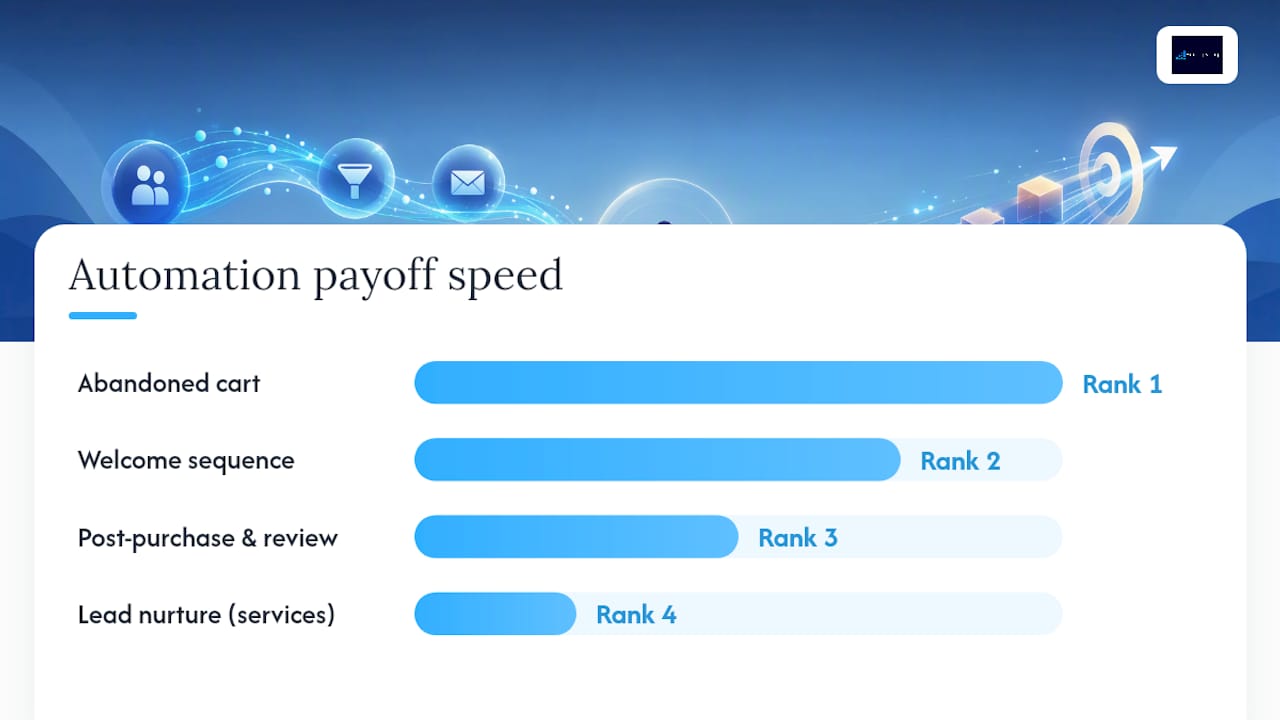
    Skip the temptation to automate everything at once. Practitioner guides consistently point to the same short list of high-leverage flows, and small businesses tend to do better when they limit themselves to two or three well-maintained automations instead of ten mediocre ones. Here’s the order that actually pays off, ranked by how fast each one recovers its setup cost.

    1. Welcome sequence. Three to five emails triggered the moment someone joins your list or buys for the first time. The job of email one is delivery (whatever they signed up for), the next two build trust with a case story or a useful tip, and the last one asks for a specific next action, like booking a call or making a first purchase. Skip the temptation to cram everything into one email. Spread it out.
    2. Abandoned cart or inquiry recovery. If someone starts checkout or fills out a quote form and stalls, send a reminder within one to three hours, a second nudge (often with a small incentive) at 24 hours, and a final message at 72 hours if you haven’t heard back. This is the single fastest-paying automation on the list.
    3. Post-purchase follow-up and review request. Send a thank-you and usage tip within a day of purchase, then ask for a review five to ten days later, once the customer has actually experienced the product or service. Asking too early gets you silence. Asking too late gets you forgotten.
    4. Lead nurture for service businesses. Instead of a purchase, the trigger is an activation event: a downloaded guide, a booked consult, or a quote request. Space four to six touches over three to four weeks, mixing education with a soft ask each time.
    5. Re-engagement and list hygiene. Every 90 days, identify contacts who haven’t opened or clicked anything. Send one direct “still interested?” message, then remove non-responders from active sends. A clean list protects your deliverability far more than a big list helps your revenue.
    6. Notice what’s missing from this list: no drip campaign for every product category, no automated social posting cadence, no elaborate lead-scoring model. Those come later, if ever. The itsdeep practical guide on small-business marketing automation backs this same sequencing: welcome sequence, then abandoned cart, then reviews, scaled progressively rather than launched simultaneously.

      Pro Tip: Write all the emails for your welcome sequence in a single sitting before you touch any automation software. Trying to write email three while your automation tool is already live turns a two-hour task into a two-week stall.

      Which Automations Should a Small Business Build First? — overview diagram

      How Do You Choose the Right Automation Setup?

      The right setup depends almost entirely on how many contacts you’re managing and how many channels you actually need, not on which tool has the flashiest interface. Use contact volume as your first filter, then layer in the other criteria.

      • 0 to 1,000 contacts: A single email tool with basic automation triggers covers you completely. Anything more sophisticated is wasted overhead at this stage.
      • 1,000 to 5,000 contacts: You’ll want tagging, segmentation, and at least one integration into your system of record (usually a CRM or spreadsheet you actually keep updated). This is also where multi-channel support, SMS on top of email, starts to matter for time-sensitive flows like cart recovery.
      • 5,000-plus contacts: Deliverability becomes its own discipline. You need dedicated sending infrastructure, list-hygiene automation, and reporting detailed enough to catch a dip in open rates before it tanks your sender reputation.

      Beyond volume, weigh five criteria before you commit to anything:

      • Usability: Can someone on your team build a flow without a training course?
      • Integrations: Does it talk to whatever already holds your customer data, so you’re not manually exporting lists?
      • Deliverability: Does the provider have a track record of landing in inboxes, not spam folders?
      • Multi-channel reach: Do you need SMS or just email right now, or is that a six-month-from-now problem?
      • Reporting depth: Can you see open, click, and conversion rates by flow, not just in aggregate?

      | Question | What it tells you |

      |—|—|

      | Under 1,000 contacts and one channel? | Stick with a free or entry tier; no integration needed yet |

      | Growing past 1,000 with a messy contact list? | Prioritize tagging and CRM integration over new features |

      | Sending time-sensitive recovery messages? | Multi-channel (SMS) support matters more than reporting depth |

      | Team includes non-technical staff? | Usability and template quality outweigh advanced logic |

      | Already hitting 5,000+ contacts? | Deliverability infrastructure and dedicated support become the deciding factor |

      Budget scales with contacts and send volume, not with the number of features you enable; for a comprehensive approach, consider reviewing a detailed business growth strategy guide. A tool that charges $20 a month for 1,000 contacts might charge $80 for 5,000, regardless of whether you’re using three automations or ten. Price out your list size eighteen months from now, not just today, so you’re not blindsided by a tier jump right when growth finally kicks in.

      How Do You Launch Your First Automation Step by Step?

      Before any automation goes live, you need three things in place: a single system of record for customer data, clear tags or fields for who’s in which stage, and enough contacts to see a pattern (a few hundred is enough to start, though patterns firm up past 500). Skipping this step is the single most common reason automations quietly fail. As one guide on marketing automation tools puts it, automation amplifies whatever inputs you already have. It doesn’t create traffic or leads out of nothing.

      Once the foundation is set, run your first automation as a tight, time-boxed sprint:

      1. Write the content first. For a welcome sequence specifically, that means drafting the lead-magnet delivery email, two value or educational emails, one social-proof or case snippet, and a single clear call to action, fully written before you touch the automation builder. This sequencing matters because content debt (unwritten emails sitting behind a “ready to launch” automation) is what stalls most first attempts.
      2. Build the flow in the tool, mapping each email to its trigger and delay.
      3. QA it by enrolling yourself and a colleague as test contacts, checking every link, merge field, and delay timer.
      4. Launch to a small segment first, not your entire list, so a broken link or a wrong send-time doesn’t hit everyone at once.
      5. Track three KPIs: open rate, click rate, and the conversion event you actually care about (a sale, a booked call, a submitted review).
      6. For the tools themselves, most small businesses start with a no-code connector like Zapier to stitch their email platform to their website or CRM. That’s the right call while you’re proving a flow works. Once a flow hits meaningful, consistent volume or handles anything revenue-critical, it’s worth graduating it off no-code glue and onto a stable, direct integration or API. This “Zap-to-API ladder” avoids the fragile middle ground where a single dropped connection silently breaks your whole recovery flow, a pattern documented in Automaton Agency’s research on small-business automation challenges.

        Pro Tip: Set a calendar reminder to check your automation dashboard weekly for the first 30 days, not just when something looks broken. Small drops in open rate are easy to miss until they’ve compounded into a real problem.

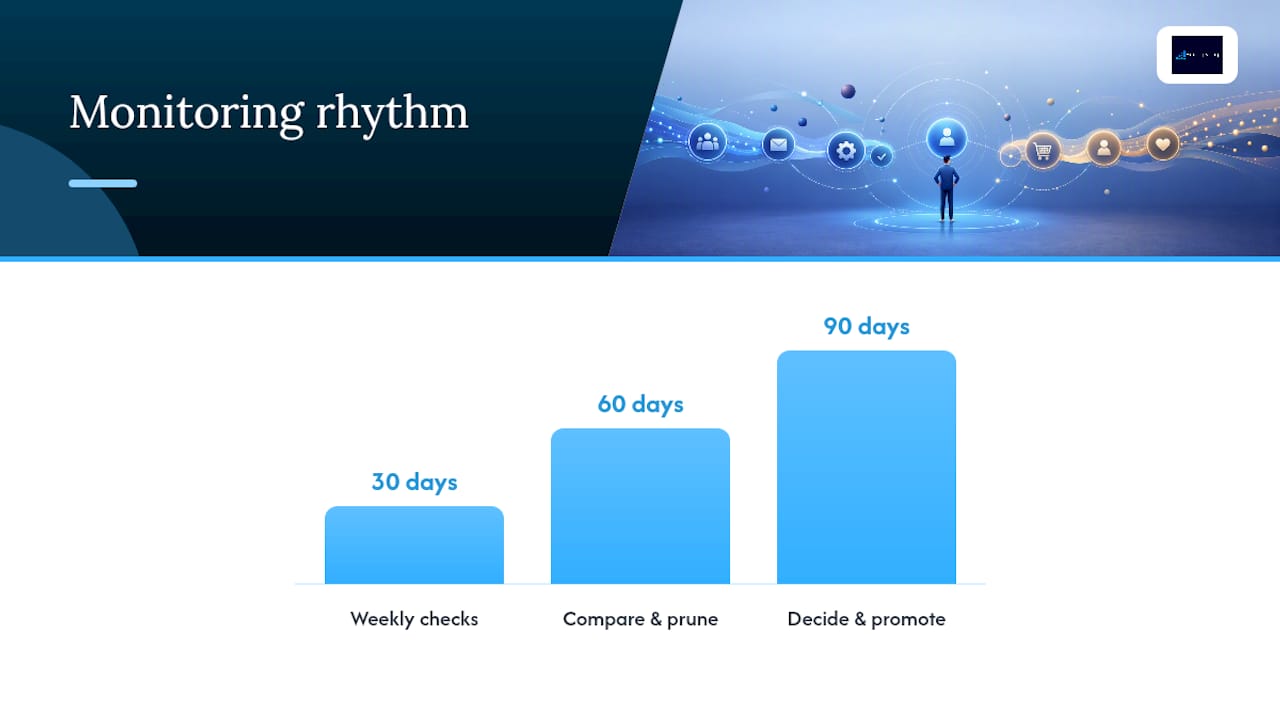
        After launch, follow a simple monitoring rhythm: at 30 days, confirm the flow is firing correctly and nothing is silently failing. At 60 days, compare performance against your baseline and prune anything underperforming. At 90 days, decide what to promote (build a second flow) and what to retire.

        How Do You Launch Your First Automation Step by Step? — overview diagram

        Why Do Small-Business Automations Break, and How Do You Fix It?

        Most automation failures aren’t technical. They’re organizational. The same operational gaps show up across small businesses again and again, and they’re almost always fixable with a governance fix rather than a new tool purchase.

        • Tool sprawl and no system of record. When your email platform, your CRM, and your spreadsheet all claim to hold “the real” customer list, automations start working off stale or conflicting data. Pick one system of record per category and route everything else through it.
        • Automating a chaotic process. If your actual sales or onboarding process changes every week, automating it just locks in the chaos and makes it harder to fix. Write the process down first, run it manually a few times, then automate the stable version.
        • Unmanaged AI review overhead. AI-drafted follow-ups and review requests still need a human checkpoint before they go out, especially in the first few weeks. Skipping that step is how a business ends up automating an apology.
        • Integration brittleness. A dropped API connection or an expired authentication token can silently kill a flow for weeks before anyone notices. Build in basic logging and an alert (even a simple email notification) that fires the moment a connection fails.

        Automaton Agency’s research on small-business automation challenges found that tool sprawl, missing systems of record, unstable processes, AI review gaps, and integration brittleness account for most of the real-world failures small teams hit, not a lack of sophisticated software.

        The fix isn’t a better tool. It’s a clearer owner. One job, one system of record, one person accountable for watching it, applied before you add a second automation, not after the first one breaks.

        Assigning a single owner to each automated job (not a committee, one person) resolves more failures than any feature upgrade. A business operating system approach, where ownership and process live in one place instead of scattered across tools, tends to prevent this category of breakage before it starts.

        What Should Small Businesses Expect to Pay, and When Does It Pay Off?

        A starter automation stack for a small business typically runs somewhere in the range of a basic email platform’s entry tier up through a mid-tier plan once you add contacts and a couple of integrations. Costs climb with contact count and send volume, not with the number of automations you’re running, so a lean two-flow setup on a larger list can cost more than an ambitious five-flow setup on a small one.

        Industry benchmarks give a useful, conservative floor for what to expect. Adaptix’s 2026 guide on marketing automation for small business points to abandoned cart recovery typically reclaiming 5 to 15% of otherwise-lost carts, with well-built welcome sequences driving noticeably higher open and click rates than one-off blast emails, along with faster time-to-first-purchase.

        To calculate your own return, keep it simple:

        • Estimate the revenue recovered by your cart or inquiry flow over a month (recovered carts times your average order value).
        • Subtract your monthly tool cost and any setup time valued at your hourly rate.
        • Track this monthly for the first quarter before drawing conclusions. One good week doesn’t prove a flow works.

        Once you’re consistently converting well enough that the per-contact cost of a paid tier is clearly smaller than the revenue it generates, or once your list has outgrown a free tier’s limits, that’s your signal to upgrade. The same applies to hiring outside help: if your team is spending more hours fighting broken integrations than the flows are worth, it’s time to bring in support rather than absorb the ongoing drag.

        How Do You Protect Customer Data in Your Automation Setup?

        Every automation you build runs on customer data, names, emails, purchase history, sometimes payment details, which means privacy and security decisions belong in your setup checklist, not as an afterthought.

        Start with the basics: use a platform that offers two-factor authentication for anyone with admin access, and limit who on your team actually has that access. Not every employee needs to see your full contact list to send one campaign.

        Check where your data physically lives and whether your provider publishes clear terms on how it’s stored, backed up, and deleted on request, especially if you serve customers in states or countries with their own data protection rules. If you collect any health, financial, or other sensitive information through your automation flows, confirm your provider’s compliance posture explicitly rather than assuming a generic tool covers it.

        Consent matters as much as security. Make sure every contact in an automated flow opted in through a clear, documented action, not a purchased list or a scraped directory. Automated unsubscribe handling isn’t optional. It’s what keeps your recovery and nurture flows legally sound and keeps your sender reputation intact.

        What Have We Learned Building Automations for Small Businesses?

        The businesses that get automation right almost never start with the fanciest tool. They start with a clear process. We’ve watched a service business fix a leaky lead-nurture flow simply by writing down its sales steps before automating anything, and the flow finally converted once the chaos underneath it was cleaned up. We’ve watched another consolidate four disconnected tools into one system of record and immediately stop losing leads to duplicate records. And we’ve seen content debt kill more launches than any software bug ever has: teams wire up a beautiful automation, then realize they never wrote email three.

        Two rules hold up every time: one job gets one owner, and no automation goes live until its content is fully written. A third rule matters increasingly as AI drafts more of that content: build a human review checkpoint into every AI-assisted flow before it reaches a customer’s inbox.

        If you’re weighing whether to build this yourself or bring in help, a free analysis is the fastest way to find out which flows will actually move your numbers.

        Frequently Asked Questions

        How many automations should a small business start with?

        Two: a welcome sequence for new contacts and one revenue-recovery flow, such as review requests or cart recovery. Prove those convert before you build a third.

        Do I need expensive business automation software to start?

        No. A no-code connector plus the email platform you already pay for is enough to prove a flow works. Move to a direct integration once a flow carries real revenue.

        How long before marketing automation pays for itself?

        Most small businesses see the first returns within two to six weeks on welcome and recovery flows, because both work on traffic you already have.

        Sources

        For readers who want to go deeper on any single piece of this roadmap, these are worth a closer read:

        Share This Article

        Found this useful? Send it to another owner who is still juggling a dozen half-built automations.

        Share on Facebook · Share on X · Share on LinkedIn · Share on Pinterest

        Want More Information? Let’s Talk.

        If you would rather not take this on yourself, we handle it for you. Our Business OS (uBOS) service takes care of the setup and the ongoing work, then reports back so you can see exactly what changed. You keep running your business; we keep this moving.

        Call us at 631-825-9464 or reach out here. No pressure, no obligation, and you can ask us anything — including whether this is even worth doing for a business your size.

        Looking ahead, request your free roadmap analysis and we will map out a 12-month plan to close the conversion leaky bucket so more of the customers you already reach turn into booked work.


        Written by Joe Leineke · Content on this blog is generated with AI assistance and independently reviewed and fact-checked by human marketing professionals for accuracy and quality.
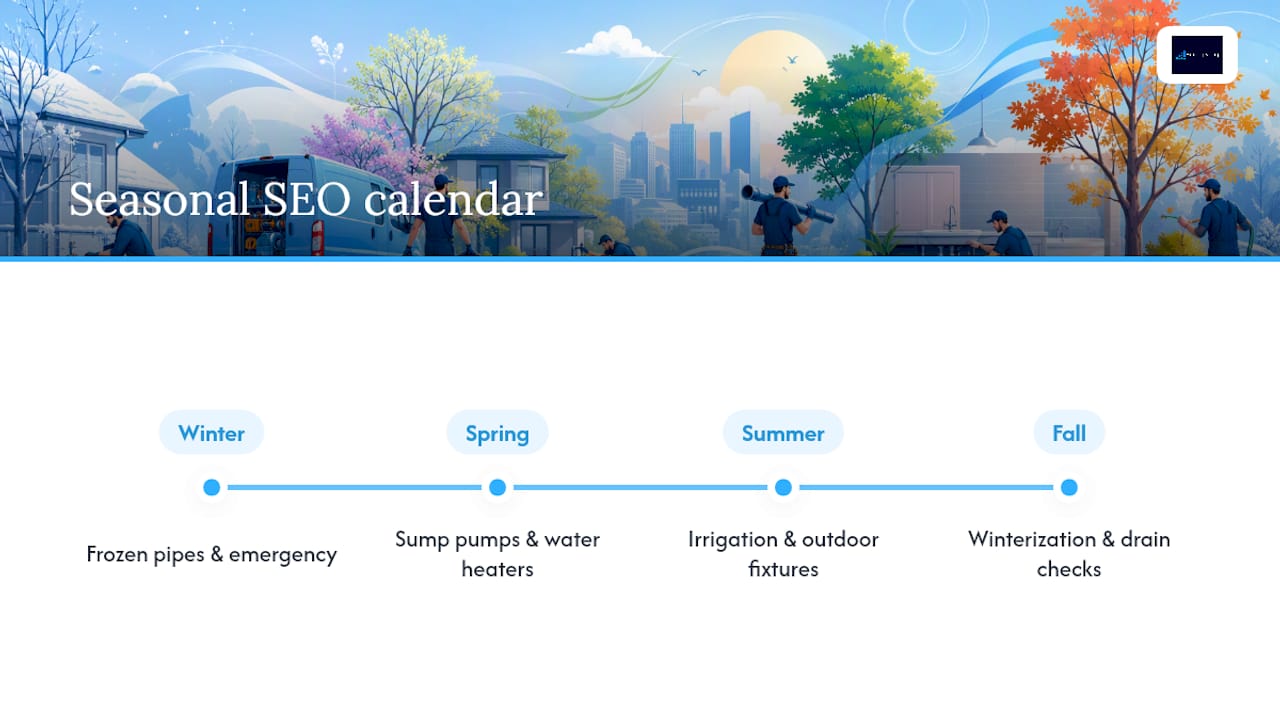
  • 2026 Google Review Policy: 3 Fixes Small Businesses Must Make

    2026 Google Review Policy: 3 Fixes Small Businesses Must Make

    Decorative Google review policy title card

    Incentivized reviews, review gating, in-store kiosks, and asking customers to name staff members by name are all prohibited under Google’s review policy, and enforcement tightened again in 2026. What remains fully allowed is asking every customer for honest feedback through the same public review link. Google now pairs stricter automated detection with real profile consequences, and the FTC adds separate legal exposure for businesses that manufacture or suppress reviews.


    TL;DR:

  • Soliciting reviews by asking customers to mention staff names or using in-store kiosks from shared devices is now explicitly prohibited and actively detected.
  • Incentivizing reviews, gating by routing satisfied and dissatisfied customers differently, and using scripted requests before customers leave are considered violations subject to removal and sanctions.
  • Moving review requests off-premises via email, SMS, or receipts and ensuring all customers receive the same public review link helps maintain compliance.
  • Google’s enforcement relies on pattern detection of device, IP clustering, and review volume spikes, with profile suspension possible after repeated violations.
  • Businesses should routinely audit their review process, disable sentiment-based routing, and immediately remove scripts or incentives that may trigger violations.

  • What Changed in Google’s 2026 Review Policy Update

    Google’s review rules didn’t rewrite the rulebook in 2026. It closed the loopholes businesses had been using for years. Practices that were technically gray before are now named violations, and enforcement caught up to match.

    Three changes matter most for day-to-day review collection:

    • Staff-name solicitation is now an explicit ban. Scripts asking customers to “mention Sarah at the front desk” in their review are flagged as manipulation, not personalization.
    • On-premises kiosks and shared devices are named violations. A tablet at checkout prompting reviews on the spot creates patterns Google’s systems now catch: same device, same IP, clustered timestamps.
    • Review gating enforcement got teeth. Routing happy customers to Google and unhappy ones to a private form was always against the rules, but 2026 brought active detection and removal at scale.

    The enforcement engine behind these changes leans on machine learning models that watch for device and IP clustering, sudden volume spikes, and repetitive language patterns across supposedly unrelated reviewers. Industry coverage of the update confirms these bans were added explicitly rather than inferred from older language, which means businesses can no longer argue a practice was “not technically prohibited.”

    For everyday review collection, this closes the gap between what businesses assumed was a gray area and what Google now treats as a clear violation. If your current workflow touches any of these three areas, it needs a rebuild, not a tweak.

    What Google Explicitly Prohibits (Detailed Breakdown)

    Google’s contribution policy draws a hard line around anything that manufactures or filters reviews instead of collecting them honestly. Four categories cause the most violations among small businesses.

    Incentivized reviews. Offering a discount, a free item, loyalty points, or a refund in exchange for a review, or for removing or editing one, breaks policy regardless of how small the incentive is. Google doesn’t grade incentives by dollar value. A $5 gift card and a $500 credit carry the same violation risk.

    Review gating and sentiment-based routing. Any system that sends satisfied customers to the public review link while diverting unhappy ones to a private survey counts as gating. So does a staff quota tied to review volume, since it pressures employees to filter who gets asked. According to analysis of the 2026 gating crackdown, the flow itself defines the violation, not the wording of the initial question.

    • Sentiment-based branching in third-party feedback tools
    • Staff bonuses or quotas tied to review count
    • “Would you recommend us?” gates that hide the public link from anyone who answers no

    On-premises pressure. Kiosks, shared tablets, and scripted requests that name specific staff members all fall under the same ban. So does asking customers to leave a review before they’ve left the building, a tactic that Google’s clustering detection now flags reliably.

    Coordinated posting and device manipulation. Reviews from employees, family members, or contractors, especially when posted from the same network or device, get caught by the same clustering signals used against gating.

    Pro Tip: Run a quick self-audit by asking one question: does every customer, regardless of how the interaction went, get the same public review link? If the answer is no, you have a gating problem before you have a review problem.

    What You Can Safely Do to Collect Reviews

    Compliant review collection isn’t complicated. It just requires treating every customer the same way, regardless of how the visit went.

    1. Ask everyone, using the same public link. No branching, no pre-screening, no “how was your experience” gate before the review request. Every customer gets identical access.
    2. Move requests off-premises. Email, SMS, printed receipts, a website page, or a QR code sent after the visit all outperform in-store kiosks, and they avoid the shared-device clustering problem entirely.
    3. Let AI help with drafting, not authorship. A tool can help a customer overcome the blank-page problem, but the customer has to write, edit, and approve the final version before it posts. Guidance from BrightLocal treats this distinction as the difference between assistance and manufacturing.
    4. Time the request for right after value delivery. A request sent within a day or two of service completion, while the experience is fresh, converts better than one sent weeks later.
    5. The timing and channel matter more than most business owners assume. A comparison of compliant review strategies found that transparent, universal requests tend to produce more reviews over time than gated systems, simply because customers trust a process that clearly doesn’t filter them.

      Pro Tip: If your website has a dedicated contact or feedback page, embed the same public review link there that you use in email and SMS campaigns. Consistency across channels makes it obvious you’re not routing anyone differently, which matters if Google ever audits your listing.

      Placement matters too. A guide to review-link UX covers where on a site a review request converts best without feeling like a pop-up ambush.

      How Enforcement Works and the Penalties You Can Face

      Google’s enforcement runs on pattern detection, not manual spot checks. Its systems track device and IP clustering, sudden spikes in review volume, repetitive phrasing across reviews, and account histories that look manufactured rather than organic. Google’s own policy help documentation confirms that both automated models and human reviewers can remove flagged content without prior notice.

      The consequences escalate in stages:

      • Review removal. Individual reviews disappear first, often with no warning to the business.
      • Temporary restrictions or public warning banners. Repeated violations trigger visible flags on the listing itself, which customers can see.
      • Profile suspension. Persistent or egregious violations, including confirmed gating schemes, can suspend the entire Google Business Profile.

      Early warning signs are quieter than most owners expect: a gradual drop in review volume or intermittent submission errors, both signals that a listing is already under scrutiny before any public banner appears.

      Beyond Google’s own penalties, the FTC’s 2024 rule on consumer reviews and testimonials creates separate civil-penalty authority for manufacturing or suppressing reviews. Reuters reporting on the FTC’s enforcement action makes clear this isn’t a theoretical risk anymore. Losing your Google listing is bad. Facing an FTC civil penalty on top of it is worse, and they aren’t mutually exclusive.

      Practical Compliance Checklist and Audit

      A working audit doesn’t need a consultant on day one. It needs honest answers to a short list of questions, run against your actual review workflow.

      1. Does every customer see the same request, regardless of sentiment? If your feedback tool asks a screening question before revealing the public link, that’s gating.
      2. Are you using kiosks or shared tablets on-site? If yes, move the request to email or SMS instead.
      3. Do staff scripts mention names or offer anything in exchange for a review? Remove both immediately, even informally.
      4. Are review quotas tied to staff performance reviews or bonuses? Quotas create incentive to filter who gets asked, even unintentionally.
      5. Do you keep a log of review-related customer complaints or removed content? A short compliance log helps you spot patterns before Google does.
      6. Third-party review software is often the hidden culprit. Many platforms ship with sentiment-based routing turned on by default, meaning a business can be gating reviews without ever writing a line of that logic themselves. Check vendor settings and disable any feature that filters customers before they reach the public review form. Tools built around search box optimization that direct every customer to one universal link avoid this trap by design.

        Pro Tip: Screenshot your review request flow once a quarter, start to finish, exactly as a customer sees it. If you can’t explain every step to a stranger without sounding defensive, Google probably can’t either.

        An outside audit catches blind spots that internal reviews miss, particularly around vendor settings and staff scripts that have drifted from written policy. EngageZing’s review generation and reputation service is built around exactly this kind of remediation, replacing risky shortcuts with compliant flows that still grow review volume.

        How to Report a Violation and Respond to Removed Reviews

        Reporting a policy-violating review takes documentation, not guesswork. Before flagging content, gather screenshots of the review, the timestamp, and, if visible, the reviewer’s profile or account activity that suggests coordinated posting.

        • Report through the review’s flag option on your Google Business Profile, selecting the category that best matches the violation (spam, conflict of interest, fake engagement).
        • Include specifics in any follow-up support request. Vague reports get deprioritized. Screenshots and exact dates get results.
        • Appeal a removed legitimate review by providing proof of the transaction, such as a receipt or booking confirmation, showing the reviewer was a real customer.

        If your own review gets pulled and you believe it was legitimate, appeal promptly with documentation rather than repeatedly resubmitting the same request. For negative reviews that are accurate but unflattering, the better move is a short, factual public reply that avoids arguing and invites the customer to continue the conversation offline. That approach protects your listing’s reputation without giving Google any reason to flag your response as coordinated damage control.

        Why Long-Term Reputation Wins Over Short-Term Manipulation

        The businesses that get burned by review policy enforcement almost always made the same mistake: they treated reviews as a marketing lever to pull instead of a customer relationship to manage honestly. Gating feels harmless in the moment. It rarely is. It just delays the damage until an algorithm catches up to the pattern.

        What actually works is less clever than most owners expect. Ask everyone the same way, every time, and let the reviews land where they land. Businesses that do this consistently build a review history that looks organic because it is organic, and that history survives every future policy tightening Google rolls out. Shortcuts don’t age well. Honest flows do.

        Frequently Asked Questions

        Can I still ask customers for Google reviews?

        Yes. Asking every customer, the same way, with one universal link is allowed. What is prohibited is filtering, gating or pressuring who gets asked.

        Does offering a discount for a review break the rules?

        Incentivised reviews are treated as fake engagement. Offering anything of value in exchange for a review puts the listing at risk, even if every review is genuine.

        What happens if Google removes my reviews?

        You can report or appeal a removal, and you should preserve the evidence: the request flow, the timestamps and screenshots. Fix the underlying flow before appealing, because a repeat offence carries heavier penalties.

        Sources

        Share This Article

        Found this useful? Send it to another owner who is still sending review requests that could get their listing suspended.

        Share on Facebook · Share on X · Share on LinkedIn · Share on Pinterest

        Want More Information? Let’s Talk.

        If you would rather not take this on yourself, we handle it for you. Our Review Generation & Reputation service takes care of the setup and the ongoing work, then reports back so you can see exactly what changed. You keep running your business; we keep this moving.

        Call us at 631-825-9464 or reach out here. No pressure, no obligation, and you can ask us anything — including whether this is even worth doing for a business your size.

        Looking ahead, request your free roadmap analysis and we will map out a 12-month plan to close the conversion leaky bucket so more of the customers you already reach turn into booked work.


        Written by Joe Leineke · Content on this blog is generated with AI assistance and independently reviewed and fact-checked by human marketing professionals for accuracy and quality.
  • 30/60/90 Local Marketing Strategies for Small Businesses, AI Ready GBP

    30/60/90 Local Marketing Strategies for Small Businesses, AI Ready GBP

    Local marketing strategy title card

    Claim and fully optimize your Google Business Profile, build a system to collect reviews every week, and pick one paid or organic channel to test. Those three moves deliver the fastest local uplift: completed profiles get 7x more clicks, review responders earn more revenue, and a focused channel beats five half-run ones. Start with the checklist below.


    TL;DR:

  • Completing and optimizing your Google Business Profile by adding photos, accurate hours, and relevant categories can significantly increase visibility and engagement.
  • Consistently posting weekly updates and responding to reviews within 48 hours enhances local rankings and builds customer trust.
  • Building a structured review collection system that asks for feedback immediately after service results in higher review volume and revenue growth.
  • Fixing on-site issues such as NAP consistency, location pages, and mobile load speed is crucial for local search performance and AI-based answer accuracy.
  • Focusing your marketing efforts on foundational improvements before investing in paid ads yields better long-term results and a stronger local presence.

  • Your 30/60/90-Day Local Marketing Strategy Checklist

    Local marketing strategies fail most often because owners try to do everything at once and finish nothing. A staged rollout fixes that. Here’s the priority order, built around what actually moves clicks and calls first.

    Days 1 to 30 (foundation):

    1. Claim, verify, and completely fill out your Google Business Profile (GBP): hours, categories, services, attributes, and a full description. Owner: you or whoever manages your online presence. Time: 2 to 3 hours.
    2. Upload at least 10 recent photos of your location, team, and product or service. Time: 1 hour.
    3. Set up a review request system: text or email every customer within 24 hours of service. Time: 2 hours to build the template.
    4. Turn on GBP messaging so customers can text your business directly from search results.
    5. Days 31 to 60 (momentum):

      1. Post to GBP weekly with an offer, update, or photo. Sample prompt: “Highlight one service, one photo, one call to action, under 100 words.”
      2. Audit your NAP (name, address, phone) across your top 10 directory listings.
      3. Launch one paid channel test, either Local Service Ads or a small geo targeted social campaign.
      4. Days 61 to 90 (scale what works):

        1. Review your KPIs (calls, direction requests, ranking movement) and double down on whichever channel produced the lowest cost per lead.
        2. Add a location or service page to your website if you serve more than one neighborhood.
        3. Build one local partnership or event tie-in to generate reviews and a backlink.
        4. Sample review request script: “Thanks for stopping in today! If you have 30 seconds, a quick Google review helps other neighbors find us. Here’s the link: [your link].”

          Pro Tip: Do not launch all ten tasks simultaneously. Finish the GBP profile and review system first. Everything after that compounds faster once those two are solid.

          How Do You Optimize Google Business Profile for Local Search?

          Your Google Business Profile is no longer a static listing. It’s an active feed that Google’s local pack, Maps, and even AI-generated answers pull from directly. Treat it like a homepage, not a business card.

          Start with categories. A study of 1.8 million Google Business Profiles found listings with specific primary categories appeared in the top 10 results about 12.5% of the time, compared to just 9.2% for businesses using generic categories. If you run a bakery that specializes in wedding cakes, “Bakery” is fine as a primary category, but “Wedding Bakery” or “Custom Cake Shop” as an additional category signals exactly what you do to both searchers and Google’s ranking systems.

          Every field matters, and most businesses leave half of them blank:

          • Categories: one specific primary category, plus 2 to 3 relevant additional categories.
          • Hours: including special hours for holidays, which prevents lost visits from customers who show up to a locked door.
          • Services and products: listed individually, not bundled into a generic description.
          • Photos: at least 10 to start, refreshed monthly, covering your storefront, team, and work in progress.
          • Q&A section: seed it yourself with the 5 questions customers ask most.
          • Business description: a full paragraph using natural language about what you do and who you serve.
          • Photo volume and posting frequency aren’t cosmetic details. Aggregated 2026 GBP data shows weekly posts drive roughly 28% more clicks than dormant profiles, and photo-heavy listings see meaningfully higher call and direction request rates than sparse ones. A profile with 5 photos and no posts since last spring is invisible next to a competitor posting weekly.

            This activity feeds more than human searchers now. Google’s AI systems increasingly pull GBP fields directly into AI Overviews, which means a thin description or an empty Q&A section is a missed chance to be the source AI cites when someone asks “best plumber near me” through a voice assistant or chat interface.

            Business data flowing into AI answers

            Set a maintenance cadence: update photos monthly, post weekly, and respond to every review and question within 48 hours. Businesses that treat GBP like a subscription service update it more, and Google notices.

            Google Business Profile maintenance timeline

            What’s the Best System for Collecting and Responding to Reviews?

            Reviews aren’t a nice-to-have side effect of good service. They’re one of the strongest ranking and conversion signals a small business controls directly, and the businesses that win locally treat review collection as a weekly task, not an occasional afterthought.

            Timing beats everything else. Ask at the moment of highest satisfaction: right after checkout, right after service completion, or on the receipt itself with a QR code. A text sent the same day converts far better than an email sent a week later, because the experience is still fresh.

            • In-store: print a QR code linking straight to your review page, placed at the register.
            • Post-service: send a text within 2 hours: “Thanks for choosing us today! Mind leaving a quick review? [link]”
            • Follow-up email: for service businesses, send a second nudge 3 days later if no review has posted.
            • Response templates: thank positive reviewers by name and mention a specific detail; for negative reviews, acknowledge the issue, apologize once, and move the conversation offline.
            • Respond fast. Businesses that reply to at least 25% of their reviews earn an average of 35% more revenue than those that ignore feedback, and replies within 24 hours correlate with stronger overall ratings over time. Set a target of 15 to 20 new reviews per month if you’re a service business with regular repeat customers, and aim for a mix of star ratings that reads as authentic rather than suspiciously perfect.

              Manual tracking works for a while, but most owners lose the thread after the first busy month. A review generation system that automates the ask and flags responses due can keep the cadence consistent without you remembering to do it every day.

              Pro Tip: Never offer a discount in exchange for a review. It violates most review platform policies and can get reviews removed in bulk, which sets you back further than never asking at all.

              How Do You Fix On-Site Local SEO Issues?

              Your website still matters, even with GBP carrying more weight than it used to. The three biggest on-site problems for local businesses are inconsistent contact information, missing location pages, and slow mobile load times.

              NAP consistency means your business Name, Address, and Phone number match exactly, character for character, everywhere they appear online. Audit your top 10 to 15 directory listings, including Yelp, Apple Maps, Bing Places, and industry-specific directories, and fix any mismatch. “Street” versus “St.” or a disconnected old phone number confuses both customers and Google’s local algorithms, which weigh proximity and consistency heavily.

              If you serve more than one neighborhood or city, build a dedicated page for each, rather than relying on one generic “service area” list. Each location page should include:

              • The neighborhood or city name in the page title and first paragraph, written naturally.
              • Local landmarks or neighborhood references that show real geographic relevance.
              • Customer photos or reviews specific to that location, where available.
              • A clear call to action, phone number, and embedded map.
              • Three to five FAQs that address that specific area’s common questions.
              • Add LocalBusiness schema markup to your homepage and every location page. This structured data tells search engines your hours, address, price range, and service area in a format machines parse instantly, rather than guessing from unstructured text. Most website platforms support a schema plugin, or a developer can add the JSON-LD snippet directly to your site’s header.

                Mobile speed is not optional. Local searches happen overwhelmingly on phones, often while someone is standing outside deciding whether to walk in. If your site takes more than 3 seconds to load on a phone connection, you’re losing visitors before they see your hours. Compress images, remove unused plugins, and test with Google’s PageSpeed Insights monthly. A website built for conversions and speed closes this gap without a full rebuild.

                What Kind of Local Content and Social Posts Actually Work?

                Generic social posts get scrolled past. Hyperlocal content, the kind that mentions a specific street, event, or neighborhood detail, earns attention because it signals you’re actually part of the community, not broadcasting from a corporate template.

                Blog posts that pair a neighborhood name with a service query perform reliably: “Best HVAC Repair in [Neighborhood]” or “[Neighborhood] Homeowners: What to Know Before Hiring a Roofer.” Keep them under 800 words, answer the question in the first two sentences, and include a real photo from that area if you have one.

                Short-form video is worth the effort even on a small budget:

                • Shot list: one 15 second clip of your storefront or team, one 20 second clip showing a service in action, one customer testimonial if you have permission.
                • Captions matter more than production quality; most viewers watch muted.
                • Repurpose the same clip across GBP posts, Instagram Reels, and Facebook, cutting production time by two-thirds.
                • Community platforms like Nextdoor and local Facebook groups reward genuine participation over promotion. Answer a neighbor’s question about a local service issue before you ever mention your business, and when you do post an offer, frame it as news for the group rather than an ad.

                  Email and text still work for retention. A monthly local promotion, a birthday discount, or a “we noticed it’s been six months” reminder keeps existing customers coming back, and a simple on-site messaging and newsletter tool can automate the follow-up without extra staff time.

                  How Should Small Businesses Start With Local Paid Ads?

                  Paid ads work best as a small, measured test, not a full budget commitment on day one. The channel you choose depends on what you’re selling and how customers search for it.

                  • Local Service Ads (LSAs) fit home service businesses (plumbers, electricians, cleaners) where customers want to call immediately; Google vets and badges you, and you pay per lead, not per click.
                  • Search ads with radius targeting work for retail or restaurants where customers search by intent plus location; set a 5 to 10-mile radius around your storefront.
                  • Geo-targeted social ads work well for visual businesses, salons, boutiques, or anything with strong before-and-after appeal.
                  • Start with a daily budget of $15 to $30 for search or social, or let LSAs run on a pay-per-lead model with a monthly cap you set yourself. Expect a wide range in your first month, often 5 to 20 leads depending on your industry and area, and calculate your target cost per lead by dividing spend by leads generated, then compare that to your average customer value. Split-test two landing pages, one focused on a phone call, one on a form, and track which source actually converts through call tracking or UTM parameters. A Local Service Ads setup removes much of the guesswork on the ad platform side.

                    How Do Community Partnerships and Events Build Local Visibility?

                    Sponsorships and local events do double duty: they generate real foot traffic and they create backlinks and user content that pure digital tactics can’t replicate on their own.

                    Approach a school, sports league, or community nonprofit with a specific offer, a cash sponsorship or product donation, rather than a vague “let us know how we can help.” Ask directly for a link on their sponsors page and a mention in their newsletter, which most organizations are happy to provide.

                    • Sponsor one local event per quarter and request a website link and social tag in return.
                    • At events, set up a simple review request station: a tablet or QR code, plus a small giveaway for anyone who leaves feedback on the spot.
                    • Pitch your local newspaper or community blog on the event tie-in before it happens; local press loves a business supporting the neighborhood.
                    • Photos and mentions from these events feed directly back into your GBP posts and social content, closing the loop between offline presence and online visibility.

                      How Do You Measure Local Marketing Results on a Small Budget?

                      Measurement doesn’t need a dashboard full of vanity metrics. Track four numbers: GBP actions (calls, direction requests, website clicks), phone calls, organic ranking movement for your top 10 keywords, and cost per lead on any paid channel.

                      1. Month 1: baseline everything. Note your current GBP actions, review count, and ranking positions before changing anything.
                      2. Month 2: measure lift from GBP optimization and the review system; expect early movement in profile actions before ranking shifts.
                      3. Month 3: evaluate your paid test’s cost per lead against your target, then decide whether to scale, pause, or swap channels.
                      4. The SBA recommends documenting your marketing plan formally, and it’s good advice: businesses with a written plan spend less on tactics that don’t work because they check results on a schedule instead of guessing.

                        For budget, a widely used baseline is 7 to 12% of revenue allocated to marketing overall. A business allocating a reasonable percentage of its annual revenue might set aside a moderate marketing budget, split across GBP management, review tools, website upkeep, and paid tests. Reallocate after month 3 toward whatever channel produced your lowest cost per lead, and cut whatever produced the highest.

                        How Do You Optimize for AI Overviews and Answer Engines?

                        Google’s AI increasingly builds its answers directly from your Google Business Profile fields, which means the businesses that get cited in AI-generated results are the ones feeding it clear, factual, sourceable content.

                        Write your GBP description and website FAQs as micro-answers: a direct sentence answering a specific question, followed by supporting detail. “We offer same-day emergency plumbing repairs in [area], with a 90-minute average response time” reads as a fact an AI system can lift and cite, while a vague marketing paragraph does not.

                        • Keep your services list current and specific, not bundled into one line.
                        • Update your GBP description whenever your offerings change; stale listings get pulled less often.
                        • Add a structured FAQ section to your website answering the exact questions customers type into search.
                        • Test your visibility by asking an AI assistant a question a customer might ask about your service and area, then check whether your business shows up.
                        • A business listings and voice search setup that keeps these fields current across platforms gives you a better shot at being the answer, not just a link below it.

                          What I’d Prioritize First on a Tight Budget

                          Most small business owners overcorrect in one of two directions: they either spend on ads before their GBP profile is even complete, or they spend months perfecting a website nobody local is searching for yet. Both waste money. The businesses that see real movement fix the free, foundational pieces first, profile completeness and reviews, then spend on paid channels only once those signals are strong enough to make the ad dollars work harder.

                          The local account management approach addresses this exact sequencing problem, because most owners don’t have the hours to run all of it themselves while also running the business.

                          Sources

                          • 10 Local Marketing Strategies That Work – SBA
                          • What 1.8 million Google Business Profiles tell us about local SEO success | Search Engine Land
                          • Your Google Business Profile is now an AI feed | Forbes
                          • Frequently Asked Questions

                            How much should a small business spend on local marketing each month?

                            It depends on your market and how competitive it is, but most local businesses get more from a smaller, sequenced budget than a large scattershot one. Start with the free work (profile, reviews, citations, on-site basics), then put paid budget behind the offers that already convert.

                            What should a local business do first with a limited budget?

                            Fix the Google Business Profile and start a review request routine. Those two cost time rather than money and they influence the map results more than anything else you can buy at this stage.

                            How long before local marketing shows results?

                            Profile and review changes can move map visibility within weeks. Content, citations and community work compound over three to six months. Paid ads can produce calls immediately, but only once the landing page and tracking are sound.

                            Does social media help local rankings?

                            Not directly. It builds the brand signals and repeat traffic that support rankings, and it keeps you visible to past customers who search your name later. Treat it as a multiplier on a foundation that already works.

                            Share This Article

                            Found this useful? Send it to another owner who is still spreading a small budget across everything at once.

                            Share on Facebook · Share on X · Share on LinkedIn · Share on Pinterest

                            Want More Information? Let’s Talk.

                            If you would rather not take this on yourself, we handle it for you. Our Near-Me Search Boost service takes care of the setup and the ongoing work, then reports back so you can see exactly what changed. You keep running your business; we keep this moving.

                            Call us at 631-825-9464 or reach out here. No pressure, no obligation, and you can ask us anything, including whether this is even worth doing for a business your size.

                            Looking ahead, request your free roadmap analysis and we will map out a 12-month plan so more of the customers you already reach turn into booked work.


                            Written by Joe Leineke · Content on this blog is generated with AI assistance and independently reviewed and fact-checked by human marketing professionals for accuracy and quality.
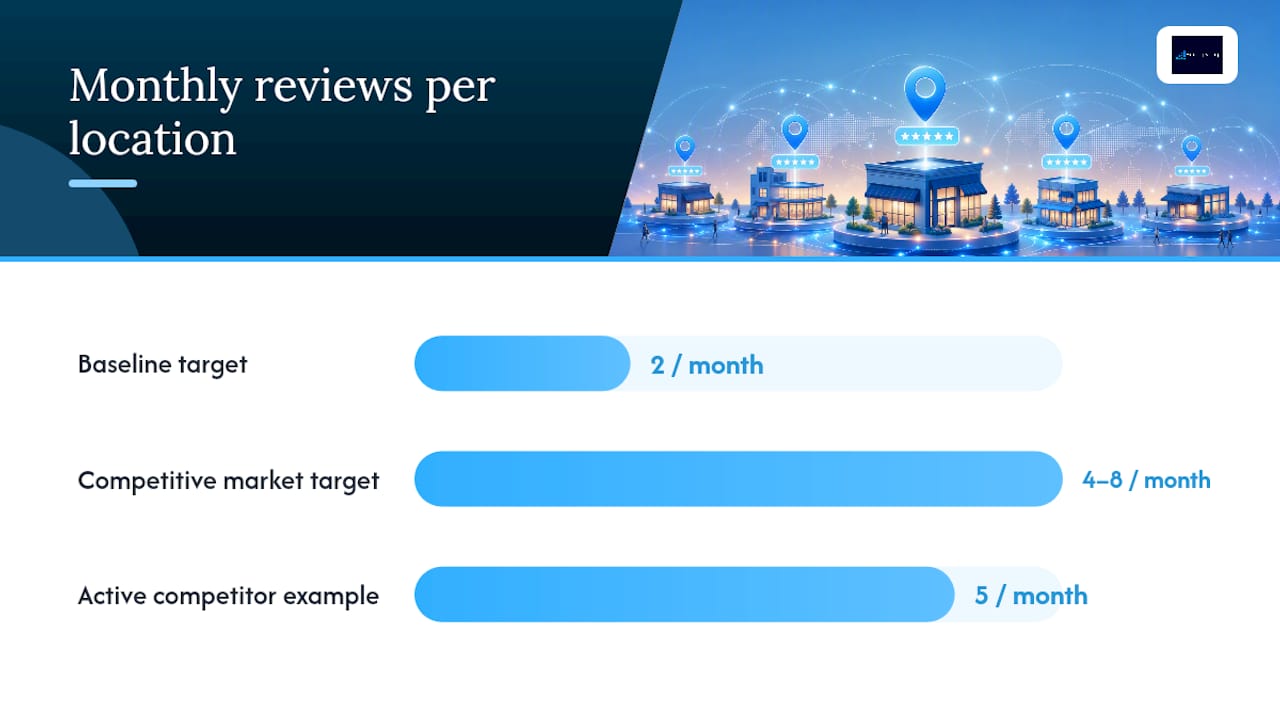
  • Fix Apple Business Connect Listings in Under an Hour for US Small Businesses

    Fix Apple Business Connect Listings in Under an Hour for US Small Businesses

    Apple Business listing migration title card

    Apple Business Connect has been folded into the unified Apple Business platform, and every listing feature you used before still works the same way under the new name. Your first move is to sign in and confirm your claimed locations and verification status. The service is still free, and Apple carried over most of your existing data automatically, but you should not assume that nothing needs your attention.


    TL;DR:

  • Verify that your claimed business category and posted hours are accurate and up-to-date to prevent customer confusion or lost sales.
  • Use a strong, specific category and regularly update your showcase promotions and action links to maximize customer engagement.
  • Prepare all necessary verification documents beforehand and choose the quickest method, such as phone verification, to avoid delays.
  • For multiple locations, consider agency support to ensure consistent listings, fast verification, and ongoing management across all sites.
  • Prioritize claiming your Apple Business listing promptly, as it requires minimal effort and offers high marketing returns, especially when combined with other local profiles.

  • What Changed With the Apple Business Connect Migration?

    Apple announced its consolidated Apple Business platform in March 2026, merging Apple Business Connect, Apple Business Manager, and Apple Business Essentials into one dashboard. The stated goal was simple: stop making owners juggle separate consoles for device management and place-card editing when both live under the same business account.

    If you had an active Business Connect listing, your claimed locations, place card content, uploaded photos, and account settings all migrated automatically. Nothing forced you to rebuild from scratch.

    That said, migrations rarely land perfectly for every account. Once you’re in, check three things first: your business category, your posted hours, and whether your action links still point where they should. A stale link or wrong category is an easy fix now and a lost customer later.

    What Can You Edit on Your Apple Business Listing?

    Your place card is the core unit of your Apple Business presence, and it’s worth treating each field as a small piece of your storefront rather than an afterthought.

    • Basic info (NAP): your business name, address, and phone number, plus hours, a short description, and your website link.
    • Showcases: timed promotional cards for sales, seasonal hours, or new offerings, useful for anything with a start and end date.
    • Custom Action Links: buttons like Book, Order, Reserve, or Shop that let customers take action straight from Apple Maps, Siri results, or Messages without visiting your site first.
    • Media: your logo, a cover image, and a photo gallery that shows your storefront, product, or team.

    Action Links deserve extra attention. Apple’s own feature description frames them as conversion tools, not decoration, and an underused booking link can shorten the path from search to sale more than most owners expect.

    How Do You Claim and Verify an Apple Business Listing?

    Setting up or verifying a listing takes under an hour for most single-location businesses. Here’s the sequence:

    1. Sign in with your Apple ID at the Apple Business portal, then go to Brands > Locations.
    2. Search for your business. If it already exists, claim it. If not, add it as a new place with accurate name, address, and category.
    3. Choose a verification method. Apple Support outlines phone or document verification, and some accounts qualify for DNS or App Store Connect verification instead.
    4. Complete phone verification if offered. According to hands-on reporting from MacObserver, this step is often instant.
    5. Upload documents if phone verification isn’t available. Expect up to roughly five business days for review.
    6. Prepare your assets beforehand: a government-issued business registration document, your logo file, cover photo, and a list of accurate hours including holidays.
    7. Run post-verification checks: confirm your category, re-check your action links, and preview how your place card actually renders in Apple Maps.
    8. Have your documents ready before you start. Verification stalls more often from missing paperwork than from any technical problem on Apple’s end.

      What Are the Best Apple Business Optimization Practices?

      A completed, accurate listing beats a perfect one you never finish. Prioritize these:

      • Match your NAP everywhere. Your name, address, and phone number should read identically across Google, Bing, and Apple Business, since mismatches can confuse both customers and search indexing.
      • Pick the most specific category available, not the broadest one, and keep hours current, including holiday hours.
      • Upload a clean logo, a wide cover photo, and a small gallery, favoring images at least 1024 pixels on the longest side.
      • Add and test one relevant Action Link and click it yourself to confirm it lands where you intend.
      • Refresh your Showcase seasonally instead of leaving a stale promotion running for months.

      Pro Tip: Set a recurring 15-minute quarterly reminder to review your listing. Businesses that touch their profile regularly tend to catch broken links and outdated hours before customers do.

      If you run a website with structured data, keeping your LocalBusiness schema helps avoid the kind of conflicting signals that can confuse local search results.

      How Do You Fix Verification Delays or Duplicate Listings?

      If phone verification fails, switch to document upload and plan for up to five business days rather than resubmitting repeatedly. For a location already managed by another person or organization, use the Request Transfer option and attach proof of ownership, like a utility bill or business license, rather than trying to claim it fresh.

      Duplicate or incorrect place cards should be reported directly through Apple Business support, not left for the next automatic sync. Escalate to support when a fix affects live customer-facing information, like a wrong phone number, and wait out routine cosmetic issues that tend to resolve on their own.

      How Do You Fix Verification Delays or Duplicate Listings? — overview diagram

      How Does Agency Support Help Manage Apple Business Listings?

      Handling one Apple Business listing is manageable solo. Managing ten, thirty, or a hundred locations with consistent categories, fresh Showcases, and working action links is a different job entirely.

      A digital marketing agency can support business owners through claim and verification, image and Showcase creation, action-link integration, and multi-location governance, with ongoing monitoring so listings don’t quietly drift out of date. The practical outcome is faster verification turnaround, consistent listing accuracy across every location, and stronger near-me visibility that turns into more bookings and orders.

      How Does Agency Support Help Manage Apple Business Listings? — overview diagram

      Should Small Businesses Prioritize Apple Business Now?

      Claiming and finishing your Apple Business listing is one of the highest-return, lowest-effort tasks on your marketing list. It costs nothing and takes less time than a single ad campaign setup.

      If you’re stretched thin, claim Google first, but don’t let Apple sit for months. Set a quarterly reminder to check your photos, hours, and action links.

      Frequently Asked Questions

      Is Apple Business Connect still free?

      Yes. Claiming and editing your place card costs nothing. The platform was renamed and merged into Apple Business, but the listing features work the same way.

      How long does Apple verification take?

      Phone verification is often instant. If you have to upload documents instead, plan for up to five business days, and do not resubmit repeatedly while you wait.

      What if someone else already manages my listing?

      Use the Request Transfer option and attach proof of ownership, such as a utility bill or business license, rather than trying to claim the location fresh.

      Sources

      Share This Article

      Found this useful? Send it to another owner who is still invisible or duplicated on Apple Maps.

      Share on Facebook · Share on X · Share on LinkedIn · Share on Pinterest

      Want More Information? Let’s Talk.

      If you would rather not take this on yourself, we handle it for you. Our Business Listings & Voice Search service takes care of the setup and the ongoing work, then reports back so you can see exactly what changed. You keep running your business; we keep this moving.

      Call us at 631-825-9464 or reach out here. No pressure, no obligation, and you can ask us anything — including whether this is even worth doing for a business your size.

      Looking ahead, request your free roadmap analysis and we will map out a 12-month plan to close the conversion leaky bucket so more of the customers you already reach turn into booked work.


      Written by Joe Leineke · Content on this blog is generated with AI assistance and independently reviewed and fact-checked by human marketing professionals for accuracy and quality.
  • Stop Guessing: Pick PPC or SEO by Business Stage and Runway

    Stop Guessing: Pick PPC or SEO by Business Stage and Runway

    Decorative PPC and SEO title card illustration

    Pick PPC when you need leads or sales within weeks and have budget to spend on clicks; pick SEO when you can invest six to 24 months building organic visibility that keeps paying off after you stop spending. Most businesses eventually need both, but if you’re starting today with limited runway, run PPC first to generate revenue and validate what actually converts, then reinvest in SEO once you know what’s working.


    TL;DR:

  • PPC provides immediate traffic and conversions but requires ongoing spend, making it ideal for short-term revenue and testing messaging.
  • SEO builds long-lasting organic rankings that compound over time and can reduce marginal costs, but it takes six to 12 months to see significant results.
  • Combining PPC and SEO strategies using shared keyword data and attribution improves overall visibility and conversion efficiency more than using either channel alone.
  • Start with PPC if you need rapid results within 90 days, then reinvest in SEO to establish sustainable, persistent traffic.
  • Continuously monitor market signals such as rising CPCs or drops in organic traffic to rebalance your focus between paid and organic channels.

  • PPC vs. SEO at a Glance: The Core Differences

    The fastest way to understand paid search vs. SEO is to look at how each one behaves over time, not just what it costs.

    PPC (pay-per-click advertising through platforms like Google Ads) puts your business at the top of search results the moment your campaign goes live. SEO (search engine optimization) earns that same position gradually, through content, technical fixes, and links, without paying for each click. Google’s own guidance is blunt about the boundary between them: running ads does not improve your organic rankings, and stopping your ads does not hurt them either. The two systems operate independently, even when they show up on the same results page.

    Here’s how the core mechanics stack up:

    • Speed: PPC generates traffic within hours of launch. SEO typically needs three to six months before you see meaningful movement.
    • Cost model: PPC charges per click or impression, so cost scales directly with volume. SEO has upfront labor and content costs but no per visitor charge.
    • Durability: PPC traffic stops the moment you stop paying. SEO rankings persist and often compound as pages accumulate authority.
    • Targeting granularity: PPC lets you target by device, location, time of day, and audience segment almost instantly. SEO targeting is shaped by content and site structure, which changes more slowly.
    • Measurability: PPC gives near real-time conversion data. SEO results take longer to attribute cleanly, especially with multi-session buyer journeys.

    One wrinkle worth flagging: AI-generated summaries and answer boxes now sit above traditional organic listings for many informational queries, which can shrink the clicks available even to a first-place organic result. That shift matters most for research-stage keywords. It matters less for high-intent, transactional searches where users still want to click through to compare options.

    If you only have time for one takeaway, it’s this: choose PPC when speed is the constraint, choose SEO when durability is the constraint, and revisit the choice as your business changes.

    What Are the Pros and Cons of SEO vs. PPC?

    Neither channel is universally better. Each one solves a different problem, and the right pick depends on what you can’t afford to wait for.

    SEO benefits:

    1. Traffic compounds over time. A blog post or service page ranking well in month 14 can still be driving leads in month 30 without added spend.
    2. Marginal cost per visitor drops as pages mature, unlike PPC where every click carries a fresh charge.
    3. Organic rankings build trust; many buyers still perceive an organic listing as more credible than a paid ad.
    4. Strong organic content increasingly feeds AI-generated answers and citations, giving well-optimized sites visibility inside those summaries too.
    5. SEO drawbacks:

      1. The ramp is slow. Expect limited results for the first three to six months, sometimes longer in competitive categories.
      2. Algorithm updates can shift rankings overnight, sometimes erasing months of progress.
      3. It demands sustained investment in content, technical maintenance, and links, not a one-time project.
      4. PPC advantages:

        1. Visibility is immediate. Launch a campaign today, and you can have clicks and conversions by tomorrow.
        2. Targeting precision lets you reach specific audiences, locations, and devices without waiting for content to rank.
        3. You can test messaging, offers, and landing pages in days rather than months.
        4. Spend scales predictably. Want more leads next month? Increase budget.
        5. PPC disadvantages:

          1. Traffic disappears the moment budget runs out; there’s no equity carried forward.
          2. Cost-per-click tends to rise in competitive verticals as more advertisers bid on the same terms.
          3. Ongoing spend is required indefinitely to sustain volume.
          4. A cash-strapped startup with three months of runway usually needs PPC’s immediacy. A seasonal retailer promoting a two-week sale often gets more from a short PPC burst than from SEO, which won’t rank in time. A business selling a high-lifetime-value service, like a home renovation contractor, can justify a slower SEO build because each customer is worth pursuing patiently. A product launch frequently benefits from both: PPC to generate initial buzz and data, SEO to sustain visibility after the launch budget dries up.

            How Do You Compare the Cost and ROI of Each Channel?

            Comparing SEO and PPC economics fairly means resisting the urge to judge them on the same timeline.

            PPC cost is transparent and immediate: you pay per click, and that cost shows up on your invoice within the billing cycle. SEO cost is upfront and diffuse. You’re paying for content creation, technical work, and possibly outside help, and that investment needs to be spread across 12 to 36 months to see the true cost per acquired customer. Treating a $5,000 SEO project as a one-month expense wildly understates its long-term return, the same way treating one month of PPC spend as your total advertising cost ignores that the spend never stops.

            A simple way to model this: divide total channel investment by the number of customers it produced over the same window, then compare that figure against average customer lifetime value. Run this for PPC over a 90-day window and for SEO over a 12-month window, and you get a much more honest comparison than lining up last month’s numbers side by side.

            That’s where blended KPIs matter more than channel-specific ones:

            • Blended CAC: total marketing spend divided by total new customers, regardless of channel.
            • Revenue per search: total revenue divided by total branded and non-branded search volume, a useful proxy for overall search visibility health.
            • Assisted conversions: conversions where SEO or PPC played a supporting role earlier in the journey, even if another channel closed the sale.

            Last-click attribution systematically undercounts SEO’s contribution, since organic touches frequently happen early in a buyer’s research before a paid ad or direct visit closes the deal. Search Engine Journal’s guidance on treating paid and organic as complementary channels is built on this exact insight: sharing keyword and performance data between the two prevents duplicated spend and reveals a coordination lift that last-click reporting hides. Backlinko has documented that a combined paid and organic presence increases total click-through rate beyond what either channel achieves alone, which is a strong argument for tracking them together rather than in isolation.

            How Long Does It Take to See Results From PPC or SEO?

            Timelines are where most budget conversations go wrong, because PPC and SEO operate on fundamentally different clocks.

            PPC timeline: Campaigns typically show early signals, click-through rate, cost per click, initial conversion rate, within the first one to two weeks. By 30 days, you should have enough data to know whether your targeting and messaging are working. Meaningful optimization usually takes 60 to 90 days as the algorithm gathers conversion data and you refine bids and creative.

            PPC and SEO results timeline comparison

            SEO timeline: New pages typically get indexed within days, but ranking movement for competitive commercial terms takes far longer. Long-tail keywords often show traction in two to four months. Ranking gains for your primary commercial terms, the ones tied directly to revenue, usually take six to 12 months, sometimes longer in crowded categories. Google’s own comparison of the two channels confirms this asymmetry directly: paid visibility is immediate, organic visibility builds over time.

            Several factors shift these timelines in either direction. High competition and elevated CPCs slow PPC ROI even though the traffic itself is instant. Existing domain authority speeds up SEO considerably. A site with years of accumulated trust can rank a new page in weeks; a brand-new domain might wait months for the same content to gain traction. AI Overviews and other SERP features are compressing the click volume available at the top of organic results for some informational searches, which means SEO success increasingly has to be measured by visibility and assists, not just clicks.

            Which Channel Should You Prioritize by Business Stage?

            The right mix isn’t fixed. It shifts as your business matures, and the smartest operators rebalance deliberately instead of sticking with whatever they started with.

            1. Early stage (pre-revenue to first 12 months): Lean PPC-heavy, often 70 to 80 percent of digital budget toward paid search. You need revenue and data now, and you likely don’t have the domain authority for SEO to move quickly anyway.
            2. Growth stage (established product-market fit, scaling spend): Shift toward a balanced mix, often close to 50/50. SEO investments made in year one should be starting to compound, letting you dial back PPC dependency on your best-performing terms.
            3. Mature stage (established brand, steady demand): Lean SEO-heavy, often 60 to 80 percent organic focus, using PPC selectively for new product launches, defensive bidding on brand terms, or short-term promotions.
            4. Pangolin Marketing’s stage-based allocation framework reflects this same logic: budget follows where the business actually needs speed versus where it can afford to build.

              Three questions cut through most of the indecision. Do you need customers in the next 90 days? If yes, fund PPC now. Do you have the runway and budget to invest for six months or more without needing immediate payback? If yes, start SEO in parallel. Is your customer lifetime value high enough to justify a patient acquisition cost? If yes, weight your long-term spend toward SEO even if PPC feels more urgent today.

              Watch for pivot signals that mean it’s time to rebalance: rapid CPC inflation in your category (a sign PPC is getting less efficient), a sudden organic traffic drop after an algorithm update (a sign of over-reliance on rankings you don’t control), or a conversion funnel problem that no amount of additional traffic, paid or organic, will fix. Pro Tip: Run a small PPC campaign on your target keywords before writing a single SEO article. Ad performance tells you which keywords actually convert, days or weeks before an SEO campaign could confirm the same thing.

              Which Channel Should You Prioritize by Business Stage? — overview diagram

              How Do You Run SEO and PPC Together Without Wasting Spend?

              The businesses that get the most out of digital marketing don’t pick a lane. They coordinate the two channels so each one covers the other’s blind spot.

              Start with a shared keyword inventory. Both your PPC and SEO teams, even if that’s just you wearing two hats, should work from the same list of target terms, tagged by intent and current performance. Map every landing page by intent rather than by which channel currently owns it; a page built to convert should serve both paid traffic and organic visitors equally well. Use your PPC data to prioritize what SEO content to write next: whichever ad groups are converting at the highest rate point to the topics worth an organic push. And keep tight negative-keyword discipline so you’re not paying for clicks on terms where you already rank first organically.

              A few concrete tactics worth borrowing:

              • Promote a high-converting PPC landing page into an organic content push once it proves itself with real conversion data.
              • Feed your best-performing ad headlines into title tag and meta description tests, since both are fighting for the same click in a results page.
              • Track assisted conversions using position-based (U-shaped) attribution, which credits both the first touch and the closing touch instead of only the last click.

              For measurement, blended CAC and revenue per search work better as shared team KPIs than channel-specific numbers that create competing incentives between whoever runs paid and whoever runs organic.

              Pro Tip: Don’t stop bidding on a query just because you now rank first for it organically. Run an incrementality test first, pausing PPC on that term for a set window and watching total clicks and conversions, because in many cases the paid and organic listings are capturing different segments of the same search.

              Frequently Asked Questions

              Should I start with PPC or SEO?

              Start with PPC when you need leads inside 90 days and have budget for clicks. Start with SEO when you can invest six months or more and want traffic that keeps paying off after you stop spending.

              How long does SEO take to work?

              Long-tail terms often move in two to four months, but ranking for your main commercial terms usually takes six to 12 months. Paid search shows signals within one to two weeks by comparison.

              Can I run PPC and SEO at the same time?

              Yes, and they work better together. Share one keyword list, map landing pages by intent, use PPC conversion data to decide what to write next, and pause paid only after an incrementality test.

              Sources

              Share This Article

              Found this useful? Send it to another owner who is still deciding between ads and SEO with no clear answer.

              Share on Facebook · Share on X · Share on LinkedIn · Share on Pinterest

              Want More Information? Let’s Talk.

              If you would rather not take this on yourself, we handle it for you. Our Google Advertising service takes care of the setup and the ongoing work, then reports back so you can see exactly what changed. You keep running your business; we keep this moving.

              Call us at 631-825-9464 or reach out here. No pressure, no obligation, and you can ask us anything — including whether this is even worth doing for a business your size.

              Looking ahead, request your free roadmap analysis and we will map out a 12-month plan to close the conversion leaky bucket so more of the customers you already reach turn into booked work.


              Written by Joe Leineke · Content on this blog is generated with AI assistance and independently reviewed and fact-checked by human marketing professionals for accuracy and quality.
  • Performance Based SEO Contracts: Insist on a Small Retainer

    Performance Based SEO Contracts: Insist on a Small Retainer

    Performance Based SEO Contracts: Insist on a Small Retainer

    Decorative SEO contract title card

    Performance-based SEO works best as a hybrid model: a small retainer paired with performance bonuses tied to clear KPIs. It only makes sense if you already have working analytics, a site that converts, and the patience for a 6 to 12 month runway. Before signing anything, audit your current tracking setup and ask any prospective agency for a full performance-agreement review.


    TL;DR:

  • Performance-based SEO works best with a hybrid approach, combining a small retainer with performance bonuses to fund foundational SEO work.
  • Rankings, revenue sharing, and lead-based models each require specific tracking tools like rank trackers, analytics, and CRM integration to ensure accurate measurement.
  • Red flags include guarantee claims, vague KPIs, restricted data access, and resistance to third-party audits, indicating potential risks in the engagement.
  • A business needs a solid analytics foundation, clear conversion tracking, and a stable website before adopting a performance-based SEO model.
  • Hybrid contracts that include both a modest retainer and performance incentives tend to produce the best long-term results and fair measurement.

  • What Is Performance-Based SEO, and How Does It Differ From a Retainer?

    Performance-based SEO, also called pay-for-performance SEO, pay-per-result SEO, or pay-on-results SEO, ties an agency’s fee to measurable outcomes instead of a flat monthly charge. Instead of paying $3,000 a month regardless of results, you pay based on rankings achieved, traffic gained, leads generated, or revenue attributed to organic search.

    Agencies have been shifting toward these performance-based pricing structures because clients increasingly want to shift risk away from themselves and onto the provider. It’s a fair ask. Why pay full price for work that hasn’t moved the needle yet?

    The trade-off shows up in execution. A traditional retainer funds ongoing technical maintenance, content production, and link building whether or not rankings move that month. Performance-based SEO usually skips or shrinks that steady funding, which means:

    • Agencies take on more financial risk, so they often cherry-pick easier keywords first
    • You get a tighter link between spend and outcome, but less guarantee of foundational work getting done
    • Cash flow gets unpredictable for the agency, which shapes how aggressively (or cautiously) they’ll pursue quick wins

    Retainers fit better when you need consistent technical upkeep. Performance models fit better when you have a clear, trackable conversion event and want your spend to follow results.

    How Do Ranking, Revenue-Share, and Lead-Based Models Actually Work?

    Performance-based SEO isn’t one pricing structure. It’s a family of models, and each one calculates payment differently, tracks different data, and carries its own set of headaches. Nick Eubanks’ breakdown of performance-based pay models covers five common structures that show up in real contracts:

    1. Ranking-based: You pay when target keywords hit agreed positions, usually top 3 or top 10. Requires a reliable rank tracker with daily or weekly snapshots, plus a defined baseline position before work started.
    2. Revenue-share: The agency takes a percentage of revenue attributed to organic traffic. This needs CRM integration, consistent UTM tagging, and often server-side tracking to avoid arguments over which sale came from where.
    3. Traffic-growth: Payment scales with organic session or user growth against a baseline, tracked through Google Analytics or GA4. Simple to measure, but vulnerable to low-quality traffic that never converts.
    4. Lead-based: You pay per qualified lead, form fill, or call generated from organic search. Requires form-level tracking and a shared definition of what counts as “qualified,” ideally verified against your CRM.
    5. Mixed models: A blend, often ranking milestones for early payments plus a smaller revenue-share once conversions start flowing. This spreads risk on both sides but adds complexity to the contract.
    6. Without a rank tracker, GA4, and CRM-level attribution working together, you and your agency will eventually disagree about whether the work paid off.

      What Are the Benefits and Red Flags of Pay-for-Results SEO?

      The upside is real. Performance-based SEO lowers your upfront cost and forces a much clearer conversation about ROI, since payment is tied directly to outcomes you can point to on a dashboard. You’re not paying for hours; you’re paying for movement.

      The risk is that pay-for-performance can quietly incentivize the wrong behavior. Some providers will chase easy, low-value keywords just to trigger a payment milestone, while your actual money keywords sit untouched. Others lean on short-term tactics that can trigger manual or algorithmic penalties under Google’s spam policies, tactics that spike rankings for a few months, then collapse the domain’s visibility entirely. Site health, meanwhile, tends to get neglected when an agency’s only incentive is the metric tied to payment, not the overall architecture of your site.

      Watch for these red flags before you sign anything:

      • Guarantees of a specific ranking position or “page one in 30 days”
      • Vague or shifting KPI definitions that change once results come in
      • Restricted or no access to your own Google Analytics, Search Console, or rank-tracking data
      • A refusal to share baseline numbers before work begins
      • No mention of what happens to your rankings if the contract ends

      Pro Tip: Insist on read-only access to every tracking tool the agency uses, and ask for a third-party audit clause in the contract. If an agency resists letting you see the raw data behind your own results, that’s your answer right there.

      Is Your Business a Good Fit for Performance-Based SEO?

      Performance-based SEO isn’t for everyone, and the businesses that get burned by it are usually the ones that skipped this checklist before signing.

      You need a minimum digital foundation first: working analytics, some baseline organic traffic, and a site that can actually convert a visitor once they arrive. Without that, there’s nothing real to measure against.

      This model tends to work well for:

      • Local service businesses with a clear, trackable conversion (calls, form fills, booked appointments)
      • Established e-commerce sites with historical traffic and revenue data to set a fair baseline
      • Any business with a well-understood customer lifetime value, since that’s what justifies a revenue-share cut

      It tends to work poorly for:

      • Brand-new domains with no ranking or traffic history to set a baseline against
      • Businesses still figuring out product-market fit, where the offer itself might change before SEO even has time to work
      • Sites with broken or missing analytics, since there’s no honest way to measure improvement

      Before you approach any agency, fix your tracking, confirm your CRM can tie leads back to source, and pull at least a few months of historical data. That prep work is what makes the entire negotiation fair to both sides.

      How Should You Structure the Contract and Measurement Plan?

      The contract is where performance-based SEO either becomes trustworthy or becomes a source of endless disputes. Start with the baseline: pull performance data from a defined period before work begins, ideally accounting for seasonality so a slow month doesn’t get mistaken for agency underperformance.

      From there, define weighted KPIs with a specific payment formula attached. Vague KPIs are how disputes start.

      What the contract must specify:

      • Baseline period and how seasonality adjustments are calculated
      • Full data access: Google Analytics/GA4, Search Console, and CRM-level lead matching
      • Attribution rules that define exactly which conversions count as organic-driven
      • A dispute resolution process, including any clawback terms if traffic later drops
      • Ongoing maintenance payments that keep technical work funded between bonus periods

      Meaningful ranking improvement rarely happens overnight; most sustained gains take months, not weeks. That’s exactly why a pure pay-only structure is risky for both sides. Hybrid models that pair a modest retainer with performance bonuses tend to hold up better over a full contract term, because the retainer funds the unglamorous technical and content work that performance incentives alone often skip.

      What Must an Agency Actually Deliver to Hit These KPIs?

      A performance contract only means something if the agency behind it can actually execute. Before you sign, ask what’s happening on the technical, content, and link-building side, because that’s where the real work lives.

      Technical SEO essentials should include site speed benchmarks, mobile usability, and Core Web Vitals scores tracked over time, not just checked once at kickoff. Content strategy should build topical coverage across your core service areas rather than chasing a handful of quick-win keywords that expire once the bonus is paid. Link-building should follow ethical outreach standards, not private blog networks or paid link schemes that put your domain at risk down the line.

      Demand these deliverables in writing:

      • A shared reporting dashboard updated on a set cadence, weekly or monthly, not just at renewal time
      • Documented technical audits with before-and-after benchmarks
      • A content calendar tied to topical authority, not isolated keyword targets
      • Link-building reports naming actual placements, not vague “authority building” line items

      Pro Tip: Ask specifically how automation supports fulfillment. EngageZing uses AI-driven operational tools to lower the cost of ongoing technical monitoring and reporting, which is part of how a hybrid pay-per-result structure stays financially sustainable for both sides over a full contract term.

      When Does a Performance Component Actually Make Sense?

      A pure pay-only contract sounds appealing until you realize it quietly discourages the technical and architectural work that produces lasting results. That’s why EngageZing’s standard offering for pay-per-result work is a hybrid structure: a modest retainer funds the site health and content foundation, while bonuses reward the outcomes you actually care about.

      Clients who’ve adopted this model with EngageZing report up to 4x improvements in conversion performance, largely because the retainer keeps foundational work funded instead of stalling once a ranking milestone is hit. Transparency matters just as much as the model itself. Every KPI, baseline, and attribution rule gets documented before work starts, with shared dashboard access throughout, not just at renewal.

      Ready to See What a Fair Performance Contract Looks Like?

      EngageZing’s pay-per-result SEO offering is built around the hybrid structure this entire guide recommends: a small retainer covering the technical and content foundation, plus performance bonuses tied to KPIs you help define upfront.

      EngageZing

      Every engagement starts with a free analysis that reviews your current KPI setup, checks whether your analytics and CRM can actually support fair attribution, and recommends a payment structure suited to your business, whether that’s ranking-based, lead-based, or a mixed model. If your site also needs help converting the traffic it gets, EngageZing’s website design services can be bundled into the same plan.

      Head to Grow for a free analysis, and get a clear, written answer on whether performance-based SEO fits your business before you commit a dollar.

      Where Can You Read More on Performance-Based SEO?

      For readers who want to go deeper on the mechanics covered in this guide, these sources are worth your time:

      Sources

      Frequently Asked Questions

      Is performance-based SEO worth it for a small business?

      It can be, if you have clean tracking and a realistic definition of a qualified lead. The model works best when both sides agree upfront what counts as a result and how it gets measured.

      What is a fair retainer on a performance-based SEO contract?

      A small retainer that covers the technical and content foundation, with performance tied to results on top. A pure no-retainer, results-only deal usually means the foundation work never gets done.

      How do you measure results in a performance-based SEO contract?

      Pick the metric before you sign: tracked leads, booked jobs, or revenue from organic search. If your analytics and CRM cannot attribute a lead to organic search, the contract will be argued over instead of paid out.

      What are the red flags in a pay-for-performance SEO offer?

      No written definition of a result, no reporting access, no retainer at all, and guaranteed ranking claims. Any one of those usually means the terms will be interpreted in the agency’s favour later.

      Recommended

      Share This Article

      Found this useful? Send it to another owner who is still locked into a contract that never measured results.

      Share on Facebook · Share on X · Share on LinkedIn · Share on Pinterest

      Want More Information? Let’s Talk.

      If you would rather not take this on yourself, we handle it for you. Our Pay-Per-Result SEO service takes care of the setup and the ongoing work, then reports back so you can see exactly what changed. You keep running your business; we keep this moving.

      Call us at 631-825-9464 or reach out here. No pressure, no obligation, and you can ask us anything — including whether this is even worth doing for a business your size.

      Looking ahead, request your free roadmap analysis and we will map out a 12-month plan to close the conversion leaky bucket so more of the customers you already reach turn into booked work.


      Written by Joe Leineke · Content on this blog is generated with AI assistance and independently reviewed and fact-checked by human marketing professionals for accuracy and quality.