Marketing automation earns its keep once your small business already has consistent leads and a reason for people to opt in. If that’s true for you, start with a welcome sequence paired with one revenue-recovery flow (abandoned cart or review request), not a dozen workflows at once. Build that first, watch it convert for two weeks, then request a free analysis before adding anything else.
TL;DR:
Focus on building a simple welcome sequence and one revenue-recovery automation such as abandoned cart or review requests before expanding. Automate only two to three high-impact flows initially, prioritizing those with the fastest return on setup, like abandoned cart recovery. Manage contact volume and choose automation tools based on list size, prioritizing deliverability, usability, and integration over flashy features. Ensure automation success by establishing a single customer data platform, clear process documentation, and assigning one owner per automation task. Protect customer data by using secure platforms, limiting access, obtaining explicit consent, and ensuring compliance with data privacy regulations.
Which Automations Should a Small Business Build First?
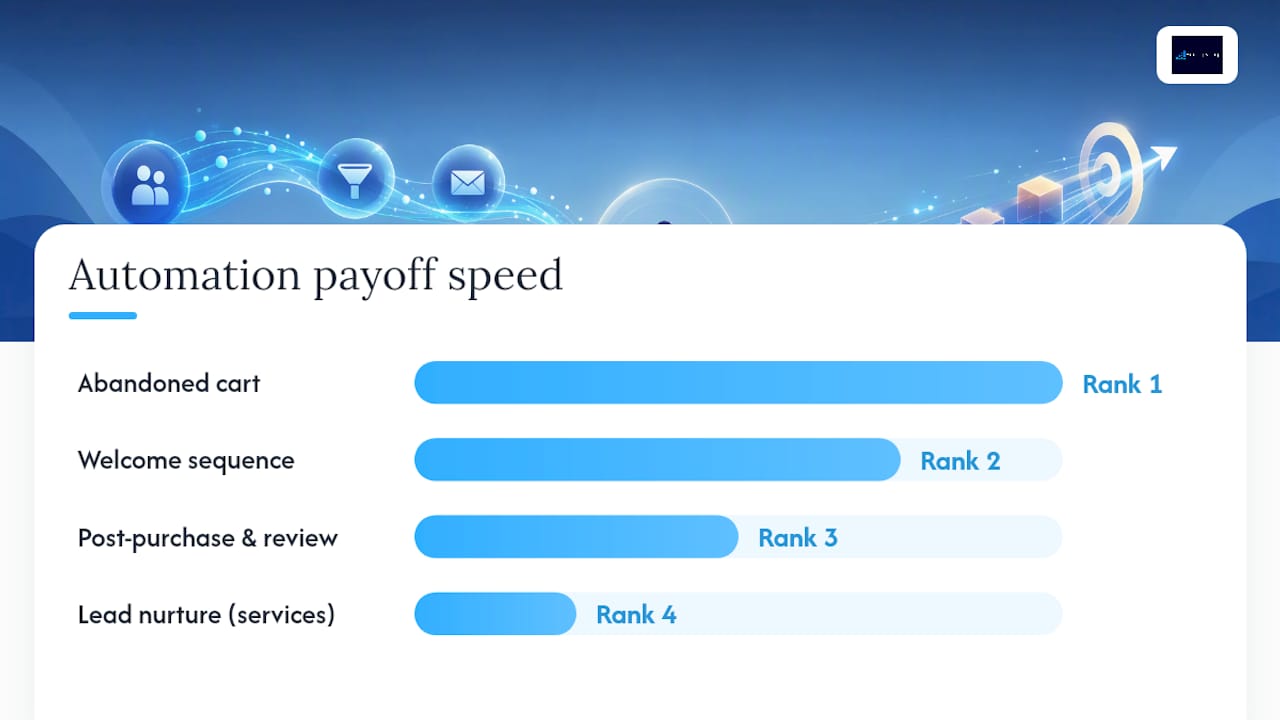
Skip the temptation to automate everything at once. Practitioner guides consistently point to the same short list of high-leverage flows, and small businesses tend to do better when they limit themselves to two or three well-maintained automations instead of ten mediocre ones. Here’s the order that actually pays off, ranked by how fast each one recovers its setup cost.
- Welcome sequence. Three to five emails triggered the moment someone joins your list or buys for the first time. The job of email one is delivery (whatever they signed up for), the next two build trust with a case story or a useful tip, and the last one asks for a specific next action, like booking a call or making a first purchase. Skip the temptation to cram everything into one email. Spread it out.
- Abandoned cart or inquiry recovery. If someone starts checkout or fills out a quote form and stalls, send a reminder within one to three hours, a second nudge (often with a small incentive) at 24 hours, and a final message at 72 hours if you haven’t heard back. This is the single fastest-paying automation on the list.
- Post-purchase follow-up and review request. Send a thank-you and usage tip within a day of purchase, then ask for a review five to ten days later, once the customer has actually experienced the product or service. Asking too early gets you silence. Asking too late gets you forgotten.
- Lead nurture for service businesses. Instead of a purchase, the trigger is an activation event: a downloaded guide, a booked consult, or a quote request. Space four to six touches over three to four weeks, mixing education with a soft ask each time.
- Re-engagement and list hygiene. Every 90 days, identify contacts who haven’t opened or clicked anything. Send one direct “still interested?” message, then remove non-responders from active sends. A clean list protects your deliverability far more than a big list helps your revenue.
- 0 to 1,000 contacts: A single email tool with basic automation triggers covers you completely. Anything more sophisticated is wasted overhead at this stage.
- 1,000 to 5,000 contacts: You’ll want tagging, segmentation, and at least one integration into your system of record (usually a CRM or spreadsheet you actually keep updated). This is also where multi-channel support, SMS on top of email, starts to matter for time-sensitive flows like cart recovery.
- 5,000-plus contacts: Deliverability becomes its own discipline. You need dedicated sending infrastructure, list-hygiene automation, and reporting detailed enough to catch a dip in open rates before it tanks your sender reputation.
- Usability: Can someone on your team build a flow without a training course?
- Integrations: Does it talk to whatever already holds your customer data, so you’re not manually exporting lists?
- Deliverability: Does the provider have a track record of landing in inboxes, not spam folders?
- Multi-channel reach: Do you need SMS or just email right now, or is that a six-month-from-now problem?
- Reporting depth: Can you see open, click, and conversion rates by flow, not just in aggregate?
- Write the content first. For a welcome sequence specifically, that means drafting the lead-magnet delivery email, two value or educational emails, one social-proof or case snippet, and a single clear call to action, fully written before you touch the automation builder. This sequencing matters because content debt (unwritten emails sitting behind a “ready to launch” automation) is what stalls most first attempts.
- Build the flow in the tool, mapping each email to its trigger and delay.
- QA it by enrolling yourself and a colleague as test contacts, checking every link, merge field, and delay timer.
- Launch to a small segment first, not your entire list, so a broken link or a wrong send-time doesn’t hit everyone at once.
- Track three KPIs: open rate, click rate, and the conversion event you actually care about (a sale, a booked call, a submitted review).
- Tool sprawl and no system of record. When your email platform, your CRM, and your spreadsheet all claim to hold “the real” customer list, automations start working off stale or conflicting data. Pick one system of record per category and route everything else through it.
- Automating a chaotic process. If your actual sales or onboarding process changes every week, automating it just locks in the chaos and makes it harder to fix. Write the process down first, run it manually a few times, then automate the stable version.
- Unmanaged AI review overhead. AI-drafted follow-ups and review requests still need a human checkpoint before they go out, especially in the first few weeks. Skipping that step is how a business ends up automating an apology.
- Integration brittleness. A dropped API connection or an expired authentication token can silently kill a flow for weeks before anyone notices. Build in basic logging and an alert (even a simple email notification) that fires the moment a connection fails.
- Estimate the revenue recovered by your cart or inquiry flow over a month (recovered carts times your average order value).
- Subtract your monthly tool cost and any setup time valued at your hourly rate.
- Track this monthly for the first quarter before drawing conclusions. One good week doesn’t prove a flow works.
- How Marketing Automation Tools Can Boost Business | CO
- 5 real challenges small businesses hit with automation (2026) | Automaton Agency
- Content debt — why your content backlog breaks growth | Contentful
- Marketing automation for small businesses: practical guide | itsdeep
Notice what’s missing from this list: no drip campaign for every product category, no automated social posting cadence, no elaborate lead-scoring model. Those come later, if ever. The itsdeep practical guide on small-business marketing automation backs this same sequencing: welcome sequence, then abandoned cart, then reviews, scaled progressively rather than launched simultaneously.
Pro Tip: Write all the emails for your welcome sequence in a single sitting before you touch any automation software. Trying to write email three while your automation tool is already live turns a two-hour task into a two-week stall.
How Do You Choose the Right Automation Setup?
The right setup depends almost entirely on how many contacts you’re managing and how many channels you actually need, not on which tool has the flashiest interface. Use contact volume as your first filter, then layer in the other criteria.
Beyond volume, weigh five criteria before you commit to anything:
| Question | What it tells you |
|—|—|
| Under 1,000 contacts and one channel? | Stick with a free or entry tier; no integration needed yet |
| Growing past 1,000 with a messy contact list? | Prioritize tagging and CRM integration over new features |
| Sending time-sensitive recovery messages? | Multi-channel (SMS) support matters more than reporting depth |
| Team includes non-technical staff? | Usability and template quality outweigh advanced logic |
| Already hitting 5,000+ contacts? | Deliverability infrastructure and dedicated support become the deciding factor |
Budget scales with contacts and send volume, not with the number of features you enable; for a comprehensive approach, consider reviewing a detailed business growth strategy guide. A tool that charges $20 a month for 1,000 contacts might charge $80 for 5,000, regardless of whether you’re using three automations or ten. Price out your list size eighteen months from now, not just today, so you’re not blindsided by a tier jump right when growth finally kicks in.
How Do You Launch Your First Automation Step by Step?
Before any automation goes live, you need three things in place: a single system of record for customer data, clear tags or fields for who’s in which stage, and enough contacts to see a pattern (a few hundred is enough to start, though patterns firm up past 500). Skipping this step is the single most common reason automations quietly fail. As one guide on marketing automation tools puts it, automation amplifies whatever inputs you already have. It doesn’t create traffic or leads out of nothing.
Once the foundation is set, run your first automation as a tight, time-boxed sprint:
For the tools themselves, most small businesses start with a no-code connector like Zapier to stitch their email platform to their website or CRM. That’s the right call while you’re proving a flow works. Once a flow hits meaningful, consistent volume or handles anything revenue-critical, it’s worth graduating it off no-code glue and onto a stable, direct integration or API. This “Zap-to-API ladder” avoids the fragile middle ground where a single dropped connection silently breaks your whole recovery flow, a pattern documented in Automaton Agency’s research on small-business automation challenges.
Pro Tip: Set a calendar reminder to check your automation dashboard weekly for the first 30 days, not just when something looks broken. Small drops in open rate are easy to miss until they’ve compounded into a real problem.
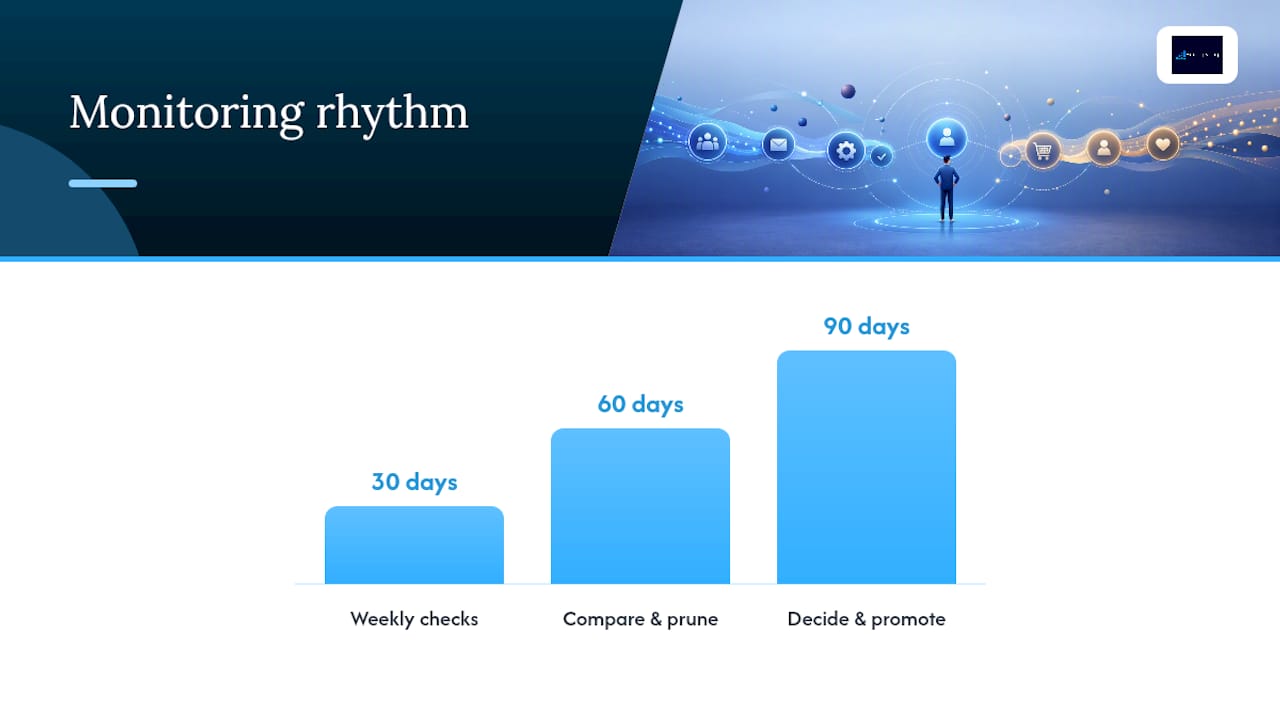
After launch, follow a simple monitoring rhythm: at 30 days, confirm the flow is firing correctly and nothing is silently failing. At 60 days, compare performance against your baseline and prune anything underperforming. At 90 days, decide what to promote (build a second flow) and what to retire.
Why Do Small-Business Automations Break, and How Do You Fix It?
Most automation failures aren’t technical. They’re organizational. The same operational gaps show up across small businesses again and again, and they’re almost always fixable with a governance fix rather than a new tool purchase.
Automaton Agency’s research on small-business automation challenges found that tool sprawl, missing systems of record, unstable processes, AI review gaps, and integration brittleness account for most of the real-world failures small teams hit, not a lack of sophisticated software.
The fix isn’t a better tool. It’s a clearer owner. One job, one system of record, one person accountable for watching it, applied before you add a second automation, not after the first one breaks.
Assigning a single owner to each automated job (not a committee, one person) resolves more failures than any feature upgrade. A business operating system approach, where ownership and process live in one place instead of scattered across tools, tends to prevent this category of breakage before it starts.
What Should Small Businesses Expect to Pay, and When Does It Pay Off?
A starter automation stack for a small business typically runs somewhere in the range of a basic email platform’s entry tier up through a mid-tier plan once you add contacts and a couple of integrations. Costs climb with contact count and send volume, not with the number of automations you’re running, so a lean two-flow setup on a larger list can cost more than an ambitious five-flow setup on a small one.
Industry benchmarks give a useful, conservative floor for what to expect. Adaptix’s 2026 guide on marketing automation for small business points to abandoned cart recovery typically reclaiming 5 to 15% of otherwise-lost carts, with well-built welcome sequences driving noticeably higher open and click rates than one-off blast emails, along with faster time-to-first-purchase.
To calculate your own return, keep it simple:
Once you’re consistently converting well enough that the per-contact cost of a paid tier is clearly smaller than the revenue it generates, or once your list has outgrown a free tier’s limits, that’s your signal to upgrade. The same applies to hiring outside help: if your team is spending more hours fighting broken integrations than the flows are worth, it’s time to bring in support rather than absorb the ongoing drag.
How Do You Protect Customer Data in Your Automation Setup?
Every automation you build runs on customer data, names, emails, purchase history, sometimes payment details, which means privacy and security decisions belong in your setup checklist, not as an afterthought.
Start with the basics: use a platform that offers two-factor authentication for anyone with admin access, and limit who on your team actually has that access. Not every employee needs to see your full contact list to send one campaign.
Check where your data physically lives and whether your provider publishes clear terms on how it’s stored, backed up, and deleted on request, especially if you serve customers in states or countries with their own data protection rules. If you collect any health, financial, or other sensitive information through your automation flows, confirm your provider’s compliance posture explicitly rather than assuming a generic tool covers it.
Consent matters as much as security. Make sure every contact in an automated flow opted in through a clear, documented action, not a purchased list or a scraped directory. Automated unsubscribe handling isn’t optional. It’s what keeps your recovery and nurture flows legally sound and keeps your sender reputation intact.
What Have We Learned Building Automations for Small Businesses?
The businesses that get automation right almost never start with the fanciest tool. They start with a clear process. We’ve watched a service business fix a leaky lead-nurture flow simply by writing down its sales steps before automating anything, and the flow finally converted once the chaos underneath it was cleaned up. We’ve watched another consolidate four disconnected tools into one system of record and immediately stop losing leads to duplicate records. And we’ve seen content debt kill more launches than any software bug ever has: teams wire up a beautiful automation, then realize they never wrote email three.
Two rules hold up every time: one job gets one owner, and no automation goes live until its content is fully written. A third rule matters increasingly as AI drafts more of that content: build a human review checkpoint into every AI-assisted flow before it reaches a customer’s inbox.
If you’re weighing whether to build this yourself or bring in help, a free analysis is the fastest way to find out which flows will actually move your numbers.
Frequently Asked Questions
How many automations should a small business start with?
Two: a welcome sequence for new contacts and one revenue-recovery flow, such as review requests or cart recovery. Prove those convert before you build a third.
Do I need expensive business automation software to start?
No. A no-code connector plus the email platform you already pay for is enough to prove a flow works. Move to a direct integration once a flow carries real revenue.
How long before marketing automation pays for itself?
Most small businesses see the first returns within two to six weeks on welcome and recovery flows, because both work on traffic you already have.
Sources
For readers who want to go deeper on any single piece of this roadmap, these are worth a closer read:
Share This Article
Found this useful? Send it to another owner who is still juggling a dozen half-built automations.
Share on Facebook · Share on X · Share on LinkedIn · Share on Pinterest
Want More Information? Let’s Talk.
If you would rather not take this on yourself, we handle it for you. Our Business OS (uBOS) service takes care of the setup and the ongoing work, then reports back so you can see exactly what changed. You keep running your business; we keep this moving.
Call us at 631-825-9464 or reach out here. No pressure, no obligation, and you can ask us anything — including whether this is even worth doing for a business your size.
Looking ahead, request your free roadmap analysis and we will map out a 12-month plan to close the conversion leaky bucket so more of the customers you already reach turn into booked work.
Written by Joe Leineke · Content on this blog is generated with AI assistance and independently reviewed and fact-checked by human marketing professionals for accuracy and quality.