Google Ads remarketing lets you re-engage past visitors across Google Search, Display, YouTube, and Gmail by matching a Google tag or Customer Match list to your ad targeting. Start by installing the Google tag (directly or through Google Tag Manager) so it starts populating audiences immediately, then layer in a Customer Match list from your customer database. Everything else, from bidding to creative, builds on those two audience sources.
TL;DR:
Remarketing performance relies heavily on properly segmented audiences, with cart abandoners and past customers requiring aggressive bids and tailored messaging. Dynamic remarketing is essential for large catalogs, requiring exact product ID matches, approval in Merchant Center, and a properly configured product feed. Proper setup of tags, consent mode, and privacy compliance is critical, with verification needed to prevent silent failures and audience size shrinkage over time. Campaign structure should differentiate intent tiers and align bid strategies accordingly, avoiding broad “all visitors” audiences that dilute the impact. Creative should focus on urgency and trust for high-impact audiences, with rotation to prevent ad fatigue and improve engagement.
What Types of Google Ads Remarketing Should You Use?
Not every remarketing type fits every business, and picking the wrong one wastes budget fast. Here’s how the main formats break down and when each one earns its place in your account:
- Standard remarketing shows display or video ads to past site visitors as they browse other sites and apps. It’s the baseline, and almost every advertiser should have it running.
- Dynamic remarketing shows the exact products or services a visitor viewed, pulled live from a product feed. This is close to mandatory for ecommerce and travel businesses with large catalogs, since generic ads underperform badly against personalized ones once a catalog exceeds a few dozen SKUs.
- RLSA (remarketing lists for search ads) lets you adjust bids or show tailored ads to past visitors when they search on Google again. This is one of the highest-ROI moves available because you’re bidding on people who already know your brand, often letting you outbid competitors on generic terms only for warm traffic.
- Video remarketing targets people who watched your YouTube videos or interacted with your channel, useful for building awareness funnels before a search or display push.
- Customer Match uses your own customer data (emails, phone numbers, mailing addresses) to reach existing customers or leads across Search, YouTube, Gmail, and Display, independent of whether they’ve visited your site recently.
Most accounts run standard and dynamic remarketing together as the always-on layer, then add RLSA to protect and extend search performance.
How Do You Build and Segment Remarketing Audiences?
Audience quality determines almost everything downstream, more than creative, more than bidding. The two foundational sources work differently, and mixing them up leads to messy targeting.
Your Google tag builds audiences based on real-time site behavior, capturing page views, events, and conversions as they happen. GA4 audiences, by contrast, are built from behavioral and event data inside Google Analytics and then exported into Google Ads, giving you more flexible segmentation logic (like combining page views with session duration or purchase value). Customer Match works differently again: it’s a first-party data upload rather than a behavioral signal, and it supports a maximum membership duration of 540 days, far longer than most site-based lists.
A practical segmentation approach looks like this:
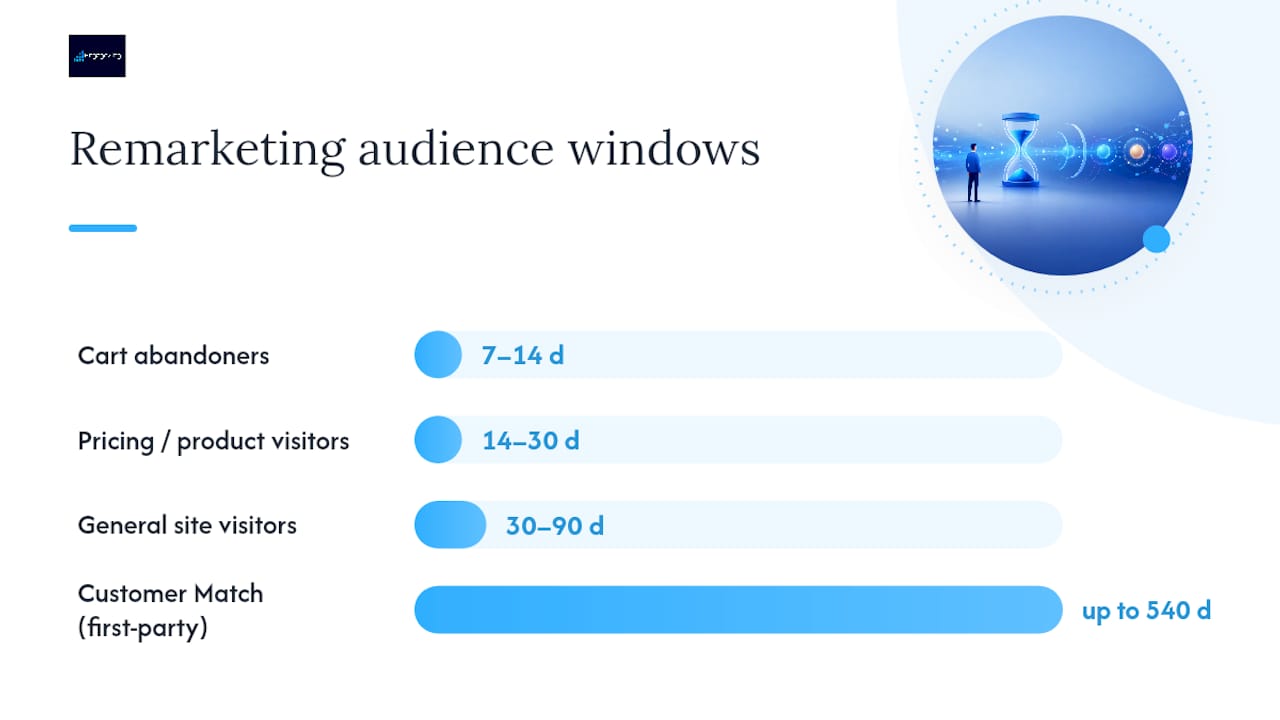
- Cart abandoners (7 to 14-day window): high intent, recent, deserves your most aggressive bids and a promotional message.
- Pricing or product page visitors (14 to 30-day window): warm but not yet convinced, good candidate for testimonials or comparison-focused creative.
- General site visitors (30 to 90-day window): the broadest pool, best used for awareness-tier bidding rather than hard selling.
- Past customers via Customer Match (up to 540 days): ideal for cross-sell, renewal, or loyalty campaigns rather than first-time-purchase messaging.
- Retrieve your Google tag from Google Ads under Tools and Settings > Audience Manager > Audience Sources, then install it directly on your site or, more commonly, deploy it through Google Tag Manager for easier management across pages.
- For dynamic remarketing, add custom parameters to the tag (like `ecomm_prodid`, `ecomm_pagetype`, and `ecomm_totalvalue`) so the tag can report which products a visitor viewed.
- Link your GA4 property to Google Ads inside the GA4 admin panel, then activate the specific audiences you want to share for targeting.
- Enable Consent Mode so tag behavior adjusts automatically based on a visitor’s cookie consent status, which keeps you compliant while still collecting modeled conversion data where consent is denied.
- Test everything using Google Tag Assistant or the GTM preview mode before launching, and check the Audience Manager dashboard a few days later to confirm lists are actually populating.
- Confirm the feed is approved and active in Merchant Center, not sitting in a disapproved or pending state.
- Verify `ecomm_prodid` values on your site match your feed IDs exactly.
- Check that the feed is linked to the correct Google Ads account and campaign.
- Confirm your audience list has met the minimum size threshold to serve.
- Separate campaigns by intent heat. Run cart abandoners and past customers in their own campaign with aggressive bids, and keep broad site visitors in a lower-bid, awareness-focused campaign.
- Match bidding strategy to conversion volume. Smart Bidding strategies like Target ROAS or Target CPA perform best once a campaign has roughly 30 conversions in a 30-day window; below that, Maximize Conversions or manual CPC gives you more stable control while data accumulates.
- Feed Performance Max campaigns your remarketing audiences as signals, not hard targeting. PMax treats these lists as a starting point for its own machine-learning expansion rather than a fixed boundary.
- Set frequency caps early, starting around 3 to 5 impressions per user per week for standard remarketing, then adjust based on click-through decay you observe in reporting.
- Allocate budget by audience heat, weighting spend toward your highest-intent segments first and treating broad awareness audiences as the flexible remainder.
- Build Responsive Display Ads with at least 5 headlines, 5 descriptions, and multiple image and logo sizes so Google’s system has enough variation to test combinations.
- Write cart-abandoner messaging around urgency and reassurance (“still available,” “complete your order,” a limited-time incentive if your margins support one).
- Write low-intent audience messaging around education and trust (reviews, guarantees, case studies) rather than a hard sell they’re not ready for.
- Rotate creative every 2 to 4 weeks to avoid banner blindness, and run at least two message angles simultaneously to see which resonates with each segment.
- High-intent audiences (cart abandoners, past customers): judge on conversion rate and CPA or ROAS, since these viewers should convert at meaningfully higher rates than cold traffic.
- Mid-intent audiences (pricing or product page visitors): watch CTR and CVR together to see whether creative or targeting is the weak point.
- Broad awareness audiences: CTR and view-through conversions matter more here than immediate CPA, since the goal is influence over the eventual conversion path, not instant return.
- Customer Match access requires meeting policy and payment-history standards, and certain advanced targeting features unlock only after 90 days of account history and $50,000 in lifetime spend; accounts below that threshold can still use Customer Match for Observation and Exclusions.
- Never pass personally identifiable information like emails or phone numbers in URL parameters; Customer Match data must be uploaded through approved, hashed methods.
- Exclude recent converters, employees, and internal traffic from every remarketing list by default, since serving ads to people who already bought (or who work for you) wastes budget and skews performance data.
- Google’s personalized advertising policy also restricts targeting based on sensitive categories and requires proper consent disclosures for users in the EEA and UK.
- If Google flags a policy issue, review the specific violation notice in your account, correct the data handling practice named, and request a policy review rather than resubmitting blindly.
- About Customer Match covers membership duration and eligibility requirements.
- Customer Match policy explains account maturity thresholds and feature access.
- Remarketing on the Tag Platform walks through tag installation and Google Tag Manager setup.
- Personalized advertising policy details data-handling rules and enforcement steps.
- About Customer Match – Google Ads Help
- Customer Match policy – Google Ads Help
- Remarketing | Tag Platform
- Personalized advertising – Google Ads policy
If any single list is too small to serve ads reliably, consolidate it into a broader tier rather than leaving it dormant. Google’s remarketing documentation notes that Display generally needs around 100 active users to activate, and Search and YouTube surfaces often require larger pools still.
Pro Tip: Don’t let “All Visitors” become your default audience. Treat it as a data-collection pool only. It’s too broad for meaningful bidding decisions and dilutes your budget across people with wildly different intent levels.
How Do You Set Up the Google Tag and Consent Mode?
Tracking infrastructure is where most remarketing programs quietly break. The setup itself isn’t complicated, but skipping verification steps causes silent failures that go unnoticed for weeks.
Here’s the practical sequence:
Consent Mode and first-party data now form the durable core of remarketing architecture as privacy rules continue tightening across markets. Accounts that skip Consent Mode setup often see audience sizes quietly shrink over time as browsers restrict third-party tracking, with no obvious error message pointing to the cause.
What Does Dynamic Remarketing Require From Your Product Feed?
Dynamic remarketing depends entirely on your Merchant Center feed talking to your site tag correctly, and this is where the most common technical failures happen.
Your feed needs, at minimum, a product ID, title, image link, price, and availability status for every item you want to show in ads. The critical detail: the `ecomm_prodid` value fired by your site tag must match the `id` field in your Merchant Center feed exactly, character for character. A mismatch here is the single most common reason dynamic ads fail to populate, even when the tag and feed both appear to be working independently.
Dynamic remarketing becomes necessary rather than optional once your catalog passes roughly 20 to 30 products, since manually building creative variations at that scale isn’t realistic. Smaller catalogs or service businesses can often get by with standard remarketing and strong static creative instead.
If dynamic ads aren’t showing, check these in order:
How Should You Structure Remarketing Campaigns and Bids?
Structure and bidding decisions should follow intent tiers, not just audience size. Lumping cold and hot traffic into one ad group forces a single bid strategy to serve incompatible goals, which almost always underperforms a segmented approach.
Pro Tip: If your remarketing CTR drops sharply after the first few days a user enters an audience, that’s ad fatigue, not audience quality. Tighten your frequency cap before you touch bids or creative.
What Makes Remarketing Ad Creative Actually Work?
Creative for remarketing should acknowledge that the viewer already knows your brand. Generic top-of-funnel messaging wastes the advantage a warm audience gives you.
How Do You Measure and Optimize a Remarketing Campaign?
Different audience tiers need different success metrics, and judging every campaign against the same KPI leads to bad decisions.
Treat view-through conversions as directional evidence rather than a hard revenue number, and keep your attribution window consistent (7 or 30 days is standard) so period-over-period comparisons stay honest. Google Ads’ audience reporting views let you break performance down by list, which is where optimization decisions should actually happen, since aggregate campaign numbers can hide a strong list dragged down by a weak one.
A workable cadence: check audience-level performance weekly, adjust bids or budgets biweekly, and refresh creative monthly unless CTR decay forces an earlier change.
What Are the Privacy and Policy Rules for Remarketing?
Google enforces specific rules around remarketing data, and violations can disable audience lists or, in repeated cases, suspend the account entirely.
Key Google Resources for Remarketing Setup
A handful of official pages cover almost everything you’ll need to verify as you build out remarketing: eligibility rules, tag installation steps, and the personalized advertising policies that govern how you can use customer data.
Sources
Frequently Asked Questions
What Is Remarketing in Google Ads?
Remarketing in Google Ads is a targeting method that shows ads to people who’ve already interacted with your website, app, or YouTube content, using a Google tag, GA4 audience, or Customer Match list to identify them.
Can You Retarget With Google Ads?
Yes. Google Ads supports retargeting (the same concept as remarketing) across Search, Display, YouTube, and Gmail, using standard, dynamic, RLSA, video, or Customer Match audience types depending on your goal.
How Do I Set Up Remarketing for Google Ads?
Install the Google tag directly or through Google Tag Manager, let it collect visitor data for a few days, then build audience segments in Audience Manager and add them to a campaign with tailored bids and creative. For dynamic remarketing, you’ll also need a Merchant Center feed with product IDs matching your tag’s `ecomm_prodid` parameter.
Is $20 a Day Good for Google Ads Remarketing?
A $20 daily budget can work for a small remarketing audience with a narrow, high-intent list like cart abandoners, but it’s often too limited for broader site-visitor audiences or dynamic remarketing across a large catalog. Budget adequacy depends more on your audience size and cost-per-click than on a fixed dollar benchmark, and an account audit can tell you whether your current spend matches your audience’s actual size and intent.
Share This Article
Found this useful? Send it to another owner who is still retargeting the same people with the same ad.
Share on Facebook · Share on X · Share on LinkedIn · Share on Pinterest
Want More Information? Let’s Talk.
If you would rather not take this on yourself, we handle it for you. Our Google Advertising service takes care of the setup and the ongoing work, then reports back so you can see exactly what changed. You keep running your business; we keep this moving.
Call us at 631-825-9464 or reach out here. No pressure, no obligation, and you can ask us anything — including whether this is even worth doing for a business your size.
Looking ahead, request your free roadmap analysis and we will map out a 12-month plan to close the conversion leaky bucket so more of the customers you already reach turn into booked work.
Written by Joe Leineke · Content on this blog is generated with AI assistance and independently reviewed and fact-checked by human marketing professionals for accuracy and quality.