
Lookalike audiences are modeled groups built from a seed list, a set of customers or leads you already have, that a platform’s AI uses to find similar prospects. In 2026, that seed mostly works as a signal for Meta or Google’s optimization systems rather than a hard rulebook. Use lookalikes for value-shaping, exclusion plays, or niche and high-ticket offers. For most prospecting, broad targeting paired with strong creative and a clear optimization event tends to work just as well, often better.
- * *
TL;DR:
Lookalike audiences now depend heavily on the quality of the seed list, with high-intent sources like recent buyers outperforming loose engagement signals. Meta’s system relies on the conversion event tied to the seed, making a purchase-based seed more predictable than one based on page views or engagement. Google’s suggestion-based lookalike model offers more algorithm flexibility, so audience expansion can go beyond the seed profile if the expansion setting is broad. Building effective seeds requires avoiding duplicates, maintaining data hygiene, and prioritizing high-value, recent conversions over larger but noisier lists. For best results, constant seed refreshment, audience size testing, and strict variable control during campaigns prevent performance drift and misinterpretation.
How lookalike audiences work today
A lookalike audience starts with a seed: your customer list, your qualified leads, or people who completed a specific action on your site. The platform studies that seed, pulls out shared patterns, and builds a modeled pool of new people who look statistically similar. That part hasn’t changed much since lookalikes first appeared.
What has changed is how much weight the seed actually carries. Meta and Google’s ad systems now lean heavily on creative engagement signals and the optimization event you choose, like a purchase or a lead form submission, to decide who actually sees your ad inside that modeled pool. The seed sets the starting boundary. The algorithm does a lot of the real targeting work from there.
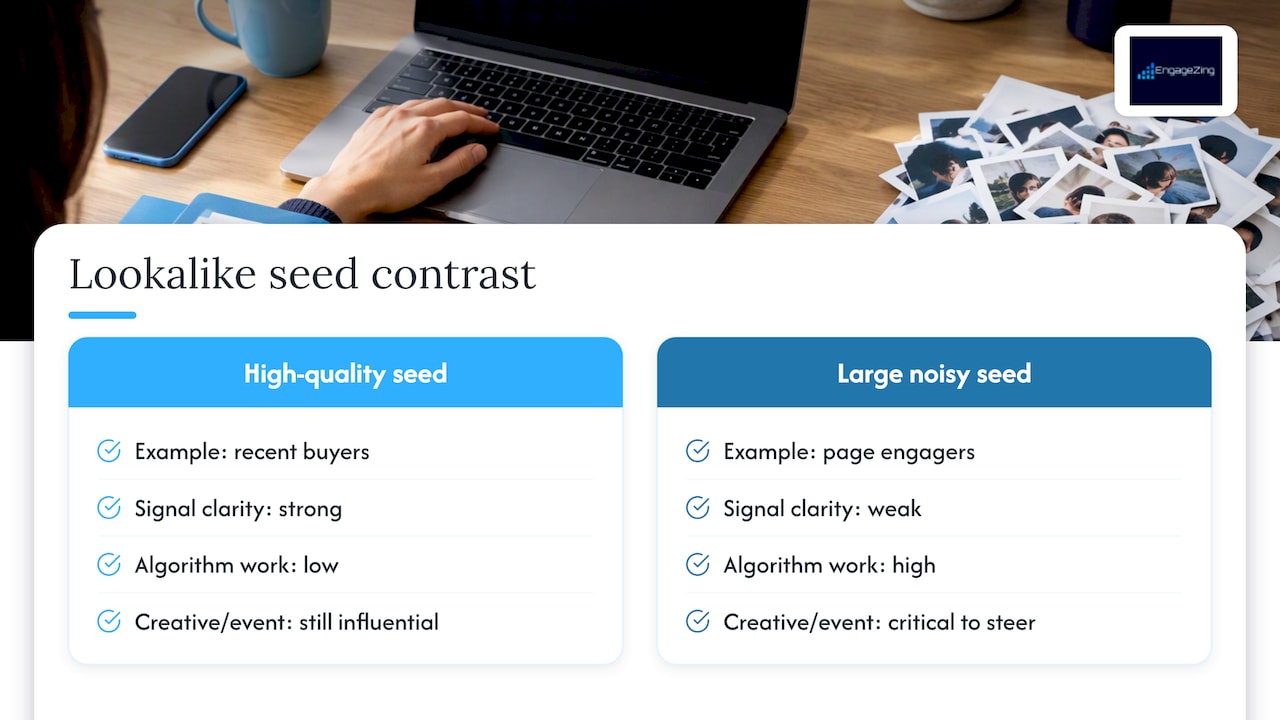
Think of the seed as a bucket, not a blueprint. A tight, high-intent seed gives the algorithm a clean signal to extend from. A noisy seed, built from page views or random engagers, gives it a confusing signal and the system spends your budget figuring out who actually matters before it finds your real buyers.
This is the practical implication every advertiser should internalize, whether you run ads yourself or hand them to an agency: lookalikes amplify whatever you feed them. A seed list made entirely of people who bought your product in the last 30 days will often outperform a seed list ten times its size made of loose page engagers, because the first seed is a clear statement of “find people like this” and the second one is closer to noise. One practitioner analysis of Meta lookalikes frames this directly: lookalikes behave more like starting buckets now, and creative paired with the right optimization event can outperform a narrow lookalike built on weak signal.
That’s the core shift to plan around. Lookalikes haven’t stopped working. They’ve become one input into a larger system that includes your creative, your tracking, and the event you’re optimizing toward, and the quality of that input matters more than its size.
Platform specifics: what changed on Meta and Google
Meta and Google have each moved lookalikes in the same general direction, giving the algorithm more freedom, but the mechanics differ enough that your setup steps need to differ too.
Meta’s system relies heavily on the conversion event tied to your seed and your campaign, so a seed built from purchasers paired with a purchase optimization event tends to behave more predictably than a seed built from one event and optimized toward another.
Google has made a more structural change. In Demand Gen campaigns, Google Ads is moving Lookalike segments toward a suggestion based model, where your seed list informs Google’s AI rather than strictly constraining who sees your ads. You can opt out and keep the older, more constrained behavior if you need tighter similarity control, but the default now gives the algorithm more room to find buyers outside the original boundary. Separately, Google’s documentation on Lookalike segments confirms these segments can be built from customer lists, site or app activity, and YouTube audiences, with narrow, balanced, or broad expansion settings, and that segments refresh every one to two days.
A few things worth checking in your own account before you launch:
- Confirm which expansion setting (narrow, balanced, broad) your Google Demand Gen campaign is using, since broad can pull well outside your seed’s profile.
- Check whether you’ve opted into or out of Google’s suggestion-based lookalike behavior, since the default may have shifted since your last campaign build.
- Verify your Meta lookalike percentage matches your actual goal: smaller for precision offers, larger for volume plays.
- Build new Google lookalike segments two to three days before launch, since they need time to populate and refresh.
Seed selection: building seeds that actually work
Not all seeds are equal, and the difference between a good one and a bad one shows up directly in your cost per result. The clearest hierarchy, confirmed by platform docs and 2026 practitioner analyses, runs from the strongest signal to weakest:
- Purchasers: people who completed a transaction, the strongest and most predictive seed you can build.
- Qualified leads: people who passed a sales or quality filter, not just submitted a form.
- Add-to-cart or checkout initiates: strong intent, but without the final confirmation a purchase gives you.
- Engagers (page likes, video views, profile visits): the weakest seed type, useful only when nothing stronger exists.
- Confirm your tracking is firing correctly before you build anything. A broken pixel event will poison every seed built from it.
- Pick one optimization event (purchase, lead, add-to-cart) and commit to it for the full test; don’t switch mid-flight.
- Build your seed from the highest-intent source available, following the hierarchy above.
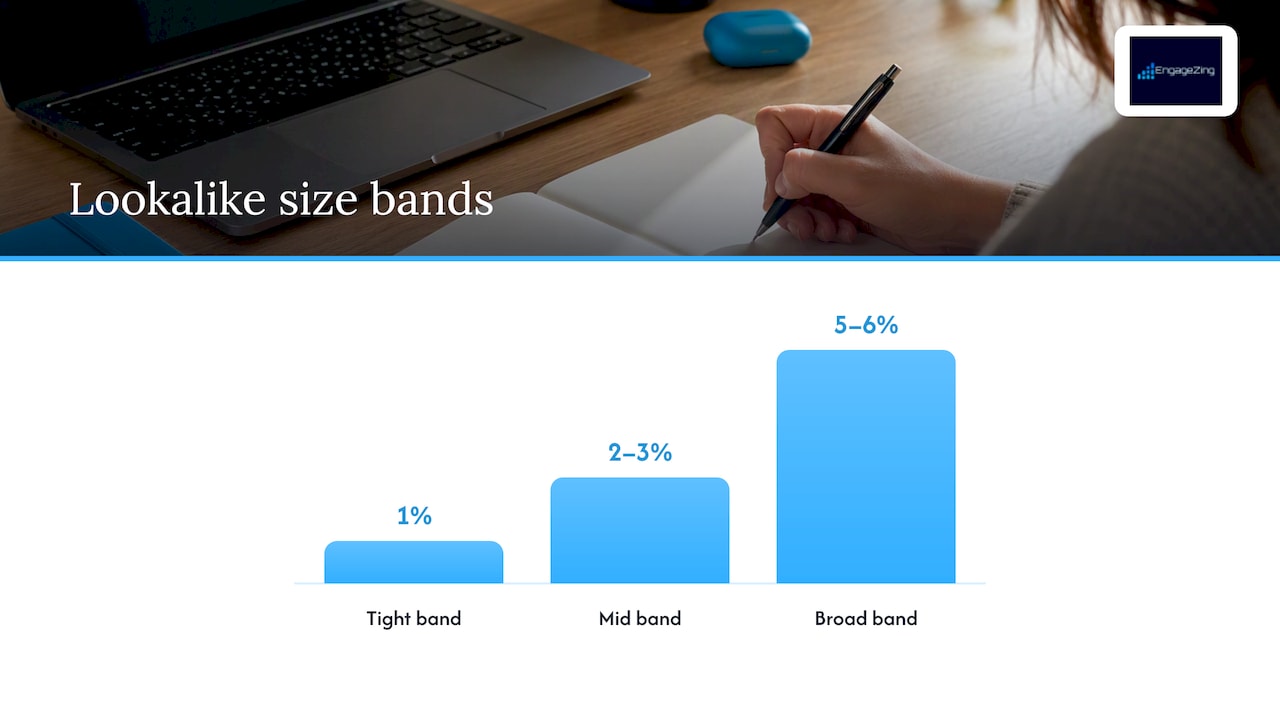
- Create three size bands to test against each other: a tight 1% lookalike, a mid-range 2% to 3%, and a broader 5% to 6%.
- Exclude your existing seed and recent converters from every band so you’re not paying to re-reach people you already have.
- Use identical creative across all three bands. If you vary creative and audience at the same time, you won’t know which one caused the result.
- Set a minimum daily conversion threshold (enough volume for the algorithm to learn, typically a steady trickle of conversions per day per ad set) before judging any band.
- Scale only the band that clears your cost per result target, and scale gradually rather than jumping budget all at once.
- If CPM is high but CTR and CVR look normal, the audience itself may be too competitive or too broad for your budget.
- If CTR is low, the issue is almost always creative, not targeting.
- If CTR is healthy but CVR is low, check your landing page and checkout flow before touching the audience at all.
- If all three metrics look fine but CPA is still high, confirm your conversion event isn’t double-counting or misattributing results.
- Refresh your seed monthly, or align it to your buying cycle if purchases happen less often than that.
- Update your exclusion lists on the same cadence so recent converters don’t stay in your targetable pool.
- Keep your recency window aligned with your actual sales cycle. A seed built on 180-day-old purchases behaves differently than one built on the last 30 days.
- Test size bands in order: start at 1%, expand to 2% to 3% once that performs, and only move to 5% to 6% once the smaller bands are proven.
- Rotate creative on a regular schedule and watch frequency. Once frequency climbs past a comfortable range for your audience size, performance usually starts to erode before you notice it in the headline numbers.
- Stacking five or six lookalikes into one ad set almost guarantees overlap. Fix it by running each size band as its own ad set with exclusions in place.
- Defaulting to engagement-based seeds because they’re easy to build produces weak signal. Fix it by using the highest-intent seed you have, even if it’s smaller.
- Scaling budget too fast after a good first few days resets the learning phase and spikes your CPA. Fix it by increasing spend gradually, in small steps, over several days.
- Running identical creative and audience changes at the same time makes results impossible to interpret. Fix it by isolating one variable per test.
- Letting seed lists go stale for months quietly degrades match quality. Fix it by refreshing on a fixed schedule rather than waiting for performance to drop first.
- Skipping event deduplication across platforms inflates or misattributes conversions. Fix it by verifying your pixel and CRM use the same event names and firing logic.
- Tracking and conversion event setup so your seeds are built on accurate data from day one.
- Campaign builds across Facebook Advertising and Google Advertising, structured around the testing approach outlined above.
- Ongoing optimization that catches seed drift and frequency fatigue before they show up in your cost per result.
- Google’s Lookalike segment overview explains the shift to suggestion-based targeting in Demand Gen and how to opt out if you need stricter constraints.
- Google’s Lookalike segment setup documentation covers seed source options, expansion levels, and refresh timing, useful when you’re troubleshooting why a segment isn’t populating as expected.
- A practitioner breakdown of Facebook lookalike strategy walks through seed hierarchy, testing bands, and the CPA diagnostic formula in more operational detail.
- Decentriq’s analysis of lookalike audiences and privacy covers why first-party data and data clean rooms matter as tracking continues to shift.
- For a deeper look at measurement frameworks, Opti Arts’ analytics partnership page is a useful next stop.
Volume matters too, but less than quality. Practitioner guidance suggests aiming for roughly 1,000 quality converters where possible. If you can’t hit that volume, don’t pad the seed with weaker events. Tighten the recency window instead and lean on the highest-intent event available, even if the resulting seed is smaller. A smaller, sharper seed usually beats a bigger, blurrier one.
Data hygiene is the part most accounts get wrong. Dedupe your seed lists regularly so the same customer isn’t counted multiple times under different identifiers. Keep event naming consistent across your pixel, your CRM, and your ad platform, since a mismatch quietly breaks your optimization signal. Use server-side event tracking where you can, since browser-based tracking alone misses an increasing share of conversions. Hash personal data before uploading customer lists, and build your seeds only from data collected with proper consent.
Pro Tip: Before building any lookalike, audit your seed source for duplicate entries and inconsistent event names. A clean list of 800 people will often out-model a messy list of 5,000.
As third-party cookies decline, first-party data and privacy-safe approaches like data clean rooms are becoming the more reliable path for keeping lookalike models accurate, since they don’t depend on tracking signals that are steadily eroding.
Building and testing your lookalike: a step-by-step map
A lookalike is only as useful as the test that validates it. Here’s a sequence that isolates whether your audience, not your creative, is driving results.
For naming, something simple works best: “LAL\_1pct\_Customers\_Oct” tells you the size, the seed, and the build date at a glance, which matters once you are running six or seven of these at once.
The testing matrix itself should hold creative, optimization event, and budget pacing constant across bands, varying only the audience size. Report results on a weekly cadence rather than daily, since lookalike audiences need a stabilization window before their numbers mean anything. Exclusion rules at the ad set level prevent this leakage and keep your test honest.
Budgeting, measurement, and diagnostic formulas
When a lookalike campaign underperforms, the fastest way to find out why is to break the cost per acquisition into its parts instead of guessing.
Statistic callout: CPA = CPM / 1,000 / (CTR × CVR) is the diagnostic formula practitioners use to separate audience cost from creative and funnel performance, and it turns a single bad number into three places to look.
Your CPA works out to $20 / 1,000 / (0.01 × 0.02), or $100. If that number is higher than your target, the formula tells you where to dig: a high CPM usually points to audience or competition issues, a low CTR usually points to creative, and a low CVR usually points to your landing page or checkout flow.
Give any new lookalike enough runway before judging it. Spending through a stable, steady volume of conversions over roughly a week, rather than reacting to the first two days, gives the algorithm’s learning phase time to settle.
A short diagnostic flow to run when a lookalike underperforms:
Fixing a conversion flow problem often matters more than fixing an audience. Services like conversion rate improvements exist specifically because landing-page issues get misdiagnosed as targeting issues more often than they should.
Best practices for maintenance and scaling
A lookalike audience isn’t a one-time build. It needs upkeep, or performance quietly drifts.
Pro Tip: Set a recurring calendar reminder to review seed freshness and frequency together. They tend to go stale at the same time, and catching both in one pass saves a separate audit later.
Size discipline matters because expansion without evidence is just guessing with a bigger number attached. Only widen a band once the tighter one has proven it can hit your cost target consistently.
Common mistakes and how to fix them
Most lookalike underperformance traces back to a short list of repeatable mistakes.
How EngageZing builds and tests lookalikes for clients
We treat lookalike audiences as one piece of a larger system rather than a shortcut, the same way we treat them for owners who run their own ads. That starts with tracking verification: before any seed gets built, the conversion event behind it needs to be firing correctly and matching across the client’s CRM and ad accounts. From there, seed creation follows the same hierarchy outlined above, purchasers and qualified leads first, engagers only when nothing stronger is available.
Campaign builds follow a testing map that separates audience from creative, so you can see which variable is actually driving a result instead of guessing. On the Meta side, that work runs through Facebook Advertising campaign management. On the Google side, it runs through Google Advertising account builds, where Demand Gen’s suggestion-based lookalike behavior gets factored into how campaigns are structured from day one.
We also layer AI-driven optimization into ongoing account management, watching for the kind of seed drift and frequency creep described earlier so clients aren’t relying on manual quarterly check-ins to catch it. If you want a sense of how this applies to your own account, a Roadmap Analysis is the fastest way to find out.
Where lookalikes still earn their place in 2026
Lookalikes aren’t obsolete, but they’re no longer the default prospecting tool they were a few years ago. Three scenarios still justify them: value-shaping (pointing the algorithm toward your highest-value customers, not just any converter), exclusion plays (keeping existing customers out of cold prospecting spend), and niche or high-ticket offers where broad targeting simply doesn’t have enough signal to work with on its own.
Outside those three cases, broad targeting paired with strong creative and a clear optimization event usually gets you there faster and cheaper. The mistake most accounts make isn’t using lookalikes. It’s using them by default instead of by decision. Going forward, treat the lookalike as a tool you reach for on purpose, not a setting you leave switched on out of habit.
Get a Roadmap Analysis before you build your next campaign
Getting lookalikes right depends on tracking that actually works, seeds built from clean first-party data, and campaigns structured to isolate what’s really driving results. That’s a lot to manage alongside everything else running your business.
EngageZing’s local experts handle this end to end, with personalized account management built around your market, not a generic template.
Ready to see where your own account stands? Claim your Roadmap Analysis, a personalized Gap Analysis and 12-month Growth Roadmap, at Grow.
Where to go for the official details
A few primary sources are worth bookmarking if you manage lookalike campaigns regularly:
Frequently Asked Questions
What are lookalike audiences?
Lookalike audiences are groups of new prospects that an ad platform builds by studying a seed list, your existing customers or leads, and finding people who share similar patterns. In 2026, that seed mostly acts as a signal for the platform’s AI rather than a strict boundary, with Meta and Google each using it differently inside their systems.
Can you give an example of a lookalike audience?
Say an online retailer uploads a list of around 1,000 customers who bought a product recently.
Does Meta still have lookalike audiences?
Yes. The platform’s algorithm now relies heavily on that seed’s associated conversion event to decide who within the modeled pool actually sees the ad.
What are the four types of target audiences?
Definitions vary across marketing resources, but a common breakdown includes demographic audiences (age, location, income), interest-based audiences (hobbies, behaviors), custom audiences (your own customer or website data), and lookalike or modeled audiences built from those custom lists. Most advertising platforms, including Meta and Google, support versions of all four within their targeting tools.
Recommended
Share This Article
Found this useful? Send it to another owner who is still is scaling ads on a hunch.
Share on Facebook · Share on X · Share on LinkedIn · Share on Pinterest
Want More Information? Let’s Talk.
If you would rather not take this on yourself, we handle it for you. Our Facebook Advertising service takes care of the setup and the ongoing work, then reports back so you can see exactly what changed. You keep running your business; we keep this moving.
Call us at 631-825-9464 or reach out here. No pressure, no obligation, and you can ask us anything — including whether this is even worth doing for a business your size.
Looking ahead, request your roadmap analysis and we will map out a 12-month plan to close the conversion leaky bucket so more of the customers you already reach turn into booked work.
Written by Joe Leineke · Content on this blog is generated with AI assistance and independently reviewed and fact-checked by human marketing professionals for accuracy and quality.