Stop Lawsuits and Lost Sales: ADA Website Compliance for U.S. Sites
If you run a website for a business open to the public or a government agency, you have accessibility obligations today, and the practical standard to follow is the Web Content Accessibility Guidelines at Level AA. The Department of Justice treats WCAG as the roadmap even where a binding rule does not yet exist for your entity type. Start with an automated audit, fix the one to three user journeys that matter most, and publish an accessibility statement while you keep working.
TL;DR:
State and local government websites must meet WCAG 2.1 AA standards by April 26, 2027 for large entities and April 26, 2028 for smaller ones; private businesses follow guidance but no fixed deadline exists. Most accessibility issues can be addressed through quick fixes like alt text, labels, and contrast adjustments on key transaction pages to mitigate legal risk and improve user experience. Automated audits identify surface problems but must be complemented with manual testing using assistive technology and real users to ensure full compliance and usability. Settlement agreements show that ongoing monitoring, reporting, and third-party testing are critical components of defending against enforcement and lawsuits. Cost-effective resources include free scans, basic accessibility guidelines, and prioritizing high-impact pages, with full remediation plans recommended for ongoing compliance and legal protection.
Who the ADA covers online and what the DOJ currently requires
The ADA splits obligations into two titles, and both reach your website. Title II covers state and local government entities: city offices, public schools, transit agencies, courts. Title III covers businesses open to the public, often called “places of public accommodation,” which includes most retail, hospitality, healthcare, and service websites.
For Title II, the DOJ has drawn a clear line. Its final web rule adopts WCAG 2.1 Level AA as the technical standard for state and local government websites and mobile apps. The rule was published on April 24, 2024, but the compliance dates were later extended through an interim final rule. Larger public entities, those serving populations of 50,000 or more, now have until April 26, 2027. Smaller entities and special districts have until April 26, 2028. If you manage a government site, mark these dates and start planning backward from them now, because a two-year runway disappears fast once you factor in procurement, development cycles, and testing.
Title III is different. The DOJ has not issued a binding technical rule for private businesses, but its own guidance on web accessibility points businesses toward WCAG 2.1 and 2.2 AA as the practical benchmark, and settlement agreements consistently require it. In plain terms: there’s no single law that names WCAG for your business, but every enforcement action treats it as the standard anyway. Adopting it voluntarily is the lowest-risk path.
Two related concepts matter for web content specifically:
- Effective communication requires that people with disabilities receive information as effectively as anyone else, which extends to how your site presents forms, alerts, and account information.
- Reasonable modification means adjusting policies or practices, such as offering an alternative way to complete a task, when a digital barrier would otherwise block access.
Both principles show up in real settlements, and both are easier to satisfy when accessibility is part of your site from the start rather than bolted on after a complaint.
What ADA-compliant websites look like in practice
WCAG organizes accessibility around four principles: content must be perceivable, operable, understandable, and robust. That’s the framework, but it only means something once it’s translated into things a developer or content editor can actually check.
Here’s the checklist that covers the majority of real-world issues:
- Alt text on every meaningful image, so screen reader users get the same information sighted users do.
- Full keyboard access, meaning every link, button, and form field works without a mouse.
- Labeled form fields, so a screen reader announces what each input expects.
- Captions and transcripts for video and audio content.
- Semantic headings that follow a logical order (H1, then H2, then H3) instead of skipping levels for visual style.
- Careful ARIA use, added only when native HTML can’t do the job, since misapplied ARIA often breaks more than it fixes.
- Sufficient color contrast between text and its background, especially for buttons and form labels.
- Visible, logical focus order so keyboard users can see where they are on the page.
- Accessible PDFs, tagged with proper reading order and alt text, or replaced with HTML content where possible.
Not every page deserves equal attention right away. Prioritize the flows that carry legal and business weight: checkout and payment, account registration, appointment scheduling, and any form that gathers contact information or completes a transaction. These are the pages where a blocked user is most likely to file a complaint, and they’re also the pages where a fix pays off fastest in completed transactions. A blog post with a missing alt tag is a problem. A checkout button a keyboard user can’t reach is a liability and a lost sale in the same moment.
Your remediation roadmap: audit, prioritize, fix, test, maintain
Treat accessibility like any other technical debt project: scope it, sequence it, and assign owners.
- Map your site and flag high-risk pages. Build or pull your existing site map, then flag pages tied to transactions, account access, and lead generation as high priority.
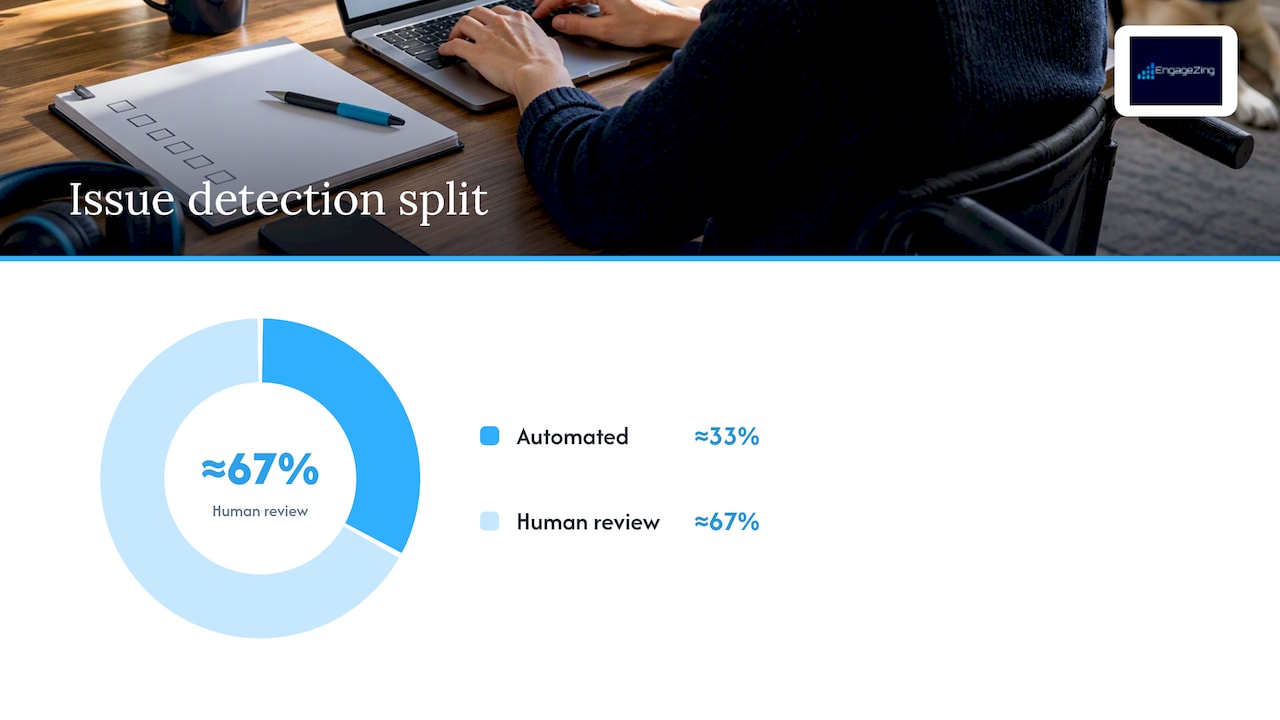
- Run a mixed audit. Automated tools give you broad coverage fast, but they only catch about a third of real issues. Pair them with manual code review and, where budget allows, testing by people who actually use assistive technology.
- Score each issue with a simple rubric. Weigh legal risk, business impact, and fix complexity. A missing form label on your contact page scores high on all three; a decorative image with no alt text scores low.
- Sequence fixes by size. Quick wins (alt text, labels, contrast) can often ship within days. Structural fixes (heading order, focus management) take longer. Full rebuilds (a custom widget with no keyboard support) belong on a separate timeline with real budget behind them.
- Assign owners and dates, not just a shared backlog item. Accessibility work stalls when no one is accountable for it.
- Document as you go. Publish an accessibility statement, set up a grievance or feedback channel, and keep records of what you fixed and when. The DOJ’s guidance for state and local government sites recommends this same approach for smaller entities: set a policy, fix new content as it’s created, prioritize existing content, offer alternatives where a fix isn’t immediate, and train your team.
- Screen reader checks using tools like NVDA or VoiceOver on your most-used pages.
- Keyboard-only navigation through every critical flow, with no mouse at all.
- Zoom and contrast checks at 200% browser zoom to confirm nothing breaks or disappears.
- A specific WCAG conformance target, almost always 2.1 AA.
- Ongoing monitoring, not a one-time fix, often including monthly automated scans.
- Third-party or independent testing, sometimes with a named consultant.
- Public reporting or documentation showing progress against the plan.
- Free automated scanners (many browser extensions) catch the low-hanging issues first.
- Paid remediation platforms, including partners like AccessWiser, combine audits, fixes, and ongoing monitoring for teams that don’t have in-house developers.
- Overlay widgets promise a quick fix but often fail to resolve underlying code issues, so treat them as a supplement, never a substitute for real remediation.
- Fact Sheet: New Rule on the Accessibility of Web Content and Mobile Apps Provided by State and Local Governments
- Settlement Agreement between the United States and Hy-Vee, Inc.
Pro Tip: Fix the checkout, login, and contact forms before touching decorative content. Legal exposure and lost conversions both concentrate in the pages where money or data changes hands.
If you work with outside vendors or contractors on your site, build accessibility requirements into those contracts now, not after a complaint arrives.
Testing and monitoring: what to run, and how often
Automated scanners are the fastest way to find a large batch of common issues, things like missing alt text, low contrast, and unlabeled fields. Run them on every code push if you can, and do a full site scan monthly at minimum. But automated tools have real limits: they can’t tell you whether a screen reader announces a form correctly or whether a keyboard user can actually complete checkout, and DOJ guidance and practitioner consensus both stress that manual and real-user testing are essential to catch what scanners miss.
Manual testing should cover:
For user testing, recruit a small group of people who use assistive technology daily and have them complete specific tasks, like scheduling an appointment or finishing checkout. Set a remediation timeline for whatever they flag, and treat critical failures (a blocked purchase path) differently from minor ones (an awkward but usable form). Track completion rates and issue counts over time so you can show a testing history if you’re ever asked to demonstrate good faith effort.
What DOJ settlements reveal about enforcement and risk
Real settlement agreements give the clearest picture of what regulators and courts expect. The settlement between the United States and Hy-Vee is a useful model: it requires WCAG 2.1 AA conformance, a mix of automated and manual testing, user testing by people with disabilities, an independent accessibility consultant, and periodic reporting to DOJ.
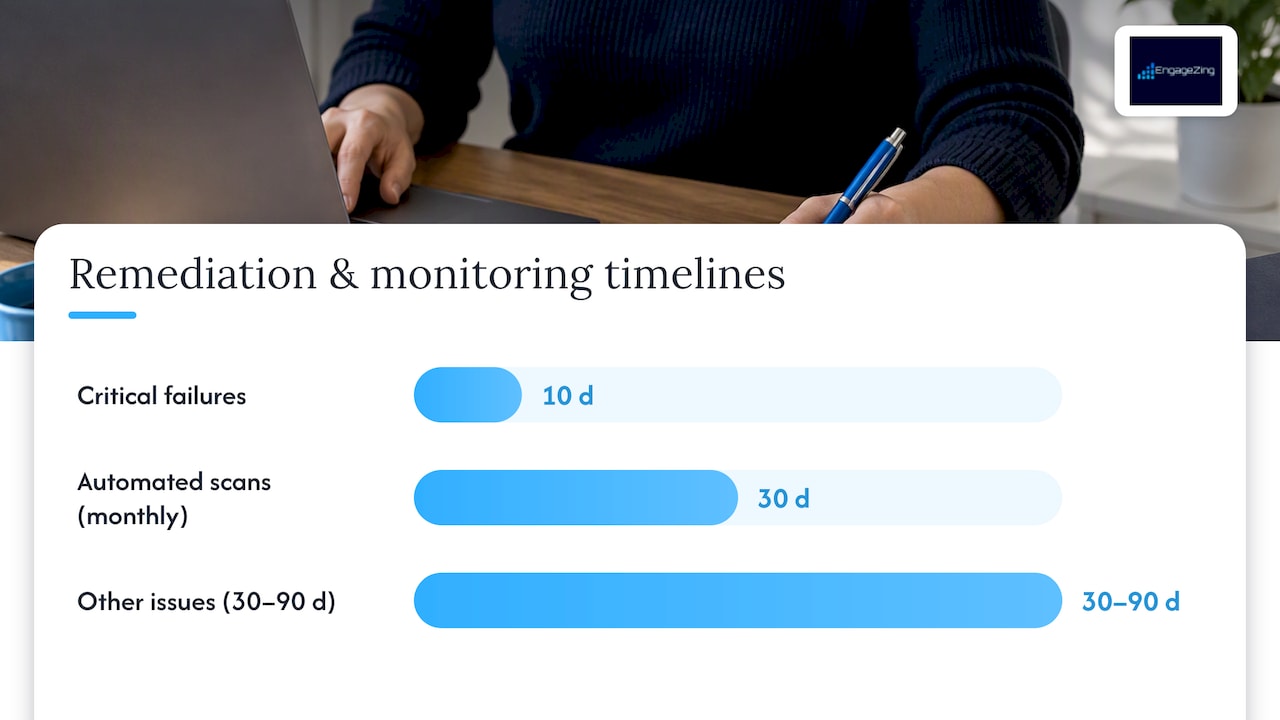
Settlement remediation timelines often separate issues by severity, with critical failures resolved in 10 days and other issues addressed within 30 to 90 days, according to DOJ settlement agreements including Hy-Vee and CVS. That kind of staged timeline is a reasonable template for your own remediation plan even if you never face a complaint.
Recurring elements across these settlements include:
The pattern matters beyond the two named companies. It tells you that documentation, not just the fix itself, is what protects you if a complaint ever lands. Private lawsuits under Title III are common and separate from DOJ enforcement entirely, so a documented, ongoing accessibility program is your best defense whether the challenge comes from a regulator or a plaintiff’s attorney.
Resources and low-cost options for small teams
You don’t need a large budget to make real progress. Start with the official sources: ADA.gov’s web accessibility guidance, the W3C’s WCAG documentation, and Section 508 materials from the U.S. Access Board all describe the technical standards in plain terms.
For tools, layer them:
If budget is tight, prioritize your top three conversion flows, add captions to existing video, publish a short accessibility statement with a contact method, and ask a local disability organization if they can connect you with testers.
Why accessibility work benefits from local marketing expertise
Accessibility fixes and conversion improvements aren’t separate projects, they’re the same project. A form a screen reader can complete is also a form more people finish. Our approach to website accessibility pairs technical remediation with local account management, so fixes get made with your actual customers and your actual market in mind, not a generic checklist.
— Joe Leineke
Get a free Roadmap Analysis for your website
If you would rather have a team handle the audit, the prioritization and the fixes for you, our Website Accessibility service maps out exactly where your site stands and what to fix first — with a local account manager and a recurring check, not a one-off report.
Start with our roadmap analysis and get a prioritized plan with clear next steps — no cost and no obligation. You can also read more about our Website Accessibility service to see what a full engagement includes.
This article is general information, not a substitute for advice from a qualified lawyer. Consult a qualified legal professional about your own circumstances before acting on anything here.
Sources
Frequently Asked Questions
What is the deadline for ADA website compliance?
Deadlines currently apply to state and local government websites under the DOJ’s Title II rule: entities serving 50,000 or more people must comply by April 26, 2027, and smaller entities or special districts have until April 26, 2028, according to the DOJ’s web rule fact sheet. Private businesses under Title III have no fixed deadline, but DOJ guidance and settlements treat WCAG 2.1 AA as the standard to meet now.
Does the ADA legally require WCAG 2.1 AA for all websites?
WCAG 2.1 AA is legally required for state and local government websites under the DOJ’s Title II rule. For private businesses under Title III, there is no binding technical rule yet, but DOJ guidance and consistent settlement terms treat WCAG 2.1 AA as the practical standard.
What happens if my website is not ADA compliant?
Non-compliance can lead to private lawsuits under Title III or DOJ enforcement action, both of which often result in settlement agreements requiring WCAG conformance, testing, and monitoring. Settlement terms commonly include remediation timelines as short as 10 days for critical issues and up to 90 days for others.
How much does an ADA website audit cost?
Audit costs vary widely depending on site size, whether you use automated tools alone or add manual and user testing, and whether you hire a consultant. A free roadmap analysis is available, giving you a prioritized starting point at no cost.
Do accessibility overlay widgets make a website ADA compliant?
Overlay widgets can help with some surface-level issues, but they typically don’t fix underlying code problems like poor heading structure or inaccessible forms. Most accessibility guidance and settlement patterns point to a mix of automated tools, manual code review, and real user testing as the reliable path to compliance.
Recommended
Share This Article
Found this useful? Send it to another owner who is still carrying accessibility risk they have never checked.
Share on Facebook · Share on X · Share on LinkedIn · Share on Pinterest
Want More Information? Let’s Talk.
If you would rather not take this on yourself, we handle it for you. Our Website Accessibility service takes care of the setup and the ongoing work, then reports back so you can see exactly what changed. You keep running your business; we keep this moving.
Call us at 631-825-9464 or reach out here. No pressure, no obligation, and you can ask us anything — including whether this is even worth doing for a business your size.
Looking ahead, request your free roadmap analysis and we will map out a 12-month plan to close the conversion leaky bucket so more of the customers you already reach turn into booked work.
Written by Joe Leineke · Content on this blog is generated with AI assistance and independently reviewed and fact-checked by human marketing professionals for accuracy and quality.