Abandoned cart emails recover high-intent shoppers when they run as a short, automated flow built on timing, personalization, and a clear call to action. Done well, this approach turns browsers who stalled at checkout into paying customers and adds measurable revenue without new ad spend. Here you’ll find real examples, subject-line formulas, a deployable timing cadence, a testing plan, and a compliance checklist you can put to work today.
TL;DR:
Most abandoned carts are caused by fixable issues like unexpected costs, long forms, or security doubts, which targeted emails can address to recover sales. Effective abandoned cart emails should include a clear subject line, product details, a persuasive benefit, a single call-to-action, and trust proof, with dynamic content and mobile optimization. Sending a sequence of three to four emails within the first few days, timed to the shopper’s behavior and value, maximizes recovery without causing fatigue or unsolicitous messaging. Personalization based on cart value, product type, first-time or repeat buyer status, and traffic source enhances conversion rates and reduces unnecessary sends. Fix checkout friction before optimizing email flows, and ensure compliance with legal and deliverability standards such as CAN-SPAM to maintain a healthy reputation and high inbox placement.
Why shoppers abandon carts in the first place
Not every abandoned cart is a lost sale. A large share of shoppers are simply browsing, comparing prices, or saving items for later, and no email will change that. Baymard Institute’s checkout research puts average cart abandonment around 70%, and about 42% of those abandonments happen because the shopper was just browsing, not because something went wrong.
The rest of the abandonments are often preventable, and that’s where your email flow earns its keep. Shoppers walk away from checkout for specific, fixable reasons, and knowing which ones apply to your store shapes what you say in each message.
- Unexpected costs: shipping fees, taxes, or surcharges that appear late in checkout push shoppers out the door.
- Forced account creation: requiring a login before purchase adds friction that guest checkout removes.
- Long or confusing forms: too many fields or unclear error messages stall progress.
- Slow or unclear delivery estimates: shoppers who can’t tell when an item will arrive often hesitate.
- Security concerns: a checkout page that looks unpolished or lacks trust signals raises doubt at the worst moment.
Email can’t fix a broken checkout page, but it can address the hesitation those problems create. A reminder that clarifies shipping costs, confirms delivery timing, or reassures the shopper about security often closes the gap. This is also why Baymard’s research matters for sequencing: since a meaningful share of abandonments are just browsing, your flow should prioritize shoppers who showed real purchase intent, meaning they added items to the cart or started checkout, rather than treating every site visitor the same way. Pair your email strategy with checkout page improvements to close both gaps at once, since accessible, well-structured checkout pages reduce the preventable losses email alone can’t recover.
What goes into an effective abandoned cart email
Every email in your flow should include the same core building blocks, even as the tone shifts from reminder to urgency to incentive. Skipping any one of these weakens the whole message.
- Subject line: specific, honest, and built to earn an open, not just describe the email’s contents.
- Product block: a clear image, product name, price, and current availability, so the shopper instantly recognizes what they left behind.
- One persuasive benefit: a single reason to come back, such as free returns, a fast delivery window, or limited stock, stated plainly.
- A single call to action: one button, one action, restoring the cart with a click rather than making the shopper search for their items again.
- Supportive proof: a short review, star rating, or trust badge that reduces hesitation without cluttering the message.
- Footer essentials: a physical mailing address and a clear unsubscribe link, both required for CAN-SPAM compliance.
- “Still thinking it over, [First Name]?”
- “Your cart is waiting, but not for long”
- “You left something behind”
- “[Product Name] is almost gone”
- “A little nudge: your cart expires soon”
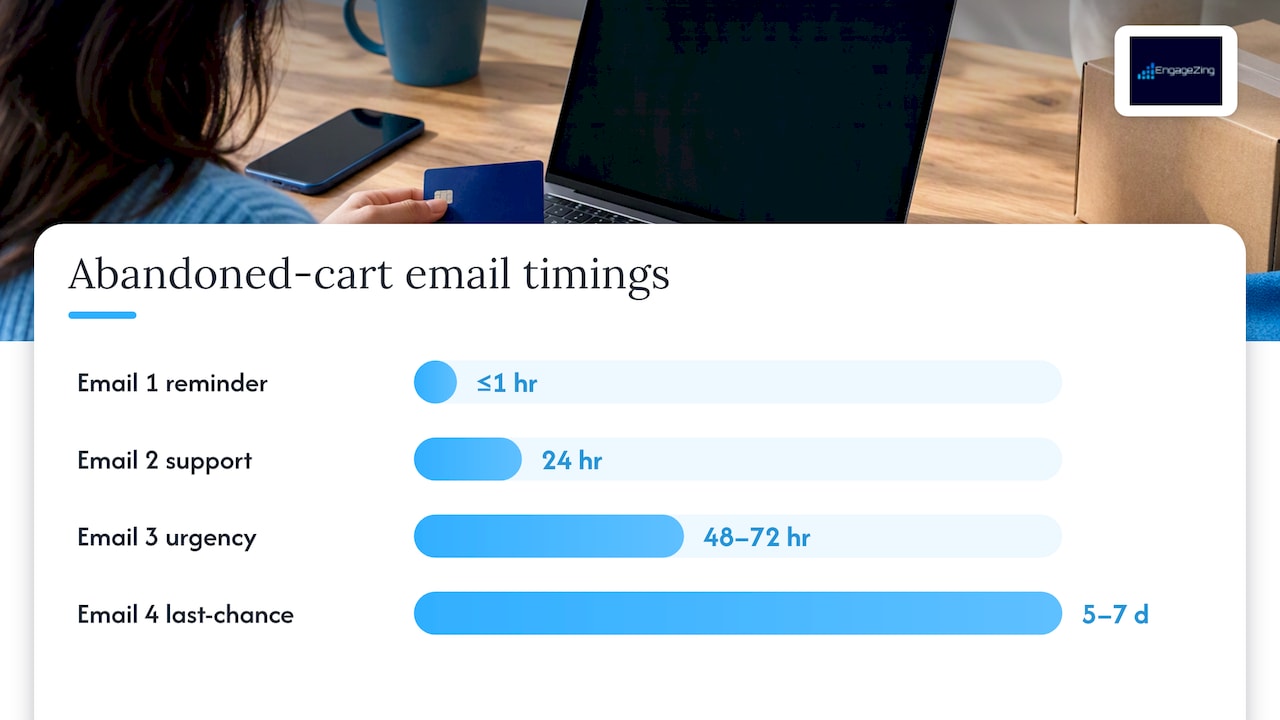
- Email 1, sent within 1 hour: a simple reminder with the product block and one clear CTA, no discount attached.
- Email 2, sent at 24 hours: add a supportive element like a review, a delivery estimate, or an answer to a common objection.
- Email 3, sent at 48 to 72 hours: introduce urgency, such as low stock or a closing price hold, and consider a modest incentive if your margins allow it.
- Email 4 (optional), sent at 5 to 7 days: a last-chance message, often the only one that includes a discount, reserved for shoppers who haven’t converted or unsubscribed.
- Cart value thresholds: a $15 cart may not justify a discount, while a $300 cart might warrant a more generous or faster follow-up.
- Logged-in versus guest checkout: logged-in shoppers have already shown account-level intent and often respond well to a shorter, more direct sequence.
- Traffic source: shoppers arriving from a paid ad or a retargeting campaign may need different messaging than those who came from an existing email list, since traffic source segmentation reveals different intent signals at checkout.
- Suppression rules: stop the sequence immediately once a purchase completes, and cap total sends per week to avoid fatigue on shoppers who never convert.
- The simple reminder: just the product, the price, and a button. Works because it respects the shopper’s time and doesn’t oversell.
- The urgency message: “Your cart expires in 2 hours” or “Only 2 left.” Works when the scarcity is real and specific.
- The discount close: a percentage off or free shipping, reserved for the final email. Works because it gives hesitant shoppers a concrete reason to finish.
- The social proof email: a short review or a “loved by thousands” line next to the product. Works by reducing perceived risk.
- The FAQ or objection-handling email: addresses shipping time, return policy, or sizing directly. Works for considered purchases like apparel or electronics.
- The VIP or loyalty follow-up: acknowledges repeat customers with a slightly warmer tone. Works because it recognizes existing relationship, not just transaction.
- The alternative product email: swaps in a similar item when the original sold out. Works by keeping the shopper engaged instead of losing them entirely.
- The personal note style: written like it’s from a founder or team member, often for smaller or DTC brands. Works when it matches the brand’s existing voice.
- Reminder: “You left [Product Name] in your cart”, “Still there?”
- Urgency: “Your cart expires soon”, “[Product Name] is almost sold out”
- Incentive: “Here’s 10% off to finish your order”, “Free shipping if you check out today”
- Personalized: “[First Name], your cart is waiting”, “We saved your size, [First Name]”
- Recovery rate: the percentage of abandoned carts that convert after receiving the flow.
- Incremental revenue per recipient: revenue attributable to the flow beyond what would have happened anyway.
- Conversion rate by email position: which message in the sequence, first, second, or third, drives the most completed purchases.
- Unsubscribe and spam complaint rates: early warning signs that your frequency or tone needs adjustment.
- Deliverability metrics: open rates and inbox placement, which signal whether your emails are reaching shoppers at all.
- Subject line: the biggest lever for open rate, test one variable at a time (personalization, urgency, length).
- Send time: the gap between abandonment and the first email, testing 30 minutes versus 2 hours versus 4 hours.
- Incentive presence and size: whether a discount helps at all, and if so, whether 10% outperforms free shipping.
- Creative and CTA wording: “Complete Your Order” versus “Return to Cart” versus “Finish Checkout.”
- Cart value: high-value carts may warrant a faster follow-up and a more attentive tone, since the potential loss is bigger.
- Product type: apparel benefits from size and fit reassurance, while electronics benefit from spec confirmation or warranty details.
- First-time versus repeat buyer: a returning customer can be addressed with familiarity, while a first-time visitor may need more trust-building content.
- Traffic source: a shopper from a retargeting ad has different context than one from an email newsletter, and the message should reflect that.
- Abandonment behavior: someone who abandoned at the shipping step needs different reassurance than someone who abandoned at payment.
- Include a valid physical postal address in every commercial email, no exceptions.
- Provide a clear, working opt-out mechanism and honor unsubscribe requests within 10 business days, as the FTC requires.
- Use accurate subject lines and header information that don’t misrepresent the email’s content or sender.
- Never send to purchased lists, since these recipients never opted in and complaints from them damage your sender reputation quickly.
- CAN-SPAM Act: A Compliance Guide for Business | Federal Trade Commission
- Baymard Institute — Cart abandonment statistics and checkout research
- The Best Abandoned Cart Email Examples & Designs — ReallyGoodEmails
Subject lines carry more weight than any other element, since they decide whether the email gets opened at all. A few formulas worth testing:
Keep the product block visual and specific. Show the exact item, not a generic category image, and include the price the shopper saw, since a mismatched price erodes trust immediately. If the item sold out or went on sale, update the email dynamically rather than sending stale information.
Scarcity and urgency work best when they’re true. “Only 3 left in stock” is persuasive because it’s specific and verifiable, while vague urgency (“Don’t miss out!”) reads as filler and trains shoppers to ignore it. If stock is genuinely limited, say so. If it isn’t, lean on a different lever, such as a delivery deadline or a time-limited bonus.
Alternative product recommendations help when the original item sold out or when the shopper’s browsing history suggests a better fit. A “you might also like” block beneath the primary product gives hesitant shoppers a second path to purchase instead of leaving the email empty-handed.
Mobile rendering deserves its own check before any email ships. More than half of email opens happen on a phone, so a single-column layout, a large tappable button, and a product image that loads quickly matter more than desktop polish. Test every email on an actual phone screen, not just a preview pane, since font sizes and button spacing often break differently than expected.

Pro Tip: Send yourself a test email and check the CTA button size on a phone screen before every campaign goes live: a button that’s hard to tap costs you conversions no copy can fix.
The footer is the one part of the email that shoppers rarely notice but that protects your sending reputation. A visible unsubscribe link and a real postal address aren’t just good manners, they’re required under the FTC’s CAN-SPAM guidance, and skipping them puts your whole email program at risk.
How many emails to send and when to send them
Many stores find success with a sequence of about three emails sent over the first few days after abandonment, but the optimal timing varies depending on factors such as average order value and shopper behavior. A single reminder can work for low-cost, low-consideration products, while higher-ticket items often benefit from a longer, more patient sequence.
A cadence that works for most catalogs:
Reserving the discount for the final message matters more than it might seem. Leading with a coupon trains shoppers to expect one every time, which erodes margin over time and teaches your list to wait you out. Early messages should lean on clarity and reassurance, while the incentive, if you use one, belongs near the end of the sequence when the shopper’s intent has had time to cool or re-ignite.
Not every shopper should get the same treatment. A few adaptive rules worth building into your flow:
The goal isn’t to message as often as possible, it’s to message at the moments a shopper is most likely to act, then stop cleanly once the opportunity passes.
Examples and subject lines worth testing today
A gallery of real abandoned cart emails, like the one curated by ReallyGoodEmails, is worth studying before you write your own, since seeing how established brands balance tone and urgency often sparks better copy than a blank template. A few approaches consistently perform well, each for a different reason:
Subject lines should match the intent of each email in the sequence. Grouped by purpose:
Adapt language to the product’s price point and your brand’s tone. A $40 candle and a $400 jacket shouldn’t sound the same in a reminder email. Lower-cost items can lean playful and quick, while higher-ticket purchases benefit from more reassurance, clearer return policies, and a slightly more formal tone that matches the size of the decision.
When you’re building your own templates, screenshot a handful of examples from different categories, apparel, electronics, home goods, and note which elements repeat: the product image size, the CTA button color, the length of the subject line. Patterns across a well-curated gallery tell you more about what’s working broadly than any single email does on its own.
Measuring what’s working and what to test next
A flow that isn’t measured is just a guess that runs on autopilot. Track a small set of KPIs consistently rather than drowning in metrics that don’t change your next decision.
Baymard’s research shows that fixing checkout friction can produce substantial conversion gains, since simplifying the checkout process directly addresses many of the preventable abandonment causes email alone can’t solve. That’s a reminder that your email flow and your checkout page should be optimized together, not treated as separate projects.
Run one test at a time so you know what actually moved the number. Priorities worth testing in order:
To calculate incremental revenue accurately, hold out a control group that receives no emails and compare their conversion rate against the group that gets the flow. The difference, not the flow’s total attributed revenue, is what the campaign actually added. Review results on a monthly cadence at minimum, since abandoned cart flows can drift as your catalog, pricing, or traffic mix changes.
Personalization and segmentation that lift recovery
Generic reminders convert, but segmented ones convert better because they speak to the shopper’s actual situation instead of a generic cart. A few segmentation rules worth building first:
Dynamic content makes personalization scalable instead of manual. Pull in the actual product image and price the shopper saw, show an estimated delivery date based on their location, or surface a “saved for later” block if they browsed alternatives before leaving. For repeat customers, a brief loyalty note, referencing their order history without overdoing it, can outperform a generic template.
Personalization has limits, and respecting them protects both the shopper and your sender reputation. Use only first-party signals you collected with consent, never data scraped or inferred in ways the shopper didn’t agree to. Suppress anyone who’s unsubscribed immediately and permanently, and avoid personalization that feels invasive, like referencing browsing behavior in a way that feels like surveillance rather than service.
Pro Tip: Start segmentation with just two groups, cart value above and below your average order value, before building anything more complex: the lift from that one split often outweighs the effort of a fully granular system.
Deliverability and legal basics you can’t skip
None of this matters if your emails land in spam or violate the law. The FTC’s CAN-SPAM guide sets the baseline every commercial sender in the United States has to meet, and it’s worth treating as a floor, not a ceiling.
Beyond legal compliance, deliverability hygiene keeps your emails in the inbox instead of the spam folder. Authenticate your sending domain with SPF, DKIM, and DMARC, warm up new sending IPs gradually rather than blasting volume on day one, and monitor spam complaint rates closely since complaint rates above roughly 0.1% put your domain reputation at meaningful risk with most inbox providers, based on the deliverability standards the FTC’s compliance guidance points toward for responsible senders.
Frequency caps matter as much as content quality. Capping total sends per shopper per week, and suppressing anyone who’s already purchased or unsubscribed, reduces complaints and protects the sender reputation your entire email program depends on. If you want a deeper implementation checklist beyond the legal minimum, this practical CAN-SPAM compliance guide for affiliates walks through sending hygiene in more operational detail.
What actually moves the needle, in our experience
Fix checkout friction before you touch a single email template. A flawless abandoned cart sequence sent to a checkout page with hidden shipping costs or a forced account requirement is polishing the wrong end of the funnel. Once the checkout itself is clean, the email flow’s job gets much easier: remind, reassure, and occasionally incentivize.
The single biggest mistake we see is leading with a discount in the first email. It works in the short term and costs margin for the life of the customer relationship. Save the incentive for the message shoppers get after clarity and reassurance haven’t already closed the sale.
We’ve applied this sequencing across client accounts with results that follow a consistent pattern: stores that separated checkout fixes from email optimization saw faster, more durable gains than stores that only tuned email copy. One retail client saw meaningful recovery lift simply by moving their discount from email one to email three. Another saw fewer unsubscribes after adding suppression rules for repeat non-openers. Small structural changes, not clever copy, tend to move the number most.
Let EngageZing build and optimize your recovery flow
Fixing an abandoned cart flow touches more than email copy, it touches your checkout page, your automation tools, and how you segment traffic, and Local account managers handle all three without asking you to coordinate three separate vendors.
Our Email Marketing service builds and tests the sequences described here against your actual catalog and traffic, while our Winning Websites team addresses the checkout friction that no email can fix on its own. If accessibility gaps are quietly costing you conversions, our Website Accessibility work closes those gaps directly.
The easiest place to start is our Conversion Roadmap, a personalized breakdown of where your store is losing shoppers and what to fix first, with no cost and no obligation attached. Head to Grow for a roadmap analysis and see exactly where your checkout and email flow stand today.
Frequently Asked Questions
Are abandoned cart emails legal?
Yes, abandoned cart emails are legal as commercial email, as long as they follow the FTC’s CAN-SPAM requirements, including a valid physical address, accurate subject lines, and a working opt-out link. Senders must also honor unsubscribe requests within 10 business days.
How many emails should be in an abandoned cart flow?
Most stores use a three-email sequence, sent within the first hour, at 24 hours, and again at 48 to 72 hours after abandonment, with an optional fourth email around a week later. The right number depends on your average order value and how your shoppers typically behave.
How do I stop receiving abandoned cart emails from a store?
Every legitimate abandoned cart email includes an unsubscribe link in the footer, required under CAN-SPAM, and clicking it should remove you from future messages within a reasonable timeframe. If emails continue after unsubscribing, the sender may be violating FTC opt-out requirements.
Can you give examples of cart abandonment emails?
Common approaches include a simple reminder with the product and price, an urgency message citing limited stock, a discount offer reserved for the final email, and a social proof message featuring a review. A curated gallery like ReallyGoodEmails shows real versions of each approach across different brands.
What’s the best time to send the first abandoned cart email?
Sending the first reminder within an hour of abandonment tends to catch shoppers while their intent is still fresh, before they’ve moved on or bought elsewhere. Later emails in the sequence, spaced a day or two apart, capture shoppers who need more time to decide.
Share This Article
Found this useful? Send it to another owner who is still has carts sitting in limbo.
Share on Facebook · Share on X · Share on LinkedIn · Share on Pinterest
Want More Information? Let’s Talk.
If you would rather not take this on yourself, we handle it for you. Our Email Marketing service takes care of the setup and the ongoing work, then reports back so you can see exactly what changed. You keep running your business; we keep this moving.
Call us at 631-825-9464 or reach out here. No pressure, no obligation, and you can ask us anything — including whether this is even worth doing for a business your size.
Looking ahead, request your roadmap analysis and we will map out a 12-month plan to close the conversion leaky bucket so more of the customers you already reach turn into booked work.
Written by Joe Leineke · Content on this blog is generated with AI assistance and independently reviewed and fact-checked by human marketing professionals for accuracy and quality.