Flag the review through your Business Profile or the Reviews Management Tool, save your evidence right away, and submit the one-time appeal if Google declines removal. Expect a wait of several days for each decision. Escalate outside Google only for extortion, impersonation or coordinated review attacks, and keep every message and screenshot as you go.
What should you do in the first 24 to 48 hours?
Acting promptly can help preserve evidence you may need later. Reviews can be edited or deleted by the reviewer, and the reviewer’s profile can change, so capture everything before you do anything else. Work through this list in order:
- Take time-stamped screenshots of the review, the star rating, the date and the reviewer’s public profile, including their other reviews.
- Save the direct URL of the review and of the reviewer’s profile in a document you can find again.
- Pull any business records that disprove the claim: receipts, booking logs, appointment calendars, camera timestamps, staff schedules and notes from the day in question.
- Flag the review in Google (three dots, then Report) and write down the date you did it. Check its status later in the Reviews Management Tool.
- Draft a calm, factual public reply, but hold it until you have read the reply guidance below.
- If the review arrives with a threat or a demand for money, do not pay. Preserve every message and contact the police.
Pro Tip: Store your evidence in a shared folder named for the review date. If you hand the case to a manager, a lawyer or an agency later, nothing gets lost.
Do not reply in anger, and do not contact the reviewer privately with accusations. Both moves can hand them material to use against you. Your goal is simple: a clean record and a filed report.
How do you report a fake Google review step by step?
Google gives business owners two main paths: reporting from the review itself and reporting from the Reviews Management Tool. Both are described in Google’s Business Profile help, which also notes that evaluating a report can take several days.
Reporting from your Business Profile
- Sign in to the Google account that manages your Business Profile.
- Search for your business name, or open the profile from Google Maps.
- Find the review you want to challenge. If you have many, sort by newest.
- Click the three dots next to the review and choose Report review.
- Select the reason that best matches the problem, then submit.
- Write down the date and the reason you selected.
- Open the tool from Google’s Business Profile help page.
- Select the location you want to manage.
- Choose the review you want to report and select the reason.
- Submit, then return to the same tool to check decisions.
- Spam or fake content: the reviewer never visited, or posted the same text on many profiles.
- Conflict of interest: a competitor, a former employee or someone with a personal stake wrote it.
- Impersonation: someone posts as another person or business.
- Off-topic: the review describes something unrelated to your business.
- Offensive or harmful content: slurs, threats or other abusive language.
- Pending or under review: Google has not decided yet. Wait and avoid re-reporting the same review repeatedly.
- Removed: the review violated policy and is gone.
- No policy violation found: Google reviewed the report and kept the review. This is the point at which you can look at the appeal option.
- Appeal eligible: the review can be included in a one-time appeal.
- Date-stamped screenshots showing the review and the reviewer’s profile.
- Transaction records, booking IDs or guest lists showing no record of the reviewer.
- Proof of a conflict of interest, such as a link between the reviewer and a competitor.
- Examples of the same or very similar text posted across other profiles.
- A clear timeline of when the reviews appeared.
- Someone threatens to post fake negative reviews unless you pay.
- A wave of reviews appears from accounts that look coordinated.
- A person impersonates you, your staff or your business.
- A competitor or a paid broker seems to be behind the attack.
- Keep every message, email, text and voicemail in its original form.
- Save payment requests and, if any money changed hands, receipts and transfer records.
- Keep your screenshots, review URLs and Google report dates in one timeline.
- Write a one-page summary of what happened, with dates, so an officer or investigator can read it quickly.
- Monitor on a schedule. Check your Google reviews and profile settings daily or weekly, and set alerts for new reviews so a sudden spike does not go unnoticed.
- Request reviews the right way. Ask real customers by email or text after a completed service. Send one follow-up if needed, and never offer a reward that depends on a positive rating. The FTC warns against incentives conditioned on sentiment.
- Limit access. Review who has owner or manager permissions on your Business Profile, remove former employees and agencies you no longer use, and avoid sharing logins.
- Keep listings accurate. Wrong hours, duplicate listings and outdated phone numbers create openings for confusion and fraud. Our business listings and voice search management keeps your information consistent across directories.
- Build a steady flow of verified reviews. A larger base of authentic feedback makes isolated fake reviews easier to spot and less damaging. Our review generation and reputation service automates compliant review requests so you do not have to chase customers manually.
- Consider managed monitoring. When your team is stretched, a managed workflow shortens reaction time and keeps evidence organized from the first alert.
Using the Reviews Management Tool
The Reviews Management Tool is the better choice when you manage several locations or need to report more than one review. It lets you see reported reviews in one place and follow their status instead of hunting through your profile.
Picking the right report category
The reason you choose matters because Google reviews reports against specific policy categories. Match the review to the one that fits best:
An angry customer who really visited and had a bad experience is not a policy violation, even if you think they are unfair. Reporting an honest negative review as fake rarely works and can slow down your real cases.
Why timing, volume and text similarity matter
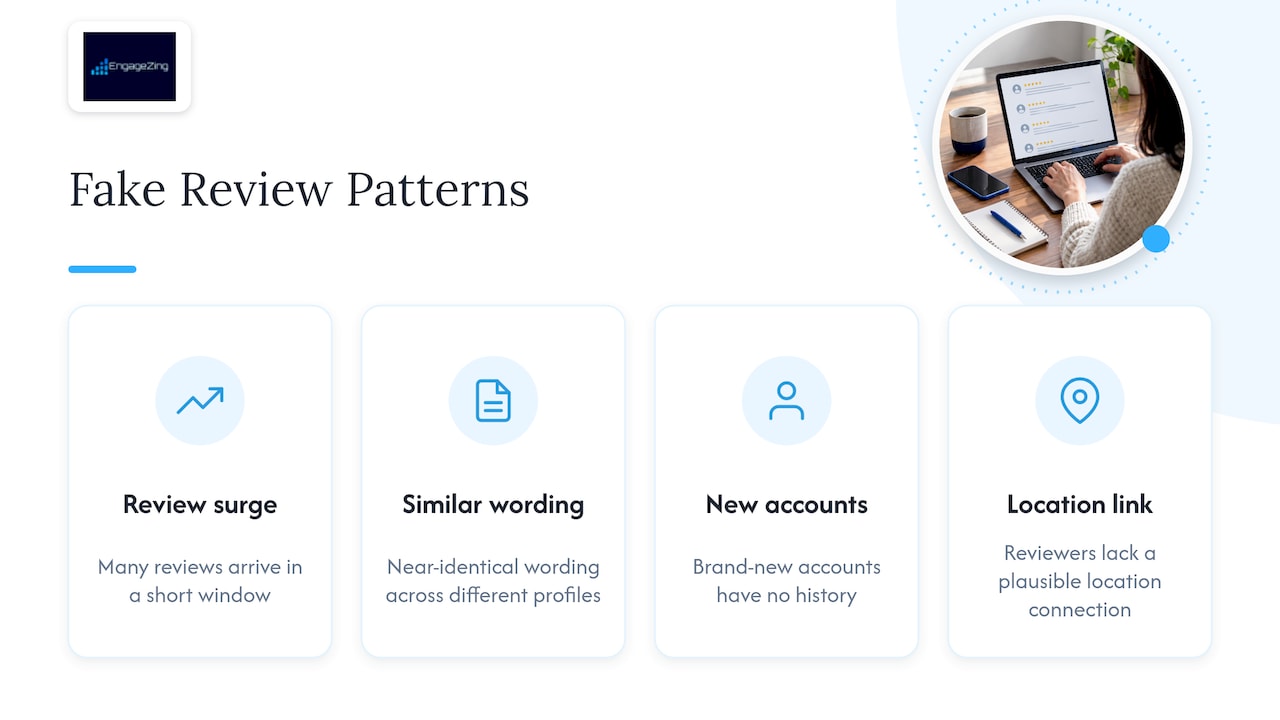
Google relies heavily on automated systems to catch fraudulent engagement, as its support pages explain. Those systems look for patterns: many reviews arriving in a short window, near-identical wording across different profiles, brand-new accounts with no history, or reviewers with no plausible connection to your location. When you report, point to those patterns in your notes. A single odd review may be hard to assess. A pattern of similar reviews can help illustrate a coordinated attack.
If a profile receives a surge of fake reviews, Google may do more than remove them one at a time. Its restrictions policy says fake engagement can lead to profile-level actions, such as turning off new reviews, unpublishing existing ones or showing a warning. That is why a review attack can hurt even honest listings, and why you should respond quickly and keep clean records.
Reading your report status
After you report, the status in the Reviews Management Tool is your guide. Labels can change over time, so read the wording on screen. In general:
Log the date of every status change. If the case grows into a legal or regulatory complaint, that timeline helps.
How do you file the one-time appeal when Google says no?
If Google keeps a review you believe breaks its rules, you get one more chance. Google’s appeals documentation describes the process and notes that decisions can take up to several business days and that eligibility has limits. Treat the appeal as your best shot, not a formality.
Where to find it
Open the Reviews Management Tool and look for reviews marked as eligible for appeal. The form lets you include up to 10 reviews in one submission, which is useful when a single attack produced several posts. Only reviews you already reported and that Google declined will appear.
What to put in the appeal
Your evidence should be short, objective and easy for a stranger to verify. Include what applies:
Leave out opinions about the reviewer’s character. Stick to what you can show.
How to write it
Use neutral, factual language. Name the policy category that matches, for example “impersonation” or “fake engagement,” and tie each piece of evidence to one claim. Two or three tight paragraphs usually beat a long story. Avoid threats, all caps and accusations of crimes, which make it harder for a reviewer to take your case seriously.
What to expect on timing
Google says review decisions can take several business days. Appeals may be denied, so keep your evidence ready for the next step. Record the submission date and each decision.
Pro Tip: Submit related reviews together in one appeal and describe the pattern once, clearly. A reviewer who sees the full picture is more likely to recognize coordinated abuse.
If Google ends up restricting your profile because of the surge, the restriction has its own appeal path, and a suspended profile may need to be reinstated before other appeals proceed. Check the wording in Google’s help pages and keep your account verification information current.
When should you go to law enforcement, the FTC or a lawyer?
Most fake reviews end with the platform. A few cases do not, and knowing the difference saves time and money. Consider escalating when you see any of these signs:
The FTC’s questions and answers on its reviews rule state that threatening to post fake negative reviews to extract money is a serious federal crime. Victims should not pay, should document the communications, and should consider reporting to local law enforcement or federal authorities.
How to document the case
File with your local police first, then ask about federal channels if the threat crosses state lines or involves organized activity. Criminal prosecutions do happen. In one Department of Justice case, a search engine optimizer admitted to extorting money from a local firm, and in another, prosecutors described a scheme built on fake accounts, fake listings and misleading reviews. Those files show that authorities take profit-driven or coordinated schemes seriously.
Civil options and cease and desist letters
When the author of a fake review is identifiable, such as a competitor or a former contractor, an attorney can send a cease and desist letter demanding removal and a stop to further posts. That letter can be enough to end a dispute, and it also builds a record if you later sue. Because defamation and business tort rules vary by state, talk with a licensed attorney before sending anything yourself, and never threaten a lawsuit in a public reply.
How should you reply to a fake review in public?
A public reply is written for everyone who reads your profile, not just the reviewer. Keep it short, factual and calm. State that you cannot find a record of the visit, invite the person to contact you, and stop there. Do not call the reviewer a liar, do not mention police or lawyers, and do not reveal private customer details.
Here are three templates you can adapt.
Mistaken customer:
“Thank you for the feedback. We can’t find a record of this visit under your name and want to make it right. Please call us at the number on our profile so we can look into it.”
Clearly fake review:
“We take every review seriously, but we have no record of this experience and believe it may have been posted in error. We’ve reported it to Google. If you did visit us, please contact us so we can help.”
Extortion attempt (public reply plus private step):
“We have reported this review to Google. We stand by the service we provide and welcome any genuine customer to contact us directly.”
Then handle the rest privately: save the threat, do not respond to the demand, and report it to the police.
For more reply examples and workflows, this guide to fake Google review responses offers practical wording you can compare against your own.
Do not fight fake with fake
Never respond to a bad review by posting positive ones yourself, and never ask staff, friends or family to post reviews they did not earn. The FTC’s final rule announcement makes clear that buying or selling fake reviews is a target of enforcement, and the agency can seek civil penalties against knowing violators. A fake positive review can undermine your credibility and put you on the wrong side of the same rules you want to use.
When to reply and when to stay quiet
A public reply helps when it corrects clear misinformation, such as a wrong date or a service you do not offer. Silence, or a private message, is better when the review is abusive, when the reviewer is hostile, or when your reply could expose a customer’s information. If Google is likely to remove the review, you can wait for the decision before replying.
Pro Tip: Write your reply in a document first, then read it as a stranger would. If it sounds defensive, revise it.
How do you prevent the next fake review attack?
Prevention is cheaper than cleanup. The goal is to spot trouble early and make your real reviews numerous and recent enough that one bad post does not define you.
Fake reviews can also affect how you show up in local results. Review quantity, recency and ratings are among the signals people see when they compare nearby businesses, so a flood of bad feedback can push customers toward a competitor. Pairing clean monitoring with our Near-Me Search Boost helps you stay visible while a dispute is pending.
Where AI tools fit
Software can help you notice patterns faster than a human scrolling through reviews: unusual spikes, repeated phrasing, or reviewers with thin histories. Treat those alerts as leads, not proof. Always check the flagged review against your own records before reporting it, because AI tools can flag honest customers too.
What does the FTC rule mean for fake reviews?
The FTC’s rule on consumer reviews and testimonials is the clearest federal statement on the issue. The agency’s Q&A page says the rule took effect on October 21, 2024, after the FTC published it on August 14, 2024. The rule prohibits buying or selling fake reviews, including AI-generated ones, and allows civil penalties against knowing violators. The full text is published as 16 CFR Part 465.
The final rule document also covers buying reviews conditioned on sentiment, undisclosed insider reviews and review suppression. For you, that means a practical way to describe the problem. When you file a complaint with Google or an agency, cite the rule and explain which prohibited practice you think occurred, such as a broker selling fake reviews or a competitor paying for negative posts. The rule does not remove a review by itself. It gives your report a clear legal frame.
A practitioner’s view on removal versus recovery
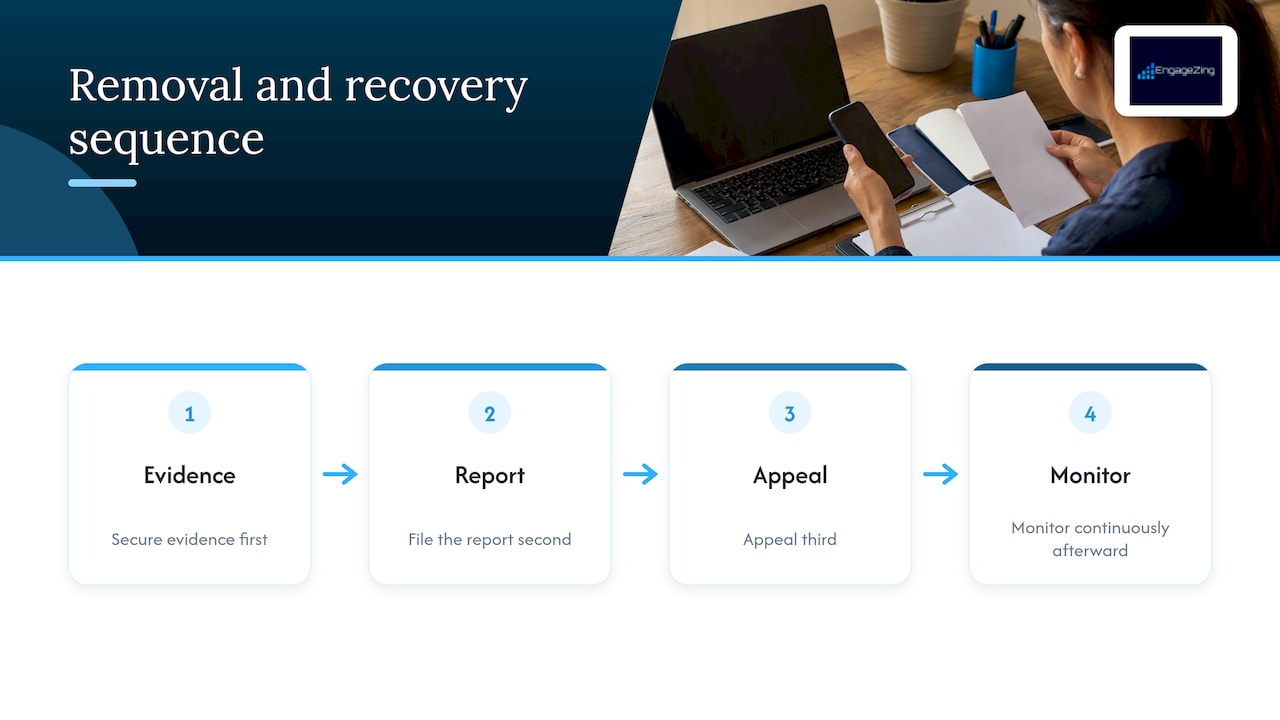
Chasing removal feels urgent, and it should be part of the plan. But the order of operations matters more than the intensity. Secure the evidence first, report second, appeal third, and monitor continuously after that. Owners who skip the evidence step often discover they have nothing to show when a reviewer deletes their profile or Google asks for proof.
The bigger lesson is that no report process can protect a profile with few reviews. A business with a small base of recent, genuine reviews may feel the impact of each fake one more acutely than a business with a larger base. That is why I put prevention ahead of cleanup: verified requests, accurate listings and tight access controls are the long-term defense. Bring in expert help when the attack is coordinated, when there is an extortion demand, or when Google denies your appeal and the damage keeps growing.
Frequently Asked Questions
Can I sue someone for a fake Google review?
You may be able to, depending on who wrote it and your state’s law. Defamation and related claims usually require proof of a false statement and harm, so speak with a licensed attorney before filing. A cease and desist letter is often a cheaper first step.
Is faking Google reviews illegal?
Buying or selling fake reviews is prohibited under the FTC’s rule, and the agency can seek civil penalties against knowing violators, according to its official announcement. Threatening to post fake reviews unless someone pays can also be a federal crime.
How can I complain to Google about fake reviews?
Report the review from your Business Profile or the Reviews Management Tool by choosing the three dots and then Report. If Google declines, use the appeal option for eligible reviews, as described in Google’s help page.
Can fake Google reviews be traced?
Google may have internal account data, but it does not hand that information to business owners. You can still build a case from public details, such as repeated wording and links to a competitor. For criminal matters, law enforcement can pursue records that you cannot.
Share This Article
Found this useful? Send it to another owner who is still the same questions keep coming up.
Share on Facebook · Share on X · Share on LinkedIn · Share on Pinterest
Want More Information? Let’s Talk.
If you would rather not take this on yourself, we handle it for you. Our Review Generation & Reputation service takes care of the setup and the ongoing work, then reports back so you can see exactly what changed. You keep running your business; we keep this moving.
Call us at 631-825-9464 or reach out here. No pressure, no obligation, and you can ask us anything — including whether this is even worth doing for a business your size.
Looking ahead, request your roadmap analysis and we will map out a 12-month plan to close the conversion leaky bucket so more of the customers you already reach turn into booked work.
Written by Joe Leineke · Content on this blog is generated with AI assistance and independently reviewed and fact-checked by human marketing professionals for accuracy and quality.