
Cut Admin 60% to 80% With AI Call Transcription and CRM Triggers
Cut Admin 60% to 80% With AI Call Transcription and CRM Triggers
AI call transcription turns spoken meetings and calls into searchable transcripts, concise summaries, and extracted action items. Sales, support, and internal teams save hours each week on note-taking and follow-up, since the system captures what was said and flags what needs to happen next. Accuracy, legal considerations, and integration choices still matter, and we cover each one below.
TL;DR:
- Most tools achieve accuracy up to 99% under ideal conditions, but background noise and overlapping speech can significantly increase error rates.
- Use dedicated microphones and build custom vocabularies to improve transcript reliability, especially for technical terms and proper names.
- Real-time captions help during calls, but teams mostly rely on post-call summaries to capture decisions and action items efficiently.
- Compliance and privacy risks vary by state, making it essential to obtain consent and set strict access controls before recording or transcribing calls.
- Costs depend on call volume and pricing models, with per-minute, per-user, and enterprise plans; additional expenses include storage, review, and automation.
Table of Contents
- What AI call transcription does and where teams use it
- Key features to prioritize when evaluating AI call transcription
- Accuracy, limitations, and how to improve transcription quality
- Legal and privacy checklist for U.S. users
- How to choose and integrate transcription into your workflows
- Cost expectations: pricing models and how to estimate monthly cost
- EngageZing's take: transcription as a marketing and local visibility asset
- How EngageZing can help you put transcription to work
- FAQ
- Sources
What AI call transcription does and where teams use it
At its core, AI call transcription converts audio into text, then layers on structure: speaker labels, timestamps, summaries, and highlighted action items. Some tools work in real time, showing captions as the call happens, while others process the recording afterward and deliver a polished transcript within minutes.
The outputs matter more than the raw text. A verbatim transcript is useful for compliance review, but a short summary with three bullet action items is what a sales rep actually reads before a follow-up call. Teams get the most value from:
- Sales calls : capturing objections, pricing discussions, and next steps without manual note-taking.
- Support tickets : attaching a searchable transcript to a case so the next agent has full context.
- Meeting minutes : turning a standing weekly call into a searchable record of decisions.
- Interviews and compliance logs : creating a defensible, timestamped record for HR or legal review.
Once transcripts pile up, they become a searchable knowledge base. A support lead can search "refund policy" across six months of calls instead of asking around, and a sales manager can pull every call where a competitor's name came up.
Key features to prioritize when evaluating AI call transcription
Not every transcription tool behaves the same way once it hits daily use. A few features decide whether the tool becomes part of the workflow or gets abandoned after a month.
- Real-time versus post-call processing : live captions help during the call, but most teams rely on the post-call summary for follow-up.
- Speaker diarization : accurate speaker labels matter most on multi-person calls where attribution affects who owns a follow-up task.
- Summarization quality : a good summarizer pulls out decisions and action items, not just a condensed version of the transcript.
- Native integrations : a tool that connects directly to your conferencing platform and CRM saves far more time than one requiring manual uploads.
- Security controls : look for encryption at rest and in transit, retention settings you control, and access logs you can audit.
- API access and export formats : if you plan to build automation downstream, confirm the tool exports to formats your other systems can ingest.
Pro Tip: Test a tool on a messy, multi-speaker call before buying. Clean demo audio hides problems that show up the moment three people talk over each other.
Accuracy, limitations, and how to improve transcription quality
Top-tier transcription systems report accuracy up to about 99% under ideal conditions, but real-world calls rarely offer ideal conditions. Background noise, overlapping speech, strong accents, and industry jargon all push error rates up, and a system tuned for general conversation often stumbles on product names or technical terms.
A few practical steps raise reliability without changing vendors:
- Use a dedicated microphone instead of a laptop's built-in mic, especially for conference room calls.
- Ask speakers to avoid talking over each other, since overlapping speech is the single biggest cause of transcription errors.
- Build a custom vocabulary list for product names, acronyms, and client names the tool would otherwise mishear.
For anything feeding into compliance or legal records, add a human review step for low-confidence segments rather than trusting the transcript blindly. When piloting a tool, sample a batch of calls, track the word-error rate against a manual review, and set an acceptance threshold before rolling it out company-wide.
Legal and privacy checklist for U.S. users
There is no federal rule banning individuals from recording phone conversations, but state laws vary, and several states require consent from every party on the call. Before you record or transcribe anything, check your state's requirements rather than assuming a one-party consent rule applies everywhere.
A few habits keep you on solid ground:
- Announce recording at the start of the call, or send calendar notice in advance.
- Get written consent for sensitive calls, such as those involving health or financial details.
- Set retention windows, limit access to transcripts, and keep an audit log if you operate in a regulated industry.
When in doubt, loop in legal or compliance before transcription becomes a standard part of your call process.
How to choose and integrate transcription into your workflows
A short pilot beats a long evaluation spreadsheet. Here is a practical path from first test to company-wide rollout:
- Map the goal : decide whether you need searchable records, faster follow-up, CRM automation, or all three.
- Prioritize features : rank real-time captions, diarization, summarization, and security based on your actual use case.
- Test integrations : confirm the tool connects natively to your conferencing platform and CRM before committing.
- Check security and SLAs : review encryption, retention controls, and uptime commitments in writing.
- Run a 30-day pilot : track time saved, transcript accuracy, and the percentage of action items correctly captured.
- Report results : compare pilot metrics against your baseline before expanding to the full team.
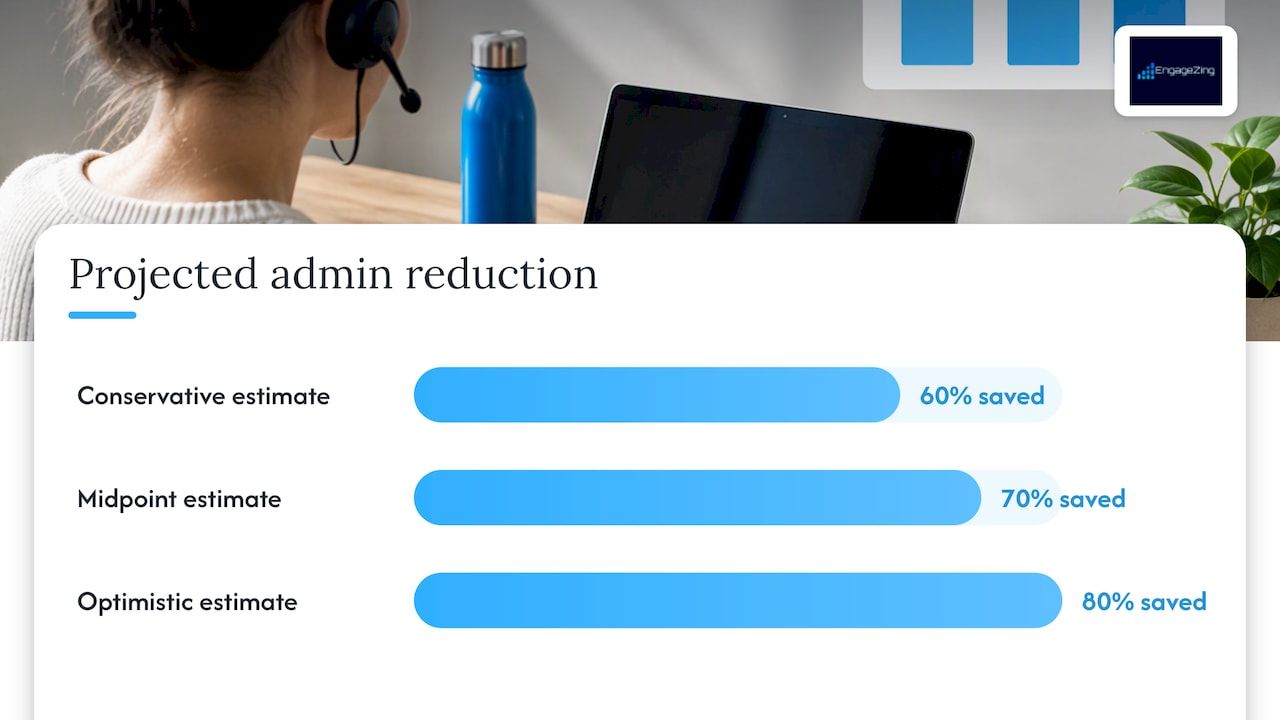
AI transcription adoption can cut administrative work tied to meeting documentation by 60% to 80% , which is the kind of number worth tracking from day one of a pilot rather than assuming it will show up later.
Set your success metrics before the pilot starts, not after. Time saved per rep, error rate against manual transcripts, and action-item capture rate give you a clear basis for deciding whether to scale the tool or try another one.
Cost expectations: pricing models and how to estimate monthly cost
Pricing for AI call transcription generally falls into a few shapes, and the right one depends on call volume and team size.
- Per-minute pricing : pay only for transcribed audio, which suits teams with unpredictable or seasonal call volume.
- Per-user subscriptions : a flat monthly fee per seat, common for sales and support teams with steady usage.
- Enterprise flat licensing : a negotiated rate for large volumes, often bundled with dedicated support.
- Hybrid models : a base subscription plus overage charges for minutes beyond a set allowance.
Beyond the sticker price, a few costs sneak up on buyers: raw audio storage fees, API call charges if you build custom automation, human review for sensitive calls, and compliance archiving if you operate in a regulated industry. As a rough forecast, a 20-person sales team averaging 50 call minutes per rep per day works out to roughly 1,000 minutes daily, or about 22,000 minutes a month, before storage and review costs are added. A framework for mapping AI productivity gains to cost per employee can help you turn that raw number into a defensible budget line.
EngageZing's take: transcription as a marketing and local visibility asset
We see transcription as more than a note-taking convenience. A transcribed sales call can trigger a review request the moment a customer mentions satisfaction, and a support call transcript can feed the kind of local relevance signals that strengthen near-me search visibility. Teams that prioritize native integrations over manual uploads tend to actually use the automation instead of letting transcripts sit unread.
— Joe Leineke
How EngageZing can help you put transcription to work
Picking the right transcription tool is only half the job. Connecting it to your CRM, review requests, and local visibility campaigns is where the real time savings show up, and that integration work is exactly what we handle every day for local businesses.
If you want a clear plan for turning call data into booked business, start with a free Roadmap Analysis and we will map out where transcription and automation fit into your growth plan at no cost.
FAQ
Can AI transcribe phone calls?
Yes, AI transcription tools can transcribe phone calls in real time or shortly after the call ends, producing a text version along with speaker labels and timestamps. Many tools also generate summaries and action items automatically from the same recording.
Are AI transcribers legal?
There is no federal law against recording phone calls, but state laws vary and some states require consent from every party on the call. Check your state's specific rules before recording, and when in doubt, announce the recording or get written consent.
Can I transcribe audio with AI?
Yes, AI transcription tools accept uploaded audio and video files and convert them into searchable text, often supporting multiple languages and media formats. Most tools also let you export the transcript for use in other systems.
How can I transcribe a call for free?
Several transcription tools offer free tiers with limited monthly minutes, and some note-taking apps include basic transcription at no cost for light use. For regular business use, a paid plan typically delivers better accuracy and faster turnaround than a free tier.
Recommended
Editorial Note: Content on this blog is generated with AI assistance and independently reviewed and fact-checked by human marketing professionals for accuracy and quality.
Recent Posts