Facebook Lead Ads let you collect contact information through a Meta Instant Form without sending anyone away from the app, using Ads Manager to build and launch the campaign. They work best for newsletter signups, quote requests, event registrations, and sales inquiries where mobile friction kills conversions. WordStream’s 2025 Facebook ads benchmark study (1,180 U.S. campaigns) put the median cost per lead at $27.66, up 21% from the year before, so targeting and form design matter more than ever.
How to create and launch a Facebook lead ad in Ads Manager
Building a lead ad campaign follows a predictable sequence inside Ads Manager, and getting each step right the first time saves you from rebuilding forms or restarting learning phases later.
- Pick the lead generation objective. Name your campaign clearly, choose a daily or lifetime budget, and set up an A/B test if you want to compare creative or audience variants from day one.
- Build the ad set. Define your audience, select placements (automatic placements usually perform well for lead objectives), and choose “leads” as your delivery optimization so Meta’s algorithm chases form completions, not just clicks.
- Set your bid strategy and budget. Start with the lowest-cost bid strategy unless you have historical data that justifies a bid cap, and give the campaign enough daily spend to exit the learning phase within about a week.
- Create the ad itself. Choose your creative, then build or select an Instant Form, add a working privacy policy link (required by Meta before publishing), and write your disclosures if you are collecting sensitive information.
- Design the thank-you screen. Add a clear call-to-action, such as a link to your website or a phone number, so people have a next step right after submitting their information.
- Choose your publishing method. Most advertisers run lead ads as standard in-feed or Stories placements, but you can also embed the form on your website or share it directly from your Facebook Page for organic reach.
- Review and publish. Double check the Instant Form preview on mobile, confirm your pixel and Conversions API are connected, and submit the campaign for review.
- Keep top-of-funnel forms concise for offers like newsletters or guides.
- Use dropdowns instead of open text fields whenever the answer fits a short list, since typing on mobile is the biggest drop-off point.
- Reserve multi-step forms for higher-intent offers like quotes or demos, where a little extra effort signals real interest.
- Prefill known fields such as name and email automatically through Meta’s autofill, which pulls from the person’s Facebook profile.
- Push deeper qualification questions (budget, timeline, project details) to a follow-up call or email instead of cramming them into the form.
- Build lookalike audiences from your best customers, not just anyone who filled out a form, since quality in means quality out.
- Layer offline conversion data (closed sales, not just leads) into your source audience whenever you can, so the lookalike reflects buyers, not browsers.
- Add exclusions for existing customers or recent leads to avoid wasting spend on people already in your pipeline.
- Narrow by relevant interests or behaviors only enough to cut obvious mismatches, since over-narrowing a lead objective often raises your cost per result.
- Lead with the benefit, not the brand. A line like “Get a free quote” may be more compelling than a general statement about your services.
- Use a short vertical video or a single clear image. Mobile feeds reward content that is legible at a glance, and opening a video with the offer may help hold attention.
- Add a few short overlay bullets on the image or video. Highlighting what the person gets (a checklist, a discount, a time estimate) reduces the mental work of deciding to tap.
- Test headline variants against each other. Try a question format against a direct statement format and let the data tell you which your audience responds to.
- Always link a working privacy policy on your Instant Form; Meta requires it, and it protects you legally.
- Include clear opt-in language for email and SMS follow-up rather than assuming silence means consent.
- Store consent records (timestamp, form version, and exact disclosure language) so you can produce evidence if a complaint ever surfaces.
- Get legal review before launching lead ads in regulated or sensitive verticals like financial services or health care.
- Set up an automated acknowledgment (text or email) the moment someone submits, confirming you received their information.
- Route qualifying leads to a human for outreach within minutes, not hours, since response speed is often the single biggest driver of contact rate.
- Build email and SMS follow-up sequences that respect the consent language on your form rather than assuming blanket permission.
- Feed outcomes (contacted, qualified, closed) back into your audience strategy so future lookalikes reflect real buyers.
- Install the Conversions API alongside your pixel so form completions register as server-side events, which improves accuracy as browser tracking continues to erode.
- Upload offline conversions from your CRM back into Ads Manager so closed deals, not just form fills, get credited to the right campaign and ad set.
- Use consistent UTM parameters and matching CRM fields to preserve source and campaign attribution as a lead moves through your pipeline.
- Track contact rate and sales-qualified-lead rate alongside cost per lead, since a cheap lead that never answers the phone is not actually cheap.
- Test form length first. Compare a minimal field set against a fuller one before drawing conclusions.
- Test lead magnets. A free guide or checklist attached to the offer often lifts completion rates more than any copy tweak.
- Test creative variants on a fixed schedule. Rotate in a new image or video regularly to fight creative fatigue.
- Let each test run long enough for a meaningful sample, generally until each variant has accumulated enough leads to compare contact rates, not just completions.
- Newsletter signup: name, email, and a headline like “Get weekly tips straight to your inbox,” paired with a one-line benefit statement.
- Quote or service inquiry: name, phone, email, and one qualifying dropdown (project type or budget range), framed as “Get your free quote in 24 hours.”
- Event registration: name, email, a dropdown for session preference, and an opt-in checkbox for reminder texts.
- Demo request: name, work email, company size dropdown, and a CTA like “See it in action this week.”
- An assessment of your lead capture flow, from ad creative to form fields to follow-up.
- Guidance on consent language and privacy disclosures.
- Recommendations on what to fix and test next.
Meta’s own Lead Ads documentation describes this format as a privacy-conscious, in-app way to gather prospective customer information without redirecting people to a separate landing page. That in-app design is the biggest reason completion rates for lead ads tend to beat traditional landing page forms on mobile.
Instant Form design: fields, friction, and progressive profiling
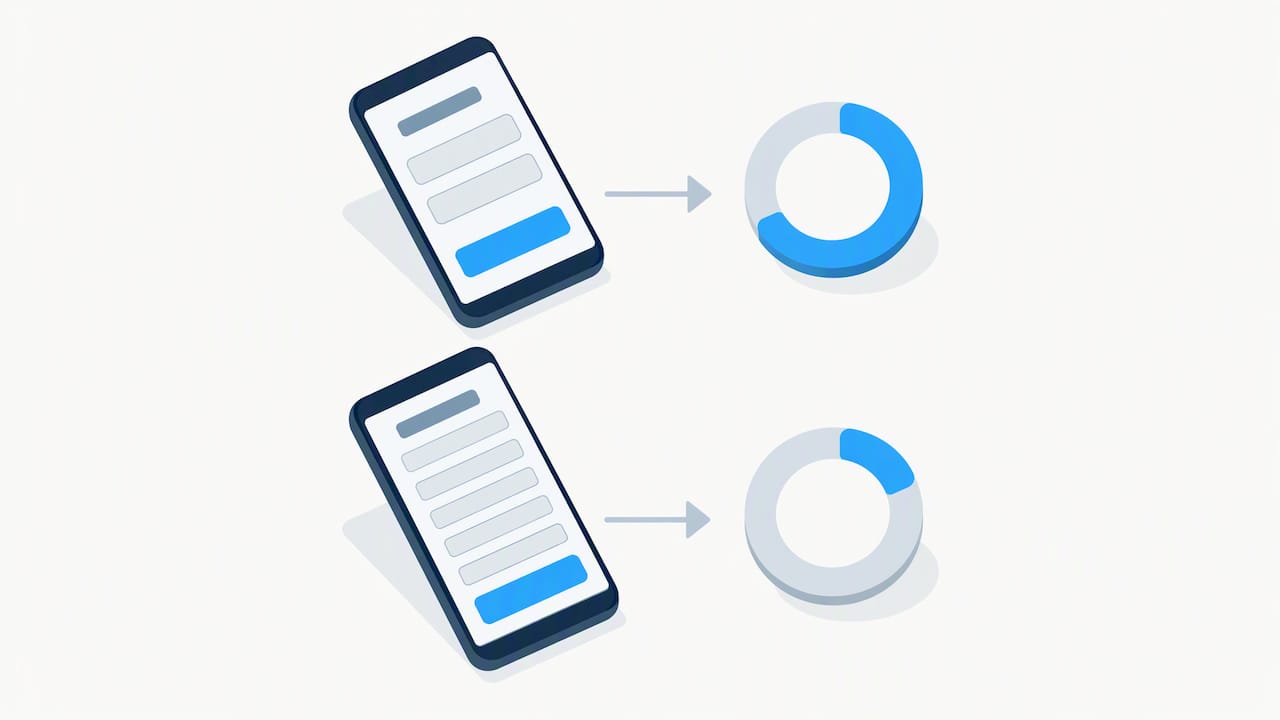
The number and type of fields you ask for can influence your cost per lead. A newsletter signup only needs a name and email. A quote request can justify a few more fields if each one filters out poor-fit prospects. An event registration might add a date preference or guest count. Every field beyond the essentials adds friction, and friction on a mobile form shows up fast in your completion rate.
Progressive profiling, where you collect basic contact details up front and gather more context later through a phone call or nurture sequence, can be a practical alternative to long forms on mobile. Place your privacy policy link and any required consent language near the submit button, visible but not interrupting the flow.
Pro Tip: Test a shorter form against a longer version before committing to either; compare completion rates to see what works for your audience.
Targeting and audiences for lead ads
Who you show the ad to matters as much as what the ad says. Cold audiences built on interests and demographics work well for top-of-funnel offers where you are introducing your business to new people. Warm retargeting, aimed at website visitors or people who have engaged with your Page, tends to produce higher intent leads because those people already know who you are.
A practical budget split for most small and local advertisers puts the bulk of spend on a lookalike audience, a smaller slice on retargeting, and a modest test budget on a fresh cold interest audience to keep the account from going stale. Lowest-cost bidding remains the safest starting point until you have enough conversion volume to justify a bid cap or cost cap strategy.
Creative and copy that improve lead ad conversion
The ad someone sees before they ever reach your form decides whether they are inclined to fill it out or scroll past. Strong lead ad creative leads with the value of the offer, not a description of your business.
Keep primary text short, front-load the offer in the first line since Facebook often truncates longer text, and match your call-to-action button (“Sign Up,” “Get Quote,” “Learn More”) to what actually happens after the tap.
Compliance and privacy for U.S. lead collection
Collecting a name, email, or phone number through a lead ad creates real legal responsibilities, and skipping this step is the fastest way to turn a good campaign into a liability. In the United States, collecting leads for commercial purposes requires clear, conspicuous disclosure of what someone is agreeing to and a working opt-out mechanism to stay compliant with laws like the CAN-SPAM Act.
A phone number captured on a form does not automatically clear you to cold-call that person. Practitioner guidance from the FTC’s Do Not Call resources notes that calling a number on the National Do Not Call Registry still requires an established business relationship or valid consent, so your form language needs to say plainly that a representative may call.
The median cost per lead on Facebook lead campaigns rose 21% year over year to $27.66 in 2025, per WordStream’s benchmark study of 1,180 U.S. campaigns, which makes compliant, well-documented consent even more valuable since a wasted or mishandled lead costs more than it used to.
Lead routing and follow-up that protect lead velocity
A lead sitting in a spreadsheet for two days is worth a fraction of one contacted in the first few minutes. You can export leads from Meta’s Lead Library as a CSV, connect a webhook to push leads instantly into a CRM, or use a native Meta integration if your CRM supports one. For speed, a webhook straight into your CRM beats manual CSV downloads every time.
A marketing automation setup can help small teams without a dedicated sales operation organize follow-up. For readers exploring automated routing in more depth, this guide to lead capture automation walks through webhook-based speed-to-lead tactics in practical detail.
Pro Tip: Set an internal rule that no lead goes more than 15 minutes without an automated touch, even if a human follow-up takes longer.
Measurement and tracking for lead ad campaigns
Cost per lead tells you almost nothing on its own. The number that matters is cost per qualified lead, and getting there requires connecting your ad platform to what actually happens after the form submission.
Setting this up correctly from the start, including Conversions API configuration for local ad accounts, makes every later optimization decision more reliable because you are optimizing toward revenue signals instead of guesswork.
Optimization and testing checklist for ongoing improvement
Lead ad performance rarely stays flat. Audiences fatigue, costs drift, and the only way to stay ahead is a regular testing cadence.
Watch contact rate and cost per qualified lead before deciding to scale a campaign, since a high completion rate with a low contact rate usually points to a targeting problem, not a form problem.
Pro Tip: If completion rates are strong but your sales team can’t reach anyone, check your follow-up speed before touching the ad account.
Examples and reusable lead ad form templates
Adapting a proven template saves time and keeps your forms focused on what actually converts.
Agency perspective: how we approach Facebook lead ads for local businesses
We build lead ad campaigns the same way we build everything else: form design that respects compliance requirements, routing that gets a lead to a human fast, and measurement that ties every dollar spent back to revenue instead of vanity metrics. A technically correct Instant Form means little if the lead sits unanswered for a day.
Our Conversion Roadmap or 12-Month Growth Roadmap can map lead ad activity against actual revenue goals instead of treating cost per lead as the finish line. For small and local businesses, the outcomes we target are concrete: faster contact rates, fewer wasted leads, and a clearer line between ad spend and booked business.
Get a Roadmap Analysis for your lead ad strategy
If you are not sure whether your current lead ads are pulling their weight, our Roadmap Analysis can help you assess them. We can review your lead funnel from the Instant Form through follow-up and identify areas to improve.
We pair this with our Facebook Advertising service when you want hands-on management, or our Winning Websites service when your post-click experience needs work too. Request an analysis at Roadmap and get a plan built around your business, not a generic checklist.
Frequently Asked Questions
What are lead ads on Facebook?
Facebook Lead Ads are a Meta ad format that opens an Instant Form directly inside the Facebook or Instagram app, letting people submit their contact information without leaving the platform. Meta’s own Lead Ads page describes this as a privacy-conscious, lower-friction way to collect prospective customer information compared to sending traffic to an external landing page.
How much does a Facebook lead ad cost?
Facebook ad costs vary by industry and targeting, but the median cost per lead across industries rose 21% year over year to $27.66 in 2025, per WordStream’s benchmark study of 1,180 U.S. campaigns (industry medians range from about $3 for restaurants to about $77 for dental services). Costs for your specific campaign will depend on your audience size, competition, and form length.
What are the major benefits of Facebook lead ads?
The biggest benefit is reduced friction: people can submit their information inside the app, often with fields prefilled from their Facebook profile, instead of loading a separate web page. This typically improves mobile completion rates compared to traditional landing page forms, especially when the Instant Form sticks to three or four essential fields.
How do you generate leads with Facebook ads?
You generate leads by choosing the lead generation objective in Ads Manager, building an Instant Form with a short, relevant field set, and targeting an audience built from lookalikes of your best customers or retargeting of engaged visitors. Fast follow-up after submission, ideally within minutes, has a major impact on how many of those leads actually turn into customers.
Authoritative resources and Meta documentation
These sources back up the setup steps, compliance guidance, and benchmark figures referenced throughout this guide, including Meta’s official Lead Ads documentation and FTC guidance on commercial communication rules.
Share This Article
Found this useful? Send it to another owner who is still is still paying for form friction.
Share on Facebook · Share on X · Share on LinkedIn · Share on Pinterest
Want More Information? Let’s Talk.
If you would rather not take this on yourself, we handle it for you. Our Facebook Advertising service takes care of the setup and the ongoing work, then reports back so you can see exactly what changed. You keep running your business; we keep this moving.
Call us at 631-825-9464 or reach out here. No pressure, no obligation, and you can ask us anything — including whether this is even worth doing for a business your size.
Looking ahead, request your roadmap analysis and we will map out a 12-month plan to close the conversion leaky bucket so more of the customers you already reach turn into booked work.
Written by Joe Leineke · Content on this blog is generated with AI assistance and independently reviewed and fact-checked by human marketing professionals for accuracy and quality.